• Skip to primary navigation
  • Skip to main content
  • Skip to primary sidebar

QTOOTH

News & Reviews for Living with Bluetooth Wireless

  • Reviews
    • Wearable
    • Gaming
    • Health & Fitness
    • Home & Office
  • How To Tips
  • Industry News
  • About QTOOTH

QTOOTH

SteelSeries unveils World of Warcraft wireless gaming mouse

2013-05-23

wireless gaming mouse

When it comes to gaming mice designed specifically for certain games in mind, SteelSeries is no doubt a company that’s familiar with that practice. After all the company launched gaming mice designed for Blizzard’s Diablo 3 and World of Warcraft in mind, along with ArenaNet’s upcoming Guild Wars 2. Well if you felt that the previous World of Warcraft gaming mice by SteelSeries were a bit too gaudy for your tastes, the company is back with a new World of Warcraft wireless mouse with unlimited profile support. Sporting a more toned down design with a pulsating logo, the World of Warcraft wireless mouse features 11 programmable buttons which macros can be assigned to. The mouse also comes with a 8,200 CPI (counts per inch) sensor, a 1-5mm lift distance, 12,000 frames per second and a 3m wireless range. It comes with a USB cable that can turn the mouse into a cabled one if that’s your preference or when you want to recharge its battery which according to SteelSeries, should last you a good 16 hours and will take an hour to charge from low to full. Expect to be able to pick this up for yourself come Q3 2012 for $130.

via SteelSeries unveils World of Warcraft wireless gaming mouse | Ubergizmo.

[amzn_product_inline asin=’B00BMQ13FC’]

[amzn_product_inline asin=’B0081KKE4I’]

[amzn_product_inline asin=’B003ZMF26W’]

Filed Under: Gaming, Reviews

Review: Fitbit Flex Activity Monitor

2013-05-21

FitBit

In well-defined markets, it’s rare to see a breakthrough device. And yet here we are. There are a lot of sleep and activity trackers to choose from right now, but none better than the Fitbit Flex. It is the most wearable, best-syncing device in the scrum, with the best app to boot. And it does all this at a great price.

The Flex is very similar to the Fitbit One, but smaller and housed and without a display. And instead of wearing it on your belt, bra or pocket, you slide it in and out of a slim, rubberized wristband. The band is extremely basic, and it lacks the design elements of the Jawbone Up or the display of the Nike+ FuelBand. Other than the LED lights it uses to give you feedback, it is visually flat. In short, it’s not obviously some sort of sensor.

What it is, however, is highly wearable. A fitted clasp keeps it locked on your wrist securely. Most of the time, at least — I managed to dislodge it once while getting my squirming two year old out of a car seat. But I found it stayed on better than the Up. Similarly, there are no parts to lose, unlike the Up’s end cap that has a tendency to pop off and disappear over time. It’s waterproof-ish — while you can’t take it diving, you can wear it in the shower. In a huge improvement over the One, you don’t have to put it in an armband (it’s already in one) at night to track your sleep. That lack of visual flair also means it doesn’t look out of place with a suit, or a track suit. It comes in black. You can buy a three-pack of other colors if you want for an extra $30.

It also has a fantastic battery life. Fitbit says it was able to push performance by improving the algorithms the Flex uses to track movement and slice up the collected data. It shows. Fitbit says single a full charge should last about two weeks. I still have not run my review sample down yet after five days of use, and the battery indicator still shows a mostly-full charge of around 60-ish percent.

Fantastically, it’s able to operate on very low power even while performing great feats of syncing. The Flex uses a low-energy Bluetooth connection to talk to a USB dongle on your computer or, more miraculously, your iPhone or Android device. (At least a small number of Android devices, that is. Check to make sure yours is supported before throwing down cash.) If you’ve got your phone in your pocket and a Flex on your wrist, the latter will trickle data to the former all day long. You can check your progress in the app (and get notifications) or tap the device itself to activate the LED lights which indicate how far along towards your goal you are.

All of that combined means you have little reason to ever take it off, which is exactly as an activity tracker should be. The most important thing an activity tracker can do is to be invisibly present. You need to be able to keep it with you all the time and forget you’re even wearing it — meanwhile, it sucks up data about your life, delivers it to an application, and reports back with numbers and charts that are easy to understand. You want something that just melts into your life. After trying very many of these devices over the past several years, I’m convinced that always-on wearability is the most important thing. The Flex pulls that off better than anything that has come before.

It also has good ecosystem capabilities. If you own the Fitbit scale, it will use that device’s data to dynamically report back on your weight and percentage of body fat. If you are a MapMyRun (or Endomondo, Lose It, MyFitnessPal, etc.) user, it will import that data so it can get a better idea of things like calories burned, for example.

It also has tools to help promote weight loss. You can enter a goal and it will tell you how many calories you are allowed per day to get there, based on your activity. But this means manually entering the caloric values of your meals into its database, which is still sort of a chore. You have to be really dedicated to keep up with it.

Finally, the sleep tracking stuff is also quite good. When you go to bed at night, you either tap the device five times, or hit a button in the app to tell it you are going to sleep (and again when you wake). If you forget, you can manually input the hours that you slept. Either way, it will look at your movements to report back with how well you slept during the night. It also has a vibrating alarm to wake you, which is really great.

If you’ve been on the fence about which tracker to get, this is the one. It beats the Basis B1 which still doesn’t have a smartphone app and still requires a cabled connection to sync (although it does track heart rate, which the Flex does not). It beats the Jawbone Up, which now integrates with more third-party apps but doesn’t sync via Bluetooth and doesn’t have an app nearly as good as Fitbit’s. It beats the Withings, which looks really promising but at this point is still vaporware. It beats the BodyMedia Fit which tracks far more about you and even delivers prescriptive feedback, but despite a recent redesign, is still too big to be truly wearable. And it trounces the Nike+ FuelBand, which doesn’t track sleep, and has lots of accuracy problems.

This is the one you’ve been waiting for. And it was worth the wait. Go get it.

via Review: Fitbit Flex Activity Monitor.

[amzn_product_inline asin=’B0095PZHPE’]

[amzn_product_inline asin=’B0095PZHZE’]

[amzn_product_inline asin=’B005PUONIK’]

Filed Under: Featured Content, Health & Fitness, Reviews

What is the Difference Between Bluetooth Technology & Wi-Fi?

2013-05-06

What is the difference between Bluetooth technology and Wi-Fi?

What is Wi-Fi®? Is it the same as Bluetooth technology?

Wi-Fi is short for “Wireless Fidelity” – a user-friendly nickname for devices that have been certified by an industry group called the Wi-Fi Alliance.

Bluetooth technology is built into electronic gadgets and allows them to connect directly with each other wirelessly.

Bluetooth technology and Wi-Fi share some pieces of technology, but are used for very different things.

Wi-Fi is often referred to as “wireless internet”, because that’s what it is most often used for, accessing the internet. When you see people surfing the web in a cafe, they’re probably using Wi-Fi.

Bluetooth technology is in lots of the devices that you already have and can be used for all sorts of things. It works for both voice–like talking hands-free on a headset or speakerphone–and data like pictures, music and documents.

How can you use Bluetooth technology?

Setting up Bluetooth products is easy. Bluetooth devices do most of the work for you–they can find and identify one another and all you need to do is push a button to give them permission to communicate. Also, because the devices work directly with each other, you can use Bluetooth technology almost anywhere.

Music – with Bluetooth wireless technology you can listen to music from your music player, mobile phone or computer using speakers, headphones, home stereos and many other devices.

Printing – with Bluetooth wireless technology you can also print your favorite pictures wirelessly directly from your Bluetooth enabled phone or PC.

Input – Bluetooth technology allows you to control your PC, laptop and more without the hassle of cords.

Transfer – Easily transfer photos, music and other information between your mobile phone and your PC or laptop using Bluetooth wireless technology.

Wi-Fi is great for the internet

You can use Wi-Fi to connect to the internet through a stationary access point. An “access point” is an extra piece of equipment that Wi-Fi generally requires to allow devices to connect and work together. While possible, it’s hard to make Wi-Fi products, like a laptop, PC and a printer, connect and work together directly. This also means Wi-Fi works primarily in fixed locations, sometimes known as “hot spots.”

Bluetooth technology goes with you

When you’re in the car, you can use Bluetooth technology to talk hands-free on your phone or computer using a headset, speakerphone or car kit.When you’re away from home and want to use your laptop, but can’t find a hot spot, no problem. You can use Bluetooth enabled 3G and 4G cell phones to tether your laptop and use the 3G and 4G speeds as an internet connection.

Speed

The speed of your Wi-Fi connection depends on how many other people are connected to the same “access point.” If the coffee shop or airport terminal is crowded, your Wi-Fi internet connection may slow down a bit.Because Bluetooth products talk directly with each other, it’s very rare that having many products connected at one time will slow down the speed of your connection.

via Bluetooth Technology | Wi-Fi | Bluetooth Technology Website.

Filed Under: News, Tech Talk

How to Pair a Cell Phone to a Bluetooth Headset: 6 Steps

2013-05-06

hx1OnEar

Pairing your new Bluetooth Headset with your Cell Phone is easy, if you can follow these simple steps.

  1. Gather and charge your cell phone and Bluetooth headset.
  2. Put your Bluetooth headset in “pairing mode”. For almost all headsets this is done by starting with the headset power off, then pressing and holding the multi-function button (the button you press to answer a call) for a few seconds. First, a light will blink showing you that the unit is on (keep holding the button) and a few seconds later, the LED on the headset will blink in alternating colors (often red-blue, but this can be anything really). The blinking lights indicate that the headset is in pairing mode.
  3. Use the cell phone to “find” the headset. Usually this is a setting in the menus of the phone, and it’s different for each phone. Most newer phones will have some kind of “Bluetooth setup” menu. Older phones may have this menu buried in the general phone settings.
  4. Provide a PIN code. When the phone “finds” the headset, it will ask for a PIN code. For 99% of headsets, this code is “0000”. Enter 0000 into the cell phone when prompted.
  5. Wait for a message. The phone and headset should connect and you should get a connection message on the phone. It should say something like “Hands Free Connection Established” or something along those lines.
  6. Finish up. That’s it! The headset and phone are now paired. The functionality on the headset will depend on the software and operation of the cell phone.

via How to Pair a Cell Phone to a Bluetooth Headset: 6 Steps.

Filed Under: How To Tips, News

Will these guys make Google Glass uncool?

2013-05-05

Google Glass - Dorky in the Shower

CNN – The Segway. The Bluetooth headset. The pocket protector.

What do these three technologies have in common? They all pretty much work as promised. They all seem like good ideas on paper. And they’re all too dorky to live.

Now, far be it from me to claim that nerdiness equals lack of popularity potential. But I contend that dorkiness and nerdiness are two different qualities. While nerdiness implies a certain social awkwardness that’s ultimately endearing, dorkiness connotes social obliviousness that opens you to deserved ridicule.

Guess which category Google Glass will fall under when it goes “mainstream?”

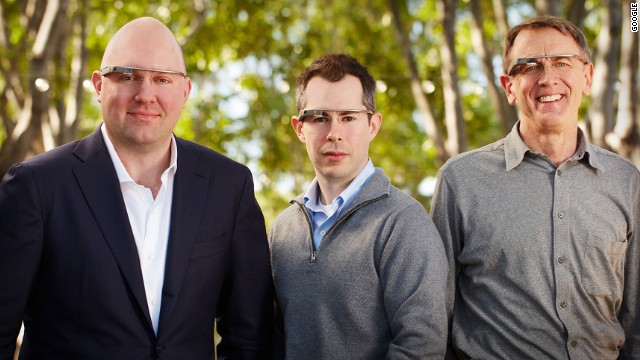
Forget about the privacy concerns for a second. I don’t think you have to get that serious to recognize the inherent antisocialness of Google Glass. All you have to do is look at the guy in the picture at the top of this post. Or any of the rest of the guys on White Men Wearing Google Glass, a new Tumblr that serves up the data needed to transform the hypothesis “Google Glass is too dorky to succeed” into a proven scientific theory.

Tech investors Marc Andreesen, Bill Maris and John Doerr model Google Glass in this image provided by the company.

Google Glass Investors Out of Touch with What's Cool

Disagree? The floor is open for falsification. Start your own Tumblr: People Who Look Cool While Wearing Google Glass.

Before its release, some of the smartest people in tech predicted that the Segway would change the world. And even when the world joined in a collective “Huh?” when the much-hyped secret Ginger project was revealed to be a gyro-balanced scooter, the idea still kind of made sense. If we were all riding around on Segways now, cities would probably be better places to live compared to the car-infested streets we still endure.

But that transformation hasn’t happened. And it won’t. Why? Because Segways are lame. They’re too rational. They fail to acknowledge all the irrational reasons people love their cars.

Test-driving Google Glass

Is there a future in Google Glass?

Similarly, Google Glass fails to acknowledge that walking around with a camera mounted on the side of your face at all times makes you look dorky. Think of the Bluetooth headset: it’s a really sensible way to use your phone without having to take it out of your pocket—so sensible that there’s really no reason not to keep that headset in your ear most of the time.

But you don’t, do you? There’s a reason that Saturday Night Live put a Bluetooth headset on Jason Sudeikis in its recurring “Two A-Holes” sketches.

Google Glass, like the Segway, is what happens when Silicon Valley spends too much time talking to itself. Maybe that’s even overstating the case: The rhetoric around Google Glass is what happens when important tech people spend a little too much time congratulating each other.

There’s really nothing wrong with Google Glass as a technological experiment. The future will include some kind of wearable smart technology, and it’s important for Google to be experimenting in that direction.

But Google co-founder Sergey Brin’s presentation at TED, in which he characterized wearing Google Glass as somehow more macho than pulling your smartphone out of your pocket, underscores the tone-deafness that can envelop Silicon Valley when VIPs get a little too excited about the Next Big Thing. Brin, after all, is a guy who thinks nothing of engaging in spontaneous yoga in the middle of a crowded tech conference. This isn’t a bad thing—on the nerd to dork scale, it definitely tilts toward “nerd.”

But if you’re one of the shareholders helping to keep Google’s shares trading above $800, the dork factor of Google Glass should give you pause. Google is still trying to crack the secret of monetizing mobile technology, which so far hasn’t proven as lucrative as its desktop search business. Google Glass may be a fun experiment in building another mobile platform to attract as-yet-unimagined revenue streams.

But making money on consumer technology requires that consumers embrace that technology. If Google Glass makes you look as cool as the guys in that Tumblr, that embrace is about as likely to happen as you hugging a Segway. Or Robert Scoble in the shower.

via Will these guys make Google Glass uncool? – CNN.com.

[amzn_product_inline asin=’B00C9QE45U’]

[amzn_product_inline asin=’B008YRG5JQ’]

[amzn_product_inline asin=’B00D7NZLK6′]

Filed Under: News, Tech Talk

BBC News – Google Glass – will we love it or hate it?

2013-05-05

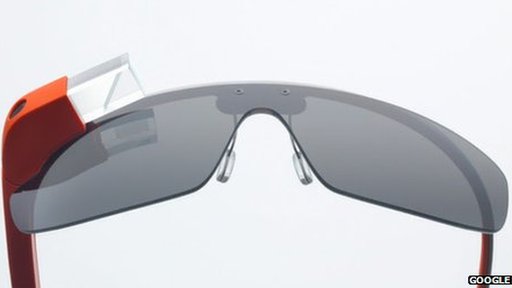
Google Glass

Google’s smart glasses project has been causing excitement in the tech world for months as speculation about what it will finally look like and be able to do reaches fever pitch.

Prototype devices are being tested by around 1,000 so-called Glass Explorers and are expected to go on sale to the public next year.

While some see such wearable computing as the obvious next step for the digital age, others regard the idea of even more intimate connections with the network quite scary.

The BBC has garnered the views of those who have tried Glass and others who have strong views about the project to see what a smart-glassed future might look like.

Read what their conclusions were via BBC News – Google Glass – will we love it or hate it?.

[amzn_product_inline asin=’B0050R67U0′]

[amzn_product_inline asin=’B00B78MT44′]

[amzn_product_inline asin=’B00BR3O4CE’]

Filed Under: News, Tech Talk, Wearable

  • « Go to Previous Page
  • Page 1
  • Interim pages omitted …
  • Page 27
  • Page 28
  • Page 29

Primary Sidebar

Affiliate Disclosure

This website uses affiliate programs for monetization. At no additional cost to you, links to various sites mentioned in posts may result in a commission that is credited to this site if you make a purchase.

Some affiliate programs and affiliations include, but are not limited to, Commission Junction, Apple, Google, Amazon.com and more.

For complete details
click here.

Copyright © 2026 · Preferred Hosting by WP Engine and Domain Name Registry by Namecheap

We are using cookies to give you the best experience on our website.

You can find out more about which cookies we are using or switch them off in .

QTOOTH
Powered by  GDPR Cookie Compliance
Privacy Overview

This website uses cookies so that we can provide you with the best user experience possible. Cookie information is stored in your browser and performs functions such as recognising you when you return to our website and helping our team to understand which sections of the website you find most interesting and useful.

Strictly Necessary Cookies

Strictly Necessary Cookie should be enabled at all times so that we can save your preferences for cookie settings.

3rd Party Cookies

This website uses Google Analytics to collect anonymous information such as the number of visitors to the site, and the most popular pages.

Keeping this cookie enabled helps us to improve our website.

Additional Cookies

This website uses the following additional cookies:

(List the cookies that you are using on the website here.)