• Skip to primary navigation
  • Skip to main content
  • Skip to primary sidebar

QTOOTH

News & Reviews for Living with Bluetooth Wireless

  • Reviews
    • Wearable
    • Gaming
    • Health & Fitness
    • Home & Office
  • How To Tips
  • Industry News
  • About QTOOTH

Gaming

A Musician’s Journey with the Beats Studio Pro: An In-Depth Review

2024-04-30

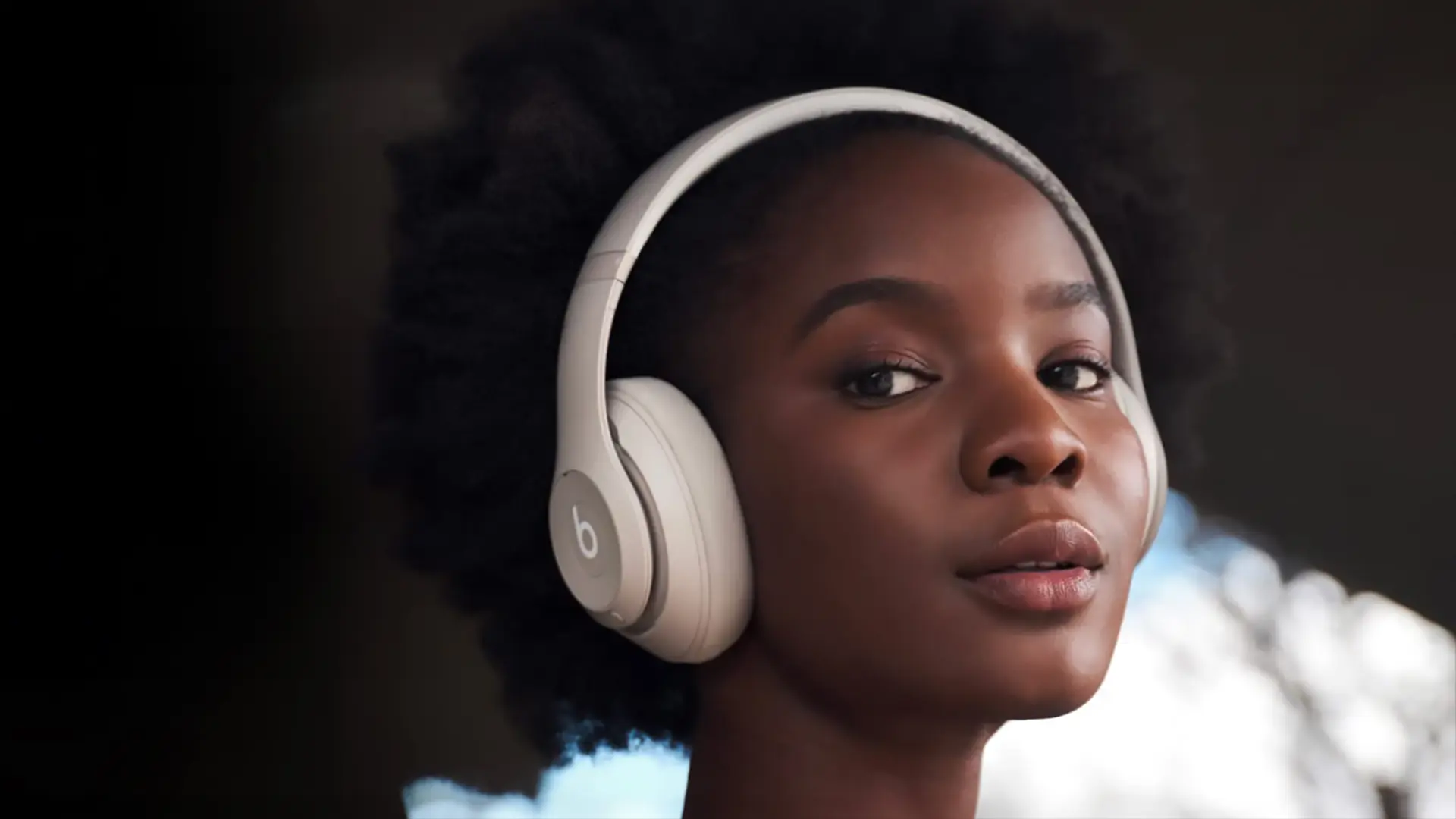
beats studio pro review wireless bluetooth headset showing woman wearing white version

As a musician, my ears are my livelihood. Whether I’m composing at my home studio, tracking in the booth, or DJing a crowded club, the quality of my headphones directly impacts my creative process and performance. That’s why I was particularly excited to get my hands on the Beats Studio Pro wireless headphones. Here’s a detailed breakdown of my experience with them, covering everything from sound quality and noise cancellation to comfort, design, and features.

beats studio pro review wireless bluetooth headset showing product with included case and cable accessories

First Impressions: Unboxing and Design

The Beats Studio Pro arrived in a sleek, black box with the signature Beats logo. Unboxing it felt like a premium experience. The headphones themselves boast a modern, stylish design. The build quality feels sturdy, with a mix of metal and matte plastic. The headband is well-padded and adjustable, ensuring a comfortable fit for various head sizes.

However, the ear cups, while generously sized, felt a tad small on my ears. This wasn’t a dealbreaker, but it’s worth considering if you have large ears. They might feel snug after extended use.

beats studio pro review wireless bluetooth headset showing available colors

Taking Flight: Sound Quality and Performance

Let’s get to the heart of the matter: how do these headphones sound? In a word, phenomenal. The custom acoustic platform delivers powerful, balanced sound with crisp highs, clear mids, and a satisfyingly deep bass. The bass response is present without being overpowering, which is crucial for bass-heavy genres like electronic music.

One of the most impressive features is the Active Noise Cancelling (ANC). It effectively blocks out external noise, creating a truly immersive listening experience. I found it particularly useful when tracking vocals in the studio, eliminating ambient noise and allowing me to focus solely on the performance. The Transparency mode, which lets in external sounds, is also a welcome addition. It’s perfect for situations where you need to be aware of your surroundings, like walking on a busy street.

beats studio pro review wireless bluetooth headset showing man wearing white version

A Match Made in Audio Heaven: Pairing with Devices

The Beats Studio Pro seamlessly connects to Apple devices via Apple’s W1 chip. Pairing with my iPhone and Macbook was a breeze. However, the headphones also offer multi-point Bluetooth connectivity, allowing them to connect to two devices simultaneously. This is a fantastic feature for someone who constantly switches between their phone and laptop.

The included USB-C cable allows for wired listening and lossless audio playback. This is a big plus for audiophiles who prioritize the purest sound quality. Additionally, the headphones support Siri for voice commands, making it convenient to control music playback and access other phone functions.

beats studio pro review wireless bluetooth headset showing find my headphone app

Putting Them to the Test: Battery Life and Durability

Beats advertises a battery life of up to 40 hours with ANC turned off. In my experience, it fell slightly short of that mark, lasting closer to 35 hours on a single charge. However, this is still excellent for extended listening sessions. The quick charging feature is also a lifesaver, providing up to three hours of playback with just a 10-minute charge.

As for durability, the headphones seem well-built. They’ve survived being tossed in my gig bag and endured the occasional accidental bump. The carrying case that comes included is a nice touch, offering protection during transport.

Beyond the Music: Calls and Gaming

While primarily a music lover’s tool, the Beats Studio Pro also handles calls surprisingly well. The built-in microphone delivers clear audio, making phone conversations a breeze. The noise cancellation also comes in handy here, ensuring your voice is heard clearly even in noisy environments.

For gamers, the low latency performance is a plus. There’s minimal audio delay, ensuring sound effects and in-game audio stay in sync with the action on screen.4

beats studio pro review wireless bluetooth headset demonstrating lossless audio via usb-c cable

The Verdict: A Worthy Investment for Discerning Listeners

Overall, the Beats Studio Pro wireless headphones have exceeded my expectations. They deliver superb sound quality, effective noise cancellation, and a comfortable (if slightly snug for large ears) design. The long battery life, multi-point connectivity, and built-in microphone make them a versatile option for musicians, producers, and audiophiles alike.

While the price point might be a consideration, the combination of features and overall quality makes them a worthwhile investment for anyone serious about their audio experience. If you’re a musician, producer, DJ, or anyone who demands the best possible sound from your headphones, the Beats Studio Pro is definitely worth considering.

Here’s a quick summary of the pros and cons to help you decide:

  • Excellent sound quality with balanced audio and powerful bass
  • Effective active noise cancellation and transparency mode
  • Comfortable and stylish design (although the ear cups might feel snug on large ears)
  • Long battery life with quick charging capabilities
  • Multi-point Bluetooth connectivity for seamless pairing with two devices
  • Built-in microphone with clear sound

Filed Under: Entertainment, Gaming, Headsets, Mobile, Reviews, Wearable

Why the Enduring Popularity of the LG Tone+ HBS-700 & HBS-730 Bluetooth Headsets? In Review

2023-05-24

It’s amazing when a manufacturer can create a tech product that actually has a substantial shelf-life. Case in point? The LG Tone+ series. The HBS-700 came out in early 2011 and has been going strong ever since. This in spite of the introduction of an “improved” HBS-730 version in early 2013. Now both headsets seem to sell equally well. QTOOTH is going to re-visit this popular series of Bluetooth headsets and take a look at what makes them such a success. Perhaps other manufacturers and designers can learn from what LG has done.

There are a few common issues that come with wearing any Bluetooth wireless headset:

  • The electronics put weight on the sensitive inner folds of the ear
  • The ear buds block normal hearing of the environment even when not in use
  • Due to their typically small size devices are often easy to lose

How did the LG Tone+ series attempt to cure these?

lg-tone+-plus-woman-wearing-around-neck-qtooth

The main thing that set the LG Tone+ HBS-700 apart when it was first introduced was the use of a collar, or necklace, mount for the ear buds. This immediately took the weight of all of the electronics off of the sensitive parts of the ear. The control interface and the electronics are all built-in to the collar itself. Connected by wires, the only part of the device that is inserted into the ear are the small, lightweight ear buds. By placing magnetized holders at each end of the collar mount, LG provided a convenient place to store the ear buds. This simultaneously cured the issues of blocked hearing when not in use and the tendency to lose them. Because the ear buds are stored only inches away from the ear, users always know where they are and can be confident that they can quickly take the ear buds in and out of their ears quickly as needed during use.

It is their unique solution to these three issues is probably what set them apart the most from the competition. There are so many built-in limitations to Bluetooth audio that the variances between models and manufacturers have thus far proven to be very small at best.

lg-tone+-tone-plus-white-bluetooth-stereo-headset-control-button-diagram-qtooth

Here are a few of the other features that have made them great. In our experience, both of the LG Tone+ HBS-700 and the LG Tone+ HBS-730 perform well and reasonably close to their stated technical specs. Great battery life at 10 hours of use and 15 days of standby time. The batteries also re-charge very quickly, sometimes within 90 minutes. The controls are located within easy reach on the collar, even if tucked inside of a shirt or sweatshirt. Because the collar can jump around on the neck a bit, this is our preferred method of wearing them, especially if moving around at work or while working out.

lg-tone+-tone-plus-bluetooth-stereo-headset-balck-main-qtooth

The main complaint we have about both headsets has to do with the quality of the microphones when making a phone call. Although they claim to be using noise-cancelling circuitry and digital noise reduction, in our experience they do not seem to be very effective in noisy environments. Background noise is an issue and we found ourselves raising our voices in order to be understood by our callers. We must stress that this is only an occasional issue and that due to the nature of this design we didn’t really expect the Tone+ to perform at the same level as a dedicated, on-the-ear headset with a microphone boom.

lg-tone+-tone-plus-bluetooth-stereo-headset-balck-top-qtooth

So what’s the real difference between the LG Tone+ HBS-700 and the LG Tone+ HBS-730? The original 700 seems to have a slightly better range and battery life. These two attributes may have gotten sacrificed just a little bit when they added the Apt-X circuitry to the 730. However the Apt-X circuitry did slightly improved the audio experience of the 730 and gave the bass frequencies a little more “oomph”.

So, which is the one for you? If you’re using it primarily for talking on the phone, dictation, or listening to podcasts, choose the LG Tone+ HBS-700. If you are going to be spending more time listening to music, movies or gaming, then the HBS-730 would be a better choice.

Note: And yes, LG did make an even better version called the HBS-800 that had slight improvements in the electronics and subtle cosmetic change. Although it’s a good headset, most people seem to agree with us that they are not worth the nearly 2-3 times amount of money that the other two models can typically be found.

Filed Under: Gaming, Mobile, Reviews, Wearable

Logitech G930 Headset Review – Wireless Gaming Performance with Surround Sound

2013-10-09

The Logitech G930 Wireless Headset has become the “go to” headset for many gamers and frequent online chatters, and we understand why. Here’s a closer look at how it got to be that way.

Overall Physical Design

First, the headsets themselves are very comfortable to wear. Solid construction while staying lightweight, they feel built to last. Big, chunky, and with a simple plastic finish,we have to admit they are not one of the better looking headsets out there. But they are highly functional. Each feature is logically located and well-thought out. The headband that arches between the two ear cups is uniquely cushioned with memory foam that forms to the wearer’s head. This lends extra stability to how they mount and can be especially handy when the tunes are rockin’ or you are instinctively ducking when under heavy fire in your gamer’s world. The ear cups are well padded and should easily surround most players ears. Take it from someone who’s got some pretty big ears! These are a sealed back ear cups, which is great for isolating you from getting distracted by ambient sound in your immediate environment but may make the side of your head sweat a bit if you tend to run on the hot side.

logitech-g930-wireless-headset-front-view

What Makes this Wireless Headset Different

The Logitech G930 Wireless Headset has very good sound characteristics. This begins with the fact that Logitech has chosen to use a style of wireless signal that is similar in nature to WiFi. And just like some WiFi signals, it transmits on the 2.4GHz frequency spectrum. Why is this a good thing? Well, because many wireless headsets use Bluetooth wireless for their signal. Bluetooth is an excellent form of wireless that is perfect for voice and some other basic audio. Although it has been steadily improving in sound over the last few years, courtesy of companies like AdaptX, it still uses highly compressed audio data that limits the depth and detail of your audio. This will probably change over the next few years, but for now utilizing a wireless signal like the one that Logitech has for the G930 gives you full spectrum, uncompressed audio today. What good are the best speakers and microphones in a headset if the audio signal through which it is being delivered can’t take advantage of that quality? Logitech’s claims their proprietary wireless technology is up to 38% faster than Bluetooth. They hope that this means you won’t experience any delayed audio. Not sure if there really is that much of a difference in the end result, but if you rely on audio cues to give you an edge in video game perhaps that will mean one more check in your win column. The Logitech G930 can also automatically hop between frequencies to avoid other signals that might create interference and should keep the signal clear and strong. The claimed range of the wireless signal is 40 feet (12m) and we’ve found this to be pretty consistent. So kudos to Logitech for doing it right and choosing a great wireless protocol.

[amzn_product_inline asin=’B003VANOFY’]

logitech-g930-wireless-headset-usb-transmitter

The signal begins at the transmitter which takes the form of a simple, black USB device that will fit directly into any USB port. It will also plug in to the included hub-like charging base. This handy accessory comes with a long standard USB cable on one end and a micro USB cable on the other. In the middle of the charger is a USB port. Here you can plugin the transmitter and then use the micro USB cable to charge the headset. You can even use the charging base to power the headset and use it like a wired device when the battery gets low. Very flexible!

logitech-g930-wireless-headset-charger

Controls

All of the controls are located on the left ear cup . This consists of three customizable buttons, a mute button for the microphone, a Dolby Digital switch and a power button.  We should note we like having the controls here instead of inline on the cable or on a separate mixer. You will always know where they are and won’t find yourself scrambling to find the controls.

logitech-g930-wireless-headset-main-view

Microphone

The flip-down microphone is also located next to the controls, putting everything you need quick access to in one place. The microphone is of decent quality, providing clear communication. It has built-in noise cancelling so your listeners will only hear you, not whatever is going on in the room near you. The microphone auto-mutes when in the up position and un-mutes itself when in the down position, ready for use. There is a convenient red light on the microphone arm that turns on when it is muted. This gives you a visual cue as to whether or not you can be heard. So, light on? Talk smack! Light off? Be careful what you say!

logitech-g930-wireless-headset-front-mic-up-view

Sound

The Logitech G930 Wireless Headset does a great job at recreating the full spectrum of audio. Although not reference quality like you’d find in a recording studio they had crisp, well-defined treble response, smooth mids and a well rounded, full bass sound. Sure, the bass could’ve been tighter and punchier, but in this price range AND being wireless we thought they performed well.  They can get very loud without breaking up at all. Although note to users!! You may want to go easy on setting the EQ controls. Some people have complained of some distortion in the audio at higher volumes. In our experience over boosting the EQ was the cause. Use the EQ to sculpt the sound, not boost the volume, and you should be fine. As for the Dolby 7.1 surround sound circuitry, we found it to be quite convincing. It can certainly help you locate opponents and other elements more quickly in a gaming situation.

Conclusion

Make no mistake, although most users will be buying these for gaming, they also make a great choice for internet chats, phone calls, and watching movies and television. It’s also great that Logitech has made all of the included accessories easily replaceable through retailers. It’s always a pain in the butt when we accidentally break an accessory to one of our devices and then have to beg the manufacturer to “allow” us to buy it separately. Versatile, easy to use, good performance and well supported are the reasons why the Logitech G930 has become one of the most popular choices in a full-size wireless headset.

[amzn_product_inline asin=’B003VANOFY’] [amzn_product_inline asin=’B006WLBEPQ’] [amzn_product_inline asin=’B008GP73TW’]

Filed Under: Gaming, News, Reviews, Wearable

PrioVR – Full-Body Immersion to Interact Naturally with Virtual Worlds

2013-09-07

Okay, okay, we know! Sure the PrioVR project is only at the Kickstarter stage, but this exactly the kind of thing that gets our juices flowing here at QTOOTH. What is it exactly?It is inertial sensing technology, which basically means that you can control virtual 3D realities, like a video game, with movements of the body.

Well, so far it is actually just a Developer’s Kit so that inventors and others of the creative persuasion can get in on the technology that they are offering. But take a look at this video to see what it promises to deliver:

[youtube=http://www.youtube.com/watch?v=MSTge5IDxF4]

Yost Engineering, the company behind this technology, claims that their system offers several advantages over optical systems such as the Microsoft Kinect. Because the use high-performance inertial sensors along with a centralized, wearable wireless hub architecture, the PrioVR will provide 360 degrees of fast, real-time motion capture without the need for cameras, optics, line-of-sight, or special environments. In fact, the PrioVR should perform at an 8x or better improvement over optical systems such as the Kinect. The system will be wireless, allow multiple simultaneous users, and will work anywhere – indoors or out. Additionally, the system will exhibit performance characteristics comparable to high-end inertial motion capture systems that cost tens of thousands of dollars, but at a cost that makes VR and motion capture affordable for everyone.

yost-priovr-wearable-tech-vr-immersion-qtooth

There is so much happening in wearable tech and wireless human-electronics/computer controllers that it is hard for anyone to keep up on who is doing what, never mind make a determination about which is really the best for which application. So, if you see a system out there that intrigues you like the Yost PrioVR that you think we should know about, please hit us up in the comment section or through your channel of choice. We don’t want to miss out on anything and would love to keep our readers in the loop, too!

[amzn_product_inline asin=’B005LDY0KC’]

[amzn_product_inline asin=’B002BSA298′]

[amzn_product_inline asin=’B00D9FQ9CQ’]

Filed Under: Gaming, News, Wearable

DualShock 4 Wireless Controller Specs & Latest News

2013-08-08

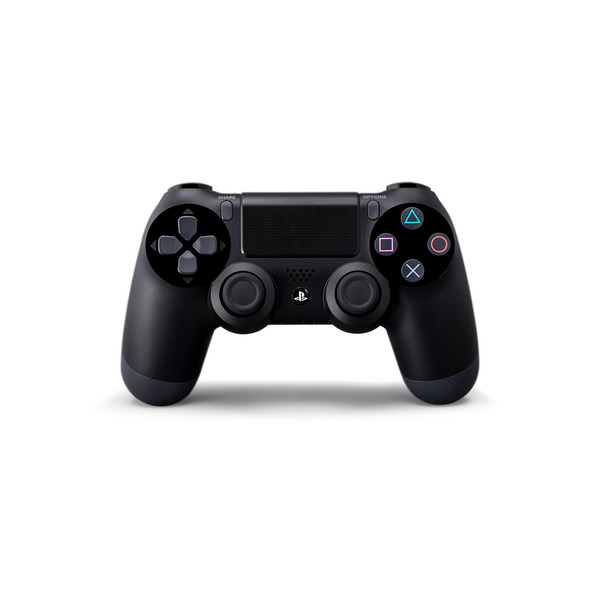
Sony DualShock 4 Wireless Controller Availability - QTOOTH

Recently announced alongside the Sony’s latest game console incarnation, the PlayStation 4, was the DualShock 4 Wireless Controller. It is a major update to previous generations of Sony’s controllers. Sony has added a touchpad, 6-axis motion and position sensors, a built-in speaker and a 3-LED Light bar for additional immersive gameplay features all while maintaining the classic DualShock button layout and design.

Sony anticipates being able to ship the DualShock 4, the main PlayStation 4 console, and the other related accessories for the 2013 Holiday season. Order up!

[amzn_product_inline asin=’B00BGA9X9W’]

[amzn_product_inline asin=’B0015AARJI’]

[amzn_product_inline asin=’B005QP3MGI’]

Filed Under: Gaming, Reviews

Xbox One Accessory Prices Announced: Controller $60, Headset $25

2013-08-07

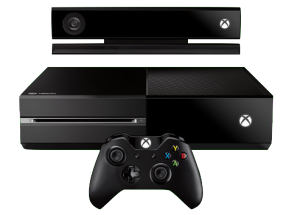
XBox One - QTOOTH

Microsoft revealed Xbox One accessory prices: the controllers will list for $59.99 and the wireless headsets for $24.99. The bad news for current owners of the Xbox 360, the current headset and controllers will not work with the Xbox One. This is good to know in case you plan on a multiplayer experience. The new Xbox One provides a single controller included in the box, so you’ll have to buy extra controllers and a headset, or headsets, separately. As a comparison, the PlayStation 4 comes with a headset and is $100 cheaper than the Xbox One, and there is forward compatibility with the PS3 headsets to the new PS4. However every Xbox console comes with Kinect, which Microsoft says can double as a headset for online gaming.

[amzn_product_inline asin=’B00CMQTVMI’]

[amzn_product_inline asin=’B003ZSP0WW’]

[amzn_product_inline asin=’B008K24BKU’]

Filed Under: Gaming, Reviews

  • Page 1
  • Page 2
  • Page 3
  • Go to Next Page »

Primary Sidebar

Affiliate Disclosure

This website uses affiliate programs for monetization. At no additional cost to you, links to various sites mentioned in posts may result in a commission that is credited to this site if you make a purchase.

Some affiliate programs and affiliations include, but are not limited to, Commission Junction, Apple, Google, Amazon.com and more.

For complete details
click here.

Copyright © 2026 · Preferred Hosting by WP Engine and Domain Name Registry by Namecheap

We are using cookies to give you the best experience on our website.

You can find out more about which cookies we are using or switch them off in .

QTOOTH
Powered by  GDPR Cookie Compliance
Privacy Overview

This website uses cookies so that we can provide you with the best user experience possible. Cookie information is stored in your browser and performs functions such as recognising you when you return to our website and helping our team to understand which sections of the website you find most interesting and useful.

Strictly Necessary Cookies

Strictly Necessary Cookie should be enabled at all times so that we can save your preferences for cookie settings.

3rd Party Cookies

This website uses Google Analytics to collect anonymous information such as the number of visitors to the site, and the most popular pages.

Keeping this cookie enabled helps us to improve our website.

Additional Cookies

This website uses the following additional cookies:

(List the cookies that you are using on the website here.)