• Skip to primary navigation
  • Skip to main content
  • Skip to primary sidebar

QTOOTH

News & Reviews for Living with Bluetooth Wireless

  • Reviews
    • Wearable
    • Gaming
    • Health & Fitness
    • Home & Office
  • How To Tips
  • Industry News
  • About QTOOTH

Reviews

The oort “Internet of Everything” Hub puts Bluetooth Front and Center

2014-06-15

oort-universal-bluetooth-smart-wireless-hub-qtooth

oort’s “Internet of Everything” Hub is using Bluetooth Low Energy as its choice of wireless signal to control and monitor all of your smart devices. They make a strong case that Bluetooth Low Energy, also known as BLE or Bluetooth Smart,  should be your choice as well.

Just recently launching its entry into the smart home controller market on Kickstarter, this Poland based company is staking its success on using Bluetooth Smart for communicating between its hub and all of the devices on its network. With Bluetooth being the protocol with the highest level of adoption among wireless device manufacturers, and with the advent of CSR making their Bluetooth Mesh open source, this seems like a very wise choice.

http://www.youtube.com/watch?v=iVXo6px-NgM

Claiming to be “the first complete universal wireless Internet of Things BTLE iBeacon system”, oort is named for the cloud of icy objects that form the boundary of our solar system. Although it is true that there are quite a few choices for wireless home automation, it does seem that oort is the first to dedicate itself to Bluetooth Smart and is focusing its entire ecosystem of compatible products on that choice. Most of oort’s immediate competitors, like Revolv, Mi Casa Verde and SmartThings, are using other wireless formats like ZigBee, Z-Wave, Insteon and WiFi. Although oort uses WiFi to connect and communicate with the internet, all of the communication between the hub, your favorite smart device like a phone or tablet, and all of the sensors and switches on the network are done through Bluetooth.

oort-smart-phone-app-compatible-devices-bluetooth-qtoothEven though oort is releasing their system with a very impressive array of companion devices with a near infinite amount of applications, they are going one step further by making their inner workings available so that third party developers can create their own add-ons. That is a smart move that will hopefully guarantee them, and their users, greater choice and the ability to grow as the Internet of Things truly becomes the Internet of Everything.

As outlined in the video above, here are a few of the applications that oort should be capable of right away:

oort-bluetooth-internet-of-things-hub-ecosystem-chart-qtooth

Proximity Beacon
Electrical Power Sockets
Power Strips
Air Quality Monitor
Tape-It Sensors
Outdoor Sensor Beacon
Wearable Thermometer
Proximity Cards

There is even a soil humidity sensor in the works that will send you an alert when your plants need to be watered (not pictured). oort hopes to make the entire selection of their products available by September 2014.

They are claiming that there are no hidden fees or costs to their product, but we have to admit that both their Kickstarter campaign and their website is rather vague about how much their cloud service is going to cost… or if it will be free. Most of companies that offer similar services charge a monthly fee, while with one or two competitors the purchase of their device gives the buyer lifetime access. If QTOOTH finds out for sure one way or the other we will post an update here. (UPDATE!! We have heard back from oort concerning their cloud service. According to CEO Radek Tadajewski, “We don’t want to charge customers for cloud services.” We’ll take that as meaning it will be free. Seems like another smart move on their part. Anything that increases the rate of people adopting your technology increases the chances that they will treat it like the standard in its industry.)

There is a lot that this series of products can do. Products like this are just the tip of the iceberg. According to Gartner Research, there are a “mere” 2.5 billion connected devices today but that number should balloon to over 30 billion in the next six years.  For complete details check out the oort website, or better yet, their Kickstarter campaign which actually has more details. Either way, we wish them luck on their campaign and hope to see it on the market this fall.

Filed Under: Home & Office, News, Reviews, Tech Talk

The Ultimate Business Headset? Plantronics Voyager Legend UC Review

2014-03-10

We are very excited to finally be giving the Plantronics Voyager Legend UC Bluetooth headset an in depth review. We’ve had the headset now for a few months and have had a lot of experience with it. We hope that this review will not only be helpful for those looking to purchase a headset but also for those who already own this particular model and would like to get more out of the experience.

plantronics-voyager-legend-uc--headset-review-rear-view-qtoothThe UC in the name stands for Unified Communications. For this version of the Voyager Legend, the UC designation means that it is intended to work seamlessly across many types of communication devices and formats, such as Bluetooth-enabled landlines, cell phones, VoIP, softphones, laptops, desktops, tablets, etc… Officially there are two models that go by the Voyager Legend UC name. The B235 version is built for UC Standard applications and softphones from Avaya®, Cisco®, IBM®, Skype® and more. The B235-M is the Microsoft-certified version and is optimized for Microsoft® Lync and Microsoft OCS 2007. Although many aspects of this review can apply to both models, the unit tested was the UC Standard B235. Make sure you understand that difference so that you will know which one you need for your particular setup before purchasing.

The Plantronics Voyager Legend UC Bluetooth Headset is a serious contender as the ultimate work or office communication controller. It is designed to automatically switch between multiple audio sources as needed. The user can instantly go from listening to any type of phone or computer audio, be it iTunes, Google Hangouts, podcasts, internet radio, to using most types of VoIP softphone services like Skype, Avaya, Cisco, or IBM, to making a standard phone call. How it achieves this will be explored later in the review.

plantronics-voyager-legend-uc-headset-review-qtooth

2 Things That Require Immediate Explanation

Not only have we used the Plantronics Voyager Legend UC for the past few months, but we’ve also read many of the prominent online critic and user reviews. They raised a lot of viable questions. We thought we would take everything that we’ve learned and address the two things that we feel deserve the most immediate attention:

 1. Call Quality

The initial call quality of the Voyager Legend UC was absolutely horrible. How can this be?! We have owned many Plantronics headsets in the past and call quality has never been an issue. We were stunned and massively disappointed. (Don’t worry, this ends well!) And to add to the mystery, the headset worked fine on all of our tests with our MacBook Pro, our older Samsung phone, on Skype and Google Voice calls, even on Google Hangouts, so why not with our iPhone 5s? Was there something wrong with our phone? Every time we were on a regular phone call it was nothing but static, drop outs, and garbled nonsense. The reaction was to immediately snatch the headset off our ear and to apologize profusely to our caller. Embarrassing doesn’t begin to cover it, especially on some of the business calls.

That made us try our calls in different environments and to re-check our settings, using friends and family as test subjects of a more patient nature. No dice. Still sub-par performance. We even ended up scanning the online forums to see if there was any scuttle on the poor performance of the iPhone 5s’ Bluetooth signal reception. Nothing to indicate the types of issues we were experiencing. We then tried some other manufacturers’ Bluetooth headsets and all of them performed at the level we expected for each device.

We would like to consider ourselves reasonably tech savvy here at QTOOTH, but when confronted with a device that really should just work out of the box, we were very frustrated. The call quality of the Voyager Legend UC was so poor that we quickly lost faith. No one, not even us, has a lot of time to mess with defective or difficult to use technology. We probably would’ve had this review done a month or more earlier if it wasn’t for this issue. Some people would’ve said “Hell no!” and sent it back immediately. However we are of a stubborn type here and, having had such good previous experiences with Plantronics, we decided to give it another go. This time we did even deeper research online and checked out UC-specific forums. There we came across a post from someone who mentioned how upgrading the firmware on their Bluetooth headset (not a Plantronics) improved the call quality on their Samsung phone. “Hmm… oh yeah, firmware.” we mused. Usually that just fixes or adds auxiliary features and functions. Never heard of it changing the actual call quality before, but it was worth a shot.

Off to the Plantronics website we went. After downloading and hooking up the Plantronics MyHeadset Updater, we realized that our headset was two firmware versions behind. Interestingly, the most recent update specifically improved performance when paired with phones using iOS7, the latest Apple mobile operating system featured on our iPhone 5s. A few minutes later our Voyager Legend was not only up-to-date but performing like an entirely different headset. We have to admit that this left us feeling somewhere between relieved and a bit disappointed. Relieved because the headset had now become a more useable product, disappointed because we had struggled with the device for more than a month and the cure was so simple.

 Here is a link to the Plantronics MyHeadset Updater.

Updater How To Video:

And just so you know:

  • Plantronics Voyager Legend UC firmware as of the writing of this article, March 10, 2014, is V 99.0 (Now Version 106.0 as of October 19, 2014 – Editor)
  • Plantronics BT300 Bluetooth USB Dongle firmware as of the writing of this article, March 10, 2014, is V 861.0 (unchanged as of October 19, 2014 – Editor)

This incident should come as a warning to Plantronics, and all manufacturers, that they should prominently post somewhere that their product may need updates, both software and firmware, right out of the box. This could be either on the packaging itself or in any manuals or user guides. This was completely lacking in this case. Maybe we just got an older unit and all the ones currently being shipped have the most recent firmware, but we would now recommend that every new owner of ANY headset IMMEDIATELY check the firmware and making sure it’s up to date as part of the initial setup.

2. Why Did Plantronics Choose A Proprietary Charger Connection?

“Why did Plantronics choose a magnetized charger connection that is unique to them?” “How will the user recharge the device if they lose the special chargers, cables or adapters?” “Why didn’t they use a Micro-USB connector like almost every other manufacturer?” “At least Micro-USB cables can be found almost anywhere on the planet!”

The above statements were the most common complaints in reviews everywhere, and it made us curious as well. Let’s take a look at what Plantronics provides as part of the Voyager Legend UC accessories package. Maybe it will tell us what their mindset was behind the choice.

The set comes with three ways to recharge the device:

plantronics-voyager-legend-uc-headset-review-micro-usb-proprietary-adaptor-qtooth1. A 2-foot/61cm USB to Micro-USB cable with a slide-on adaptor to convert it to their magnetized 5-pin connector.

plantronics-voyager-legend-uc-review-usb-charging-stand-qtooth2. A magnetized desk charging base with a hardwired 4-foot/122cm USB cable.

plantronics-voyager-legend-uc-charging-case-bt300-headset-review-qtooth3. A charging case with a magnetized bed that not only hooks to a computer or wall-charger through a Micro-USB-to-USB cable but also has its own internal rechargeable battery that can fully charge the headset twice before the case itself needs to be recharged.

All three of these can be used with the included wall plug to USB convertor:

plantronics-voyager-legend-uc-review-charger-usb-adaptor-qtoothplantronics-voyager-legend-uc-review-charger-usb-adaptor-2-qtoothAs pictured, the wall plug to USB convertor can come equipped with different AC plugs depending on the country where it is sold. Different variations can be purchased separately and should be a very welcomed and convenient feature for travelers.

The first method for recharging the headset threw us for a loop… literally! Why did they decide to use this tiny adaptor? It’s gotta be the easiest thing to lose. Tiny and black, it could hide itself just about anywhere. Never mind the toddlers in the house, it’s so small we were afraid even we might swallow it. We have to admit that we were a little slow on realizing why the adaptor had a tiny cloth-covered elastic loop attached to it. We knew it was meant to attach it to something, but what? After a few weeks, while trying to figure out the call quality issues, it suddenly dawned on us. Of course! Wrap the loop around the cable and then pass the adaptor through the loop will secure it to the cable!

Here are a couple of pictures to show what we mean:

plantronics-voyager-legend-uc-headset-review-usb-proprietary-adaptor-looped-qtoothStep One: Wrap the elastic around the cable near the Micro-USB end of the cable and then pass the adaptor through the loop formed by the elastic.

plantronics-voyager-legend-uc-headset-review-usb-proprietary-adaptor-engaged-qtoothStep Two: Pull the adaptor to tighten the loop and then slide the adaptor onto the Micro-USB connector. Voila! Now you have something that is at least as large as the cable to lose instead of something smaller than the end of a thumb.

Simple enough. But what baffles us is why are they not more specific about it in the manuals and Quick Start Guide? We did notice later that this is subtly pictured in a few of the manual images, but nowhere is there clarification or explanation. It could even be already looped onto the included cable from the factory. People shouldn’t be expected to figure out small but important details like this on their own.

As for the  2-foot/61cm cable that is intended to be used with the adaptor, we agree with all of the reviewers that complained about it being too short. The Plantronics Voyager Legend UC is meant to be a premium, business class headset. For the $200 retail price, these should come with a high quality USB-to-Micro-USB cable that can easily reach to where people will need it most: the power strip tucked down behind the desk. Perhaps something more in the 6-foot/3-meter variety.

Next we’ll take a look at the desk stand charger. It’s 4-foot/122cm cable length is probably adequate for most scenarios, unless the only USB port you have is on your desktop computer… which is most often situated under people’s desks. Luckily, most recently manufactured monitors and many keyboards have their own USB ports.

plantronics-voyager-legend-uc-headset-review-in-charging-stand-qtoothplantronics-voyager-legend-uc-headset-review-charging-stand-qtoothFinally, we’ll take a look at the charging case. As mentioned before, it connects any USB port through its own Micro-USB connector. This means that the case itself is acting as a convertor to go from the Plantronics proprietary magnetized 5-pin connector to Micro-USB. The case, which holds both the headset and the included BT300 Bluetooth dongle, is well-built. It is the perfect size to fit in a pocket or a purse. Here are more detailed pictures:

plantronics-voyager-legend-uc--headset-review-in-charger-case-qtoothplantronics-voyager-legend-uc-headset-review-charging-case-qtoothHere’s our take on why they chose to use a proprietary charging connector: the key is in the connection being secured by using a magnet. Plantronics recognizes that most people just don’t want to wear any headset all of the time. They would prefer to be able to take the headset on and off as needed. People are used to answering phone calls single-handed. Since USB connectors require the use of two hands to unplug a cable from its socket, the magnet allows for simple disconnection of the headset from its charger using one hand… in theory, anyway. In practice it was a little different. Lifting the headset out of the charging case was easy enough, but it was a little more tricky with the cable adaptor and the desk stand.

The magnetic pull of the cable adaptor is quite strong. Even giving the headset a strong shaking won’t always release the cable. The only consistent way to get it to release requires a bit of a sleight of hand, holding the headset between the thumb and the first two fingers while using the third and fourth fingers to swipe off the adapter. With a little bit of practice I’m sure it could become routine. As for the desk stand, the magnet is so strong that lifting the headset out of its cradle usually takes the base with it. To achieve a one-handed pick up, the trick is to first rocker the headset forward in its cradle, just enough to break the magnetic hold, then lift.

Once again, NONE of this is obvious and there is no mention of it in the manuals or in any of the sales literature. QTOOTH is actually just venturing a guess as to what the reason is for the connector, but it would be nice if Plantronics explained their choice and then gave some instruction on how to best benefit from it.

 Now to the Rest of the Review!

plantronics-voyager-legend-uc-box-review-qtoothplantronics-voyager-legend-uc-open-box-review-qtoothplantronics-voyager-legend-uc-review-complete-package-qtoothWhat’s in the Box:

  • Plantronics Voyager Legend UC Bluetooth Headset
  • Charging Carrying Case that provides 2 complete recharges of the headset
  • Desk Stand Charging Dock with attached 4-foot/122cm USB cable
  • 2-foot/61cm USB-to-Micro-USB cable
  • Plantronics Proprietary Magnetic Cable Adapter
  • Wall-plug to USB Charger
  • Additional silicone ear bud tips with foam sleeves in Large and Small sizes (Medium size is pre-installed on headset)
  • Quick Start Guide, Safety and Precautions Guide, and a “first year free” activation code for the Plantronics’ Vocalyst program

Design and Comfort

The Plantronics Voyager Legend UC uses the same over-the-top-of-the-ear design that they have been using for many years now. Essentially the same as what hearing aid manufacturers call BTE, or behind-the-ear, this design has proven itself to be fairly comfortable when worn for longer periods of time. One of the benefits of this design is that it takes a lot of the weight off the sensitive inner folds of the ear. However, this can lead to crowding if the user also wears glasses, or is wearing a hat or a helmet, or heaven forbid both:

plantronics-voyager-legend-uc-headset-review-mount-issues-qtoothplantronics-voyager-legend-uc-headset-review-mount-issues-helmet-qtoothLuckily, we have ears that tend towards the larger scale of things and this really didn’t seem like a big issue to us. However, for those who may not benefit from over-sized ears this may be something to consider.

It is a good thing that Plantronics uses the over-the-ear mount to help relieve the weight. Many of their competitors’ designs can weigh in the 8-10 gram range. The Voyager Legend UC is touted as weighing 18grams. We weighed ours and it came in at almost 19 grams (.6649 ounces).

plantronics-voyager-legend-uc-review-headset-weight-qtoothIn general, the Voyager Legend UC stays relatively secure on the ear. However we would not recommend it for anyone doing anything truly active, like exercising. Turning upside-down, leaning over to pick something up, or giving a vigorous shake of the head “no” a few times will cause it to dislodge and fall off the ear. However, keep in mind that this headset is targeted more for the business user who typically aren’t in a physically challenging environment.

The silicon ear bud tips come in three sizes and seem to do a good job at providing a tailored fit. The foam sleeves are also handy, especially if you are doing something that will make you sweaty or you need to share the headset for some reason. They are easy to clean and dry quickly. Speaking of sweating, the Plantronics headset has a P2i liquid-repelling nano-coating that should help extend the life of the product when it comes to general environmental dampness.

plantronics-voyager-legend-uc--headset-review-rear-view-qtoothThere is a total of four physical buttons on the Voyager Legend UC. Two of them are located on the boom of the microphone. One is used for answering/ending voice calls while the other one activates voice commands. It took some time to instinctively locate these buttons, but overall they are well positioned and easy to reach. The power on/off switch and the volume control switches are to be found on the rear of the unit. We actually found these consistently easier to find and to use than the buttons located on the boom. Perhaps all of the controls could/should be located on the rear of the device? Overall though we are quite happy with the button selection and appreciate that they are not trying to have a single button do everything. Some competitors do that in an attempt to simplify operation of the headset. We find that approach too limiting. We’d rather have the most commonly used functions represented by a dedicated button. It’s actually simpler.

Charging Times – Battery Life

The Plantronics Voyager Legend UC is listed as having a 7-hour talk time and lasting 11-days in standby mode. It will also recharge fully in 90 minutes. In our tests we found these estimates to be quite accurate. The 7-hour talk time is a bit shorter than many competitors’ headsets, who are averaging 10-hours of talk time. However, this could be due to the extra functionality that is built-in to the Plantronics device (of which we’ll get into in a bit). The charging case also does an admirable job of quickly recharging the headset to its full power. And yes, it will do it twice before it needs recharging.

The BT300 Bluetooth Dongle – The Key to What Makes the Voyager Legend UC Great

plantronics-voyager-legend-uc-review-bt300-usb-dongle-qtoothThe Plantronics Voyager Legend UC comes with the BT300 Bluetooth dongle that plugs into the USB port of any compatible device, typically a desktop or laptop computer. The dongle is a small piece of hardware that when attached enables additional functions. These functions are what makes the UC, Unified Communication, aspect of the Voyager Legend come alive.

The first question that might come to mind is, “If my PC or my laptop already has Bluetooth, do I need to use the dongle?” No, you do not need to use the dongle. The headset will communicate as normal with your computer. However, you will be missing out on the call management system that brings an extra level of usefulness to the Voyager Legend headset.


Plantronics Voyager Legend UC Headset BT300 Review QTOOTHBy having the dongle in place and by downloading the Plantronics Spokes software, the transition between audio coming from your laptop, PC or phone and taking a call becomes seamless. A good example of this in use is listening to music on iTunes, or streaming online audio from a service like Spotify, when a call comes in on Skype. Accept the call on Skype and not only does it mute the music or streaming audio but it will actually pause it as well. Finish with Skype, or any similar softphone/VoIP call, and Spokes will automatically resume your audio or streaming content where you left off. Same with listening to content from your phone or tablet, as soon as a phone call comes in the audio will pause and mute. Take the phone call and go right back to where you were before. Or, it could be a mix of all of those, from phone call, to music on the PC, to playing a game on your smart device, to chatting on Skype and back again. Seamlessly. This isn’t possible without the BT300 dongle. The Plantronics Voyager Legend UC headset/BT300 combo becomes the hub for all of your communication mediums.

 Sound Quality Revisited

Once we were sure we were on the latest firmware and got the Plantronics Voyager Legend Bluetooth headset to perform in a more predictable fashion, how did the sound really stack up against the competition? Well, we found it to be very competitive when dealing with audio that was coming directly from our PCs, laptops, tablets, and phones. We would have to mention that the audio that streams from the BT300 dongle is better than just pairing the headset directly with the given device.

The one place where the Voyager Legend could be a little better is in a traditional phone call. Every other audio source we would consider to be among the very best you can currently get through Bluetooth. Why it doesn’t work quite as well during a phone call is a mystery to us. Perhaps there are still refinements that can be done through firmware.

Music and video audio on the Voyager Legend is good, as long as you remember that the main purpose of this device is to deliver the human voice as clearly as possible. In order to do that, the equalization is set to emphasize the frequencies of the human voice needed to cut through any noise in the environment and provide better comprehension. This means that the sound is a bit mid-rangy with strong treble response. Perfect if you are making a phone call or listening to talk radio or a podcast, a little on the brash side for music and video. We’ve heard that there is a hack available out there that provides an app/software controllable for this headset. We would LOVE to get our hands on that! Being able to adjust the EQ depending on the sound source would make this one powerhouse of a headset. Personally, we don’t understand why ALL headset makers don’t provide programmable EQ as part of the package. Maybe in time!

Here are some samples of how the headset actually sounds on the recipient’s end in a few different, specific situations.

Audio Test: Plantronics Voyager Legend to Apple MacBook Pro via BT300 Bluetooth Dongle

Audio Test: Plantronics Voyager Legend to Apple MacBook Pro without BT300 Bluetooth Dongle

Audio Test: Plantronics Voyager Legend UC during Standard Phone Call-Using Apple iPhone 5s

Added Functionality, Vocalyst and More…

One of the cooler things about the Plantronics Voyager Legend UC is its built-in proximity  Smart Sensor™ that detects whether or not the headset is being worn. Plantronics realizes that most people might prefer keep the headset powered on in its charging case or cradle and to only put it on when a call comes in. With Smart Sensor™, all the user has to do is to pick up the headset and place it on their ear and the headset will automatically answer the call. Another benefit of the sensor is that when the device is removed from the ear, not only is the call disconnected but it  will even pause playback of any music or other media that is currently playing on your phone or computer. Once the headset is placed back on the ear it will automatically reconnect and resume playback. It should be noted that the pause/resume of media playback only worked for us on media players like iTunes. It did not work for us using Spotify or online players like YouTube. A related feature also makes sure that media playback is paused when a call comes in. Finish the call and the song, podcast, or movie will automatically restart right where you left off. Awesome!

A newly added voice command menu lets you use your voice to answer calls, check battery level, redial, put headset in pairing mode and for a host of other headset commands. Caller Name Announcement (mobile only) tells you who is calling without needing to glance at your mobile phone while enhanced voice alerts announce remaining talk time, connection status, battery level and mute, enabling you to work smarter.

One of the much touted aspects of the Plantronics Voyager Legend UC is their Vocalyst service. Available for free for the first year, this premium service is integrated with your Plantronics hands-free product that lets you do things hands free using only your voice.

Plantronics wants you to think of it as an assistant built into your headset.  When you want to do something you call the Vocalyst service, using a voice command or a button on your headset, say what you want to do, and it gets done.  You can record reminders, send text messages, do email and use a range of popular services like Facebook, Twitter, Evernote and many more, just by using your voice.

Here is a list of the free services:

vocalyst-available-services-free-subscription-qtoothHere is a list of the premium, paid services:

vocalyst-available-services-paid-subscription-qtoothAs you can see it is a fairly comprehensive list. We’re not sure how many people actually commit to paying for the premium service, but it was fun to be able to mess around with it. Our only issue, and a very minor one, is that it does take a bit of time to navigate through the menus to get to certain features like a news feed. When we tried the news feed from the New York Times, it took up to 20 seconds to get the Vocalyst service to start reciting excerpts from the main headline stories of the day. We found this delay to happen every time we switched from one function to another. It may not seem like long, but to us it felt like being put on hold with nothing to indicate whether or not we had successfully initiated the next function to occur.

Once we were in a specific application things went well. It was very simple to use voice commands to skip from story to story or from email to email. Dictation of emails went smoothly and it was surprisingly accurate in its voice-to-text interpretation. Here is an example of a reminder that we sent to ourselves that later called us back at the appropriate, pre-selected time:

Audio Test: Plantronics Vocalyst Reminder

It was also a nice touch to receive a very personable email from the Vocalyst support team the day after I signed up. The email was filled with tips and direct contact information to make sure that I was having the best experience possible. They even guarantee a 24-hour or less response time to all inquiries. This level of service is what really let’s you know you are dealing with a company that takes its long history of providing business communications seriously.

So, who is Vocalyst for? Since we are more of the office-bound type we don’t feel like we would use it too much. It would be faster for us to just find the info we need on our computer of tablet. But if you are the type of business person who is always on the move and spends a lot of time in your car or on mass transit, someplace where hands-on manipulation of your devices is impossible, Vocalyst could be indispensable and a joy.

Conclusion

Now that we’ve taken care of the issues outlined at the beginning of this article, we have really started to enjoy using the Plantronics Voyager Legend UC. It is quickly becoming our preferred choice of connecting to our phone and our laptop. Aesthetically it is still on the large side, but since this is meant more for use around the office, practicality might win the day.

If you are someone looking for a headset for music, working out, or leading a very active lifestyle, we might suggest other headsets. But if you are a working professional who is looking for a great solution for business communications, the Plantronics Voyager Legend UC would make a great choice.

This is one of the most advanced Bluetooth headsets on the market with one of the largest support systems out there. So many of the competitors have promised to deliver on a more complete experience but have never really seemed to follow through. Plantronics has been one of the largest providers of business communications solutions for almost half a century and it shows. They know their customer and they know what their customer wants. The Plantronics Voyager Legend UC Bluetooth headset delivers.

[easyazon_block add_to_cart=”default” align=”center” asin=”B009ZJ3MUM” cloaking=”default” layout=”left” localization=”default” locale=”US” nofollow=”default” new_window=”default” tag=”uneomediacom-20″]

[easyazon_block add_to_cart=”default” align=”center” asin=”B009ZJ3MSY” cloaking=”default” layout=”left” localization=”default” locale=”US” nofollow=”default” new_window=”default” tag=”uneomediacom-20″]

[easyazon_block add_to_cart=”default” align=”center” asin=”B00DIOAM4Y” cloaking=”default” layout=”left” localization=”default” locale=”US” nofollow=”default” new_window=”default” tag=”uneomediacom-20″]

Filed Under: Home & Office, News, Reviews, Wearable

The Bluefingers Smart Beanie is a No-Brainer: Wearable Tech Done Right

2014-03-09

bluefingers smart beanie womens grey on head bluetooth headset qtooth
Photo: Bluefingers Labs UK

The Smart Beanie from Bluefingers Labs UK is the perfect example of where wearable tech is headed: simple, easy-to-use and obvious. What do we mean by obvious? Because the moment we saw them incorporating a Bluetooth headset into a beanie it felt like a no-brainer. Of course, that’s exactly how it should be done! Here is wireless wearable tech that is practical, good looking, and something that people will want to wear.

bluefingers smart beanie grey on head bluetooth headset qtooth
Photo: Bluefingers Labs UK

Using a beanie for this is very smart too. After a baseball cap, the beanie is probably the second most popular style of hat in the world. However, most hats don’t typically cover the ears and figuring out how to get audio from the hat to the ears poses a problem. But a beanie naturally covers the ears. This means that the choices for delivering audio can range anywhere from a connected ear bud to providing a fuller-sized headphone experience, as in the case of the Smart Beanie. Even though originally intended for cold weather use, many people wear beanies nearly year round. This may have as much to do with the beanies amazing hair management qualities as it does for keeping your noggin warm, making it as popular with women as with men.

bluefingers smart beanie womens black on head bluetooth headset qtooth
Photo: Bluefingers Labs UK

So, how does it stack up to other headsets and how does the Smart Beanie perform in the real world. Well, if this video of random people’s impressions taken on the streets of Manchester, England is any example, then it seems like it works just fine:

bluefingers smart beanie control panel bluetooth headset qtooth
Photo: Bluefingers Labs UK

The controls of the Smart Beanie are handily located right on the side of the hat. This is also where the USB cable plugs in for fast charging. There is an LED light that let’s you know when the charging is complete.

bluefingers smart beanie usb charging bluetooth headset qtooth
Photo: Bluefingers Labs UK

We didn’t find a lot of the technical specs concerning the electronics when we visited the Smart Beanie website, so we thought we’d get in touch with them for details. Nicholas of Bluefingers got back in touch with us almost immediately and gave us some of the particulars:

  • Bluetooth V3.0 +EDR
  • 10M/33′ range
  • 3.7V Li-ion Battery provides 60 Hours Standby and 6 Hours Play/Talk
  • Charges in 1.5 Hours using USB
  • A2DP for true stereo sound
  • Noise cancelling circuitry using a multi-mic setup
  • Easy removal and replacement of electronics for easy washing
bluefingers smart beanie color selection bluetooth headset qtooth
Photo: Bluefingers Labs UK

Bluefingers is also looking towards the future with the Smart Beanie. They are considering using AptX or something similar to even further improve audio quality. They are also working on a codec that will allow the wearer to change tracks with a wiggle of their head. This could be a great thing depending on what motion of the head is required. Bluefingers will have to be careful so that these head movements don’t make the wearer look like a crazy person or that it doesn’t accidentally change tracks during some activities, like exercising.

bluefingers smart beanie black on head bluetooth headset qtooth
Photo: Bluefingers Labs UK

We were told that there are more products on the way, including a hooded sweatshirt with a built-in Bluetooth headset. Since the hoodie is unofficially the “suit and tie” of tech firms everywhere, this might prove equally popular.

The Smart Beanie is available in the UK and the EU, but they do hope to be landing Stateside soon. We hope so, too! So many tech companies are striving to make wearable tech a reality, but many of them overshoot and come up with solutions that are overcomplicated. This is a great idea that makes wearable tech a part of now and not the future. We’ll keep you posted on any updates.

[easyazon_block add_to_cart=”default” align=”center” asin=”B009A5204K” cloaking=”default” layout=”left” localization=”default” locale=”US” nofollow=”default” new_window=”default” tag=”uneomediacom-20″]

[easyazon_block add_to_cart=”default” align=”center” asin=”B00EULMBZC” cloaking=”default” layout=”left” localization=”default” locale=”US” nofollow=”default” new_window=”default” tag=”uneomediacom-20″]

[easyazon_block add_to_cart=”default” align=”center” asin=”B00D3WQMVI” cloaking=”default” layout=”left” localization=”default” locale=”US” nofollow=”default” new_window=”default” tag=”uneomediacom-20″]

Filed Under: News, Reviews, Wearable

House of Marley Finds a Way to Be Unique in Bluetooth Audio – Review

2014-01-20

It was painfully obvious at the 2014 CES show that there are more than enough “me too” products out there. Everybody and their cousin makes a version of a smartphone case (look, we’re unique, ours has Swarovski crystals!), and almost every booth at the world’s largest consumer electronics show featured a Bluetooth portable audio device. It went from mind-numbing to nauseating-overload pretty quickly!

In our non-scientific opinion, we would estimate 70% of these Bluetooth devices run the gamut from bad to nothing special. That leaves the other 30% to be quite good, sold by reputable companies, and worthy of consideration. However, that is still a heck of a lot of Bluetooth portable audio devices to sift through! What could possibly make us choose one over another?

Well, that’s how we felt as we stumbled into the House of Marley booth. House of Marley? Like, as in Bob Marley? Yes, confirms the massive banners sporting his iconic image. Yes, the discrete use of green, gold and red on their product tags subtly testifies (Haile Sellassie I!). Yes, declares the music bumping a chill, trans-world groove. Ok, say we, the marketing for this line of audio and lifestyle products is a no-brainer. Hard to go wrong with Robert Nesta Marley as your lead salesman. The product was good looking, well-designed. We took a few pictures, muttered a non-committal “yeah, that’s cool” and went to make our way to the next of 2,300 vendors hawking their wares at this massive Las Vegas trade show.

And that’s when Nick, one of the Beautiful People working the House of Marley booth, came sprinting after me and asked me in rapid-fire succession:  “Do you have any questions about any of our products? Would you like to try anything out or get a demo?  Would you at least take one of our free (cool, wood-finished) thumb drives that has all of our info and media on it? Is there anything in particular that you’re looking for at the show?” It was a classic, courteous, and earnest save when an experienced salesperson realizes that a potential customer has been neglected and is about to slip away. Having been in sales and marketing for a long time, the gesture was greatly appreciated. And his last question let me get right to the point, “Anything wireless?” “Absolutely, please let me have you try a few of our latest Bluetooth products…”

house-of-marley-get-together-bluetooth-wireless-review-qtoothWhy do I relate this long introduction to a review? Because I soon learned this level of professionalism and attention to detail permeates not only the company but also their products. House of Marley has found a few supremely cool niches to help them standout in a VERY crowded field. So what exactly are they doing? Here’s the three main things:

First, they made sure anyone who wanted to had a chance to actually try out their products at CES. Too many booths at the show had all of their products behind glass or securely locked down to a display case. If a company isn’t willing to let the attendees at the biggest trade show in their industry try out the gear than these potential influencers will have no reason to get excited. They might even think it’s because these companies don’t believe in their own product. In this case, Nick had me back in the House of Marley booth and auditioning the sound of their new Liberate XL Bluetooth wireless headphones in under a minute.

Second, they  definitely adhere to their credo, “Beauty—Durability—Earth-Conscious”. These are the three drivers behind House of Marley’s entire product line. There is no doubt that they have it down when it comes to the “beauty” department. Everything in their line is the perfect mix of rootsy urban cool. A strong component of their design sense is their choice of materials.  They use their exclusive REWIND fabric, a unique blend of recycled water bottles, organic cotton and hemp, along with other materials including cotton and canvas textiles, recycled plastics, recyclable metals, bamboo and Forest Stewardship Council (FSC) certified woods. All of these things combine to create beauty and a durability with an earth-conscious peace-of-mind. The result is both fashionable and classic.

Third, they choose the right components. Let’s face it, if you know anything about technology you’ll know that most companies have to go to the same vendors to get the parts that go in these devices. Still, it helps when they assemble the right mix of components to make the whole package the best it can be. QTOOTH would go to some manufacturer’s booths at the trade show and ask what made their products special. The response would often be based on color, celebrity endorsement, or some unique feature that only worked with that company’s accessories. Ask them what they were doing to overcome the inherent limitations of the Bluetooth audio quality and either get some mumbo jumbo of it not being necessary, meaningless specs, or a blank stare. Not so with the House of Marley. Nick knew exactly what placed their product among the best.

house-of-marley-get-up-stand-up-bluetooth-wireless-review-qtoothAll House of Marley Bluetooth products include the A2DP profile, which means that they fully support wireless streaming of stereo audio. That’s cool, but then they go one step further. by making sure that their devices can handle AAC audio. AAC audio, common on iTunes and an ever-increasing number of devices, is an improved successor of the well-known MP3 format. This means better fidelity at a lower bit rates (better sound with smaller files). And on certain models (listed below) House of Marley Bluetooth also supports the aptX platform, which vastly improves the quality of all wireless audio. The results are noticeably great, especially combined with their design which included materials and ported cabinets that truly helped to improve audio quality. Can any manufacturer put these components in their devices? Yes, but only a few of them take the effort to do so. House of Marley could’ve easily rested on their cool aesthetic and the Bob Marley name and moved plenty of units. Instead, it was great to see that they cared enough to bring their customers the best experience possible.

house-of-marley-bag-of-riddim-bluetooth-wireless-review-qtoothImpressions: In general, there is always a lot of noise at these trade shows. Add to that all of the other music demos going on at the same time and it makes for a tough environment to gauge the audio quality of these devices. But in a way it’s ideal. If the sound coming out of the headphones or speakers can cut through all of that distraction and still sound great, that says a lot in their favor. Across the board we found the sound quality of the House of Marley line of Bluetooth wireless devices to be warm, tight and punchy with a good, precise articulation on the high end that provided what we would best describe as “musical clarity”. Overall, we did favor the devices that included aptX as part of the Bluetooth spec. But any way about it, the whole line gives a lot of value and easily goes head to head with the best of their competition. And did we mention all of this AND they are as Earth-friendly as possible? Irie, mon!

[easyazon_link asin=”B00CIHAIU0″ locale=”US” new_window=”default” tag=”uneomediacom-20″ add_to_cart=”default” cloaking=”default” localization=”default” nofollow=”default” popups=”default”]The Get Up Stand Up Bluetooth Wireless Home Audio System[/easyazon_link]

Drivers: Two 4.5″ Woofers and Two 1″ Tweeters

Enclosure Type: Bass-Reflex

Amplifier Power: 40 Watts (20W x 2)

Features:

  • Quick pairing to any Bluetooth Device
  • Auto re-connect to last used Bluetooth Device
  • FSC Cerified Bent Walnut and Birch Wood Frame
  • Touch Sensitive Controls
  • Convenient Carry Bag with Strap
  • Optional Rechargeable Battery Pack Available
  • Supports Advanced Bluetooth AAC and APTX Codecs
  • IR Remote

Controls: Power, Volume, Bluetooth Pairing/Disconnect

Inputs/Outputs: Power Input, 3.5mm Stereo Audio Input,  RCA Sterio Audio Input, USB Power Output (For Recharging/Powering Personal Devices)

[easyazon_link asin=”B00C9WFJ5S” locale=”US” new_window=”default” tag=”uneomediacom-20″ add_to_cart=”default” cloaking=”default” localization=”default” nofollow=”default” popups=”default”]Bag of Riddim Bluetooth Wireless Portable Audio System[/easyazon_link]

Drivers: Two 4.5″ Woofers and Two 1″ Tweeters

Enclosure Type: Bass-Reflex

Amplifier Power: 40 Watts (20W x 2)

Features:

  • Quick pairing to any Bluetooth Device
  • Auto re-connect to last used Bluetooth Device
  • Exclusive Rewind Fabric Covering
  • FSC Cerified Bent Birch Wood Baffle
  • Touch Sensitive Controls
  • Convenient Carry Bag with Strap
  • Optional [easyazon_link asin=”B00GZ1R0W4″ locale=”US” new_window=”default” tag=”uneomediacom-20″ add_to_cart=”default” cloaking=”default” localization=”default” nofollow=”default” popups=”default”]Rechargeable Battery Pack[/easyazon_link] Available
  • Supports Advanced Bluetooth AAC and APTX Codecs

Controls: Power, Volume, Bluetooth Pairing/Disconnect

Inputs/Outputs: Power Input, 3.5mm Stereo Audio Input, USB Power Output (For Recharging/Powering Personal Devices)

[easyazon_link asin=”B00BPV4W8E” locale=”US” new_window=”default” tag=”uneomediacom-20″ add_to_cart=”default” cloaking=”default” localization=”default” nofollow=”default” popups=”default”]Roots Rock Bluetooth Wireless Portable Audio System[/easyazon_link]

Drivers: Two 2″ Woofers and Two 2.25″ Passive Radiators

Enclosure Type: Bass-Reflex

Amplifier Power: 16 Watts (8W x 2)

Features:

  • Quick pairing to any Bluetooth Device
  • Auto re-connect to last used Bluetooth Device
  • Exclusive Rewind Fabric Covering
  • Integrated cover protects drivers during transit
  • Easily rests anywhere with integrated footrest

Controls: Power, Volume, Bluetooth Pairing/Disconnect

Inputs/Outputs: Power Input, 3.5mm Stereo Audio Input

[easyazon_link asin=”B00ESJ9PQE” locale=”US” new_window=”default” tag=”uneomediacom-20″ add_to_cart=”default” cloaking=”default” localization=”default” nofollow=”default” popups=”default”]Get Together Bluetooth Wireless Portable Audio System[/easyazon_link]

Drivers: Two 3.5″ Woofers and Two 1″ Tweeters

Enclosure Type: Bass-Reflex

Amplifier Power: 20 Watts (10W x 2)

Features:

  • Quick pairing to any Bluetooth Device
  • Auto re-connect to last used Bluetooth Device
  • Exclusive Rewind Fabric Covering
  • Bamboo Front Baffle and Rear Trim

Controls: Power, Volume, Bluetooth Pairing/Disconnect

Inputs/Outputs: Power Input, 3.5mm Stereo Audio Input

Liberate Bluetooth Wireless Portable Audio System (Available May 2014)

Drivers: Four 1.125″ Full-Range Drivers

Enclosure Type: Sealed (Acoustic Suspension)

Amplifier Power: 10 Watts (5W x 2)

Features:

  • Speakerphone with Microphone
  • Quick pairing to any Bluetooth Device
  • Auto re-connect to last used Bluetooth Device
  • Exclusive Rewind Fabric Covering
  • Angled Design for Proper Sound Propagation

Controls: Power, Volume, Call Answer/End, Bluetooth Pairing/Disconnect, Play/Pause

Inputs/Outputs: Micro USB Power Input, 3.5mm Stereo Audio Input

[easyazon_link asin=”B00C76P7Q2″ locale=”US” new_window=”default” tag=”uneomediacom-20″ add_to_cart=”default” cloaking=”default” localization=”default” nofollow=”default” popups=”default”]Chant Bluetooth Wireless Portable Audio System[/easyazon_link]

Drivers: One 2″ Full-Range Driver

Enclosure Type: Sealed (Acoustic Suspension)

Amplifier Power: 2 Watts x 1

Features:

  • Speakerphone with Microphone
  • Quick pairing to any Bluetooth Device
  • Auto re-connect to last used Bluetooth Device
  • Exclusive Rewind Fabric Covering
  • Carabiner Clip for Easy Portability

Controls: Power, Volume,  Call Answer/End, Bluetooth Pairing/Disconnect

Inputs/Outputs: Micro USB Power Input, 3.5mm Stereo Audio Input

The Liberate XL Bluetooth Wireless Over-the-Ear Headphones (Available May 2014)

Headphone Type: Over-Ear
Communication: Universal In-Line Microphone
Control: Universal Three-Button Controller
Driver: 50MM Moving Coil
Connector: Nickel-Plated 3.5MM
Stereo Frequency Response: 15Hz – 22KHz
Sensitivity: 103dB @ 1kHz
Impedance: 32Ω @ 1kHz
Supports: Bluetooth aptX and AAC Codecs

Filed Under: Home & Office, News, Reviews

The Fastest Way to Join the Internet of Things? Belkin WeMo Home Automation

2013-12-04

Do you want to take advantage of the Internet of Things today? The Belkin WeMo Home Automation line of products is perhaps the easiest and fastest way to do it.

You may know Belkin for making great consumer accessories, however the majority of their business is probably that of being a supplier the electronics and electrical industries. for many decades. I know that as a lifelong musician, getting a guitar or microphone cable that featured Belkin components was always a good sign. So it was with interest that we had a chance to use the Belkin WeMo Home Automation family of products. In particular, the WeMo Switch,  Insight Switch, and WeMo Light Switch.

We’ve seen many reviews of these, including the ones on Amazon. Most people are thrilled with their performance and ease of use. A few people have reported issues with setting up the devices initially. From what I can glean from these frustrations, it is either because the person didn’t understand the requirement necessary for proper installation or they didn’t allow the devices to automatically update themselves first to the latest firmware before attempting to use them. From my point of view there is not much that can be done about those cases. Whether on a retail website like Amazon or on Belkin’s own website, great care has been made to alert consumers about how to use them. I’m not sure how much more Belkin can do. There will always be people who just won’t read a manual or watch a video no matter how simplified and accurate they may be.  That said, I found the Belkin WeMo Home Automation line of products easy to set up and consistently performed as advertised. Here’s a look at the big three that I’ve used in the series:

Belkin WeMo Switch

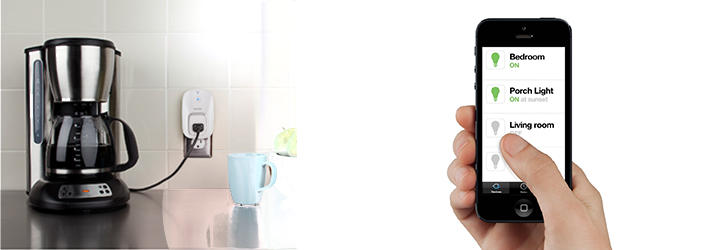
belkin-wemo-switch-qtoothThe Belkin WeMo Switch is the most simple device in the series. Looking like a single outlet plug adaptor, you simply plug it into your wall outlet and then plug whatever device you want to control into the WeMo switch. Setting it up to communicate with my home WiFi network was pretty routine and the instructions on how to do so were quite clear. Then, using the free app that is available for the iPhone, I was able to remotely power the outlet on and off, thereby turning the floor lamp that was plugged into it on and off. Voila! Simple. As long as my house has power, the WiFi is turned on, and I have my cell phone, this can be done from virtually anywhere in the world. There are also options to program when there is power to the outlet by using the app’s scheduler. Perfect if I want to automate lights to turn on or off when I’m away on vacation or if I want to turn the lights on from my car before I come into the house (handy when carrying armloads of groceries).

Of course this can be used with any device that plugs into the wall, stereos, TVs, space heaters, coffee maker, holiday lights, air conditioners, etc…  Limited only by your imagination.

Belkin WeMo Light Switch

http://www.youtube.com/watch?v=27GI-X-IXaQ

belkin-wemo-light-switch-qtoothThe Belkin WeMo Light Switch is probably the second most popular unit in the series. It takes a bit more to use because it actually requires replacing your current light switch. This involves a bit of know-how when it comes to wiring, If you are not comfortable with this, and fear the risk of getting shocked with the full electrical current from your house’s wiring, you should really look into hiring a professional. Or, at the very least, ask your more tech or handy-oriented friend or member of the family. Since I grew up in a house full of master tradesmen, this was a piece of cake for me. The Belkin WeMo Light switch is perfectly designed to replace the stock light switch in the majority of cases. There are two tips that Belkin tries very hard to make clear: the wiring in your wall MUST have a neutral wire and you should use the included faceplate if the current one is made of metal. This last tip is there because a metal faceplate might block the wireless WiFi signal. Makes sense! Once installed, these work great and can be overridden remotely at anytime. No need to worry if you last left the switch in a certain position that might inhibit remote access.

Belkin WeMo Motion

http://www.youtube.com/watch?v=hxEI_Wrkz9k

belkin-wemo-motion-sensor-qtoothThe Belkin WeMo Motion is a motion detector that hooks into one of their WeMo Switches. That said, the first tip would be to make sure you understand that the WeMo Motion will NOT work without buying a WeMo Switch to go with it. Luckily they are mostly sold a s apackage deal and it is likely that you’ll end up with exactly what you need. Besides that, there are plenty of uses for this and I found that it worked really well. Great for security purposes, it can also be used so that environmental controls or entertainment devices can cycle on and off as you move room to room.

Although I haven’t tried them, there are other members of the Belkin WeMo Home Automation family. There is the WeMo Insight Switch that allows you to track your electrical usage per outlet and the WeMo Baby that acts as an update on the classic baby monitor.

belkin-wemo-phone-app-qtoothAll of this is pretty powerful stuff and can all be controlled on either an iOS device or an Android device using Belkin’s free apps. I find the aesthetic design of these to be spot on and should meld well with just about any decor. Conclusion? Love it, and am looking forward to maybe hacking a few of these for my own nefarious IoT (Internet of Things) purposes. Especially when by writing a few controller scripts on IFTTT. Mwahahahahaha…!

[amzn_product_inline asin=’B00BB2MMNE’]

[amzn_product_inline asin=’B00DGEGJ02′]

[amzn_product_inline asin=’B0089WFPRY’]

Filed Under: Featured Content, Home & Office, Reviews

Welcome to the Wireless World, Jawbone UP24!

2013-11-20

jawbone-up-orange-iphone-qtoothIt finally happened, the Jawbone UP Fitness Band has joined the world of wireless devices. This is a great move and many might say about time. There were some wrinkles when the UP first came on the market, but we have to give credit where credit is due: The Jawbone UP was one of the very first health tracking devices on the mass market.

Officially called the Jawbone UP24, this new version is touting Bluetooth connectivity. Besides a change in texture,  it is almost identical in appearance to the original versions.

jawbone-up-bands-black-orange-qtoothAs can be expected, adding Bluetooth to the device results in a little bit of a shorter battery life between charges. Originally the UP claimed 10 days per charge, which we found fairly accurate. The UP24 promises to last around 7 days. It will be good to test this out over time. With all things wireless, batteries can be drained more or less depending on how strong the signal needs to be. Environmental conditions and distance to the connecting device may cause this to vary.

Despite the  Jawbone UP24 now communicating wirelessly, it has retained a headphone jack style plug for connecting to its charger. However, it is now a 2.5mm instead of a 3.5mm. That’s fine, but it is interesting to note that it still has an end cap that might get lost during charging. Since all data is only transmitted wirelessly and not through the headphone jack like on previous models, it would’ve been interesting if they opted for a wireless charger. Not only would it be easier to do, but they would be able to truly make the UP24 waterproof. Currently the device is only water resistant.

There is a social component to using the Jawbone UP24 where users can track and compare their progress with friends, teammates, and others. However, the info that is traded is relatively minimal, and there is no way to tell if the person you are competing against is in the same demographic as you, such as sex, weight, height, age, etc… But perhaps this is a blessing in disguise. Besides, in this world of over-sharing nd lack of privacy, maybe there is a line there that needs to be drawn.

jawbone-up-one-million-steps-iphone-qtoothIn general, I feel myself wanting to call the Jawbone UP24 a wellness tracker more than a fitness tracker. Lack of a display for immediate feedback and the fact that it doesn’t connect to a scale for real-time weight, BMI and body fat percentage puts its information at a distance from those who are truly trying to get fit by staying… well, active.

jawbone-up-notifications-iphone-qtoothHowever, there are a few things that the Jawbone UP24 really gets right. It has its own highly functional app that does an amazing job with logging your dietary intake and then making suggestions for better food and beverage choices. It even has a bar code scanning function that allows instant nutritional information on many pre-packaged food products.

jawbone-up-dietary-suggestions-iphone-qtoothAnd after all that exercise and food, who wouldn’t need a nap? The sleep log functions measure the length and quality of your sleep, providing plenty of detailed stats. The Jawbone UP24 will tell you how many times you woke during the night, how much light or deep slumber you had, and how quickly you were able to reach your REM (dream) state.

jawbone-up-bedtime-success-iphone-qtoothUnfortunately, the UP24 has launched as an iOS-only device. For those lucky enough to be on an Apple iOS device, the selection of 3rd party apps is truly deep. However they are promising that Android support should be soon to follow. Like many app creators, Jawbone blames the delay on the difficulty the variety of Android devices that are on the market, as well as the fact that the adoption rate of the latest Android OS is hit or miss and can vary greatly depending on both the manufacturer and the telecom platform. Let’s hope it’s not far behind, because this is a really fun device and it would be great to see more people benefit from its use.

jawbone-up-friendly-apps-iphone-qtooth

Available for $149.99 directly from Jawbone, it should be available at other major retail outlets after November 19th. We’ll try to keep you posted and will list Amazon links below (the current links are for the original hardwired version).

[amzn_product_inline asin=’B00E1QW2IC’]

[amzn_product_inline asin=’B00A17IAO0′]

[amzn_product_inline asin=’B00BB9OWKI’]

Filed Under: Health & Fitness, News, Reviews, Wearable

  • « Go to Previous Page
  • Page 1
  • Interim pages omitted …
  • Page 3
  • Page 4
  • Page 5
  • Page 6
  • Page 7
  • Interim pages omitted …
  • Page 10
  • Go to Next Page »

Primary Sidebar

Affiliate Disclosure

This website uses affiliate programs for monetization. At no additional cost to you, links to various sites mentioned in posts may result in a commission that is credited to this site if you make a purchase.

Some affiliate programs and affiliations include, but are not limited to, Commission Junction, Apple, Google, Amazon.com and more.

For complete details
click here.

Copyright © 2026 · Preferred Hosting by WP Engine and Domain Name Registry by Namecheap

We are using cookies to give you the best experience on our website.

You can find out more about which cookies we are using or switch them off in .

QTOOTH
Powered by  GDPR Cookie Compliance
Privacy Overview

This website uses cookies so that we can provide you with the best user experience possible. Cookie information is stored in your browser and performs functions such as recognising you when you return to our website and helping our team to understand which sections of the website you find most interesting and useful.

Strictly Necessary Cookies

Strictly Necessary Cookie should be enabled at all times so that we can save your preferences for cookie settings.

3rd Party Cookies

This website uses Google Analytics to collect anonymous information such as the number of visitors to the site, and the most popular pages.

Keeping this cookie enabled helps us to improve our website.

Additional Cookies

This website uses the following additional cookies:

(List the cookies that you are using on the website here.)