• Skip to primary navigation
  • Skip to main content
  • Skip to primary sidebar

QTOOTH

News & Reviews for Living with Bluetooth Wireless

  • Reviews
    • Wearable
    • Gaming
    • Health & Fitness
    • Home & Office
  • How To Tips
  • Industry News
  • About QTOOTH

Reviews

Why the Enduring Popularity of the LG Tone+ HBS-700 & HBS-730 Bluetooth Headsets? In Review

2023-05-24

It’s amazing when a manufacturer can create a tech product that actually has a substantial shelf-life. Case in point? The LG Tone+ series. The HBS-700 came out in early 2011 and has been going strong ever since. This in spite of the introduction of an “improved” HBS-730 version in early 2013. Now both headsets seem to sell equally well. QTOOTH is going to re-visit this popular series of Bluetooth headsets and take a look at what makes them such a success. Perhaps other manufacturers and designers can learn from what LG has done.

There are a few common issues that come with wearing any Bluetooth wireless headset:

  • The electronics put weight on the sensitive inner folds of the ear
  • The ear buds block normal hearing of the environment even when not in use
  • Due to their typically small size devices are often easy to lose

How did the LG Tone+ series attempt to cure these?

lg-tone+-plus-woman-wearing-around-neck-qtooth

The main thing that set the LG Tone+ HBS-700 apart when it was first introduced was the use of a collar, or necklace, mount for the ear buds. This immediately took the weight of all of the electronics off of the sensitive parts of the ear. The control interface and the electronics are all built-in to the collar itself. Connected by wires, the only part of the device that is inserted into the ear are the small, lightweight ear buds. By placing magnetized holders at each end of the collar mount, LG provided a convenient place to store the ear buds. This simultaneously cured the issues of blocked hearing when not in use and the tendency to lose them. Because the ear buds are stored only inches away from the ear, users always know where they are and can be confident that they can quickly take the ear buds in and out of their ears quickly as needed during use.

It is their unique solution to these three issues is probably what set them apart the most from the competition. There are so many built-in limitations to Bluetooth audio that the variances between models and manufacturers have thus far proven to be very small at best.

lg-tone+-tone-plus-white-bluetooth-stereo-headset-control-button-diagram-qtooth

Here are a few of the other features that have made them great. In our experience, both of the LG Tone+ HBS-700 and the LG Tone+ HBS-730 perform well and reasonably close to their stated technical specs. Great battery life at 10 hours of use and 15 days of standby time. The batteries also re-charge very quickly, sometimes within 90 minutes. The controls are located within easy reach on the collar, even if tucked inside of a shirt or sweatshirt. Because the collar can jump around on the neck a bit, this is our preferred method of wearing them, especially if moving around at work or while working out.

lg-tone+-tone-plus-bluetooth-stereo-headset-balck-main-qtooth

The main complaint we have about both headsets has to do with the quality of the microphones when making a phone call. Although they claim to be using noise-cancelling circuitry and digital noise reduction, in our experience they do not seem to be very effective in noisy environments. Background noise is an issue and we found ourselves raising our voices in order to be understood by our callers. We must stress that this is only an occasional issue and that due to the nature of this design we didn’t really expect the Tone+ to perform at the same level as a dedicated, on-the-ear headset with a microphone boom.

lg-tone+-tone-plus-bluetooth-stereo-headset-balck-top-qtooth

So what’s the real difference between the LG Tone+ HBS-700 and the LG Tone+ HBS-730? The original 700 seems to have a slightly better range and battery life. These two attributes may have gotten sacrificed just a little bit when they added the Apt-X circuitry to the 730. However the Apt-X circuitry did slightly improved the audio experience of the 730 and gave the bass frequencies a little more “oomph”.

So, which is the one for you? If you’re using it primarily for talking on the phone, dictation, or listening to podcasts, choose the LG Tone+ HBS-700. If you are going to be spending more time listening to music, movies or gaming, then the HBS-730 would be a better choice.

Note: And yes, LG did make an even better version called the HBS-800 that had slight improvements in the electronics and subtle cosmetic change. Although it’s a good headset, most people seem to agree with us that they are not worth the nearly 2-3 times amount of money that the other two models can typically be found.

Filed Under: Gaming, Mobile, Reviews, Wearable

Plantronics Expands Line with Voyager Edge UC

2015-02-11

plantronics-voyager-edge-uc-review-main-view-qtooth

Some Background

Plantronics recently introduced four new UC (unified communications) audio devices designed to deliver exceptional audio quality and noise management technology to help people effectively communicate and collaborate, regardless of workplace or location. Of course the one QTOOTH is most interested in is the wireless Bluetooth headset Voyager Edge UC. The other three offerings are the [easyazon_link asin=”B00SLP52YK” locale=”US” new_window=”default” nofollow=”default” tag=”uneomediacom-20″ add_to_cart=”default” cloaking=”default” localization=”default” popups=”default”] Blackwire 725-M[/easyazon_link], the company’s first UC stereo headset with Active Noise Canceling (ANC) for those people who want to stay focused in noisy office environments; the [easyazon_link cloaking=”default” keywords=”Plantronics Calisto 610″ localization=”default” locale=”US” nofollow=”default” new_window=”default” tag=”uneomediacom-20″]Calisto 610[/easyazon_link], a portable speakerphone for instant anywhere conferencing, and the [easyazon_link cloaking=”default” keywords=”Plantronics Clarity 340″ localization=”default” locale=”US” nofollow=”default” new_window=”default” tag=”uneomediacom-20″]Clarity 340[/easyazon_link], designed for those who face vision, hearing, or dexterity challenges.  Now, workers in the office and on the road have tools they can use to control outside noise that allow them to hear as well as be heard clearly.

“There’s been increasing emphasis on the importance of a reliable, high-quality, seamless user experience when communicating and collaborating today, and rightly so,” said Rich Costello, senior research analyst, unified communications, IDC. “The new Plantronics offerings not only address these important requirements, but also the surrounding noise factor on both sides of the call.”

“Everywhere is the new workplace. We know office noise is increasingly becoming a concern due to more open working environments that promote collaboration, but workplace noise isn’t just a problem for those in the office,” said Bill Loewenthal, vice president, enterprise product solutions, Plantronics. “You can’t always control your environment and you certainly can’t control your caller’s environment, so we help ensure workers have solutions they need to block out the noise, allowing them to have a high-quality communication experience wherever their workplace is.”

The shift to Smarter Working-style environments, though undoubtedly beneficial, creates new noise challenges for individuals and their colleagues which can often undermine productivity gains. The following are Plantronics’ new solutions that address the inherent ambient noise challenges and potential audio quality concerns associated with today’s Smarter Working scenarios and environments:

Voyager Edge UC

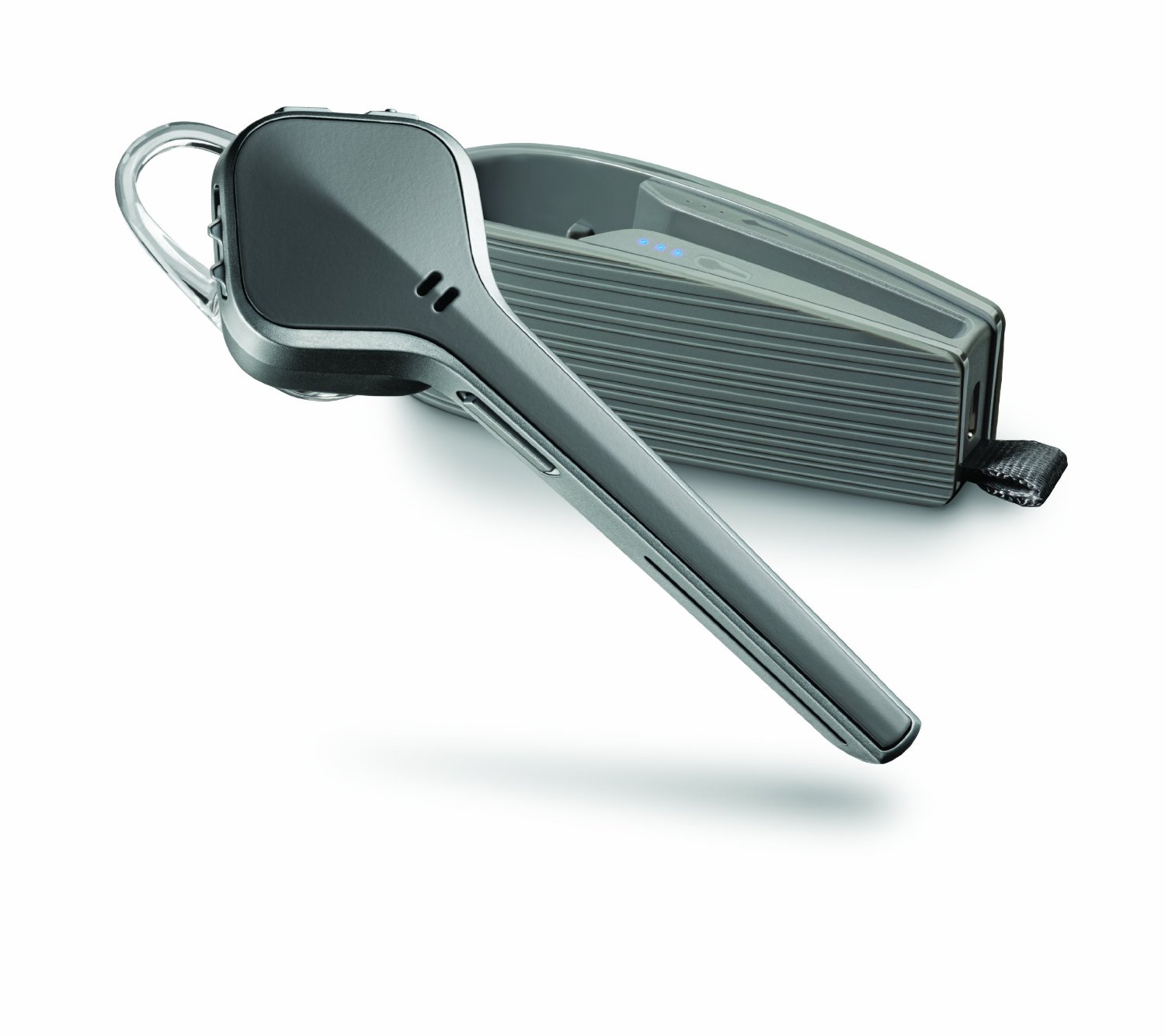
New wearing style for mobile UC users who need to be heard and want to use their Bluetooth® enabled communications devices (laptop, smartphone or tablet) together. The solution includes a small Bluetooth USB dongle that provides seamless wideband audio to your laptop.  The latest addition to the Voyager line features a slim, sophisticated design that fits quickly and comfortably in your ear and comes with its own portable charging case. It boasts signature Plantronics audio technology that eliminates disruptive background noise and includes intuitive, responsive features that keep you moving by automatically answering calls as you place it on your ear.

Connectivity

The point of UC, or Unified Communication, is that one device can seamlessly work among several different communication sources, automatically switching from one to the next. This comes in handy especially in work situations, where you might be taking calls on your cell phone, your office phone system, and your computer using platforms like Skype or Microsoft Lync. In fact, there are actually two models available: the Voyager Edge UC and the Voyager Edge UC-M. If you haven’t guessed already, the “M” in the second model means it is compatible with Microsoft’s “soft phone”, over-the-pc, communication platforms. It’s a real treat to be listening to music one moment, taking a call on your phone, going back to your music, then joining an online conference call… all without having to reconfigure your system or re-pairing Bluetooth to the next device. Plantronics definitely has this experience down with the Voyager Edge UC.

Smart Sensor Technology

The Voyager Edge has built in Smart Sensor technology that senses when you have put the headset on and will automatically answer calls from either computer or mobile calls. When the headset is not worn, it automatically routes incoming mobile calls to your phone. Then, if you simply put the headset back on, your calls are automatically transferred back to the headset. If you want, any time you are wearing the headset and are on a mobile or computer call, your softphone service will automatically update your availability status.

One great feature of the Smart Sensors that we really appreciate is the call button is automatically locked when the headset is not worn. This eliminates any classic accidental “pocket dialing” that may occur, and certainly has for us, with other headsets.

We also really like the fact that our media pauses playback as soon as we take a call. It doesn’t work with all media players, but it certainly does with iTunes and other major media playback programs on the market. Pretty cool, though, to jump right back into the music, podcast, or ebook that we were listening to before we were so rudely interrupted… by work, no less!

Charging Case

plantronics-voyager-edge-uc-adapter-and-case-review-qtooth

Throwing in a charging case is something that Plantronics has been doing for a while with all of their premium headsets. It’s a great idea and we wish more companies did it. Most headsets of this quality are in very similar price ranges. The amazing thing is that Plantronics is doing this without charging you any more than their closest rivals do. The benefit? The headset typically has a talk time of 6 hours on its own. But if you store it in the case, which is more like a quick-deploy holster than a case, it is easy to get 16 hours of talk time before needing to plug in the headset or the case. There is also a cool little storage space for the USB dongle (more about the dongle in a moment). A thoughtful detail is the addition of a on-demand visual battery status indicator for both the headset and the case. Since between the two of them there is quite abit of charge time it’s easy to forget that they do indeed need to be recharged. The display is helpful in anticipating when to recharge before it’s too late.

Audio Quality

The audio quality in our tests has been great. They rate the background noise cancellation to work in environments of up to 80 decibels. We’ve found that to be easily true, at least from the receiving caller’s end. Even when it was too loud, easily above 80 decibels, for us to hear our caller, they said that they still had good results in understanding us. Be advised, although listening to music on the Voyager Edge UC is better than acceptable, that is not the ultimate use target of this device. Everything about it is designed to provide the best speech quality available. It does just that quite well.

Bluetooth USB Mini-Adapter

plantronics-voyager-edge-uc-system-with-dongle-review-qtooth

Plantronics has started to call this a “mini-adapter” versus a dongle. We’re cool with that. Most people who are super-techy may not be familiar with what a dongle is anyway! Either way, this adapter provides a better connection to your computer and helps allow for the seamless transition between one device to the next. It’s small enough to keep plugged into your computer’s USB port all the time, but it also has a cool compartment to itself in the charging case (as mentioned above).

Music/Multimedia

The Voyager Edge has built in A2DP, which let’s you listen to streaming media from all of your Bluetooth devices, including songs, video, turn-by-turn navigation and more.

Voice Commands/Alert

As all wearable tech and the Internet of Things (IoT) is moving in the direction of more voice control than ever anyway, it is good to see more commands being integrated into these devices to control their own behavior and functionality. This includes using your voice to answer incoming calls, check battery level/talk time, redial, put the headset in pairing mode, and more. There are also very handy voice alerts that tell you important things, like an incoming caller’s name (mobile only), remaining talk time, connection status, battery level, maximum, minimum, and mute levels, and more.

 Battery Life

As we mentioned above, the Voyager Edge UC battery allows for up to 6 hours of continuous talk time with an additional 10 hours of non-continuous when paired stored in the case between calls. The headset by itself also has an impressive 7 days of standby time.

Comfort/Design

The Voyager Edge UC is quite comfortable, especially considering its size. The Voyager does not have the smallest of form factors when it comes to its physical presence. Luckily, it comes in at a mere 9 grams. That’s very competitive to other headsets out there that are also of the “on ear” design. by on ear, we mean that it mounts by wedging itself between the folds of cartilage on either side of the ear passage.

plantronics-voyager-edge-uc-review-side-top-view-qtooth

There are pluses and minuses, of course, to its overall shape and design. The headset has a longer and larger mic boom than many “on-ear” mounted headsets, but overall it feels quite balanced and allows for faster mounting and removal of the headset, which can easily be done one-handed. Part of the reason why the audio quality is better on this design with a longer mic boom arm is because the microphone is that much closer to the mouth of the user. However, because the longer mic arm moves some of the weight further away from the ear mount, it acts as a bit of a lever and may add a bit more fatigue to the soft parts of the ear that bear the weight. Once again, this is a slight issue at most and probably only relevant for those who wear the headset for extended periods of time.

he Voyager Edge UC is also protected against moisture damage by its P2i technology. P2i is a nano-coating applied during manufacturing and results in invisible liquid repellent properties and is intended to  make the headset more reliable.

Colors?!

Now here’s something we don’t usually see out of Plantronics. Most of their devices,as Henry Ford once famously said, come in “any color you want… as long as that color is black”. Plantronics actually offers the Voyager Edge UC in three colors: black, gray and white:

Conclusion

There is a lot to love about the Plantronics Voyager Edge UC. To find out more about the vast ecosystem of support and apps that can leverage all that this headset can offer you might want to check out the comprehensive article we did on the Voyager Legend UC. Otherwise, this is a great choice for anybody who is on the move and needs a no-fuss headset to get it done.

[easyazon_block add_to_cart=”default” align=”center” asin=”B00JLVNF5Q” cloaking=”default” layout=”right” localization=”default” locale=”US” nofollow=”default” new_window=”default” tag=”uneomediacom-20″]

[easyazon_block add_to_cart=”default” align=”center” asin=”B00JLVNF2O” cloaking=”default” layout=”right” localization=”default” locale=”US” nofollow=”default” new_window=”default” tag=”uneomediacom-20″][easyazon_block add_to_cart=”default” align=”center” asin=”B00DQ5NU76″ cloaking=”default” layout=”right” localization=”default” locale=”US” nofollow=”default” new_window=”default” tag=”uneomediacom-20″]

Filed Under: Home & Office, Mobile, News, Reviews, Wearable

OORT, Bluetooth, and the Open Source Future of IoT

2015-02-06

While at CES 2015, I had the pleasure to sit down and have a wide-ranging talk with Radek Tadajewski, CEO of OORT. His company has been working mostly behind the scenes in the burgeoning Internet of Things market. They are making fast advances in directions that deserve attention.

oort-logo-qtooth-large

So What Exactly Does OORT Do?

OORT is a manufacturer of wireless devices that can be directly controlled through Bluetooth Smart using a free app that is available for both smartphones and tablets. By themselves, without any hub or extra hardware, these devices can be grouped into virtual networks so that any number of them can be controlled by a single tap of a button.

oort-iot-bluetooth-wireless-phone-app-screen-customizing-groups

However, if they are part of a network controlled by OORT’s hub, these same devices can also be controlled remotely from anywhere in the world via the internet. The hub is not available yet but it should be soon. OORT is expecting to receive their EU certification in early February and, having already secured three distributors in Europe, hope to ship shortly thereafter.

oort-hub-iot-bluetooth-wireless-qtooth

What Makes OORT Different?

This lack of needing a hub is at the core of OORT’s philosophy.  Buy any single one of their components, download the free app, and you can start using it immediately. It makes the entry cost of getting your first SmartHome IOT device much more affordable.

oort-bluetooth-wireless-iot-on-phone-app-bulb-controller

Not only are the OORT components less expensive because they don’t require a hub, they are typically less expensive as a single component. For example, currently their [easyazon_link asin=”B00GC8LSPA” locale=”US” new_window=”default” nofollow=”default” tag=”uneomediacom-20″ add_to_cart=”default” cloaking=”default” localization=”default” popups=”default”]SmartLED BLE Enabled Smart Bulb[/easyazon_link] costs $39.90 vs. the [easyazon_link asin=”B00HNLQQ7K” locale=”US” new_window=”default” nofollow=”default” tag=”uneomediacom-20″ add_to_cart=”default” cloaking=”default” localization=”default” popups=”default”]Philips Hue Bulb[/easyazon_link] which starts at $60. The price for the OORT should fall even lower as they start manufacturing in higher volumes. They expect the price for their bulbs will eventually drop to below $30.

oort-bluetooth-wireless-iot-system-diagram

The app will also control and track data from other devices that OORT has in the pipeline, including beacons, pet trackers, thermostats, light switches, air quality sensors, and more. These devices can be organized into groups so that a single press of a button on a touchscreen will change the settings of all the devices assigned to each group. You can have as many groups as you want, and in as many locations as you want. That means you can set up multiple preferences by group for work, home, or anywhere you are using your OORT Bluetooth-enabled devices.

oort-iot-bluetooth-wireless-phone-app-screen-customizing-groups

oort-iot-bluetooth-wireless-phone-app-screen-group

It is worth repeating: not only will it do this without a hub but it will also do this without the internet! Many, if not all, of their competitors require internet connectivity and rely on cloud services to make their magic. Not OORT! They allow a tremendous amount of functionality right from the start, with a single device and a free app from either Apple iTunes or Google Play. No registration, no creating an account, no surrendering of personal data… unless you want to. Currently there is a lot of concern among the general public about privacy and security issues. So, when it comes to starting your own SmartHome or Internet of Things network, QTOOTH feels like OORT’s approach will lower the resistance barrier to the point of a non-issue.

The hub can control 1000s of devices, allowing a variety of complex networks to be configured and to respond to the needs of many users. Hubs can also control things based upon proximity to connected devices using things such as wearables or embedded beacons.

We here at QTOOTH love most things open source, so we think it is a very smart move that OORT is the first to offer a truly open ecosystem of devices. Just about any Bluetooth device can be incorporated into the network. They have an open API and SDK (Application Program Interface and Software Development Kit, respectively) and supply development kits for anyone who wants to try their hand at adding their own Bluetooth controlled devices into the ecosystem.

OORT Developer Kit

Originally, OORT thought that they would be a consumer-facing company, selling their devices directly to the public. However, there has been a tremendously positive response to their approach from some pretty major players in the SmartHome market. Although selling their product to consumer is still very much a part of the plan, they have done a bit of a pivot to address the needs of the their business-to-business clientele. Even this has further segmented itself into more tightly focused opportunities:

First, OORT offers startup companies and independent developers an excellent end-to-end solution to make their products “smart”. By leveraging the hardware and embedded software technology that OORT already has in place, products can join the Internet of Things in 6-9 months.

Second, OORT is already already working with several major brands including an appliance manufacturer that will be coming out with a line of smart kitchen appliances by the end of 2015.

And finally, in a move that could have significant impact on many industries, OORT is currently helping to develop SmartHome-enabled set top boxes with several partners using OORT’s technology. This means that the same box that provide major utilities in the home, including power, internet, telephone, and cable, will also be acting as your hub for your connected devices. This will give these big players the opportunity to sell services that are targeted specifically to the end customer based on their known use habits. There may come a time when it will make more sense for these providers to give the hardware away for free but charge for cloud-based services. Another opportunity for OORT is that the information that each device collects is sent to OORT’s cloud for processing before being forwarded to the provider’s cloud.

The good news is that all of these business-to-business endeavors should not only help to increase the rate of adoption of OORT’s technology among developers, but to also hasten the availability of one of the more open-ended systems for consumers.

OORT is a member of the Bluetooth SIG’s SmartHome Market, the consortium of Bluetooth manufacturers that set the standards which all Bluetooth products must follow. It’s for these types of innovative approaches that OORT has been nominated for a 2015 Bluetooth SIG Breakthrough Award for Breakthrough Prototypes. Of course by the time the award winners are announced in March at the Mobile World Congress event in Barcelona, OORT should be making some waves as their presence starts to be felt within the industry. OORT CEO Radek Tadajewski will also be a featured speaker at Bluetooth World in April.

On a final note, we were curious to know how it was to start a forward thinking company in a country like Poland. Was it an issue being so far away from some of the traditional centers for technology and funding, like Silicon Valley or New York City? No, according to Radek Tadajewski. Starting any company any where presents its challenges but it can also make for some unique opportunities. There are a lot of beacon companies already in Poland and, due to its centralized location in Europe, a lot of big companies have setup R&D (research and development) facilities there. And from a venture capitalist’s perspective the “rate of burn”, or how quickly a startup company burns through its investors’ money, is significantly slower. This gives the company more time to develop its product and market before needing another round of investment or just simply going out of business. This is due in no small way because the average pay for qualified employees is about 1/3 of what can be in more mature markets. Poland also enjoys a large base of highly trained engineers and other talent that are hungry for the jobs and the challenges that startups and hi-tech companies typically offer.

We are looking forward to seeing where things go for OORT over the course of the next year. Big things seem to be on the horizon for them and it seems like we all stand to benefit from their efforts and forward-thinking vision.

In the meantime, check out our review of a few of their currently available individual devices.

Filed Under: Home & Office, News, Reviews, Tech Talk

OORT Review – Bluetooth Wireless IOT with SmartLED, SmartFinder, and SmartSocket

2015-02-06

oort-logo-qtooth-large

Here it is, our first OORT review! We’ve been tracking this company since we first took notice of them on Kickstarter last June. We’ve even had a chance to talk to the CEO, Radek Tadajewski, at the 2015 International in January. (Check out what we learned from that fascinating conversation here.) Now we finally own a few of their components and wanted to share our experiences with you.

First, a little backstory so you know why we are so intrigued by what OORT is bringing to the market. Unlike many other IOT systems (Internet of Things) out there that use proprietary or uncommon wireless protocols, OORT takes advantage of Bluetooth, something that pretty much all of us already own and use in the form of our smartphones and tablets. There may have been a time when using another form of wireless would’ve had its benefits. But now when it comes to low power consumption, longer battery life, the number of devices that can be on a single network, range, and a host of other attributes, Bluetooth, especially BluetoothSmart or Bluetooth BLE, either meet or exceed those other formats. The only way that these other wireless formats can be used is if:

  • The smartphone and tablet manufacturers start building their products with additional chips to handle the new wireless format
  • They use a hub that acts as a translator between devices and any networks

Neither of these are ideal, adding cost, compatibility issues, and unnecessary complexity. Luckily, we have companies like OORT that are choosing to use existing technologies that are already in place and keeping things open source so that anyone can add their own devices and apps to the ecosystem, keeping costs down and virtually eliminating compatibility issues.

In this OORT review, we’ll show you how easy they’ve made it to begin your own SmartHome network. OORT has an ever-expanding line of products in the pipeline which may soon be joined by other manufacturers’ offerings. For now, we’ll focus on what’s already available and what we ourselves own and use: the SmartLED Bulb, the SmartFinder tracking beacon, and the SmartSocket power outlet.

OORT SmartLED BLE Enabled Smart Bulbs

The [easyazon_link asin=”B00GC8LSPA” locale=”US” new_window=”default” nofollow=”default” tag=”uneomediacom-20″ add_to_cart=”default” cloaking=”default” localization=”default” popups=”default”]OORT SmartLED BLE Enabled Smart Bulbs[/easyazon_link] are already available on Amazon in the US. One of the great advantages of their bulb over the competition, like the [easyazon_link asin=”B00HNLQQ7K” locale=”US” new_window=”default” nofollow=”default” tag=”uneomediacom-20″ add_to_cart=”default” cloaking=”default” localization=”default” popups=”default”]Philips Hue Bulb[/easyazon_link], is that OORT’s bulb does not require a hub or a bridge to work. It can communicate directly with any device like a smartphone or tablet using their native Bluetooth capabilities. Sure, using the hub will expand functionality and allow remote control over the internet but it is not required.  We think that’s pretty cool! Best of all, because it’s an energy-efficient LED light, it will last up to 40,000 hours.

OORT SmartLED Review - Bluetooth IOT

We were going to make our own videos showing how easy these things are to use, but the following videos are so short and to the point it seemed redundant to make videos that basically looked the same. Here is the OORT SmartLED Bulb in use and how to set it up right out of the box:

https://www.youtube.com/watch?v=aEnL4aBTepo

We’ve had a lot of fun with the OORT bulbs. They are capable of displaying millions of colors and have a variety of presets settings that make the bulbs perform a variety of tricks, from the useful to the fanciful. Here’s a list of what those modes are and what they do:

  • Sleep – Sets a timer so the lamp will automatically shut off at a set interval (5s – 8m)
  • Reading – The perfect light for reading
  • Love – We were a bit confused by this one at first. It’s effect is initially very subtle. It has a timer that can be set from 50 seconds to 5 hours. The light starts with a kind of rose color (perhaps to give your partner an attractive, healthy skin tone?) and slowly turns purple and eventually emits an ever deepening blue… and then snaps off! You know, it just might work. At least it removes the excuse for cuddle time by someone saying, “Sorry honey, I’ve gotta shut the light off!”
  • Dance – Party Mode! The light cycles through every color option. How long it displays each color is set by a timer that can range from 1 to 20 seconds
  • Snore – Allows you to pick a color, set an interval of 2 – 20 seconds, and then start the light to snoring, similar in effect to the sleep mode indicator lights on most devices like a laptop. Soothing. Might be even better if we could match it with the Sleep mode so it would shut off after we drift off to sleep.
  • Flash – Warning? Or Party Mode Part Deux? You decide! Pick the color and get it to flash at intervals between .25 – 2 seconds.

OORT - SmartLED Review, App Light Controls

Two things that we feel people should know:

  1. The color picker can be difficult to master. It works, but sometimes getting an exact shade can be difficult. It’s also helpful to know a little bit about color theory so that we know how the controls of the color wheel (hue or color), saturation (the amount of color vs. white) and brightness (overall level of light) interact. Knowing how to get it to display a true red, for instance, can take some time, at least initially. We did notice that the color wheel (hue) seems to jump a bit when it goes between colors instead of a seamless transition. Not a big deal and it seems that the other controls of saturation and brightness help achieve those in-between colors. A feature we would love to see? It might be impossible to calibrate precisely, but it would be cool if we could enter a color’s hex or RGB value to achieve the color that we want. For our example of true red, that would mean values like #FF0000 or (255, 0, 0). No one is doing this though, so we are not taking OORT to task for this. Just a wishlist-type of thing. However, it would be great to have shortcuts that brought us straight to the primary and secondary colors (red, blue, yellow, violet, green and orange).
  2. These lights are not super powerful. They are rated at 9.5 watts, which is roughly equivalent to 35 watts in a traditional bulb. Unless you use a few bulbs in a single fixture or in some type of lighting array, we feel that they are mostly for accent lighting, ambience, or illuminating a specific area, like a table or work surface. However, there is one setting that is not featured in the above video that we particularly enjoy: the Reading mode. If you use it as a reading or desk lamp, the OORT SmartLED gives off a particularly soothing light that manages to keep things crisp and clear on the written page… that is, for those old timers who still read things from the medium of paper!

 OORT SmartFinder

Also currently available is the [easyazon_link asin=”B00QVYY5XM” locale=”US” new_window=”default” nofollow=”default” tag=”uneomediacom-20″ add_to_cart=”default” cloaking=”default” localization=”default” popups=”default”]OORT SmartFinder[/easyazon_link], a smart tracking device that can help you locate any item to which it is attached, even if that “item” is a person or pet! Of course, the range of the tracking feature is limited to the current Bluetooth spec of 30 meters (approx. 100 feet). Here’s a video showing setup and some use-case scenarios:

https://www.youtube.com/watch?v=PB1DtzcR7gA

The version that we have is same as what you saw in the above video. It looks like this:

oort-finder-beacon-iot-bluetooth-wireless-qtoothWe’ve been told by OORT that they have a new version coming out that is quite a bit smaller, about one third the size, and should be easier to mount on a variety of different objects, including the classic keyring. The current version would require something like a [easyazon_link asin=”B0083D7DG0″ locale=”US” new_window=”default” nofollow=”default” tag=”uneomediacom-20″ add_to_cart=”default” cloaking=”default” localization=”default” popups=”default”]carabiner clip[/easyazon_link] to attach it to smaller objects.

OORT SmartFinder Review - App Controls

So, how does it work in the real world? We did have some occasional issues where we had to be almost right on top of it before it started to register strongly on the finder window in the app, but overall it worked quite well. For us, the fastest way to find it was to press the speaker icon in the middle of the app’s screen. This triggers a little alarm tone on the SmartFinder beacon that we could easily hear in most environments. After all, as long as they are working, two of the fastest, most powerful location devices that we have at our disposal are the human ears!

OORT SmartSocket

The [easyazon_link asin=”B00OG897MY” locale=”US” new_window=”default” nofollow=”default” tag=”uneomediacom-20″ add_to_cart=”default” cloaking=”default” localization=”default” popups=”default”]OORT SmartSocket BLE Enabled Smart Plug Energy Meter[/easyazon_link] is one of our favorite things. It is the fastest way to add other devices in your life into the Internet of Things. Plug it into any standard power outlet, find it and connect it on the OORT app, and you can immediately start to schedule all kinds of tasks from your formerly “dumb” appliances. Check out the video:

https://www.youtube.com/watch?v=stOq7eSj_CQ

Not only is it simple to use but it can save you significantly on your utility bills by scheduling automated on and off times for appliances throughout your home or office… or both. There is also a screen on the app that allows you to track power consumption so you know exactly what devices are drawing the most power. It even allows you to attach a dollar amount to that devices power consumption. Just check your utility bill’s cost per kilowatt hour and enter it into the appropriate space on the app and voila! You now know exactly how much it costs to run that extra space heater in the spare bedroom!

OORT SmartSocket - App Controls

One thing people should know about the OORT SmartSocket:

The OORT SmartSocket is pretty much a perfect product. The one thing it doesn’t necessarily do is instantly turn on or off. It is very fast, but it is not the same as flicking a switch on the wall. There can be a slight, variable, delay between when you tap the button on the app and when the SmartSocket actually responds. For almost all applications this will never be an issue. We just thought we’d warn you if you are trying to turn on or off a device where the timing is critical or involves any health or safety issues.

The OORT APP

The power of OORT’s system is that you have incredible control over these devices before ever needing to invest in a hub or any other type of “bridge”. They can all communicate directly with your smartphone or tablet using its built-in Bluetooth capability. It is also possible to create an unlimited number of virtual networks using the app’s “Group” function. Assign devices to a group and in one touch of a button you can either turn on or off each device in that group, depending on what you have assigned each device to do.

OORT Review - Assigning Devices to a Group Using the OORT App

Examples? Press a button and the outside lights of your house go off and all of the interior lights come on. Press a button and the stereo goes off and the TV comes on. Getting the idea? All of these functions can be programmed to happen at specific times up to a week in advance… without a hub! Without sending information to the cloud! Without being connected to the internet! How awesome is that?

OORT Review - Customizing Groups using the OORT App

And did we mention the app is free? You can find it for both iOS and Android devices on their respective stores:

oort-app-itunes-qtooth

oort-app-google-play-qtooth

Coming Soon: The OORT SmartHub

Ok, so it’s cool that we can have all of this control without a hub, without the internet or the cloud… but what if we want to control it all from a remote location? Have no fear, the OORT SmartHub will soon be here!

OORT Review - IOT Hub

The hub that OORT is releasing, and most likely shipping by March 2015, provides the link between your home or office devices and the internet. Using OORT’s cloud system, you can have complete access and control of everything on your network from anywhere in the world with internet access. With a SmartHub connection, users can create custom actions, such as triggering a blue light to flash when you receive a Facebook message, or red when your child comes home. Here is a video that shows some of those expanded capabilities:

https://www.youtube.com/watch?v=iVXo6px-NgM

Still Not Enough? Add Your Own Custom Devices to the Network!

OORT Developer Kit

OORT is set to make available a developer kit that allows you to convert just about any device to work with your SmartHome network. It will come with the Hub and a chipset on a PC board that will allow you to customize your way into the Internet of Things. Here’s a fun example:

https://www.youtube.com/watch?v=X06L1dkxqv4

And for the true developer and inventor in all of us, OORT is also making their API and SDK available too (Application Program Interface and Software Development Kit, respectively). Got a cool idea for something that you want to control via your smartphone or the internet? Get in there already, make it happen!

Conclusion

I’m sure this won’t be our only OORT Review. This company is on the move and we are pretty sure there are going to be many more products and developments to come.

[easyazon_block add_to_cart=”default” align=”center” asin=”B00GC8LSPA” cloaking=”default” layout=”right” localization=”default” locale=”US” nofollow=”default” new_window=”default” tag=”uneomediacom-20″]

[easyazon_block add_to_cart=”default” align=”center” asin=”B00OG897MY” cloaking=”default” layout=”right” localization=”default” locale=”US” nofollow=”default” new_window=”default” tag=”uneomediacom-20″]

[easyazon_block add_to_cart=”default” align=”center” asin=”B00QVYY5XM” cloaking=”default” layout=”right” localization=”default” locale=”US” nofollow=”default” new_window=”default” tag=”uneomediacom-20″]

Filed Under: Home & Office, News, Reviews

Eye Tracking, Gesture Control, Voice-Activated… What Will Become of the Mighty Mouse? Logitech Wireless Performance Mouse MX Review

2015-01-04

logitech-wireless-performance-mouse-mx-review-front-left-view-qtoothAs mentioned in the title of the article, there are so many options these days for controlling our electronics that it makes us wonder… is there a future for the once mighty and all powerful computer mouse? Of course, this might make you wonder why we are even doing a [easyazon_link asin=”B002HWRJBM” locale=”US” new_window=”default” nofollow=”default” tag=”uneomediacom-20″ add_to_cart=”default” cloaking=”default” localization=”default” popups=”default”]Logitech Wireless Performance Mouse MX for PC and Mac[/easyazon_link] review. Hasn’t it been on the market for over five years? But these are exactly the reasons why we want to take another look at it.

Similar to our second look at the enduring popularity of the LG Tone+ HBS-700 & HBS-730 Bluetooth Headsets, we wanted to find out why this remains one of the best selling, most popular mice on the market, beating out almost every wired and wireless model in existence. Not only that, it gives evidence that there is a huge amount of people out there who just plain prefer them over every development in human-to-computer interface technology, including not only the now readily-available touch pads and touch screens, but also the ever-improving forms like eye-tracking, gesture control and voice-activation. Please note that the Logitech Wireless Performance Mouse MX is meant as a best-in-class device for typical uses, such as office or web work. We treat gaming mice as a separate class and will do a review on the most popular version soon. In the meantime, let’s take a look at what the Logitech Wireless Performance Mouse MX offers!

The Basics

Comfort – It is an asymmetrically sculpted, ergonomically designed mouse. What it sacrifices in the ability to be used in either hand it more than makes up for by being incredibly comfortable. This is one of the most natural feeling we’ve used. It disappears into the hand and we experienced little if any fatigue over extended use.

logitech-wireless-performance-mouse-mx-review-rear-left-view-qtoothlogitech-wireless-performance-mouse-mx-review-front-left-view-qtooth

Rechargeable – It recharges through USB, so just connecting it to your computer or any powered USB hub or device will get you back in business quickly. The Logitech Wireless Performance Mouse MX comes with a micro-USB cable to do this. Each charge can last up to a month depending on use. If the battery does die, it is a very easy to find single AA rechargeable nickel metal hydride battery. We appreciate that they didn’t choose some odd, hard to-find size like some manufacturers seem to do.

Versatile – There are 9 buttons, 4 of which are thumb buttons that can change functionality depending on the software being used and/or user choice. There are ingertip controls for hyper-fast scrolling, quick-zoom and more. There is a button just below the scroll wheel that changes how it operates, varying between a “clicky” feel and a completely smooth, fluid feel. The fluid mode makes the wheel free-spinning, so you can actually ‘flick’ the wheel and it’ll keep spinning after you take your finger off. Great for extended documents, email threads, and web pages. The click-by-click mode is great for precise, line-by-line navigation of lists, slides and photos. The scroll wheel can also be tilted to the left and right for side-to-side scrolling. The convenient thumb buttons can help you things like quickly flip through web histories.

logitech-wireless-performance-mouse-mx-review-unity-dongle-view-qtoothWireless – It’s interesting to note that this is NOT a Bluetooth wireless device. Instead, the Logitech Wireless Performance Mouse MX opts for using a 2.4 GHz UHF signal. There are some tradeoffs here, but mostly it’s a positive. First, Logitech provides a USB dongle that acts as a receiver. It needs to be plugged into your device’s USB port for the mouse to work. Luckily, the receiver is so small you can basically leave it plugged in even when transporting the device. Logitech also has other accessories in the line, referred to as Unifying Technologies, that can work off the same dongle. A single Unifying dongle can connect up to 6 Unifying compatible devices, allowing you to add accessories like a Unifying wireless keyboard without having to manage multiple USB receivers. Second, 2.4GHZ has up to a 30m range, much greater than the 10m average range of most Bluetooth devices. We typically didn’t experience quite as long of a range as they specify, but is definitely more than Bluetooth and seemed to perform in a more consistent manner at extended distances. This longer range could be really handy when holding meetings in a large conference room where the speaker wants to demo things on a large screen but might be far removed from the computer and projector setup.

logitech-wireless-performance-mouse-mx-review-works-on-glass-view-qtoothPrecise Tracking – Logitech uses something that they call “Darkfield Tracking”, which makes a marked improvement in tracking, especially noticeable on super smooth surfaces like glass, granite and polished wood without a restrictive mouse pad. We’ll go into detail with Darkfield Technology next.

Tracking Technology

It is common in the tech world to use laser tracking to achieve a high level of precision. This is accomplished by setting the laser at an angle to the surface that it wants to track. In effect, this creates shadows to be cast by all of the little bumps and irregularities of the surface, even if they are very small and barely detectable to the eye. This in turn causes the reflected light bouncing off the surface to also be irregular. The reflection is then detected by a sensor which interprets the changes in the light into movement with the result being electronic tracking.

logitech-wireless-performance-mouse-mx-review-how-darkfield-technology-works-qtoothIf you take a look at the above illustration, you can see that in traditional optical setups the sensor is directly above the tracked surface, picking up the reflection at an angle perpendicular to the lens. In the specular optical setup, like that used by the Logitech Wireless Performance Mouse MX,  both the LED beam AND the lens and sensor configuration are set at angles to the tracked surface. Logitech calls this technique Darkfield Laser Tracking. It is a significant improvement over traditional optical and laser mice and helps enhance the visibility of the surface’s irregularities, especially on super-smooth materials like glass, metal and polished stone (like a tile or granite counter top).

logitech-wireless-performance-mouse-mx-review-use-on-glass-top-view-qtoothConclusions

So, no matter that most of us are now quite comfortable with touch screens, touch pads, and might soon be able to do more using voice-activation, eye-tracking and gesture controls, many of us still prefer the mouse. Maybe it’s a generational thing? Perhaps, but maybe it’s also just a choice of  tool for personal expression. Just like some people still like to use a manual typewriter, or oil paints, charcoal, hand saw, etc… It’s possible that the mouse will find its fans for generations to come.

It is extraordinary the success that this particular product has had and continues to have.  They seem to be selling just about as many as when it was first introduced. We here at QTOOTH are going to continue this series of reviews of devices that have obviously just gotten it right. When something receives universal praise over an extended period of time, often for years, and does not find itself becoming obsolete is something we want to recognize. Perhaps we can detect deeper trends of where technology is headed, or what questions or problems it needs to address, to be a true success. Stay tuned for more to come… in the meantime, if you need or just prefer a mouse for everyday use*, this is probably the one for you.

* Gaming mice have slightly different needs. We’ll be doing  a similar review of one soon!

[easyazon_block add_to_cart=”default” align=”center” asin=”B002HWRJBM” cloaking=”default” layout=”left” localization=”default” locale=”US” nofollow=”default” new_window=”default” tag=”uneomediacom-20″]

Logitech Wireless Performance Mouse MX System Requirements

Windows-based PC
  • Windows® XP, Windows Vista®, or Windows® 7, Windows® 8
  • Internet connection
  • USB port
Mac® computer
  • Mac OS® X 10.5 or later
  • Internet connection
  • USB port

Warranty Information

3-year limited hardware warranty

Package Contents

  • Logitech® Performance Mouse MX
  • Micro-USB charging cable
  • USB receiver
  • Quick-start guide
  • Tips guide

Technical Specifications

Mouse Dimensions (height x width x depth):
3.29 in (83.5 mm) x 5.05 in (128.3 mm) x 1.85 in (47 mm)
Mouse Weight (including battery): 5.19 oz (147 g)
Receiver Dimensions (height x width x depth):
0.57 in (14.4 mm) x 0.74 in (18.7 mm) x 0.24 in (6.1 mm)
Receiver Weight: 0.06 oz (1.8 g)
Sensor technology: Laser (Darkfield)
Sensor Resolution: Variable (100dpi~1500dpi) (Can be set in increments of 100dpi )
Number of buttons: 9
Scroll Wheel (Y/N): Yes (with Hyper-Fast Scrolling)
Tilt scroll function (Y/N) Yes
Battery life: 1-month battery life*
Battery type: 1-AA form rechargeable nickel metal hydride battery
Wireless operating distance: Approx 10m*
Wireless technology: Advanced 2.4 GHz wireless connectivity(Unifying supported)
Interface: USB receiver
Supported OS:
  • Windows Vista, Windows 7, Windows 8, Windows 8.1
  • Mac OS X 10.5 or later

Filed Under: Home & Office, News, Reviews, Tech Talk

NewerTech NuGuard KX Protective Cases and KX Screen Armor – Complete Review and Real World Tests

2015-01-02

We’ve had the NewerTech NuGuard KX Protective Case and Screen Armor for the Apple iPhone 5s in our possession for a while now and we’ve had ample opportunity to put it through some real world tests. NuGuard makes some bold claims about the level of protection that their products provide and we’ve had a chance to see it for ourselves.

NuGuard KX iPhone Case Installed FrontBut first, let’s give credit to the amazing job that the human body does at being resilient. Daily living immerses us in a surprisingly harsh environment. Just think of how many falls, bumps, crashes, and exposure to liquids that we experience every day with little or no ill effect. Now any time we use phones, smart watches, tablets, fitness trackers, etc… we bring them into that same mix. I’m sure you already know how quickly and easily they can get damaged when we subject to them to the same abuses. It’s understandable why the products that aim to protect these devices are such a huge part of the market that surrounds our wireless and wearable technologies. Go to any trade show, or any mall, or any gas station kiosk, and you will find a seemingly infinite number of companies making cases and covers intended to save our devices from certain destruction. Because there is such a glut of “me too” products in this field, only a few of these have really caught our eye. One such offering is from the company HzO, which is a manufacturing process that makes electronics nearly 100% liquid proof. However, it can only be applied during manufacturing and is not meant be added to the device by owner. The NuGuard KX Protective Cases and Screen Armor, on the other hand, can be used and installed by any of us at any time.

What makes the NuGuard KX products unique? The use of impact absorbing reactive gel. We first became aware of reactive gel about 7 years ago when athletic apparel and protective gear companies started using it in their products. As far as we know, it was the 3DO company that developed the first versions of it and licensed it to other manufacturers. How does it work? Here’s 3DO’s explanation but to us, it just means that under normal conditions the gel is soft and flexible. However, the more violently it is hit with force by another object, the more the gel hardens and disperses the blow across a greater surface area and diminishes the effect of the impact. We’ve already personally experienced the benefits of this type of technology while crashing into things on our mountain bikes (thank you body armor!). We immediately recognized the potential of using it for protecting our favorite electronic wireless devices.

The first thing we did was to install the NuGuard KX Screen Protector. Here’s what it looks like in the package:
nuguard-kx-screen-protector-packaging-exterior-front-qtooth

nuguard-kx-screen-protector-packaging-exterior-qtoothAnd besides the screen protector itself, here’s what is included inside that package: lint free cloth, adhesive dust removal tool, and application tool.

nuguard-kx-screen-protector-package-contents-qtooth

Here’s what it looks like halfway through the application process:

nuguard-kx-screen-protector-iphone-review-application-install-qtooth

The blue layer is a tear-away film that is provided as a surface by which you can apply the smoothing tool without having to worry about scratching the actual screen protector. That color really helps distinguish it from the clear layers as well as the phone’s screen itself so that you don’t accidentally try to remove the wrong layer at the wrong time. As soon as the screen protector is positioned and smoothed to your satisfaction, simply peel the blue layer off and enjoy a virginal, blemish-free NuGuard KX Screen Protector. The install went very smoothly and we were able to achieve a clear, air bubble-free application.

PLEASE NOTE! The following image is actually somewhat misrepresentative of the results. The NuGuard KX Screen Protector is nearly entirely transparent. So much so that it was exceptionally hard to actually have it visible in our photos! We had to over-light, over-expose the shot and use some funky, macro-focused angles just to get the edge of it to show. What looks like a lint and dust along the edges does not show up to the un-aided eye. The best shot we took of it was actually taken after this and appears at the top of this article. More about why we took this shot up next…

nuguard-kx-screen-protector-iphone-review-edge-sizing-qtooth

One of the things that we noticed was that the NuGuard KX Screen Protector didn’t come quite to the edge of the screen.

nuguard-kx-screen-protector-iphone-review-edge-sizing-qtooth-2

Initially, we thought it might be a case of poor sizing and that it might leave the edge vulnerable, but apparently there is a reason for this. As the folks from KX NuGuard explain, if it did go all the way to the edge it would mean that taking the case on and off would risk peeling up the edges of the screen protector.This would be a bad thing! Better to leave a small gap and extend the life of the product. As seen in the image below, NewerTech wisely offers their screen protector in both sizes, depending on your needs or case requirements. The full coverage version is shown on the left and the case-friendly version is shown on the right. You can easily use this with other manufacturers’ cases and in a moment we’ll show you why you might want to do just that!kxs-full-size-vs-case-friendlyNext comes the NewerTech NuGuard KXs Kinetic Energy X-orbing case. Here’s what it looks like in its retail packaging:

nuguard-kx-screen-protector-iphone-case-packaging-exterior-front-qtooth

The case also incorporates reactive gel for the same impact dispersion qualities. A nice details is that it uses a felt-like material as a liner to make sure that your phone is truly pampered while inside the case. Not much of a chance of your phone being scratched or abraded by the case.

nuguard-kx-iphone-case-review-front-view-empty-qtooth

The fit is excellent, with just the right amount of room around the cutaways to provide easy access to the microphone, speaker, and controls of the phone without sacrificing protection.

NuGuard KX iPhone Case Installed Front

nuguard-green-iphone-case-back-qtooth

What’s great about this case is that even though it fits the phone very closely and adds very little to the overall size of the phone, it still has some “give”, some squishiness, to the way it feels.

So, how does it work? Does it live up to the hype? And why would you choose this over other protective cases?

First, reactive gel, what they refer to as “kinetic impact absorbing” gel, simply works. We wish we had a video camera available at the time, but we viciously stabbed this thing with both the blade and the blunt ends of a very hefty stainless steel butter knife. Not only was there no damage to the device, but even the blade end of the knife only left the most barely detectable checks in the protective film. They weren’t kidding in their ads that it exhibits some “self-healing” properties. Those check marks had almost completely disappeared after a few minutes. Only by holding the screen up to a very bright light at an odd angle made them visible to the eye. Please keep in mind that a butter knife has a rounded and dull blade. We’re not sure how it would do with a sharp, pointy tipped blade. We were too chicken to try. And we have a feeling that a truly sharp object would most likely penetrate and damage the screen beneath. The reactive gel will go a long way, but it’s not Kevlar bullet proof material. Here’s a video with some of the tests that the folks at NewerTech did on their own:

Second, we even took the phone on a few random tests, tempting the fates with a haphazardly stowed phone in the back pocket of our mountain bike jersey. It actually took a few rides to get the phone to dislodge from the pocket. It was harder than we thought and it’s not in our nature to intentionally wipeout or attempt to destroy our own phone. But after a few too many jumps and jostling through some deep ruts it eventually came out, tumbled down the trail, and came to a stop only after a riding buddy sprayed it with debris from a most excellent skid. Here was the result:

NuGuard KX Screen Protector iPhone Case Mountain Bike Test - QTOOTH

Brushed it off. Checked its functions. Good to go. Back in the pocket it went:

nuguard-kx-screen-protector-iphone-case-jersey-pocket-qtoothWe’d say that the case, and especially the screen protector, completely live up to the hype. We could see using the screen protector regardless of what case we chose, or as a suggestion to those who like to show off the beauty of their phone in its naked state.

So, why would we go for this case when it comes to rugged protection and not one of the fully waterproof cases that are available?

  1. It’s smaller fit means that it will easily fit in a pocket and in our hands.
  2. If we anticipate being in or around water, we’d rather just throw it in a [easyazon_link cloaking=”default” keywords=”waterproof electronics bag” localization=”default” locale=”US” nofollow=”default” new_window=”default” tag=”uneomediacom-20″]waterproof electronics bag[/easyazon_link]. That’s what they’re for! They’re inexpensive and many of them float, something most cases don’t do. They’re also typically rated for greater depths, just in case the thing that they are in, like a backpack, makes the trip to the bottom of whatever body of water it is in. Most waterproof cases are rated for a depth of 1 meter and only for a very short period of time.
  3. Most waterproof or impact resistant screen protectors greatly degrade the performance of  the touch screen. No thanks! This reactive gel based approach leaves the performance as it should be, quick and responsive. We’re often amused by friends and colleagues who curse out their phones as if it was the phone’s fault. No, you’ve hidden it behind a really poor conductive material that’s really thick for no apparent reason!
  4. The NuGuard KX Case and Screen Protectors in no way compromise sound, either for the caller or the receiver. Many waterproof/rugged cases severely compromise sound quality.
  5. The access to plugs and controls is first rate. No having to use extra “oomph” to activate a control. No having a headphone jack either not being able to insert all the way or getting stuck once inserted.

So why would we want to suffer from all of these drawbacks all of the time just for the exceptionally rare occurrence when we might end up submerged in water? If we end up submerged in water that unexpectedly, we have other things to be worried about besides the state of our phone. Maybe if you’re a lobsterman or work as an animal trainer at Sea World it would be worth it, but for most people, having 24/7  waterproof protection just isn’t needed and the tradeoffs are just too big.

Hopefully soon all personal electronics will be treated with a process like HzO, but until then we’ll stick with just a great case with top notch impact proofing like the NewerTech KX Screen Protector and Case. They are also making these for a growing variety of models: [easyazon_link cloaking=”default” keywords=”newertech kx phone” localization=”default” locale=”US” nofollow=”default” new_window=”default” tag=”uneomediacom-20″]newertech kx phone[/easyazon_link] and [easyazon_link cloaking=”default” keywords=”newertech kx tablet” localization=”default” locale=”US” nofollow=”default” new_window=”default” tag=”uneomediacom-20″]newertech kx tablet[/easyazon_link]. You can also purchase tese directly from the NewerTech website. We recommend them.

[easyazon_block add_to_cart=”default” align=”center” asin=”B00HVH8YJO” cloaking=”default”layout=”right” localization=”default” locale=”US” nofollow=”default” new_window=”default” tag=”uneomediacom-20″]newertech kx tablet[/easyazon_block]

[easyazon_block add_to_cart=”default” align=”center” asin=”B00BHXHZ1G” cloaking=”default” layout=”right” localization=”default” locale=”US” nofollow=”default” new_window=”default” tag=”uneomediacom-20″]newertech kx tablet[/easyazon_block]

[easyazon_block add_to_cart=”default” align=”center” asin=”B00HM7T780″ cloaking=”default” layout=”right” localization=”default” locale=”US” nofollow=”default” new_window=”default” tag=”uneomediacom-20″]newertech kx tablet[/easyazon_block]

Filed Under: Featured Content, Mobile, News, Reviews

  • « Go to Previous Page
  • Page 1
  • Page 2
  • Page 3
  • Page 4
  • Page 5
  • Page 6
  • Interim pages omitted …
  • Page 10
  • Go to Next Page »

Primary Sidebar

Affiliate Disclosure

This website uses affiliate programs for monetization. At no additional cost to you, links to various sites mentioned in posts may result in a commission that is credited to this site if you make a purchase.

Some affiliate programs and affiliations include, but are not limited to, Commission Junction, Apple, Google, Amazon.com and more.

For complete details
click here.

Copyright © 2026 · Preferred Hosting by WP Engine and Domain Name Registry by Namecheap

We are using cookies to give you the best experience on our website.

You can find out more about which cookies we are using or switch them off in .

QTOOTH
Powered by  GDPR Cookie Compliance
Privacy Overview

This website uses cookies so that we can provide you with the best user experience possible. Cookie information is stored in your browser and performs functions such as recognising you when you return to our website and helping our team to understand which sections of the website you find most interesting and useful.

Strictly Necessary Cookies

Strictly Necessary Cookie should be enabled at all times so that we can save your preferences for cookie settings.

3rd Party Cookies

This website uses Google Analytics to collect anonymous information such as the number of visitors to the site, and the most popular pages.

Keeping this cookie enabled helps us to improve our website.

Additional Cookies

This website uses the following additional cookies:

(List the cookies that you are using on the website here.)