• Skip to primary navigation
  • Skip to main content
  • Skip to primary sidebar

QTOOTH

News & Reviews for Living with Bluetooth Wireless

  • Reviews
    • Wearable
    • Gaming
    • Health & Fitness
    • Home & Office
  • How To Tips
  • Industry News
  • About QTOOTH

Video

PetziConnect – A Wireless Remote Camera & Treat Dispenser For Pet Owners

2013-08-09

petziconnect-dog-qtooth

Pet owners have gone boffo crazy for gadgets that allow them to remotely monitor and care for their pets. How modern! Taking advantage of this developing mania, err… we mean need, is Petzila who has created the PetziConnect wireless monitor. It includes not only a wireless HD camera and microphone but also a dispenser that will provide treats for your pet when triggered remotely.

Where other devices, like the FitBark or the Tagg Pet Locator are more for tracking either the fitness or the location of your pet, the PetziConnect allows you to interact with your pet even while you are at another location, like work, school, vacation, etc…

petziconnect-box-front-side-back-qtoothUsing the camera and microphone allows pet owners to remotely summon their furry four-legged family member from their mid-day nap and then watch as they react to the disembodied voice of their master coming out of a box plugged into the wall. The PetziConnect can also record video or take photos. The owner then has the option to reward their feigned interest by dispensing a treat using a button on either the iOS or the Android app or through the internet.

Petzila was seeking funding on Indiegogo to manufacture the first batch of its wirelessly connected pet monitor/treat dispensers but easily passed its crowdfunding $30,000 goal. And in case you were wondering, PetziConnects says its device is made rugged enough to survive being mauled by a frenzied pet hoping to get more treats or to liberate its owner from inside the box. The lowest price-tag for crowdbackers to purchase a device is $99 and is scheduled for a December delivery.

In the meantime, check out all of the alternatives that are already available in the links below.

[vimeo http://vimeo.com/69582864]

[amzn_product_inline asin=’B006ZP8UOW’]

[amzn_product_inline asin=’B0077I42S4′]

[amzn_product_inline asin=’B001COT8LU’]

[amzn_product_inline asin=’B003WF0LDG’]

Filed Under: Featured Content, Home & Office, News

Google Chromecast – What Is It… and Why You Should Care!

2013-08-01

Chromecast Display Sample - QTOOTH

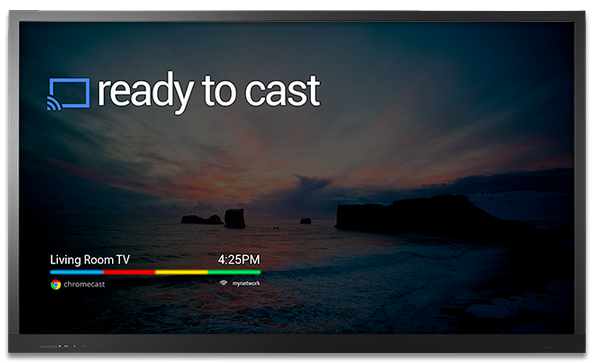
What is Chromecast? Chromecast is a brilliantly simple product: plug it into your TV and stream video and music to it from apps running on your Android device, iPhone, or laptop. Chromecast has no need for a remote; just use whatever device you’re streaming from as the remote. Instead of Chromecast having its own dedicated user interface it’s got a single screen that displays the time and, if nothing is being streamed, an indicator as to whether or not it’s connected to your WiFi. How can it be so simple? Because the device you’re streaming from acts as the primary interface. Chromecast is simply a wireless media streamer to your TV and doesn’t try to be anything more.

What’s in the Box?

First, the price of Chromecast is only $35. Google felt compelled to assure the media that they’re not selling them at a loss. I believe them. Even though it has a Wi-Fi chip, a basic CPU, 2GB of flash memory, RAM, a licensing fee to use HDMI, the cost of these parts are pretty cheap these days. Plus it is really a re-purposing of existent, very common technologies so the R & D I’m sure was next to nil. And yet we love it. There’s is so much brilliant technology already in existence and we here at QTOOTH know that most of us, whether as developers or as the end-user customer, barely scratch the surface of the devices that we already own.

The setup is ridiculously easy. Plug it into an HDMI port, give it some juice (through USB, which most new TVs have, or a standard adaptor), then run the Chromecast app on a laptop or other compatible device so that it can connect to your Wi-Fi network. That’s it!

From the day of its release, the Chromecast App has been compatible with some of the most popular online video apps, including Netflix and YouTube. No need to update these apps either, just launched them and the Chromecast button is already there. There is even an extension for Chrome that promises to greatly expand the functionality of the device. It is an early, Beta release and I’m sure it will improve over time.

It’s interesting to note that Google released this with very little fanfare, even though in our eyes this is one of the coolest things they’ve ever released as a physical product (here’s looking at you Google Glass).

There are a few things that will need to be improved, but this is off to a great start. It will be interesting to see how competitors respond.

https://www.youtube.com/watch?v=cKG5HDyTW8o

So far the video streaming quality seems to be on par with Apple TV or the Xbox 360, especially when using an app or website like Netflix, Youtube, or Google Play, that been designed for compatibility.

If you’re using the Chromecast extension for Chrome on your laptop to project an otherwise incompatible video site (like Hulu or HBOGO), however, video quality can dump quite a bit depending on your setup. It’s using your laptop as a middle man to encode the video signal and broadcast it to the Chromecast, whereas the aforementioned compatible sites just send video straight to the dongle, mostly removing your laptop from the mix. When casting video tabs on a 2012 MacBook Air running on an 802.11n network, the framerate was noticeably lower and there were occasional audio syncing issues.

While we’re on the topic, the Chrome extension packs a bit of an easter egg: the ability to stream local videos from your laptop to the Chromecast. Just drag a video into Chrome, and it’ll start playing in a new tab. Use the Chrome extension to cast that tab, and ta da! You’re streaming your (totally legitimate, not-at-all-pirated-am-i-right) videos without bringing any other software into the mix. I tried it with a bunch of video formats (mostly AVIs and MKVs. MOVs kinda-sorta work, though most won’t push audio from the laptop to the TV for some reason), and they all seemed to work quite well, albeit with the lowered framerate I mentioned earlier.

Even within the apps that have already been tweaked for Chromecast compatibility, there are some day-one bugs. Sometimes videos don’t play the first time you ask them to, instead dropping you into a never-ending loading screen. Other times, the video’s audio will start playing on top of a black screen. These bugs aren’t painfully common, but they’re not rare, either.

As compared to AirPlay, AppleTV’s built-in streaming feature, Chromecast’s wins because of its cross-platform compatibility. Whereas AirPlay is restricted to Macs and iOS devices and only has limited support for Windows through iTunes, Chromecast works well with any iOS, Android, Mac, or Windows app that utilizes Google’s Cast SDK (or software development kit). although Chromecast just launched, we would be very surprised if developers didn’t jump on this and expand upon the universe of applications that are possible. That means it could be adopted by TV, speaker, entertainment device manufacturers and more, putting the AirPlay protocol in certain jeopardy of being the odd man out.

As expected the experience on Android is a slightly better than it is on iOS. Google has considerably more freedom on their own platform; as an example, apps that use Chromecast can take priority over the lockscreen so that the user can operate the controls, like play/pause/skip, of a video without having to fully unlock their Android device. But that’s a minor thing and, for the most part, all of the primary features work just as well on iOS as they do on Android.

Conclusion

This is the future. It’s probably in all of our futures. If not Chromecast then something almost exactly like Chromecast.

[amzn_product_inline asin=’B00DR0PDNE’]

[amzn_product_inline asin=’B00DVFLJKQ’]

[amzn_product_inline asin=’B00E5M7P1G’]

Filed Under: Entertainment, Featured Content, Mobile, Reviews

DJI Phantom Quadrocopter – A Drone that Can Be Used for the Art of Film Making

2013-07-31

dji-phantom-quadrocopter-qtoothThe DJI Phantom Quadrocopter, coupled with a GoPro Hero 3 camera, makes an easy, inexpensive way by which to capture incredible aerial views of our world. Traditionally this would require the rental of a helicopter or a crane, often costing thousands of dollars for just  few hours. Now you can get this footage using equipment that costs $1000-2000… and you get to KEEP the equipment to use whenever you want! Don’t believe us? Here’s everything you need available right on Amazon:

[amzn_product_inline asin=’B00AGOSQI8′]

[amzn_product_inline asin=’B009TCD8V8′]

[amzn_product_inline asin=’B00CUJXGS2′]

The videos below were filmed using a GoPro Hero 3 Black Series mounted on a DJI Phantom quadrocopter and using a Zenmuse H3-2D gimbal for image stabilization. Of course there are even cheaper alternatives out there. Check some of the Amazon links below or just do a quick search yourself and you’ll quickly realize how many options there are out there to achieve this.

The main video shows Bodie just before sunset, affording us a nearly shadowless and perfect view of Bodie’s main street and abandoned buildings, including the mining machinery that made it  a thriving place back in the 1860s.  It played host to all of the usual cliched characters of the old West: miners who had recently struck it rich, stagecoach robbers, denizens of the opium den, brothel madams and outlaw doctors. Then, within the span of sixty years, Bodie was a ghost town with a population in the single digits.—the ruins of which are explored in this incredible video created using the Phantom Quadrocopter.

These days Bodie is a National Historic Landmark and receives its share of tourists every year. Here it is captured like never before by two California videographers named Russell Brown and Aaron Grimes.

[vimeo http://vimeo.com/71185761]

However, this view is probably the most artsy take on what can be done using a drone. Recently we’ve seen local filmmakers using drones to film parties in LA:

[youtube http://www.youtube.com/watch?v=tMwSVDVJNWc]

And surfers in Santa Cruz:

[vimeo http://vimeo.com/70812846]


[amzn_product_inline asin=’B00CR6DXEA’]

[amzn_product_inline asin=’B00BS4FDWW’]

[amzn_product_inline asin=’B00BS2UEAU’]

Filed Under: Art & Media, Entertainment

  • « Go to Previous Page
  • Page 1
  • Page 2

Primary Sidebar

Affiliate Disclosure

This website uses affiliate programs for monetization. At no additional cost to you, links to various sites mentioned in posts may result in a commission that is credited to this site if you make a purchase.

Some affiliate programs and affiliations include, but are not limited to, Commission Junction, Apple, Google, Amazon.com and more.

For complete details
click here.

Copyright © 2026 · Preferred Hosting by WP Engine and Domain Name Registry by Namecheap

We are using cookies to give you the best experience on our website.

You can find out more about which cookies we are using or switch them off in .

QTOOTH
Powered by  GDPR Cookie Compliance
Privacy Overview

This website uses cookies so that we can provide you with the best user experience possible. Cookie information is stored in your browser and performs functions such as recognising you when you return to our website and helping our team to understand which sections of the website you find most interesting and useful.

Strictly Necessary Cookies

Strictly Necessary Cookie should be enabled at all times so that we can save your preferences for cookie settings.

3rd Party Cookies

This website uses Google Analytics to collect anonymous information such as the number of visitors to the site, and the most popular pages.

Keeping this cookie enabled helps us to improve our website.

Additional Cookies

This website uses the following additional cookies:

(List the cookies that you are using on the website here.)