• Skip to primary navigation
  • Skip to main content
  • Skip to primary sidebar

QTOOTH

News & Reviews for Living with Bluetooth Wireless

  • Reviews
    • Wearable
    • Gaming
    • Health & Fitness
    • Home & Office
  • How To Tips
  • Industry News
  • About QTOOTH

QTOOTH

The Fastest Way to Join the Internet of Things? Belkin WeMo Home Automation

2013-12-04

Do you want to take advantage of the Internet of Things today? The Belkin WeMo Home Automation line of products is perhaps the easiest and fastest way to do it.

You may know Belkin for making great consumer accessories, however the majority of their business is probably that of being a supplier the electronics and electrical industries. for many decades. I know that as a lifelong musician, getting a guitar or microphone cable that featured Belkin components was always a good sign. So it was with interest that we had a chance to use the Belkin WeMo Home Automation family of products. In particular, the WeMo Switch,  Insight Switch, and WeMo Light Switch.

We’ve seen many reviews of these, including the ones on Amazon. Most people are thrilled with their performance and ease of use. A few people have reported issues with setting up the devices initially. From what I can glean from these frustrations, it is either because the person didn’t understand the requirement necessary for proper installation or they didn’t allow the devices to automatically update themselves first to the latest firmware before attempting to use them. From my point of view there is not much that can be done about those cases. Whether on a retail website like Amazon or on Belkin’s own website, great care has been made to alert consumers about how to use them. I’m not sure how much more Belkin can do. There will always be people who just won’t read a manual or watch a video no matter how simplified and accurate they may be.  That said, I found the Belkin WeMo Home Automation line of products easy to set up and consistently performed as advertised. Here’s a look at the big three that I’ve used in the series:

Belkin WeMo Switch

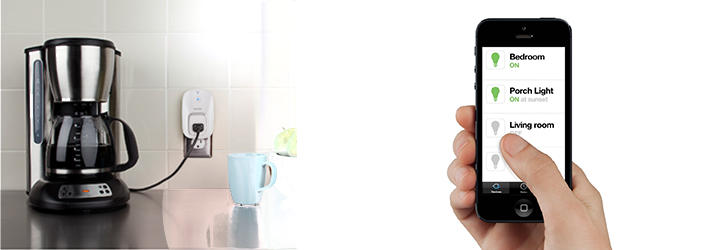
belkin-wemo-switch-qtoothThe Belkin WeMo Switch is the most simple device in the series. Looking like a single outlet plug adaptor, you simply plug it into your wall outlet and then plug whatever device you want to control into the WeMo switch. Setting it up to communicate with my home WiFi network was pretty routine and the instructions on how to do so were quite clear. Then, using the free app that is available for the iPhone, I was able to remotely power the outlet on and off, thereby turning the floor lamp that was plugged into it on and off. Voila! Simple. As long as my house has power, the WiFi is turned on, and I have my cell phone, this can be done from virtually anywhere in the world. There are also options to program when there is power to the outlet by using the app’s scheduler. Perfect if I want to automate lights to turn on or off when I’m away on vacation or if I want to turn the lights on from my car before I come into the house (handy when carrying armloads of groceries).

Of course this can be used with any device that plugs into the wall, stereos, TVs, space heaters, coffee maker, holiday lights, air conditioners, etc…  Limited only by your imagination.

Belkin WeMo Light Switch

http://www.youtube.com/watch?v=27GI-X-IXaQ

belkin-wemo-light-switch-qtoothThe Belkin WeMo Light Switch is probably the second most popular unit in the series. It takes a bit more to use because it actually requires replacing your current light switch. This involves a bit of know-how when it comes to wiring, If you are not comfortable with this, and fear the risk of getting shocked with the full electrical current from your house’s wiring, you should really look into hiring a professional. Or, at the very least, ask your more tech or handy-oriented friend or member of the family. Since I grew up in a house full of master tradesmen, this was a piece of cake for me. The Belkin WeMo Light switch is perfectly designed to replace the stock light switch in the majority of cases. There are two tips that Belkin tries very hard to make clear: the wiring in your wall MUST have a neutral wire and you should use the included faceplate if the current one is made of metal. This last tip is there because a metal faceplate might block the wireless WiFi signal. Makes sense! Once installed, these work great and can be overridden remotely at anytime. No need to worry if you last left the switch in a certain position that might inhibit remote access.

Belkin WeMo Motion

http://www.youtube.com/watch?v=hxEI_Wrkz9k

belkin-wemo-motion-sensor-qtoothThe Belkin WeMo Motion is a motion detector that hooks into one of their WeMo Switches. That said, the first tip would be to make sure you understand that the WeMo Motion will NOT work without buying a WeMo Switch to go with it. Luckily they are mostly sold a s apackage deal and it is likely that you’ll end up with exactly what you need. Besides that, there are plenty of uses for this and I found that it worked really well. Great for security purposes, it can also be used so that environmental controls or entertainment devices can cycle on and off as you move room to room.

Although I haven’t tried them, there are other members of the Belkin WeMo Home Automation family. There is the WeMo Insight Switch that allows you to track your electrical usage per outlet and the WeMo Baby that acts as an update on the classic baby monitor.

belkin-wemo-phone-app-qtoothAll of this is pretty powerful stuff and can all be controlled on either an iOS device or an Android device using Belkin’s free apps. I find the aesthetic design of these to be spot on and should meld well with just about any decor. Conclusion? Love it, and am looking forward to maybe hacking a few of these for my own nefarious IoT (Internet of Things) purposes. Especially when by writing a few controller scripts on IFTTT. Mwahahahahaha…!

[amzn_product_inline asin=’B00BB2MMNE’]

[amzn_product_inline asin=’B00DGEGJ02′]

[amzn_product_inline asin=’B0089WFPRY’]

Filed Under: Featured Content, Home & Office, Reviews

Intel Posts Great Guide to the Internet of Things Infographic

2013-12-02

Intel recently posted this great guide to the Internet of Things infographic. It’s basically a snapshot of where the technology is right now, not only explaining what the term means but also demonstrates the many areas of our lives that are being affected by its development.

The basic concept of an Internet of Things, or IoT, is that “smart” technology is being put into millions of devices, from microscopic ones that can be embedded in other devices, or event he human body, to large scale machines and systems. This allows them to communicate and work with each other and with us. As the technology finds greater adoption and becomes part of our daily lives, we will have everything from our clothing to our cars to our appliances and environmental systems communicating over the internet.

It is a concept that is exploding in popularity. There are virtually limitless areas that can be developed for both industries and our personal lifestyles. It’s a time of the wild frontier and there is so much to be explored. The potential benefits of an Internet of Things are enormous.

There are a few links embedded in the original that we can’t replicate here but we have listed those links below the infographic here for convenience.

internet-of-things-infographic-intel-qtoothHere, in order of their appearance, are the links that are referred to within the graphic:

Video: The Smart World in 2020

Video: Big Data, Big Future for Retail

Link to Intelligent Systems Twitter: Weigh In On Mind Control

Link to Intelligent Systems Twitter: Weigh in Robots

Link to Intelligent Systems Twitter: Can’t All Our Things Just Get Along

Video: End On a Good Note with a Futuristic Computer Orchestra

And of course the original graphic on Intel’s website.


[amzn_product_inline asin=’B00DGEGJ02′]

[amzn_product_inline asin=’B00713RSE0′]

[amzn_product_inline asin=’B005ZA2W42′]

Filed Under: How To Tips, News, Tech Talk

QTOOTH Official Media Sponsor of the 2014 Europe Wearable Tech Conference

2013-11-26

wearable-technologies-conference-europe-2014-qtooth-largeThe next Wearable Technologies Conference will be held in Munich on January 27 and 28. QTOOTH is proud to be a part of the event as an official Media Sponsor. We learned a lot from the last one that was held in Taipei last October. It’s at these conferences that we get a real peek at what’s coming next in wireless wearable technologies. Many of the companies and their representatives may not be household names, but they are the root source of all the cool innovations that make the latest gadgets work their magic.

The Munich conference offers two full days of talks, symposiums, plenty of networking opportunities, as well as an extensive exhibition area where attendees can check out the gear for themselves. What’s great is, that if this is something that is of interest to you, you are welcome to attend the event. You can register here. Following is the tentative agenda for the event:

Agenda

Monday, 27th January 2014
09:00Welcome and Introduction
Keynote: To Ubiquity and Beyond – the Growth of Appcessories Nick Hunn, Wireless Evangelist, Wifore Consulting Ltd
10:00Enabling Tech: New Materials
11:00Enabling Tech: Communication
GestIC – Touchless Gesture Interface Dr. Roland Aubauer, Technical Director, Microchip Technology
12:00Lunch Break
13:30Enabling Tech: Sensors
Emerging MEMS sensor technologies and applications Dr. Wolfgang Schmitt, Senior Manager Strategic Marketing, Bosch Sensortec GmbH
Flexible Sensor Materials for Improved Product Development Mark Melnykowycz, Scientist, Empa – Swiss Federal Laboratories for Materials Science and Technology
14:30Enabling Tech: Energy
The power in you: Energy-harvesting sensors for body area networks Matthias Kassner, Product Marketing Director, EnOcean GmbH
Solid State Thin Film Battery: Future Energy Storage Source for Wearable Devices B. Leo Kwak, DMTS, Applied Materials, Inc.
15:30Break
15:50Enabling Tech: User Interface & Prototyping
16:50WT Innovation World Cup Award Ceremony
Introduction
Elevator Pitches of the Finalists
Announcement of the Winner
18:00Get-Together
Tuesday, 28th January 2014
09:00Welcome and Introduction
Keynote: From Carryables to Wearables to Implantables and Beyond Dr. Isabel Pedersen, Research Chair and Associate Professor, University of Ontario Institute of Technology Canada
9:40Panel Discussion: The Wearable Technologies – Growth Potential
Josh Flood, Senior Analyst, ABI Research
Jeremie Bouchaud, MEMS Director, IHS
10:30Break
10:50Smart Watches & Wristbands
Touch to stay in touch Christoph Dressel, COO, Kwamecorp, Ltd.
11:50Smart Glasses & AR moderated by Thomas Alt, CEO, metaio
12:50Lunch Break
14:00Safety & Security
Certification and Interoperability
15:00Health & Fitness
Grassroots in digital health Eugene Jorov, Co-founder, Seraphim Sense
Push your fitness further with stats right on your wrist.
16:00Break
16:20Beyond the Body
Welcome To the Clickable World Muhammad Abdurrahman, Chief Executive Officer, Playtabase
17:40Wrap-Up Session

Wearable Technologies Conferences have been held since 2006 and helps showcase cutting-edge innovation, and brings and opportunity to hear decision makers, experts and developers from commerce, production and research demonstrate where things are headed in this exciting and rapidly developing field. Subjects range from the fields of Health, Wellness, Active Life, Lifestyle Computing, Communication, Security/Safety, and Fashion. By encouraging a dialogue between the respective industries the conferences aim to bring forward new solutions and applications for a rapidly growing target group. Attendees experience the most comprehensive line-up of technological innovations, and have the opportunity to discuss the latest trends all while meeting original thinkers as well as new start-ups in this area. For more a look at what the previous events were like take a look at the conferences that were held in 2013.

We’ll be reporting on all of the happenings and will post highlights for our readers here on QTOOTH. Check back late January! For more information about the Munich event to be held January 27-28, 2014 click here.

Filed Under: News, Wearable

Welcome to the Wireless World, Jawbone UP24!

2013-11-20

jawbone-up-orange-iphone-qtoothIt finally happened, the Jawbone UP Fitness Band has joined the world of wireless devices. This is a great move and many might say about time. There were some wrinkles when the UP first came on the market, but we have to give credit where credit is due: The Jawbone UP was one of the very first health tracking devices on the mass market.

Officially called the Jawbone UP24, this new version is touting Bluetooth connectivity. Besides a change in texture,  it is almost identical in appearance to the original versions.

jawbone-up-bands-black-orange-qtoothAs can be expected, adding Bluetooth to the device results in a little bit of a shorter battery life between charges. Originally the UP claimed 10 days per charge, which we found fairly accurate. The UP24 promises to last around 7 days. It will be good to test this out over time. With all things wireless, batteries can be drained more or less depending on how strong the signal needs to be. Environmental conditions and distance to the connecting device may cause this to vary.

Despite the  Jawbone UP24 now communicating wirelessly, it has retained a headphone jack style plug for connecting to its charger. However, it is now a 2.5mm instead of a 3.5mm. That’s fine, but it is interesting to note that it still has an end cap that might get lost during charging. Since all data is only transmitted wirelessly and not through the headphone jack like on previous models, it would’ve been interesting if they opted for a wireless charger. Not only would it be easier to do, but they would be able to truly make the UP24 waterproof. Currently the device is only water resistant.

There is a social component to using the Jawbone UP24 where users can track and compare their progress with friends, teammates, and others. However, the info that is traded is relatively minimal, and there is no way to tell if the person you are competing against is in the same demographic as you, such as sex, weight, height, age, etc… But perhaps this is a blessing in disguise. Besides, in this world of over-sharing nd lack of privacy, maybe there is a line there that needs to be drawn.

jawbone-up-one-million-steps-iphone-qtoothIn general, I feel myself wanting to call the Jawbone UP24 a wellness tracker more than a fitness tracker. Lack of a display for immediate feedback and the fact that it doesn’t connect to a scale for real-time weight, BMI and body fat percentage puts its information at a distance from those who are truly trying to get fit by staying… well, active.

jawbone-up-notifications-iphone-qtoothHowever, there are a few things that the Jawbone UP24 really gets right. It has its own highly functional app that does an amazing job with logging your dietary intake and then making suggestions for better food and beverage choices. It even has a bar code scanning function that allows instant nutritional information on many pre-packaged food products.

jawbone-up-dietary-suggestions-iphone-qtoothAnd after all that exercise and food, who wouldn’t need a nap? The sleep log functions measure the length and quality of your sleep, providing plenty of detailed stats. The Jawbone UP24 will tell you how many times you woke during the night, how much light or deep slumber you had, and how quickly you were able to reach your REM (dream) state.

jawbone-up-bedtime-success-iphone-qtoothUnfortunately, the UP24 has launched as an iOS-only device. For those lucky enough to be on an Apple iOS device, the selection of 3rd party apps is truly deep. However they are promising that Android support should be soon to follow. Like many app creators, Jawbone blames the delay on the difficulty the variety of Android devices that are on the market, as well as the fact that the adoption rate of the latest Android OS is hit or miss and can vary greatly depending on both the manufacturer and the telecom platform. Let’s hope it’s not far behind, because this is a really fun device and it would be great to see more people benefit from its use.

jawbone-up-friendly-apps-iphone-qtooth

Available for $149.99 directly from Jawbone, it should be available at other major retail outlets after November 19th. We’ll try to keep you posted and will list Amazon links below (the current links are for the original hardwired version).

[amzn_product_inline asin=’B00E1QW2IC’]

[amzn_product_inline asin=’B00A17IAO0′]

[amzn_product_inline asin=’B00BB9OWKI’]

Filed Under: Health & Fitness, News, Reviews, Wearable

Check Out All of the Latest Gear at the WearableTech Expo in Los Angeles

2013-11-13

wearable-tech-expo-los-angeles-logo-qtoothWe here at QTOOTH are extremely excited to be attending the first Wearable Tech Expo to be held in Los Angeles. It promises to be a very eye-opening event with plenty of innovative technologies on display as well as talks by some of the industry’s leading luminaries. The conference is being held at the Hilton Los Angeles December 10-11, 2013. The event is tailored to explore the ins and outs of the rapidly growing market for wearable technology products and services. The two-day conference will feature live presentations and educational discussions from the pioneers of this movement who will share their profound insights on the latest wearable tech devices, trends, technologies and the future of this multi-billion dollar industry.

Sound like fun? Would you like to go? As media sponsor of the event, QTOOTH has a line on discounted tickets to the event which you can find by clicking here.

With new companies and products entering the market virtually every week, it can be hard to keep up or gain a clear perspective on where it all might be leading. This expo will help to gain some much needed perspective on how wearable technology will impact both our businesses and our personal lifestyles.

The range of topics on the agenda are extremely diverse. The Wearable Tech conference program includes:

  • Opening Keynote Panel: Wearable Tech – The Next Generation Electronics that will Drive Next Generation WT Products – This keynote will kick off the event, diving into the next wave of internal electronics and sensors that will drive innovation and power next generation product development.
  • The Smart Watch Phenomenon – Extraordinarily Useful or Simply Marketing Hype? – This panel will speak to the five-year future of smart watches and provide insight on what to expect from this market.
  • Quantifying Yourself – Do All Those Wearable Device Health Details and Graphs Really Make a Difference to Your Health? – Attendees will discuss the hype around health monitors and explore the truth behind functionality vs. fashion statements.
  • Enterprise Wearable Technology – This session will feature both enterprise vendors and enterprise end users who are working to develop and deploy cutting-edge solutions and discuss how these technologies will evolve at every point in the workforce value chain.
  • Fireside Chat: Creating a Wearable Tech Business from the Ground Up – Attendees will learn from an entrepreneur who has taken the plunge in building a wearable technology company from the ground up. Learn best practices, potential pitfalls and the “secret advice” for launching a successful wearable tech business.
  • Wearable Tech and Your Brain Waves – Really Useful Devices or Possibly Dangerous Toys? – As wearable devices begin to wirelessly monitor brain waves and brain-generated electrical signals via EEG, where’s the line between safe and dangerous when it comes to monitoring information as it’s emitted from the brain. This panel will debate that answer.
  • Fashion Technology and WT Design – Endless Possibilities – Fashion lovers will have the opportunity to discover the driving force behind a variety of technologies, especially smart clothing and how devices and sensors interact with and become part of the fashion itself.
  • Augmented Reality and a Hands-Free World – With new technologies designed to enhance visual reality, this session will explore the current state of the art in augmented reality.
  • Smart Materials – It’s Not Just the Toy, It’s what the Toy is Made of that Counts as Well – As wearable tech continues to grow, new materials come to market to help create the solutions. Attendees in this session will have the opportunity to discover many of these new wearable materials and get a glimpse into tomorrow’s possibilities.
  • Will Wearable Technology Prove Itself to be a Sustainable $50 Billion Market? – This panel discussion dives deep into perspectives on why wearable technology is either already turning into a significant marketplace or will have a shorter lifespan than expected.
  • Wearable Technology in the Entertainment Industry – Attendees will have the chance to examine how much of the wearable technology shown in movies such as “Tron: Legacy” and television shows can actually be implemented in the real world.
  • Making Sense of Google (News – Alert) Glass – Unsustainable Phenomenon or the Real Future? – Attendees will hear expert opinions on Google Glass, including the developers building applications for the device, as well as end-user content developers using Glass in creative ways.

Not only will attendees get to take part in all of these presentations and discussions, but they will also have the opportunity to go to the Wearable Tech Demo Forum and Reception. This will give them a chance to see technology and product presentations from nearly 20 companies. Nothing beats hands-on experience and this will be the place to do it.

So the question is: Wouldn’t you love to go? As mentioned before QTOOTH does have a line on discounted tickets. Click here for details.

And if you can’t make it, have no fear, QTOOTH is going to be there and we’ll be live tweeting from the event and posting many a followup story to everything that goes on. Hey, it’s what we do! Stay tuned…

Filed Under: News, Tech Talk, Wearable

FAA Changes Guidelines Allowing More Use of Wireless Devices on Airplanes

2013-11-04

faa-changes-electronic-device-use-restrictions-qtooth

We’ve all been wondering for years whether it really makes a difference to our safety, but the FAA is finally starting to make changes to their guidelines and are going to start allowing more use of wireless devices and electronics on Airplanes. We’ve even heard from some of our strategically placed friends (i.e. pilots and flight attendants) that what they really want is not for the device to be off but rather that they have our undivided attention should things get “interesting”. However there seems to be some relaxing of the current restrictions according to the FAA, which oversees air travel announced on Thursday.

What this does not mean is that you can just go crazy and use all of your electronic devices all of the time. The changes in the restrictions may vary depending on the airline. This is because there are differences between types of planes and how things are run at each different carrier. The FAA does anticipate that most airlines will permit passengers to use their devices “in airplane mode, gate-to-gate, by the end of the year.”

The word is that passengers can use e-book readers, play games and watch videos on devices, and can either hold gadgets or else stow them in the seat back pocket during both take-off and landing. And even though these devices are required to be in Airplane Mode or have cell service turned off during both landing and taxi/take-off, you can actually use Wi-Fi during your flight and continue to use any Bluetooth accessories connected to your phone.

Here are some quick guidelines that the FAA says travelers need to be aware of in order to make sure they’re still covered under these most recent changes:

1. Make safety your first priority.

2.  Changes to PED policies will not happen immediately and will vary by airline. Check with your airline to see if and when you can use your PED.

3.  Current PED policies remain in effect until an airline completes a safety assessment, gets FAA approval, and changes its PED policy.

4. Cell phones may not be used for voice communications.

5.  Devices must be used in airplane mode or with the cellular connection disabled. You may use the WiFi connection on your device if the plane has an installed WiFi system and the airline allows its use.  You can also continue to use short-range Bluetooth accessories, like wireless keyboards.

6. Properly stow heavier devices under seats or in the overhead bins during takeoff and landing. These items could impede evacuation of an aircraft or may injure you or someone else in the event of turbulence or an accident.

7. During the safety briefing, put down electronic devices, books and newspapers and listen to the crewmember’s instructions.

8.  It only takes a few minutes to secure items according to the crew’s instructions during takeoff and landing.

9.  In some instances of low visibility – about one percent of flights – some landing systems may not be proved PED tolerant, so you may be asked to turn off your device.

10. Always follow crew instructions and immediately turn off your device if asked.

We’re glad to see the FAA is being considerate in adjusting itself to changing realities. Most of us would prefer a little inconvenience over any compromised safety, but some of the restrictions did seem arbitrary. Now, where were we in our in-flight entertainment….

[amzn_product_inline asin=’B0054JJ0QW’]

[amzn_product_inline asin=’B007K5BY08′]

[amzn_product_inline asin=’B00AVLOHJ8′]

Filed Under: News, Transportation

  • « Go to Previous Page
  • Page 1
  • Interim pages omitted …
  • Page 14
  • Page 15
  • Page 16
  • Page 17
  • Page 18
  • Interim pages omitted …
  • Page 29
  • Go to Next Page »

Primary Sidebar

Affiliate Disclosure

This website uses affiliate programs for monetization. At no additional cost to you, links to various sites mentioned in posts may result in a commission that is credited to this site if you make a purchase.

Some affiliate programs and affiliations include, but are not limited to, Commission Junction, Apple, Google, Amazon.com and more.

For complete details
click here.

Copyright © 2026 · Preferred Hosting by WP Engine and Domain Name Registry by Namecheap

We are using cookies to give you the best experience on our website.

You can find out more about which cookies we are using or switch them off in .

QTOOTH
Powered by  GDPR Cookie Compliance
Privacy Overview

This website uses cookies so that we can provide you with the best user experience possible. Cookie information is stored in your browser and performs functions such as recognising you when you return to our website and helping our team to understand which sections of the website you find most interesting and useful.

Strictly Necessary Cookies

Strictly Necessary Cookie should be enabled at all times so that we can save your preferences for cookie settings.

3rd Party Cookies

This website uses Google Analytics to collect anonymous information such as the number of visitors to the site, and the most popular pages.

Keeping this cookie enabled helps us to improve our website.

Additional Cookies

This website uses the following additional cookies:

(List the cookies that you are using on the website here.)