• Skip to primary navigation
  • Skip to main content
  • Skip to primary sidebar

QTOOTH

News & Reviews for Living with Bluetooth Wireless

  • Reviews
    • Wearable
    • Gaming
    • Health & Fitness
    • Home & Office
  • How To Tips
  • Industry News
  • About QTOOTH

QTOOTH

Great Opportunities at the 2nd Annual Internet of Things World – May 12-13, 2015

2015-01-20

internet-of-things-world-2015-horizontal-banner-qtooth

The 2nd annual Internet of Things World is taking place from May 12 – 13 at the Moscone Center in San Francisco. Not only are there Early Bird discount opportunities for tickets, but use our discount code of IOTWORLD15 at checkout and receive an additional 15% off admission price!

Your conference pass gets you access to the following features:

  • Access to 2 days of inspiring keynote presentations
  • 2 day high level conference featuring 250+ speakers – including 8 tracks dedicated to
  • Connected Cars, Smart Homes, Manufacturing, Smart Cities, Consumer wearables & fitness, Healthcare, Energy & Utilities and Beacons.
  • Access to IoT Security Summit, IoT Data Analytics Summit & IoT Open Source Summit taking place on the exhibition floor.
  • Access to Apps World North America exhibition floor
  • Networking breaks and sessions each day
  • Lunch and refreshments each day
  • Access to Internet of Things World exhibition floor featuring 150+ exhibitors
  • Presentations on the Center Stage

Below is a sample of the conference program. As they are still finalizing the schedule, click here or on the image to learn more:

internet-of-things-world-2015-agenda-at-a-glance

Want to know who is speaking at the conference? See below for a list of just some of our confirmed speakers with more being announced daily….

Garrett Dunham, Founder & CEO, Prebacked
Shawn Sanderson, Vice President, Internet of Things, Telus
Eugene Kolker, Chief Data Officer, Seattle Children’s Hospital
Stuart Lombard, CEO, ecobee
Scott Burnell, Global Lead, Business Development & Partner Management, Ford Developer, Ford Motor Company
Peter Li, Co-Founder & CEO, Atlas Wearables
Ryan Wartena, CEO & Co-Founder, Geli
Brian Nordmann, AVC VTT Director, US Department of State
Thierry Zylberberg, Executive Vice President & General Manager, Health Line of Business, Orange Healthcare
Peter Taylor, Senior Product Manager, Belkin
Michael Luna, CTO, Jawbone

View the full speaker line-up here

And, if that is not enough to pique your interest, there will also be a hackathon and two summits, the IOT Open Source Summit and the IOT Analytics Summit.

internet-of-things-world-2015-floorplanAnd if you just can’t make it for some reason, QTOOTH will be giving you periodic updates as we get closer. Stay tuned!


Filed Under: Events, News

Eye Tracking, Gesture Control, Voice-Activated… What Will Become of the Mighty Mouse? Logitech Wireless Performance Mouse MX Review
2015-01-04

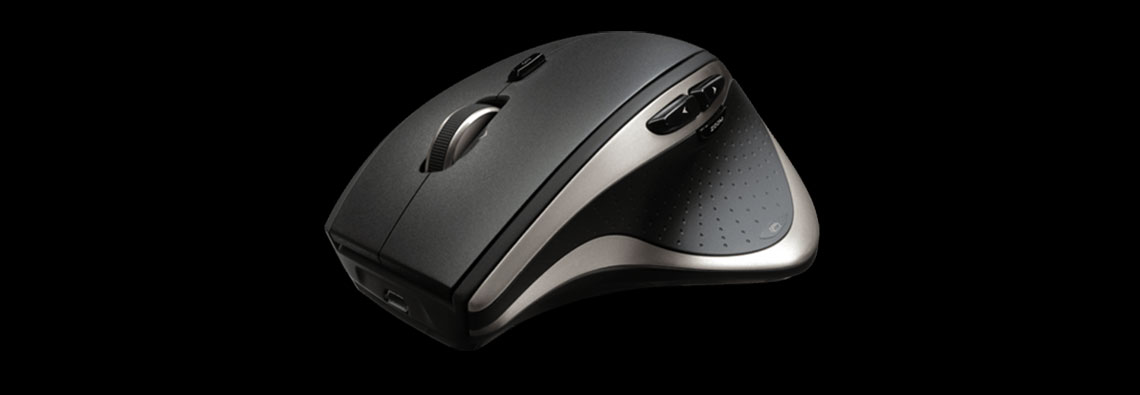
logitech-wireless-performance-mouse-mx-review-front-left-view-qtoothAs mentioned in the title of the article, there are so many options these days for controlling our electronics that it makes us wonder… is there a future for the once mighty and all powerful computer mouse? Of course, this might make you wonder why we are even doing a [easyazon_link asin=”B002HWRJBM” locale=”US” new_window=”default” nofollow=”default” tag=”uneomediacom-20″ add_to_cart=”default” cloaking=”default” localization=”default” popups=”default”]Logitech Wireless Performance Mouse MX for PC and Mac[/easyazon_link] review. Hasn’t it been on the market for over five years? But these are exactly the reasons why we want to take another look at it.

Similar to our second look at the enduring popularity of the LG Tone+ HBS-700 & HBS-730 Bluetooth Headsets, we wanted to find out why this remains one of the best selling, most popular mice on the market, beating out almost every wired and wireless model in existence. Not only that, it gives evidence that there is a huge amount of people out there who just plain prefer them over every development in human-to-computer interface technology, including not only the now readily-available touch pads and touch screens, but also the ever-improving forms like eye-tracking, gesture control and voice-activation. Please note that the Logitech Wireless Performance Mouse MX is meant as a best-in-class device for typical uses, such as office or web work. We treat gaming mice as a separate class and will do a review on the most popular version soon. In the meantime, let’s take a look at what the Logitech Wireless Performance Mouse MX offers!

The Basics

Comfort – It is an asymmetrically sculpted, ergonomically designed mouse. What it sacrifices in the ability to be used in either hand it more than makes up for by being incredibly comfortable. This is one of the most natural feeling we’ve used. It disappears into the hand and we experienced little if any fatigue over extended use.

logitech-wireless-performance-mouse-mx-review-rear-left-view-qtoothlogitech-wireless-performance-mouse-mx-review-front-left-view-qtooth

Rechargeable – It recharges through USB, so just connecting it to your computer or any powered USB hub or device will get you back in business quickly. The Logitech Wireless Performance Mouse MX comes with a micro-USB cable to do this. Each charge can last up to a month depending on use. If the battery does die, it is a very easy to find single AA rechargeable nickel metal hydride battery. We appreciate that they didn’t choose some odd, hard to-find size like some manufacturers seem to do.

Versatile – There are 9 buttons, 4 of which are thumb buttons that can change functionality depending on the software being used and/or user choice. There are ingertip controls for hyper-fast scrolling, quick-zoom and more. There is a button just below the scroll wheel that changes how it operates, varying between a “clicky” feel and a completely smooth, fluid feel. The fluid mode makes the wheel free-spinning, so you can actually ‘flick’ the wheel and it’ll keep spinning after you take your finger off. Great for extended documents, email threads, and web pages. The click-by-click mode is great for precise, line-by-line navigation of lists, slides and photos. The scroll wheel can also be tilted to the left and right for side-to-side scrolling. The convenient thumb buttons can help you things like quickly flip through web histories.

logitech-wireless-performance-mouse-mx-review-unity-dongle-view-qtoothWireless – It’s interesting to note that this is NOT a Bluetooth wireless device. Instead, the Logitech Wireless Performance Mouse MX opts for using a 2.4 GHz UHF signal. There are some tradeoffs here, but mostly it’s a positive. First, Logitech provides a USB dongle that acts as a receiver. It needs to be plugged into your device’s USB port for the mouse to work. Luckily, the receiver is so small you can basically leave it plugged in even when transporting the device. Logitech also has other accessories in the line, referred to as Unifying Technologies, that can work off the same dongle. A single Unifying dongle can connect up to 6 Unifying compatible devices, allowing you to add accessories like a Unifying wireless keyboard without having to manage multiple USB receivers. Second, 2.4GHZ has up to a 30m range, much greater than the 10m average range of most Bluetooth devices. We typically didn’t experience quite as long of a range as they specify, but is definitely more than Bluetooth and seemed to perform in a more consistent manner at extended distances. This longer range could be really handy when holding meetings in a large conference room where the speaker wants to demo things on a large screen but might be far removed from the computer and projector setup.

logitech-wireless-performance-mouse-mx-review-works-on-glass-view-qtoothPrecise Tracking – Logitech uses something that they call “Darkfield Tracking”, which makes a marked improvement in tracking, especially noticeable on super smooth surfaces like glass, granite and polished wood without a restrictive mouse pad. We’ll go into detail with Darkfield Technology next.

Tracking Technology

It is common in the tech world to use laser tracking to achieve a high level of precision. This is accomplished by setting the laser at an angle to the surface that it wants to track. In effect, this creates shadows to be cast by all of the little bumps and irregularities of the surface, even if they are very small and barely detectable to the eye. This in turn causes the reflected light bouncing off the surface to also be irregular. The reflection is then detected by a sensor which interprets the changes in the light into movement with the result being electronic tracking.

logitech-wireless-performance-mouse-mx-review-how-darkfield-technology-works-qtoothIf you take a look at the above illustration, you can see that in traditional optical setups the sensor is directly above the tracked surface, picking up the reflection at an angle perpendicular to the lens. In the specular optical setup, like that used by the Logitech Wireless Performance Mouse MX,  both the LED beam AND the lens and sensor configuration are set at angles to the tracked surface. Logitech calls this technique Darkfield Laser Tracking. It is a significant improvement over traditional optical and laser mice and helps enhance the visibility of the surface’s irregularities, especially on super-smooth materials like glass, metal and polished stone (like a tile or granite counter top).

logitech-wireless-performance-mouse-mx-review-use-on-glass-top-view-qtoothConclusions

So, no matter that most of us are now quite comfortable with touch screens, touch pads, and might soon be able to do more using voice-activation, eye-tracking and gesture controls, many of us still prefer the mouse. Maybe it’s a generational thing? Perhaps, but maybe it’s also just a choice of  tool for personal expression. Just like some people still like to use a manual typewriter, or oil paints, charcoal, hand saw, etc… It’s possible that the mouse will find its fans for generations to come.

It is extraordinary the success that this particular product has had and continues to have.  They seem to be selling just about as many as when it was first introduced. We here at QTOOTH are going to continue this series of reviews of devices that have obviously just gotten it right. When something receives universal praise over an extended period of time, often for years, and does not find itself becoming obsolete is something we want to recognize. Perhaps we can detect deeper trends of where technology is headed, or what questions or problems it needs to address, to be a true success. Stay tuned for more to come… in the meantime, if you need or just prefer a mouse for everyday use*, this is probably the one for you.

* Gaming mice have slightly different needs. We’ll be doing  a similar review of one soon!

[easyazon_block add_to_cart=”default” align=”center” asin=”B002HWRJBM” cloaking=”default” layout=”left” localization=”default” locale=”US” nofollow=”default” new_window=”default” tag=”uneomediacom-20″]

Logitech Wireless Performance Mouse MX System Requirements

Windows-based PC
  • Windows® XP, Windows Vista®, or Windows® 7, Windows® 8
  • Internet connection
  • USB port
Mac® computer
  • Mac OS® X 10.5 or later
  • Internet connection
  • USB port

Warranty Information

3-year limited hardware warranty

Package Contents

  • Logitech® Performance Mouse MX
  • Micro-USB charging cable
  • USB receiver
  • Quick-start guide
  • Tips guide

Technical Specifications

Mouse Dimensions (height x width x depth):
3.29 in (83.5 mm) x 5.05 in (128.3 mm) x 1.85 in (47 mm)
Mouse Weight (including battery): 5.19 oz (147 g)
Receiver Dimensions (height x width x depth):
0.57 in (14.4 mm) x 0.74 in (18.7 mm) x 0.24 in (6.1 mm)
Receiver Weight: 0.06 oz (1.8 g)
Sensor technology: Laser (Darkfield)
Sensor Resolution: Variable (100dpi~1500dpi) (Can be set in increments of 100dpi )
Number of buttons: 9
Scroll Wheel (Y/N): Yes (with Hyper-Fast Scrolling)
Tilt scroll function (Y/N) Yes
Battery life: 1-month battery life*
Battery type: 1-AA form rechargeable nickel metal hydride battery
Wireless operating distance: Approx 10m*
Wireless technology: Advanced 2.4 GHz wireless connectivity(Unifying supported)
Interface: USB receiver
Supported OS:
  • Windows Vista, Windows 7, Windows 8, Windows 8.1
  • Mac OS X 10.5 or later

Filed Under: Home & Office, News, Reviews, Tech Talk

NewerTech NuGuard KX Protective Cases and KX Screen Armor – Complete Review and Real World Tests

2015-01-02

We’ve had the NewerTech NuGuard KX Protective Case and Screen Armor for the Apple iPhone 5s in our possession for a while now and we’ve had ample opportunity to put it through some real world tests. NuGuard makes some bold claims about the level of protection that their products provide and we’ve had a chance to see it for ourselves.

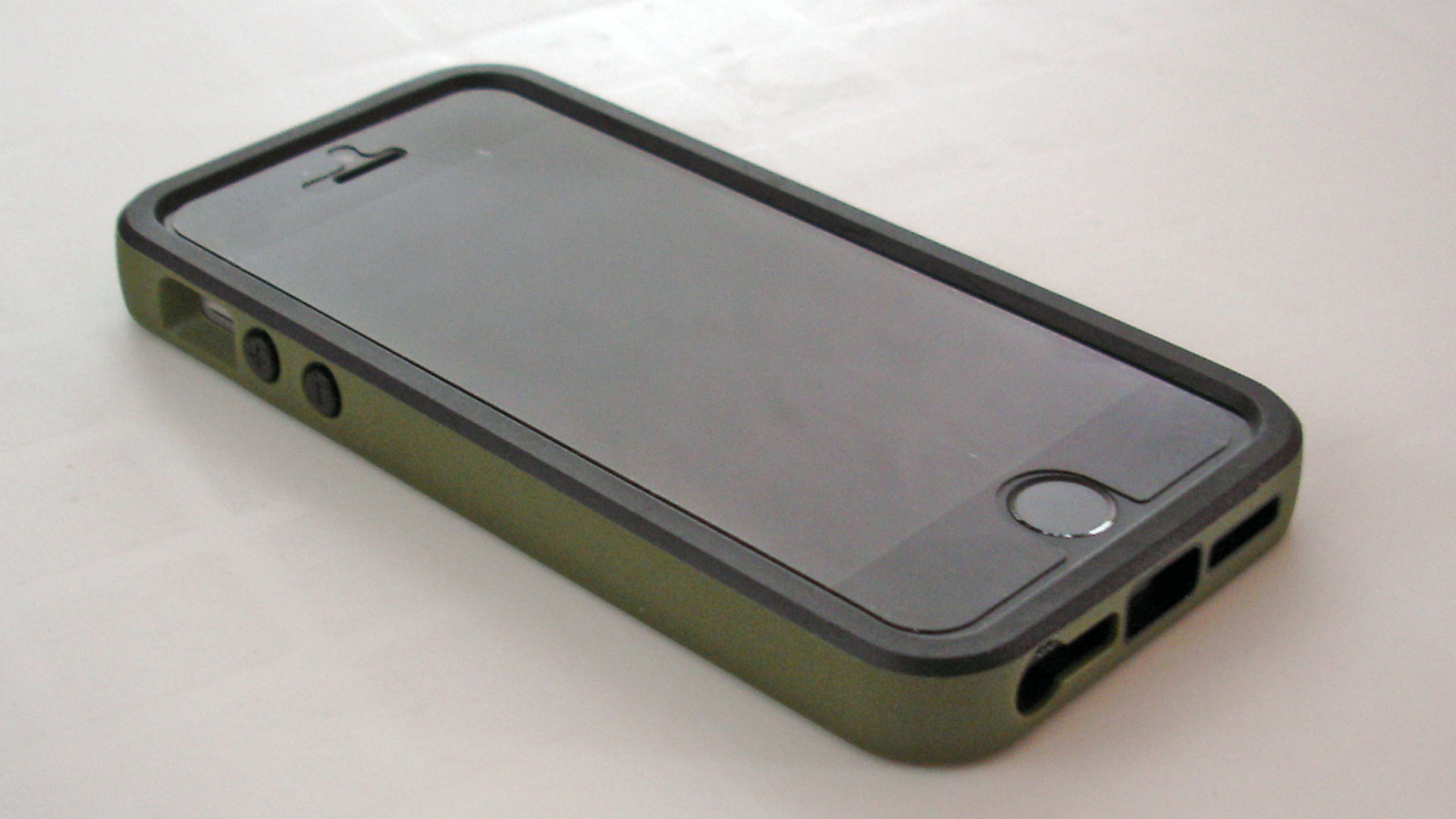
NuGuard KX iPhone Case Installed FrontBut first, let’s give credit to the amazing job that the human body does at being resilient. Daily living immerses us in a surprisingly harsh environment. Just think of how many falls, bumps, crashes, and exposure to liquids that we experience every day with little or no ill effect. Now any time we use phones, smart watches, tablets, fitness trackers, etc… we bring them into that same mix. I’m sure you already know how quickly and easily they can get damaged when we subject to them to the same abuses. It’s understandable why the products that aim to protect these devices are such a huge part of the market that surrounds our wireless and wearable technologies. Go to any trade show, or any mall, or any gas station kiosk, and you will find a seemingly infinite number of companies making cases and covers intended to save our devices from certain destruction. Because there is such a glut of “me too” products in this field, only a few of these have really caught our eye. One such offering is from the company HzO, which is a manufacturing process that makes electronics nearly 100% liquid proof. However, it can only be applied during manufacturing and is not meant be added to the device by owner. The NuGuard KX Protective Cases and Screen Armor, on the other hand, can be used and installed by any of us at any time.

What makes the NuGuard KX products unique? The use of impact absorbing reactive gel. We first became aware of reactive gel about 7 years ago when athletic apparel and protective gear companies started using it in their products. As far as we know, it was the 3DO company that developed the first versions of it and licensed it to other manufacturers. How does it work? Here’s 3DO’s explanation but to us, it just means that under normal conditions the gel is soft and flexible. However, the more violently it is hit with force by another object, the more the gel hardens and disperses the blow across a greater surface area and diminishes the effect of the impact. We’ve already personally experienced the benefits of this type of technology while crashing into things on our mountain bikes (thank you body armor!). We immediately recognized the potential of using it for protecting our favorite electronic wireless devices.

The first thing we did was to install the NuGuard KX Screen Protector. Here’s what it looks like in the package:
nuguard-kx-screen-protector-packaging-exterior-front-qtooth

nuguard-kx-screen-protector-packaging-exterior-qtoothAnd besides the screen protector itself, here’s what is included inside that package: lint free cloth, adhesive dust removal tool, and application tool.

nuguard-kx-screen-protector-package-contents-qtooth

Here’s what it looks like halfway through the application process:

nuguard-kx-screen-protector-iphone-review-application-install-qtooth

The blue layer is a tear-away film that is provided as a surface by which you can apply the smoothing tool without having to worry about scratching the actual screen protector. That color really helps distinguish it from the clear layers as well as the phone’s screen itself so that you don’t accidentally try to remove the wrong layer at the wrong time. As soon as the screen protector is positioned and smoothed to your satisfaction, simply peel the blue layer off and enjoy a virginal, blemish-free NuGuard KX Screen Protector. The install went very smoothly and we were able to achieve a clear, air bubble-free application.

PLEASE NOTE! The following image is actually somewhat misrepresentative of the results. The NuGuard KX Screen Protector is nearly entirely transparent. So much so that it was exceptionally hard to actually have it visible in our photos! We had to over-light, over-expose the shot and use some funky, macro-focused angles just to get the edge of it to show. What looks like a lint and dust along the edges does not show up to the un-aided eye. The best shot we took of it was actually taken after this and appears at the top of this article. More about why we took this shot up next…

nuguard-kx-screen-protector-iphone-review-edge-sizing-qtooth

One of the things that we noticed was that the NuGuard KX Screen Protector didn’t come quite to the edge of the screen.

nuguard-kx-screen-protector-iphone-review-edge-sizing-qtooth-2

Initially, we thought it might be a case of poor sizing and that it might leave the edge vulnerable, but apparently there is a reason for this. As the folks from KX NuGuard explain, if it did go all the way to the edge it would mean that taking the case on and off would risk peeling up the edges of the screen protector.This would be a bad thing! Better to leave a small gap and extend the life of the product. As seen in the image below, NewerTech wisely offers their screen protector in both sizes, depending on your needs or case requirements. The full coverage version is shown on the left and the case-friendly version is shown on the right. You can easily use this with other manufacturers’ cases and in a moment we’ll show you why you might want to do just that!kxs-full-size-vs-case-friendlyNext comes the NewerTech NuGuard KXs Kinetic Energy X-orbing case. Here’s what it looks like in its retail packaging:

nuguard-kx-screen-protector-iphone-case-packaging-exterior-front-qtooth

The case also incorporates reactive gel for the same impact dispersion qualities. A nice details is that it uses a felt-like material as a liner to make sure that your phone is truly pampered while inside the case. Not much of a chance of your phone being scratched or abraded by the case.

nuguard-kx-iphone-case-review-front-view-empty-qtooth

The fit is excellent, with just the right amount of room around the cutaways to provide easy access to the microphone, speaker, and controls of the phone without sacrificing protection.

NuGuard KX iPhone Case Installed Front

nuguard-green-iphone-case-back-qtooth

What’s great about this case is that even though it fits the phone very closely and adds very little to the overall size of the phone, it still has some “give”, some squishiness, to the way it feels.

So, how does it work? Does it live up to the hype? And why would you choose this over other protective cases?

First, reactive gel, what they refer to as “kinetic impact absorbing” gel, simply works. We wish we had a video camera available at the time, but we viciously stabbed this thing with both the blade and the blunt ends of a very hefty stainless steel butter knife. Not only was there no damage to the device, but even the blade end of the knife only left the most barely detectable checks in the protective film. They weren’t kidding in their ads that it exhibits some “self-healing” properties. Those check marks had almost completely disappeared after a few minutes. Only by holding the screen up to a very bright light at an odd angle made them visible to the eye. Please keep in mind that a butter knife has a rounded and dull blade. We’re not sure how it would do with a sharp, pointy tipped blade. We were too chicken to try. And we have a feeling that a truly sharp object would most likely penetrate and damage the screen beneath. The reactive gel will go a long way, but it’s not Kevlar bullet proof material. Here’s a video with some of the tests that the folks at NewerTech did on their own:

Second, we even took the phone on a few random tests, tempting the fates with a haphazardly stowed phone in the back pocket of our mountain bike jersey. It actually took a few rides to get the phone to dislodge from the pocket. It was harder than we thought and it’s not in our nature to intentionally wipeout or attempt to destroy our own phone. But after a few too many jumps and jostling through some deep ruts it eventually came out, tumbled down the trail, and came to a stop only after a riding buddy sprayed it with debris from a most excellent skid. Here was the result:

NuGuard KX Screen Protector iPhone Case Mountain Bike Test - QTOOTH

Brushed it off. Checked its functions. Good to go. Back in the pocket it went:

nuguard-kx-screen-protector-iphone-case-jersey-pocket-qtoothWe’d say that the case, and especially the screen protector, completely live up to the hype. We could see using the screen protector regardless of what case we chose, or as a suggestion to those who like to show off the beauty of their phone in its naked state.

So, why would we go for this case when it comes to rugged protection and not one of the fully waterproof cases that are available?

  1. It’s smaller fit means that it will easily fit in a pocket and in our hands.
  2. If we anticipate being in or around water, we’d rather just throw it in a [easyazon_link cloaking=”default” keywords=”waterproof electronics bag” localization=”default” locale=”US” nofollow=”default” new_window=”default” tag=”uneomediacom-20″]waterproof electronics bag[/easyazon_link]. That’s what they’re for! They’re inexpensive and many of them float, something most cases don’t do. They’re also typically rated for greater depths, just in case the thing that they are in, like a backpack, makes the trip to the bottom of whatever body of water it is in. Most waterproof cases are rated for a depth of 1 meter and only for a very short period of time.
  3. Most waterproof or impact resistant screen protectors greatly degrade the performance of  the touch screen. No thanks! This reactive gel based approach leaves the performance as it should be, quick and responsive. We’re often amused by friends and colleagues who curse out their phones as if it was the phone’s fault. No, you’ve hidden it behind a really poor conductive material that’s really thick for no apparent reason!
  4. The NuGuard KX Case and Screen Protectors in no way compromise sound, either for the caller or the receiver. Many waterproof/rugged cases severely compromise sound quality.
  5. The access to plugs and controls is first rate. No having to use extra “oomph” to activate a control. No having a headphone jack either not being able to insert all the way or getting stuck once inserted.

So why would we want to suffer from all of these drawbacks all of the time just for the exceptionally rare occurrence when we might end up submerged in water? If we end up submerged in water that unexpectedly, we have other things to be worried about besides the state of our phone. Maybe if you’re a lobsterman or work as an animal trainer at Sea World it would be worth it, but for most people, having 24/7  waterproof protection just isn’t needed and the tradeoffs are just too big.

Hopefully soon all personal electronics will be treated with a process like HzO, but until then we’ll stick with just a great case with top notch impact proofing like the NewerTech KX Screen Protector and Case. They are also making these for a growing variety of models: [easyazon_link cloaking=”default” keywords=”newertech kx phone” localization=”default” locale=”US” nofollow=”default” new_window=”default” tag=”uneomediacom-20″]newertech kx phone[/easyazon_link] and [easyazon_link cloaking=”default” keywords=”newertech kx tablet” localization=”default” locale=”US” nofollow=”default” new_window=”default” tag=”uneomediacom-20″]newertech kx tablet[/easyazon_link]. You can also purchase tese directly from the NewerTech website. We recommend them.

[easyazon_block add_to_cart=”default” align=”center” asin=”B00HVH8YJO” cloaking=”default”layout=”right” localization=”default” locale=”US” nofollow=”default” new_window=”default” tag=”uneomediacom-20″]newertech kx tablet[/easyazon_block]

[easyazon_block add_to_cart=”default” align=”center” asin=”B00BHXHZ1G” cloaking=”default” layout=”right” localization=”default” locale=”US” nofollow=”default” new_window=”default” tag=”uneomediacom-20″]newertech kx tablet[/easyazon_block]

[easyazon_block add_to_cart=”default” align=”center” asin=”B00HM7T780″ cloaking=”default” layout=”right” localization=”default” locale=”US” nofollow=”default” new_window=”default” tag=”uneomediacom-20″]newertech kx tablet[/easyazon_block]

Filed Under: Featured Content, Mobile, News, Reviews

CSR Set to Release SiRFusion SDK Kit for Android in First Quarter of 2015

2015-01-01

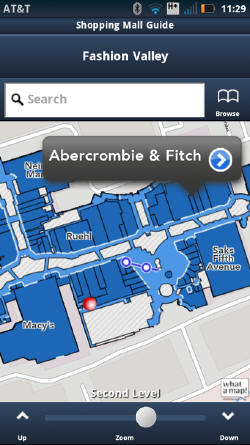
csr-sirfusion-indoor-location-mapping-screenshot-example-qtoothRecently, CSR, who is mostly recognized for their GPS chip technology, has announced a software development kit (SDK) for Android to integrate the SiRFusion library into mobile apps running Android 4.4 or later to enable indoor positioning.

According to Dave Huntingford, director of product management of CSR, the company realized around four years ago that even though the demands for outdoor positioning using their technology were mostly met, indoor was the next frontier. So, CSR began focusing on the problem by utilizing technology currently found inside mobile devices which would not require the installing of extra infrastructure to buildings. These types of technologies included the Wi-Fi radio and the micro-electro-mechanical system (MEMS) sensors such as the gyroscope and accelerometer. The end result was to attain approximately 5 meter location accuracy.

Here’s how SiRFusion gets the job done. Upon the detection of Wi-Fi access points inside a building, the SDK is designed to capture their SSID or MAC address, determine their specific location and store the points in a database. Trilateration of Wi-Fi access points is one technique to identify position. Limitations include variations in signal strength and quantity of access points available. MEMS sensors provide momentary, inertial measurements such as dead reckoning. The mobile device can identify, for example, the number of footsteps by the user.

According the the CSR press release from today:

The system automatically crowd-sources a venue’s indoor Wi-Fi signatures as consumers walk through the location, and it has also been designed to accommodate future proximity and location technologies such as Bluetooth Smart beacons, Wi-Fi Round Trip Time (RTT), and Indoor Messaging System (IMES).

And so, as Huntingford made clear, the quest when it comes to ever-better positioning is never ending, hence the desire for an architecture that is versatile enough to support new technology as it comes online. The Android SDK for SiRFusion will be released in the first quarter 2015; incorporation of Bluetooth Low Energy (BLE) technology will most likely be available by Q2 2015.

Filed Under: Mobile, News, Tech Talk

Wearables TechCon, March 9-11, Santa Clara

2014-12-03

wearables-tech-con-2015-qtooth-240x240Wearables TechCon, March 9-11 in Santa Clara, expands beyond its DevCon roots to include a focus on both the hardware and software behind the coming generation of wearable technology.

Classes and tutorials in the TechCon tracks will focus on embedded computing, hardware design, sensors, and physical technology, while tracks in the DevCon portion will focus on programming apps and mastering the SDKs of the next wave of computing devices.  With over 2,000 attendees, you can see a list of the amazing classes on offer here. And the roster of who’s conducting the talks and classes at Wearables TechCon is top notch, with representatives from Plantronics, Bluetooth SIG, HTC, Hewlett Packard, Freescale, Epson and more. Check out the complete list here.

Use code WEARIT for a $200 conference discount off the 3-day pass. www.wearablestechcon.com

Here are some scenes from last year’sWearables TechCon event:

Filed Under: Events, News

5 Great Reasons to Attend Location and Context World

2014-11-10

location-and-context-logo

Need 5 Great Reasons to Attend Location and Context World on December 2-3 at the JW Marriott, San Francisco?

  1. This will be the first conference fully dedicated to location based services and contextual applications.
  2. Hear from a variety of industry leaders during the 2-day program, including speakers from companies such as; NFL, Google, LinkedIn, Los Angeles World Airports, Ford Motor Company, Golden State Warriors, GE, Verizon Wireless, Walmart and many more.
  3. Learn from successful CIO case studies from the biggest brands and how to apply those lessons within your business
  4. Discover how your business can profit from a $38.9 billion opportunity. Don’t miss out – your competitor’s won’t.
  5. Access a variety of networking opportunities, including speed networking and one-to-one meetings, to discuss future projects and share best practice.

Click here to download the full agenda.

Who Should Attend?

Location and Context World is the meeting place for innovators driving the new revolution of personalized services, with discussions and talks around proximity and beacons and the future of privacy. Meet and connect with the game changers driving contextual applications into the new age.

Here are two quick “5 Question” sessions posed to two of the scheduled speakers at Location and Context World:

Speaker Interview: Steve Hegenderfer, the Director of Developer Programs, Bluetooth SIG

1. What topics do you expect to cover in your presentation/panel position?

I expect that the panel will focus on beacons and how they are being used in the real world, but I would also expect that we’ll talk about the ‘freaky line’…this is what level of privacy that most people feel shouldn’t be crossed, but that line is in a different place for everyone.

2. What have been the biggest milestones for your company over the past year in regards to location and context?

The biggest milestone was probably the announcement on the iBeacon program from Apple; it generated great awareness for Bluetooth within the beacon space.

3. What/who do you see as the current drivers for location based services?

I think initially, retail is pushing location via beacons, but that will soon move to the commercial side of the house as there are a LOT of great scenarios for beacons/proximity in that sector as well.

4. In your opinion, what would you say are the main challenges for the implementation of location based services and contextual applications?

With regards to beacons, it’s really a policy thing. How much is too much? When do you become annoying/spam? When does beaconing technology become ignored because the value exchange with users isn’t high enough?

5. What do you think you will get out of Location and Context World, San Francisco?

I’m hoping to meet a lot of new people in the space and see what interesting things they are working on, as well as get a different take on the industry in general.

Speaker Interview: Jeff Richards, Managing Partner, CIO Professional Services LLC & CIO of the YMCA

1. What topics do you expect to cover in your presentation/panel position?

The Evolving role of the CIO with location based services (4:50 on Day 1) – The advent of location based services allows us to better tailor the member experience at our branches. As the CIO in a not for profit organization I need to build the business case and act as educator/enabler for executives tht are focused on the mission of the Y not new technologies that might make delivery of that mission better.

The transformation taking pace in the CIO suite is one of becoming more business centric, enabling access to new revenue streams and generally defending their relevance in an age of SaaS applications and cloud providers that can be engaged without involving the IT team.

2. What have been the biggest milestones for your company over the past year in regards to location and context?

We are just getting started on the journey and are putting the case together. We have not yet settled on architecture or hardware.

3. What/who do you see as the current drivers for location based services?

We are the the ‘YMCA of Silicon Valley’ and we need to present ourselves as such. Meaning that we need to be more on the forefront of using the available technology. Our members our staff would value easier interactions and more personally relevant offerings.

4. In your opinion, what would you say are the main challenges for the implementation of location based services and contextual applications?

We are in the midst of replacing aging applications across the board, CRM, ERP and Finance. We need to get the internals right in order to be able to fulfill the services. Otherwise we are just putting nice sensors on a paper based fulfillment model. I would liken it to putting racing wheels and tires on a 1985 Camry.

5. What do you think you will get out of Location and Context World, San Francisco?

A better understanding of what others are doing, what is real and implementable versus marketing hype and where the industry is headed.

Can you afford to miss out? See Below for Discount Tix Opportunities…

location-and-context-world-infographic

Also featured among the speakers will be Robert Scoble, the author of “Age of Context: Mobile, Sensors, Data, and the Future of Privacy” who will be kicking off the event with his keynote. Robert will be sharing his thoughts on this fast growing billion dollar market

Michelle McKenna-Doyle, the CIO of the NFL will be joining us as our day two keynote speaker to discuss how the NFL is leading the way with location based services and providing fans with the next level of engagement and fan experience.

Location and Context World will feature 30+ industry leading speakers including Miguel A. Gamiño Jr, the CIO of San Francisco, Wendy Bergh, the VP of Walmart eCommerce, Kenny Lauer, the VP of Digital Marketing for the Golden State Warriors, Henry Bzeih, the CTO of the Connected Car at KIA, Monisha Perkash, the CEO and Co-Founder of Lumo Body Tech, and Peter Yared, the founder and CTO of Sapho.

QTOOTH is delighted to provide you with a 15% discount code off the price of your pass. Please use code I8K3C/DIS15 when prompted.

Book your pass today.

Filed Under: Events, News

  • « Go to Previous Page
  • Page 1
  • Interim pages omitted …
  • Page 7
  • Page 8
  • Page 9
  • Page 10
  • Page 11
  • Interim pages omitted …
  • Page 29
  • Go to Next Page »

Primary Sidebar

Affiliate Disclosure

This website uses affiliate programs for monetization. At no additional cost to you, links to various sites mentioned in posts may result in a commission that is credited to this site if you make a purchase.

Some affiliate programs and affiliations include, but are not limited to, Commission Junction, Apple, Google, Amazon.com and more.

For complete details
click here.

Copyright © 2026 · Preferred Hosting by WP Engine and Domain Name Registry by Namecheap

We are using cookies to give you the best experience on our website.

You can find out more about which cookies we are using or switch them off in .

QTOOTH
Powered by  GDPR Cookie Compliance
Privacy Overview

This website uses cookies so that we can provide you with the best user experience possible. Cookie information is stored in your browser and performs functions such as recognising you when you return to our website and helping our team to understand which sections of the website you find most interesting and useful.

Strictly Necessary Cookies

Strictly Necessary Cookie should be enabled at all times so that we can save your preferences for cookie settings.

3rd Party Cookies

This website uses Google Analytics to collect anonymous information such as the number of visitors to the site, and the most popular pages.

Keeping this cookie enabled helps us to improve our website.

Additional Cookies

This website uses the following additional cookies:

(List the cookies that you are using on the website here.)