• Skip to primary navigation
  • Skip to main content
  • Skip to primary sidebar

QTOOTH

News & Reviews for Living with Bluetooth Wireless

  • Reviews
    • Wearable
    • Gaming
    • Health & Fitness
    • Home & Office
  • How To Tips
  • Industry News
  • About QTOOTH

Mobile

Warning: iPhones Can Auto-Connect to Rogue Wi-Fi Networks

2013-06-20

Warning: iPhones can auto-connect to rogue Wi-Fi networks - QTOOTH

Security researchers say they’ve uncovered a weakness in some iPhones that makes it easier to force nearby users to connect to Wi-Fi networks that steal passwords or perform other nefarious deeds.

The weakness is contained in configuration settings installed by AT&T, Vodafone, and more than a dozen other carriers that give the phones voice and Internet services, according to a blog post published Wednesday. Settings for AT&T iPhones, for instance, frequently instruct the devices to automatically connect to a Wi-Fi network called attwifi when the signal becomes available. Carriers make the Wi-Fi signals available in public places as a service to help subscribers get Internet connections that are fast and reliable. Attackers can take advantage of this behavior by setting up their own rogue Wi-Fi networks with the same names and then collecting sensitive data as it passes through their routers.

“The takeaway is clear,” the researchers from mobile phone security provider Skycure wrote. “Setting up such Wi-Fi networks would initiate an automatic attack on nearby customers of the carrier, even if they are using an out-of-the-box iOS device that never connected to any Wi-Fi network.”

The researchers said they tested their hypothesis by setting up several Wi-Fi networks in public areas that used the same SSIDs as official carrier networks. During a test at a restaurant in Tel Aviv, Israel on Tuesday, 60 people connected to an imposter network in the first minute, Adi Sharabani, Skycure’s CEO and cofounder, told Ars in an e-mail. During a presentation on Wednesday at the International Cyber Security Conference, the Skycure researchers set up a network that 448 people connected to during a two-and-a-half-hour period. The researchers didn’t expose people to any attacks during the experiments; they just showed how easy it was for them to connect to networks without knowing they had no affiliation to the carrier.

Sharabani said the settings that cause AT&T iPhones to automatically connect to certain networks can be found in the device’s profile.mobileconfig file. It’s not clear if phones from other carriers also store their configurations in the same location or somewhere else.

“Moreover, even if you take another iOS device and put an AT&T sim in it, the network will be automatically defined, and you’ll get the same behavior,” he said. He said smartphones running Google’s Android operating system don’t behave the same way.

Once attackers have forced a device to connect to a rogue network, they can run exploit software that bypasses the secure sockets layer Web encryption. From there, attackers can perform man-in-the-middle (MitM) attacks that allow them to observe passwords in transit and even forge links and other content on the websites users are visiting.

The most effective way to prevent iPhones from connecting to networks without the user’s knowledge is to turn off Wi-Fi whenever it’s not needed. Apps are also available that give users control over what SSIDs an iPhone will and won’t connect to. It’s unclear how iPhones running the upcoming iOS 7 will behave. As Ars reported Monday, Apple’s newest OS will support the Wi-Fi Alliance’s Hotspot 2.0 specification, which is designed to allow devices to hop from one Wi-Fi hotspot to another.

Given how easy it for attackers to abuse Wi-Fi weaknesses, the Skycure research isn’t particularly shocking. Still, the ability of iPhones to connect to networks for the first time without requiring users to take explicit actions could be problematic, said Robert Graham, an independent security researcher who reviewed the Skycure blog post.

“A lot of apps still send stuff in the clear, and other apps don’t check the SSL certificate chain properly, meaning that Wi-Fi MitM is a huge problem,” said Graham, who is CEO of Errata Security. “That your phone comes pre-pwnable without your actions is a bad thing. Devices should come secure by default, not pwnable by default.”

via Ars Technica.

[amzn_product_inline asin=’B00C63PL62′]

[amzn_product_inline asin=’B00DV81YIA’]

[amzn_product_inline asin=’B00B8M4IMK’]

Filed Under: How To Tips, Mobile, News, Tech Talk

iOS 7 Massively Expands Bluetooth Support for Smartwatches, Fitness Trackers, Other Devices

2013-06-17

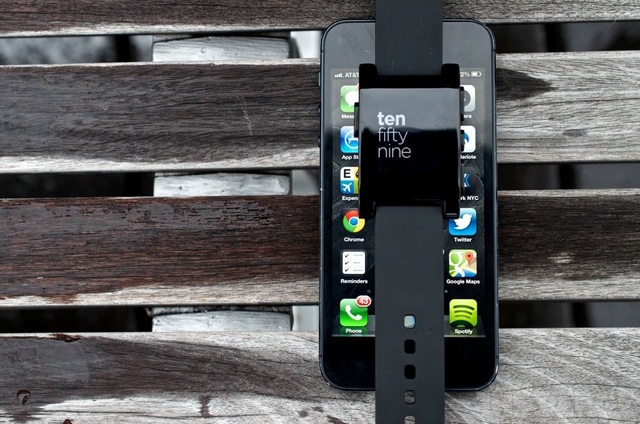
Using a Pebble or any other smartwatch alongside iOS isn’t nearly as convenient or user-friendly as it should be, but thankfully Apple plans on fixing that come fall. As part of iOS 7 (and OS X Mavericks), the company is greatly broadening its support for Bluetooth, a huge boon for smartwatches, fitness trackers, medical devices, and other products based around the technology.

“Less will be needed of the user”

In a post at the official Bluetooth blog, chief marketing officer Suke Jawanda outlines some of these changes. First, he confirms that Bluetooth Smart is a big part of AirDrop, an iOS 7 feature that lets nearby users quickly exchange photos and documents. With the new operating systems, Bluetooth hardware will also gain access to Apple Notification Center Services (ANCS), making the task of pushing notifications to smartwatches and other wearables far more seamless for developers. Rather than having to come up with clever workarounds — as Pebble had to do with iOS 6 — the expanded support ideally means users shouldn’t have to worry about fussing with settings to get things functioning properly.

iOS 7 Bluetooth Enhancements - QTOOTH


Bluetooth Smart devices will also see inclusion in iOS Preservation and Restoration services. What this means is that rather than needing to hold down a sync button on your Nike Fuelband, the fitness tracker will automatically push your stats to Nike’s iOS app in real time without requiring any user intervention — even if the app is closed. It’s equally big news for the growing number of Bluetooth-based medical devices on the market and in hospitals; patients won’t be encumbered with nearly as many special directives to ensure everything is communicating properly. As Apple has famously said in years past, it should “just work.” We’ll have to see whether Apple’s execution can live up to its promises when iOS 7 ships this fall. With Android also embracing Bluetooth Smart, Jawanda hints that we should hear more about Microsoft’s standing at Build later this month.

via The Verge.

[amzn_product_inline asin=’B0097CZBH4′]

[amzn_product_inline asin=’B004ZLV5PE’]

[amzn_product_inline asin=’B008XV7VTG’]

Filed Under: Featured Content, Mobile, News, Tech Talk

Samsung Introduces GALAXY S4 Zoom – First Smartphone to Offer 10x Optical Zoom

2013-06-16

Samsung Introduces GALAXY S4 zoom – the first smartphone to offer 10x optical zoom, for perfect picture taking.

Samsung Electronics announced the launch of the Samsung GALAXY S4 zoom, a powerful new device which combines the stylish heritage of the latest GALAXY S4 smartphone with advanced photographic capabilities.

Samsung Galaxy Zoom - QTOOTH

Part of the GALAXY S4 family, the GALAXY S4 zoom is the realization of Samsung’s mission to create a single device that can fulfill the role of both an industry leading smartphone and a high-end compact camera. Combining 10x Optical Zoom, 16 Mega Pixel CMOS Sensor, OIS and Xenon Flash with the very latest Samsung GALAXY S4 technology, the GALAXY S4 zoom sets new standards for perfect mobile photography. It is the ultimate smartphone and camera experience in one, and the only device you’ll ever need.

Galaxy S4 Zoom - QTOOTH

Revolutionary new interface

Do it all and miss nothing thanks to the revolutionary new Zoom Ring, a simple and intuitive way to access the GALAXY S4 zoom’s key features. When you’re in the middle of a phone call and you see something you absolutely have to share, a quick twist of the Zoom Ring will activate the In-Call Photo Share feature, letting you capture and send an image directly via MMS to whoever you are talking to simply.

For easy camera navigation, the Zoom Ring can be used to activate the Quick Launch and Shortcut features, giving you instant access to multiple camera modes including Auto, Gallery and Smart Mode with a simple twist.

The Zoom Ring also revolutionizes conventional camera zoom controls. Optical zoom control replaces traditional dials and buttons with smooth, easy-to-operate digital controls. Professional-quality accuracy and unprecedented ease of use are just a twist away, making it easy to compose a scene and capture wide-angle shots or tight close-ups.

Galaxy S4 Zoom Lense Side - QTOOTH

Capture the best images

When it comes to high quality photography, bigger isn’t always better. The compact GALAXY S4 zoom’s best-in-class 10x Optical Zoom and 16MP BSI CMOS Sensor lets you capture beautiful images from far away or up close and personal, in all light conditions, without having to carry heavy camera gear around with you. Furthermore, the built-in Optical Image Stabilizer (OIS) helps keep the camera perfectly still even when you’re not, reducing blur and stabilizing the image while zoomed in for high-quality photos and video.

Photo Suggest instantly connects you to huge libraries of images taken by fellow photographers, to help you find and compose your best shots anywhere in the world. Photo Suggest can even direct you to the ideal nearby location which will give you the vantage point you need for that perfect photo.

The GALAXY S4 zoom also features Samsung’s popular Smart Mode, so you can stop worrying about settings and start taking professional-quality artistic shots. Simply choose from a series of pre-set modes and the camera will automatically adjust to ensure you capture the best photo possible. Use Drama Shot to merge continuous shots of moving objects into a single composed image, or Action Freeze to instantly capture high-speed action. If you aren’t sure which Smart Mode to select, the Smart Mode Suggest feature can assess the scene for you and provide a short list of the best options for your consideration based on surrounding factors such as light levels, focal length, or face detection, ensuring you always get the best shot you want.

Samsung GALAXY S4 zoom Product Specifications

Unlimited entertainment in the palm of your hand

The GALAXY S4 zoom’s heritage is evident throughout, from its sleek and stylish design to the powerful, yet intuitive user interface. Running on Android Jelly Bean 4.2, the GALAXY S4 zoom boasts many of the same features as the recently launched GALAXY S4, including Touchwiz, which lets you fully customize various aspects of your device including the lock screen and notification bar, for a truly personal mobile experience.

When you return from your travel adventures, Story Album lets you arrange all of your treasured images and videos into one timeline to share with friends and loved ones. You can also edit images and even order prints directly from the device through a partnership with blurb*. If you’d rather transfer your images to your laptop or tablet for safe keeping, Samsung Link lets you do so quickly and easily with just the touch of a button. Alternatively, you can sync all of your data in your own personal cloud through HomeSync, providing the ultimate peace of mind and ensuring your images and videos are waiting for you whenever you need them.

The GALAXY S4 zoom features the new Samsung Hub, a one-stop destination for all of the latest music, videos, books and games. Search, download and enjoy all of your favorite entertainment at the touch of a button, all directly from your device. When you find that amazing new track or game that you can’t wait to share with your friends, Group Play lets you connect directly with their Samsung devices so you can all listen and play together, without the need for a Wi-Fi AP or cellular signal.

via Samsung

[amzn_product_inline asin=’B00DRH70ZQ/’]

[amzn_product_inline asin=’B00DSR62KY’]

[amzn_product_inline asin=’B00CQ253WU’]

Filed Under: Featured Content, Mobile, News, Reviews

Spot Global Phone Keeps Adventurers Connected with the Power of Satellites

2013-06-15

SPOT Global Phone Brings Affordable, Superior Voice Quality to the Outdoor Recreation Market

Spot Global Phone - QTOOTH

Portable, easy-to-use and affordable, the new SPOT Global Phone keeps users connected to family, friends and emergency services when their adventures take them off the grid

Covington, LA (May 14, 2013) – SPOT LLC, a wholly owned subsidiary of Globalstar, Inc. and leader in satellite messaging and emergency notification technologies, today announced the new SPOT Global Phone, a portable, easy-to-use and data-enabled satellite phone. Hunters, hikers, boaters, off-road travelers and all outdoor enthusiasts will find that SPOT Global Phone provides industry-leading, crystal clear voice quality where cell service won’t work.

“Outdoor recreationists have come to appreciate SPOT as a brand that keeps them safe as they explore new ways of getting off the grid,” said Jay Monroe, Chief Executive Officer, Globalstar. “As the first satellite phone available in major retail outlets such as West Marine, REI and Cabela’s, SPOT Global Phone will not only provide a lifeline during these adventures, but an opportunity to connect with impeccably clear voice quality on a satellite network that is light years ahead of the competition.”

  • SPOT Global Phone Features
  • Compact size: 5.3″H x 2.2″ W x 1.5″D
  • Lightweight: 7 ounces
  • Satellite-based technology
  • Superior voice clarity with no noticeable delay or echo
  • Backlit color display optimized for outdoor daytime viewing
  • Long-life battery: 4 hours talk time, 36 hours standby
  • Data capable enabling email and file transfers
  • Quick online activation, ten-digit dialing with local phone numbers
  • Ergonomic design
  • Lighted keypad
  • 911 emergency service access

SPOT Global Phone ensures users can connect with family, friends and businesses even when their adventures take them out of cell coverage. With patented Qualcomm-based CDMA technology providing crystal-clear voice quality from anywhere within the service footprint, SPOT Global Phone users experience superior performance. Critical communications happen in an instant, with no noticeable time delays on a network that transmits even a whisper. With the availability of Express Data on most data plans, guaranteed data speeds of 9.6Kbps provide up to four times the data speed of most other mobile satellite data services and enable emails, file transfers, and basic services to occur at high-speed.

[amzn_product_inline asin=’B00CU9Z88S’]

[amzn_product_inline asin=’B00BX7TJ2O’]

[amzn_product_inline asin=’B008RYYESU’]

Filed Under: Mobile, News, Tech Talk

Nokia Lumia 925 vs HTC One

2013-06-14

Here’s a great little video review on the pros and cons of the Nokia Lumia 925 vs. the HTC One from the folks over at PocketNow.

nokia-lumia-925-qtoothEach of these phones are the flagship of their respective companies. Both have some stunning features and just like most phone shootouts, each comes out on top… depending on what features you value the most. Choices, choices. Nokia Lumia 925 or HTC One. Hmm… htc-one-qtooth

Check it out:

[amzn_product_inline asin=’B009ZC90P0′]

[amzn_product_inline asin=’B00C5SJEXO’]

[amzn_product_inline asin=’B00BOG1MS8′]

Filed Under: Featured Content, Mobile, News, Reviews

Jabra adds headset support for Siemens’ OpenScape

2013-06-03

Jabra Bluetooth Headset

Here’s a development that we here at QTOOTH have been hoping for for sometime: more seamless switching between devices on our Bluetooth devices. Wireless device maker Jabra and Siemens’ Enterprise Communications arm seek to solve this by partnering to support the latter’s OpenScape Mobile Call Swipe feature, which allows you to switch devices without losing connection or switching headsets.

Here’s how it works: with a swipe, you can move a voice conversation from an office phone or laptop to a mobile device. It’s all part of the “unified communications” trend that essentially aims — through technological cooperation — to make conversations about who you’re talking to, not how you’re talking to them.

Jabra’s Holger Reisinger says that the feature is “solving a longstanding, low-tech challenge for mobile workers, moving from the office to the car without having to interrupt the call to change device.”  In a news article on ZDNet it was asked, “Is seamless device switching a nice-to-have feature, or is it really solving a productivity-killing issue at the office?” From our perspective? Absolutely critical. In fact, we’d prefer not to have to do the “swipe”. We want our Bluetooth enabled devices to seamlessly, and intelligently, switch from one device to another, from one wireless environment to another, automatically. And we want it now! (Yeah… we know, it’s coming. But hopefully sooner than later.)

[amzn_product_inline asin=’B00BWG4TUI’]

[amzn_product_inline asin=’B00AQUO5RI’]

[amzn_product_inline asin=’B004MCJBJI’]

Filed Under: Mobile, News, Tech Talk, Wearable

  • « Go to Previous Page
  • Page 1
  • Interim pages omitted …
  • Page 5
  • Page 6
  • Page 7

Primary Sidebar

Affiliate Disclosure

This website uses affiliate programs for monetization. At no additional cost to you, links to various sites mentioned in posts may result in a commission that is credited to this site if you make a purchase.

Some affiliate programs and affiliations include, but are not limited to, Commission Junction, Apple, Google, Amazon.com and more.

For complete details
click here.

Copyright © 2026 · Preferred Hosting by WP Engine and Domain Name Registry by Namecheap

We are using cookies to give you the best experience on our website.

You can find out more about which cookies we are using or switch them off in .

QTOOTH
Powered by  GDPR Cookie Compliance
Privacy Overview

This website uses cookies so that we can provide you with the best user experience possible. Cookie information is stored in your browser and performs functions such as recognising you when you return to our website and helping our team to understand which sections of the website you find most interesting and useful.

Strictly Necessary Cookies

Strictly Necessary Cookie should be enabled at all times so that we can save your preferences for cookie settings.

3rd Party Cookies

This website uses Google Analytics to collect anonymous information such as the number of visitors to the site, and the most popular pages.

Keeping this cookie enabled helps us to improve our website.

Additional Cookies

This website uses the following additional cookies:

(List the cookies that you are using on the website here.)