• Skip to primary navigation
  • Skip to main content
  • Skip to primary sidebar

QTOOTH

News & Reviews for Living with Bluetooth Wireless

  • Reviews
    • Wearable
    • Gaming
    • Health & Fitness
    • Home & Office
  • How To Tips
  • Industry News
  • About QTOOTH

Mobile

Ruckus Explores Tracking Your Indoor Location with Your Cell Phone

2013-07-14

WiFi Symbol - QTOOTHRuckus Wireless has discovered another application for its Wi-Fi technology beyond just delivering fast connections to the web. Drawing on the help of YFind, a location services startup based in Singapore, Ruckus utilizes Wi-Fi signals to triangulate a smartphone’s position indoors, an environment that GPS signals typically can’t penetrate.

Ruckus revealed on Wednesday that it purchased YFind for an undisclosed amount. Wi-Fi location is becoming a hot market now that most of the world has been mapped, marked and recreated in a wide variety of navigation and location-based services apps. The problem with using GPS in buildings is that our usual tools that we depend on to determine location — like GPS satellites and mobile network towers — aren’t strong enough or accurate enough to deliver a precise interior location.

When discussing a building’s interior, location data needs to be within a few meters, otherwise the app will display a position in the wrong room or floor. GPS signals can’t pass through most roofs or floors and cell tower triangulation just doesn’t have that level of accuracy.

Ruckus WiFi Location Services - QTOOTH

But the big the big dogs like Google and Qualcomm, and even smaller niche companies like Wifarer, Walkbase,  and WifiSlam (which was just purchased by Apple, are attempting to solve that problem by converting Wi-Fi networks into miniature GPS constellations. Every Wi-Fi access point has a unique identifier, and by measuring the strength and direction of a building’s access points, these companies can determine a device’s position within a few meters.

The first Wi-Fi location companies began by working independently of the Wi-Fi equipment manufacturers producing the signals — and usually independently of the businesses that owned the networks. However, the big Wi-Fi vendors are starting to get involved. The large enterprise-level wireless-LAN supplier Aruba Networks purchased Meridian earlier this year, and now Ruckus has acquired YFind.

Ruckus said it would begin offering up a suite of location services such as indoor navigation, geo-targeted advertising and “footfall analytics” to customers. Ruckus is most likely looking to use YFind as a teaser to gain more enterprise Wi-Fi customers (right now the majority of Ruckus’s business is in outdoor Wi-Fi). By layering location data on top of access, Ruckus’s indoor access points become all the more useful to the businesses that buy them.

[amzn_product_inline asin=’B0087NZ31S’]

[amzn_product_inline asin=’B008ALA2RC’]

[amzn_product_inline asin=’B005WKIKA0′]


Filed Under: Mobile, News, Tech Talk

Twine: The Wireless Sensor That Monitors Your Life and Alerts You – Wherever You Are

2013-07-12

So here’s the scenario:
You’re at work, on vacation, goofing off on holiday… but you have that nagging feeling that the relentless rainstorms back home might be finally adding up to enough to flood your basement. Again. Although you can’t see it, things are happening pretty much exactly as you fear is starting to look like this:

Twine Monitoring System - QTOOTH

Not so bad you think? EXACTLY! It’s just starting to come into the basement. Luckily you have a Twine wireless sensor unit ready to detect the state of things and it sends you a lovely notification through text, email, tweet, etc… Like so:

TWine Sensor Alert on iPhone - QTOOTH

Now you can call your family, neighbors, house-sitter, handyman, and make sure things are taken care of BEFORE there’s any real damage from an otherwise avoidable disaster. But wait! The Twine is capable of doing a lot more. And if you are really clever, and one of those home inventor/creative-types, you’re pretty much only limited by your imagination. Here’s the lowdown for Twines own site:

Listen to your home, wherever you are.

Twine alerts you to small problems before they become big problems. Quick Wi-Fi setup and AAA batteries that last up to 3 months let you drop Twine anywhere you want to monitor temperature, vibration and orientation. Additional wired sensors detect floods, leaks, opened doors, and signals from your other home systems. Tell a web app what to listen to with simple rules, and you’ll get notifications and peace of mind via email, SMS, Twitter and more.

How it works

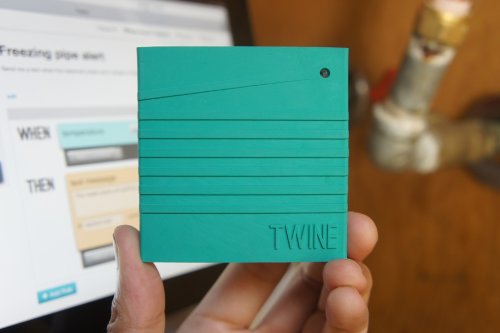
Twine is a wireless sensor block tightly integrated with a cloud-based service. The durable, rubbery block has Wi-Fi, on-board temperature and orientation sensors, and an expansion connector for other sensors. Power is supplied by micro USB or two AAA batteries that will run for up to 3 months (and Twine will email you when you need to change the batteries).

twine-screenshot-qtoothThe Twine web app makes it simple to set up and monitor your Twines from a browser anywhere. You set rules to trigger messages — no programming needed. The rules are put together with a palette of available conditions and actions, and read like normal sentences: WHEN moisture sensor gets wet THEN text “The basement is flooding!”

Because the hardware and software are made for each other, setup is easy. There’s nothing to install — just point Twine to your Wi-Fi network. Sensors are immediately recognized by the web app when you plug them in, and it reflects what the sensors see in real time, which makes understanding and testing your rules easy.

Listen to your world

Talk to the Web

Out of the box, Twine has several internal sensors.

Temperature

Measure the temperature. Are your pipes freezing? Is your air conditioning broken? Is it nice up by the lake today?

Vibration

Sense when Twine starts or stops shaking, with adjustable sensitivity. Know when your laundry’s done, your sump pump starts, or someone’s knocking at the door.

Orientation

Sense which side of Twine is facing up. Trigger actions by flipping Twine over, or detect when the garage or the oven is left opened.

Plug in additional external sensors and they pop up on the web app, ready to use.

External temperature

Measure the temperature where your Twine can’t go. Make sure your freezer or refrigerator is working properly, your grain silo isn’t too hot, or that the weather outside is nice.

Magnetic switch

Triggered when a magnet is moved toward or away from it. Get notified when your door or window is opened, the mailbox is opened, or your dog goes outside.

Moisture sensor

Detect the presence of water. Know when your basement floods, when your AC’s drip pan is overflowing, or when it rained.

Breakout board

Plug in your own digital input without soldering. Terminals for signal, 3.3V power and ground are provided. Connect your doorbell, garage door or other electrical system.

Cloud Shield

The easiest way to make an Arduino talk to the Internet. Add Twine actions to your project, or use Arduino to build custom sensors for Twine.

Twine can contact you in a number of ways.

  • Email
  • Twitter
  • Text message *
  • Phone call (text-to-speech)*
  • HTTP GET and POST requests
  • Put your real-time Twine sensor information in Panic Status Board or your own webpage

* With optional paid account: $5/month for 100 text messages, $9/month for 200 text messages or voice calls.

via Supermechanical: Twine

twine-wireless-sensor-monitor-qtooth

These is one cool unit. We here at QTOOTH can’t wait to get our hands on one. I see these, or similar devices, becoming routine in many homes in the near future. Can you say, “Hey insurance company! How’s about a discount on our home or renter’s policy if we promise to run these?”

[amzn_product_inline asin=’B009YWTPNS’]

[amzn_product_inline asin=’B009YWTNFI’]

[amzn_product_inline asin=’B009YWTOF2′]

Filed Under: Featured Content, Home & Office, Mobile

7 Tips for Using EMF Protection to Lower Cell Phone Radiation Exposure

2013-07-11

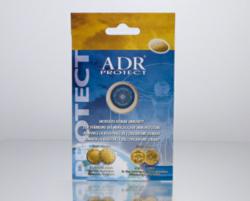
ADR Protect Anti-EMF for Cell Phones - QTOOTH

Here are 7 Tips for Lowering Cell Phone EMF Radiation Exposure. Why? Because modern electronic devices are an integral part of human life. These products release EMF pollution in the form of undesired and harmful electromagnetic waves that create numerous potential health risks. This “electro-smog” pollution emitted, especially from cell phones, may affect the functionality of various body organs, the immune system, energy and vitality. Moreover, EMF radiation exposure may also cause a number of illnesses including high blood pressure, unexplained headaches, electo sensitivity disorder, diabetes, lower vitality and even cancer. That’s why proven cell phone radiation protection products are becoming more and more important.

There are many products on the market that promise varieties of solutions and remedies to EMF and cell phone radiation exposure. In fact most of them rely mainly on graphics, marketing and sales techniques. In this current situation, a common sense approach for most consumers seems to be appropriate. Here is a list of most common steps for EMF and cell phone radiation protection.

7 cell phone tips for lowering EMF radiation exposure:

1: Keep your your cell phone from directly touching your head during phone conversations.

2: Use speaker phone while talking on the phone.

3: If possible limit the amount of talk time to 10 minutes.

4: Use Blue-tooth for longer conversations.

5: Keep your phone in your purse or cell phone case when not used to limit direct contact between the body and cell phone.

6: Try to only use your cell phone when the signal reception is strong (at least three bars) – the weaker the signal reception the stronger cell phone antenna has to work to maintain connectivity.

7: Use only credible EMF protection and cell phone radiation protection products.

According to World Health Organization reports cell phone radiation may deliver a negative impact on the human brain. ADR-Protect by AdrProVita is a registered medical device in the European Union and is supported by clinical and lab research results and international awards (Golden Medal Eureka Inventions, Brussels and Golden Medal INPEX Therapeutics, Pittsburgh).Although results from studies on the true level of impact on health vary, using EMF protection might be smart to do what we can to make the risk a non-issue.

[amzn_product_inline asin=’B00D8ADGTQ’]

[amzn_product_inline asin=’B00CNO82FQ’]

[amzn_product_inline asin=’B0006GRNGW’]

Filed Under: Health & Fitness, Mobile, Tech Talk

Acer’s Iconia W3: Full Windows 8 on an 8-inch Tablet

2013-07-07

The Acer Iconia W3 (starting at $379) is among the first tablets to come with a full version of Windows 8 of the gate with a product.

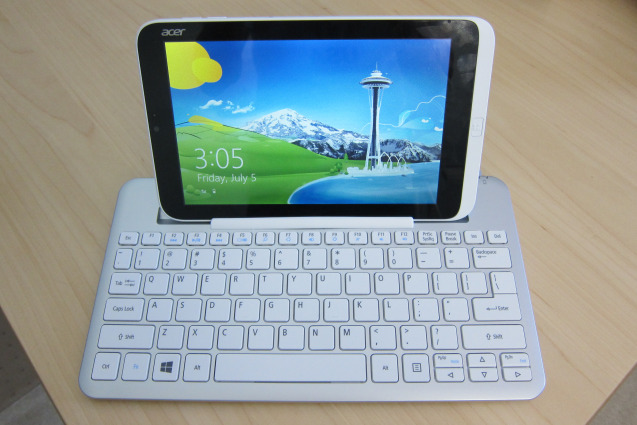
Acer Iconia W3 in Keyboard - QTOOTH

The following notes are for the $429 version; the extra $50 boosts the storage capacity from 32 GB to 64 GB. Acer also sent an optional $69 Bluetooth keyboard that doubles as a both a stand and type of carrying case for the small slate:

  • The 8-inch tablet is solidly built and shares design elements from Acer’s larger Windows 8 tablets such as the W510. You can’t flex the device due to a solid body (likely polycarbonate) but the back is all plastic meant to look like metal.
  • At 8 inches, the 1280 x 800 display provides a decent 188 pixels per inch, yet some text and images appear grainy and not so crisp. It could be the fonts or font sizes used by default, but the viewing experience is marginal to my eyes: not terrible nor impressive. The screen is not an IPS panel, so viewing angles aren’t the best either. Screen brightness is quite good except in full sunlight.
  • Because of the resolution, the W3 doesn’t support snapping apps in Windows; you can’t run two apps on the screen at the same time unless you connect the tablet to an external monitor of 1366 x 768 resolution or greater.
  • Instead of a capacitive Windows button under the screen when in landscape, Acer used a physical button that’s off to the right in this orientation. Holding the tablet in portrait mode puts the button under the screen, but I find myself using Windows 8 in landscape far more often. I suspect most others do, or will do, the same. Windows 8 screen gestures all work great.
  • The device’s two speakers also suffer from what I call “portrait-itis”: When holding the tablet in landscape, both speakers are on the right side of the unit. I’d like to see Acer add a third speaker to offset this. The speakers aren’t very loud either.
  • For a tablet of this size, I think you get a fair amount of ports and interfaces: micro USB, micro HDMI and micro SD memory card slot, in addition to the expected power port and headphone jack.
  • Battery life is rated for 7 to 8 hours and, although I’ve only had the unit a short time, I was able to use it continuously for 5 hours with juice to spare. I think the run-time claims are accurate.
  • The 1.5 GHz Intel Atom chip is helping in the battery department: this chipset is used in Acer’s Iconia W510 tablet, which gets similar battery life. There are 2 GB of memory, which is standard for the Atom-powered Windows 8 devices on the market.
  • Likewise, performance on the W3 is similar to the larger Atom-powered tablets currently available. That makes sense since the guts of this 8-inch tablet are mostly the same as its larger siblings. It’s certainly not as fast a Windows 8 machine running an Intel Core chip, but it’s at least as fast as Windows RT machines. And unlike those devices, you can install any Windows application you like on the W3.
  • The device has two cameras — front and rear — and I can’t say that either impressed me. I’d use the front camera for video chatting but the rear sensor is sub-par.
  • I’m still not a fan of jumping between the Windows Desktop for full Windows apps and the modern user interface for touch-friendly apps. That’s more of an issue with Windows itself, not the W3 tablet, and is due to some personal preference on my part.
  • Microsoft Office is pre-installed, which is a big value for those that need it.
  • Using the Desktop mode is a bit of a challenge, at least for me, because it’s not optimized for touch and everything is a bit smaller in a screen of this size. You can modify the DPI scaling (I find 150 percent to work well) and even the size of Windows elements, such as title bars and scroll bars, but I think Acer should optimize these out of the box.

Acer Iconia W3 Front Panel Display - QTOOTH


  • The touch apps I used all worked well on the small slate, offering the same experience as a full-sized Windows 8 or Windows RT computer.
  • I want to like the keyboard, but have a major issue with it. It’s easy to pair with the tablet; I like the feel and layout of the keys. And it’s nearly a full-sized keyboard. There’s a slot to prop up the tablet on the keyboard that works fine… until you start tapping at the tablet screen. That’s quite often since this is a touchscreen device. When closing apps — swiping from top to bottom on the display — the tablet would often fall out of the keyboard. And as I tapped the display with regular use, each little tap dislodged it a little more from the rubber keyboard grip, eventually causing the W3 to tip over. Perhaps it’s me or a defective unit, but this doesn’t seem well-designed.
  • I do like how the tablet clips in to the back of the keyboard, making it easier to carry while protecting the screen.

Acer Iconia W3 Back Panel - QTOOTH


If you like or mostly use Metro style apps and don’t mind limited performance, I suggest considering the W3 tablet. The 1.1 pound device measures in at 8.62 x 5.31 x 0.45 inches, so it’s easy to tote around. And it runs the full version of Windows 8 with support for legacy Windows software. Is it a super-fast performer or a premium device? No, but starting at $379, I think many will find it a great value for the price, given all Windows capabilities.

via Hands on with Acer’s Iconia W3: Full Windows 8 on an 8-inch tablet — Tech News and Analysis.

Filed Under: Home & Office, Mobile, Reviews

Motorola Rolls Out First Ad for Moto X Smartphone

2013-07-04

Motorola has set a patriotic tone for its Moto X smartphone campaign, the company’s first since being acquired by Google last summer.

“What we are doing which is very different is assembling [Moto X smartphones] here in the U.S. in our assembly plant in Fort Worth, Texas,” Brian Wallace, Motorola’s VP-global brand and product marketing, said. “What better time than July 4th to come with a message like that?”

Motorola Assembled in USA - QTOOTH

The ad will run as a full-page spread in the July 3 editions of The New York Times, USA Today, The Wall Street Journal and Washington Post, Motorola said. It’s Motorola’s first ad for its Moto X smartphone, and the copy and timing emphasize the re-branded company’s emphasis on freedom.

Behind it was Motorola’s new creative agency of record is independent shop Droga5, which won the business without a pitch. Assisting on the creative and strategy for the campaign will be Publicis Groupe’s Digitas.

Moto X will be “the first smartphone that you can design yourself,” the copy says. It promises that users will be able to design phones as unique as their personalities.

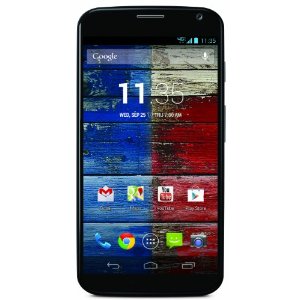
motorola-moto-x-qtooth

“Smartphones are very different than other tech products a consumer owns,” Mr. Wallace said. “They’re closer to shoes or a watch. You carry it with you everywhere you go. Everyone sees what phone you’re carrying and they judge you on it. Yet it’s the one thing you carry that’s the least customizable.”

Mr. Wallace declined to comment on which Moto X aspects will be available for personalization, and the ad doesn’t show the phone, but that its part of injecting what he called a “Googley attitude” into the company’s operations and brand image. The emergence of a (literally) colorful new Motorola started when the company debuted its new logo last week.

Motorola wants to do with phones what Google did with search, Mr. Wallace said.

The smartphone’s marketing will emphasize old-fashioned American patriotism. The ad touts Moto X as the “first smartphone designed, engineered and assembled in the USA.” Some Moto X components will be created abroad, but final assembly will occur domestically, Mr. Wallace said.

The tagline for Moto X is “Designed by you. Assembled in the USA.” Mr. Wallace said that while that may change as the campaign progresses, subsequent work will be in the same vein.

via Digital – Advertising Age.

[amzn_product_inline asin=’B004ZSGAMU’]

[amzn_product_inline asin=’B005FPT380′]

[amzn_product_inline asin=’B00DQFNAC6′]

Filed Under: Mobile, News

Firefox Smartphone Hits the Market

2013-07-02

Firefox OS - QTOOTH

ZTE and Telefonica have launched the first Firefox OS smartphone, the ZTE Open. Priced as low as $51 ($90 retail, with $39 worth of free airtime for prepaid customers), the ZTE Open is clearly designed for the mobile phone user who has never before been able to afford a smartphone. It goes on sale today in Spain, and is headed for Colombia and Venezuela this summer as well.

Mozilla’s Firefox OS is based on HTML 5, and has the potential to build a large portfolio of apps quickly because of the widespread use of HTML 5 in the developer community. “There are 3 million HTML developers around the world,” Mozilla CEO Gary Kovacs said last year. “It is the language that they are speaking and when asked to choose, they choose HTML 5. HTML 5 is optimized for what the web has become today: apps, video, music, and immersive experiences.” Apps that are already part of the Firefox Marketplace include Facebook, Twitter, AccuWeather, Nokia HERE Maps, SoundCloud, Terra, Time Out, TMZ, and some Electronics Arts games.

Still, Firefox OS has a long way to go to catch up with Google’s Android operating system, clearly its main competitor in the entry-level smartphone space. At last count there were roughly 800,000 apps in the Google Play store, more than in any other app store including Apple’s iTunes.

But if Telefonica’s ZTE Open is an indicator of what’s coming, Firefox OS phones will definitely be competitive when it comes to value. The ZTE Open’s specs are comparable to those of Android phones like the new HTC Desire. The Open has a 3.5-­‐inch, HVGA TFT touchscreen display and is powered by a 1GHz Qualcomm Snapdragon processor. It has 256MB of RAM, a 3.2-megapixel camera, Bluetooth, A-GPS and Wi-Fi. It comes with a 4GM microSD card.

The phone is also meant to be intuitive for those who have not used smartphones before. Although many potential customers may not be used to using computers either, Mozilla has made the Firefox web search capability a central part of the OS experience. By swiping to the right on the touchscreen, the user can enter a term and get immediate search results, including videos and e-commerce options.

“We believe that smartphones need to be more open and that the web is the platform for making this possible,” said Luis Miguel Gilpérez, CEO of Telefónica España. “Consumers should not be locked to any one system but have the choice to consume the content they want and the flexibility to be able to take it with them when they change devices. This first open web device marks a significant milestone in making this possible. This is just the beginning as we plan to bring a wide range of Firefox OS devices to our customers.”

“In order for any mobile OS to gain critical mass, there needs to be a product that delights consumers, a platform that attracts and retains developers and an app ecosystem that can compete with iOS and Android,” said Jefferson Wang, partner at IBB Consulting. “Firefox OS has an entry-level international growth strategy which can help Mozilla build out these three key elements needed for a future offensive U.S. play.”

The next Firefox OS smartphone to hit the market is likely to be the Alcatel One Touch Fire, which was introduced along with the ZTE Open at Mobile World Congress. While the ZTE Open and the Alcatel One Touch Fire have both been approved by the FCC, but there is no word yet on when they might come to the United States. When Mozilla announced its roster of carrier and OEM partners for Firefox OS last year, the one U.S. carrier on the list was Sprint Nextel.

via Firefox smartphone hits the marketMobile Technology | Wireless Broadband | Wireless Carriers | RCR U.S. Wireless News.

[amzn_product_inline asin=’0471748994′]

[amzn_product_inline asin=’B007MZVRXA’]

[amzn_product_inline asin=’B004T9RR6I’]

Filed Under: Featured Content, Mobile, News, Tech Talk

  • « Go to Previous Page
  • Page 1
  • Interim pages omitted …
  • Page 3
  • Page 4
  • Page 5
  • Page 6
  • Page 7
  • Go to Next Page »

Primary Sidebar

Affiliate Disclosure

This website uses affiliate programs for monetization. At no additional cost to you, links to various sites mentioned in posts may result in a commission that is credited to this site if you make a purchase.

Some affiliate programs and affiliations include, but are not limited to, Commission Junction, Apple, Google, Amazon.com and more.

For complete details
click here.

Copyright © 2026 · Preferred Hosting by WP Engine and Domain Name Registry by Namecheap

We are using cookies to give you the best experience on our website.

You can find out more about which cookies we are using or switch them off in .

QTOOTH
Powered by  GDPR Cookie Compliance
Privacy Overview

This website uses cookies so that we can provide you with the best user experience possible. Cookie information is stored in your browser and performs functions such as recognising you when you return to our website and helping our team to understand which sections of the website you find most interesting and useful.

Strictly Necessary Cookies

Strictly Necessary Cookie should be enabled at all times so that we can save your preferences for cookie settings.

3rd Party Cookies

This website uses Google Analytics to collect anonymous information such as the number of visitors to the site, and the most popular pages.

Keeping this cookie enabled helps us to improve our website.

Additional Cookies

This website uses the following additional cookies:

(List the cookies that you are using on the website here.)