• Skip to primary navigation
  • Skip to main content
  • Skip to primary sidebar

QTOOTH

News & Reviews for Living with Bluetooth Wireless

  • Reviews
    • Wearable
    • Gaming
    • Health & Fitness
    • Home & Office
  • How To Tips
  • Industry News
  • About QTOOTH

QTOOTH

Moto X Phone – Revealed by Google at Last

2013-08-03

The Moto X! Finally revealed by Google it represents a bid to revive the once mighty mobile tech giant. We here at QTOOTH remember having several Motorola phones over the years. We loved them. Durable with excellent call quality. Nothing else compared. The ultimate benchmark for quality was a Motorola phone on the Verizon network. We were huge, devoted fans. Remember those days?

And then the smart phone revolution began and Motorola was completely cut out of the loop. How they didn’t see it coming is a mystery. Apple, Samsung, HTC, Nokia, LG, even Blackberry had at least something going on. But not Motorola.

So, after much hype and anticipation, Motorola Mobile’s new owner Google finally rolled out their new offering. The general consensus? Better luck next time. Overpriced, under-performing and laden with curious choices, including NOT including the latest version of the Android operating system. This has to be one of the biggest mysteries, after all, Google makes Android and Google owns Motorola. Why wouldn’t it be sporting you latest offering? Baffling…

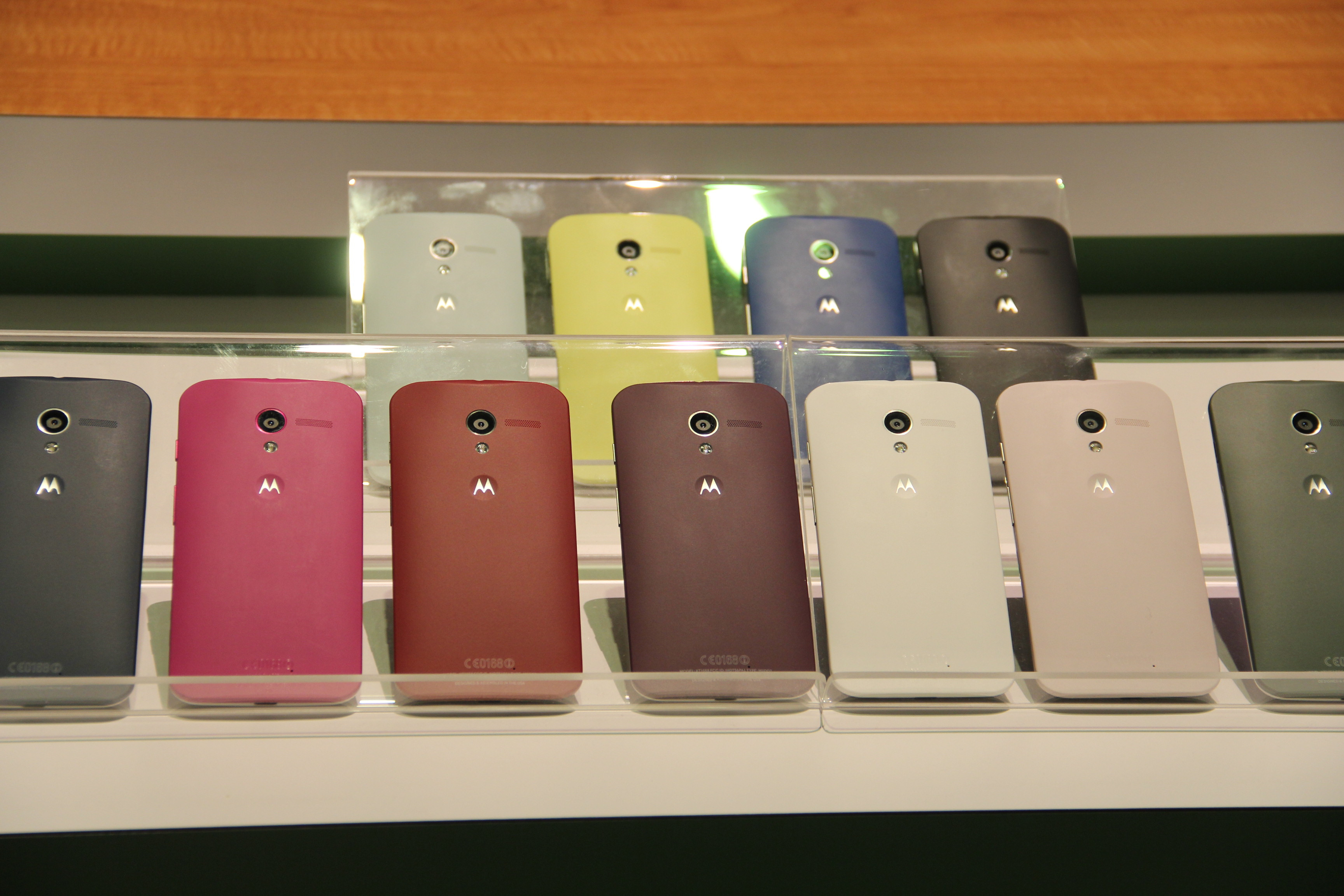
The biggest feature that they are touting? It’s ability to come in different colors… after being special ordered… and taking at a few days to get to you. Really? When most people want a phone they want it immediately. They want to walk into a store and by it today. And in the end, who really cares what color your phone is when you are just going to cover it with a case or some type of protector? That’s where the real style choices happen, not with the phone itself.

Google’s Motorola Moto X Phone - QTOOTH

Google’s Motorola Moto X Phone

Google’s Motorola Moto X Phone - QTOOTH

The phone features a 4.7-inch screen device is aimed at the iPhone and the Galaxy S phones. The Moto X features “all-day” battery life, a choice of colors and materials, and an instant-start camera, the company said today at a press event in New York. The Moto X is priced starting at $199 with a two-year contract and will only be available on all AT&T by the end of August or early September. That’s about the same time that the new Apple iPhone is set to hit the market and will probably make the Moto X completely irrelevant.

The device is the first homegrown smartphone from Motorola since Google acquired the business last year for $12.4 billion, as the Internet giant ramps up its hardware ambitions against Apple and others.

There is some claim to being made in U.S.A. and are hoping to attract fans because of this. The reality is that it will only be assembled in Texas at a former Nokia factory and that this will mostly involve the customizing of the color options.  Customers can choose the colors of the front, back and accents of the Moto X on the website Motomaker.com. Motorola guarantees phone delivery in four days. One of the custom options is to have a wooden back made from a choice of ebony, teak, rosewood, or bamboo. Only that last choice is remotely sustainable. So? Not exactly hi-tech and not exactly made in America. Unlikely that they will fool anyone with this ruse.

Here are a few good details:A curved, ergonomic back and 10-megapixel camera. Similar to the Motorola Droids on Verizon Wireless, the Moto X runs on a chip system known as X8. Motorola developed twin lower-powered chips to run alongside the Qualcomm Snapdragon S4 Pro main processor.

The multichip system is designed to conserve battery life by letting the processor sleep while the lower-power chips work in the background — sensing location, speed and message notifications, as well as listening for voice commands. As an example, even if the phone is locked, the user can say, “OK Google now,” to create and send a message, or open turn-by-turn navigation through Google Maps. And with two flips of the wrist, sensors will turn on the camera and be ready to shoot in 2 seconds, said Rick Osterloh, product chief for Motorola.

As we see it here at QTOOTH maybe Google/Motorola will make more of their investment back when they introduce it to the international market. Maybe they are just trying to establish value by charging $199 with a two year contract but it should be half the price, or less, for what it offers. We’ll take an iPhone 4s or a Galaxy S3 over this anytime. Also, maybe they have plans to roll out instant upgrades to the latest Android OS. Whatever their plans are, they better move quickly to save this phone from an early death.

[amzn_product_inline asin=’B005SSB0YO’]

[amzn_product_inline asin=’B004ZLV5UE’]

[amzn_product_inline asin=’B00A29WCA0′]

Filed Under: Featured Content, Mobile, News, Reviews

Google to Provide Free WiFi to San Francisco Parks

2013-08-02

San Francisco Parks Get Google Wireless - QTOOTH

Google has made a $600,000 gift to the city of San Francisco in the form of providing free WiFi to 31 parks, playgrounds, plazas and recreation centers. Under the agreement, Google will install the system starting in November and it should be complete by April of 2014. The no-strings-attached deal is intended to empower citizens and community groups and will serve as a pilot for a future, city-wide version.

Attempts at this have been made before, most notably six years ago, but none of the players involved could agree on the terms of the contract. However it wasn’t to be, in part because of the public and officials’ fears that the companies would make undue profit. The current initiative, headed by Supervisor Mark Farrell along with with SF’s Department Of Technology and Ron Conway’s sf.citi, includes no plan for Google to make money. The terms of the contract are for the next two years. After that it will be up to the city to find funding from local businesses and tech partners for continuing support.

San Francisco Free WiFi in the Parks - QTOOTH[amzn_product_inline asin=’B005WKIKA0′]

This move by is not without precedent. Google has paid for limited wireless networks in neighborhoods of New York and Boston, and also set up a paid fiber-optic network in Kansas City.

San Francisco’s Mayor Lee stated, “We are behind. I call us the innovation capital of the world but we need to catch up. This is where the relationship with the private sector is so important to us” and that the program will “Bridge not only the digital divide but bring the innovative spirit to every community in San Francisco.”

Hard to believe, but a lot of the recreation centers are still on dial-up connections. This should go a long way to improving their infrastructure. This will also help residents who are at a disadvantage because they proper lack access to the internet, increasing their education, voice in civic affairs, and to gain the tools necessary to better their socioeconomic standing.

San Francisco Free Wifi in the Parks Press Conference - QTOOTH

Here’s the full list of public areas gaining free Wi-Fi in San Francisco, via the SF Chronicle:

Alamo Square, Balboa Park, Bernal Heights Recreation Center, Boeddeker Park, Chinese Recreation Center, Civic Center Plaza, Corona Heights, Crocker Amazon Playground, Duboce Park, Eureka Valley Recreation Center, Gene Friend Recreation Center, Hamilton Recreation Center, Huntington Park, Joseph Lee Recreation Center, Justin Herman Plaza, Margaret S. Hayward Playground, Marina Green, Minnie and Lovie Ward Recreation Center, Mission Dolores Park, Mission Recreation Center, Palega Playground, Portsmouth Square, Richmond Recreation Center, St. Mary’s Recreation Center, St. Mary’s Square, Sue Bierman Park, Sunnyside Playground, Sunset Playground, Tenderloin Recreation Center, Upper Noe Recreation Center, Washington Square

[amzn_product_inline asin=’B007PTCFFW’]

[amzn_product_inline asin=’B004YNK9O6′]

Filed Under: News

Google Chromecast – What Is It… and Why You Should Care!

2013-08-01

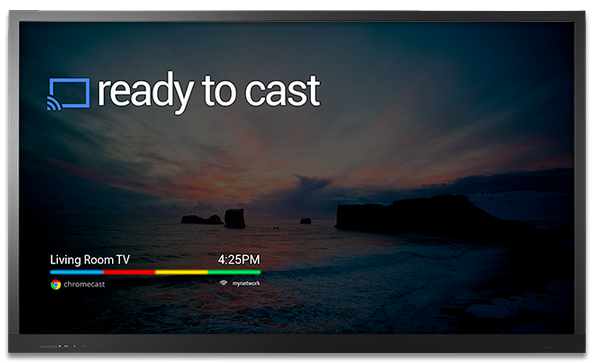
Chromecast Display Sample - QTOOTH

What is Chromecast? Chromecast is a brilliantly simple product: plug it into your TV and stream video and music to it from apps running on your Android device, iPhone, or laptop. Chromecast has no need for a remote; just use whatever device you’re streaming from as the remote. Instead of Chromecast having its own dedicated user interface it’s got a single screen that displays the time and, if nothing is being streamed, an indicator as to whether or not it’s connected to your WiFi. How can it be so simple? Because the device you’re streaming from acts as the primary interface. Chromecast is simply a wireless media streamer to your TV and doesn’t try to be anything more.

What’s in the Box?

First, the price of Chromecast is only $35. Google felt compelled to assure the media that they’re not selling them at a loss. I believe them. Even though it has a Wi-Fi chip, a basic CPU, 2GB of flash memory, RAM, a licensing fee to use HDMI, the cost of these parts are pretty cheap these days. Plus it is really a re-purposing of existent, very common technologies so the R & D I’m sure was next to nil. And yet we love it. There’s is so much brilliant technology already in existence and we here at QTOOTH know that most of us, whether as developers or as the end-user customer, barely scratch the surface of the devices that we already own.

The setup is ridiculously easy. Plug it into an HDMI port, give it some juice (through USB, which most new TVs have, or a standard adaptor), then run the Chromecast app on a laptop or other compatible device so that it can connect to your Wi-Fi network. That’s it!

From the day of its release, the Chromecast App has been compatible with some of the most popular online video apps, including Netflix and YouTube. No need to update these apps either, just launched them and the Chromecast button is already there. There is even an extension for Chrome that promises to greatly expand the functionality of the device. It is an early, Beta release and I’m sure it will improve over time.

It’s interesting to note that Google released this with very little fanfare, even though in our eyes this is one of the coolest things they’ve ever released as a physical product (here’s looking at you Google Glass).

There are a few things that will need to be improved, but this is off to a great start. It will be interesting to see how competitors respond.

https://www.youtube.com/watch?v=cKG5HDyTW8o

So far the video streaming quality seems to be on par with Apple TV or the Xbox 360, especially when using an app or website like Netflix, Youtube, or Google Play, that been designed for compatibility.

If you’re using the Chromecast extension for Chrome on your laptop to project an otherwise incompatible video site (like Hulu or HBOGO), however, video quality can dump quite a bit depending on your setup. It’s using your laptop as a middle man to encode the video signal and broadcast it to the Chromecast, whereas the aforementioned compatible sites just send video straight to the dongle, mostly removing your laptop from the mix. When casting video tabs on a 2012 MacBook Air running on an 802.11n network, the framerate was noticeably lower and there were occasional audio syncing issues.

While we’re on the topic, the Chrome extension packs a bit of an easter egg: the ability to stream local videos from your laptop to the Chromecast. Just drag a video into Chrome, and it’ll start playing in a new tab. Use the Chrome extension to cast that tab, and ta da! You’re streaming your (totally legitimate, not-at-all-pirated-am-i-right) videos without bringing any other software into the mix. I tried it with a bunch of video formats (mostly AVIs and MKVs. MOVs kinda-sorta work, though most won’t push audio from the laptop to the TV for some reason), and they all seemed to work quite well, albeit with the lowered framerate I mentioned earlier.

Even within the apps that have already been tweaked for Chromecast compatibility, there are some day-one bugs. Sometimes videos don’t play the first time you ask them to, instead dropping you into a never-ending loading screen. Other times, the video’s audio will start playing on top of a black screen. These bugs aren’t painfully common, but they’re not rare, either.

As compared to AirPlay, AppleTV’s built-in streaming feature, Chromecast’s wins because of its cross-platform compatibility. Whereas AirPlay is restricted to Macs and iOS devices and only has limited support for Windows through iTunes, Chromecast works well with any iOS, Android, Mac, or Windows app that utilizes Google’s Cast SDK (or software development kit). although Chromecast just launched, we would be very surprised if developers didn’t jump on this and expand upon the universe of applications that are possible. That means it could be adopted by TV, speaker, entertainment device manufacturers and more, putting the AirPlay protocol in certain jeopardy of being the odd man out.

As expected the experience on Android is a slightly better than it is on iOS. Google has considerably more freedom on their own platform; as an example, apps that use Chromecast can take priority over the lockscreen so that the user can operate the controls, like play/pause/skip, of a video without having to fully unlock their Android device. But that’s a minor thing and, for the most part, all of the primary features work just as well on iOS as they do on Android.

Conclusion

This is the future. It’s probably in all of our futures. If not Chromecast then something almost exactly like Chromecast.

[amzn_product_inline asin=’B00DR0PDNE’]

[amzn_product_inline asin=’B00DVFLJKQ’]

[amzn_product_inline asin=’B00E5M7P1G’]

Filed Under: Entertainment, Featured Content, Mobile, Reviews

DJI Phantom Quadrocopter – A Drone that Can Be Used for the Art of Film Making

2013-07-31

dji-phantom-quadrocopter-qtoothThe DJI Phantom Quadrocopter, coupled with a GoPro Hero 3 camera, makes an easy, inexpensive way by which to capture incredible aerial views of our world. Traditionally this would require the rental of a helicopter or a crane, often costing thousands of dollars for just  few hours. Now you can get this footage using equipment that costs $1000-2000… and you get to KEEP the equipment to use whenever you want! Don’t believe us? Here’s everything you need available right on Amazon:

[amzn_product_inline asin=’B00AGOSQI8′]

[amzn_product_inline asin=’B009TCD8V8′]

[amzn_product_inline asin=’B00CUJXGS2′]

The videos below were filmed using a GoPro Hero 3 Black Series mounted on a DJI Phantom quadrocopter and using a Zenmuse H3-2D gimbal for image stabilization. Of course there are even cheaper alternatives out there. Check some of the Amazon links below or just do a quick search yourself and you’ll quickly realize how many options there are out there to achieve this.

The main video shows Bodie just before sunset, affording us a nearly shadowless and perfect view of Bodie’s main street and abandoned buildings, including the mining machinery that made it  a thriving place back in the 1860s.  It played host to all of the usual cliched characters of the old West: miners who had recently struck it rich, stagecoach robbers, denizens of the opium den, brothel madams and outlaw doctors. Then, within the span of sixty years, Bodie was a ghost town with a population in the single digits.—the ruins of which are explored in this incredible video created using the Phantom Quadrocopter.

These days Bodie is a National Historic Landmark and receives its share of tourists every year. Here it is captured like never before by two California videographers named Russell Brown and Aaron Grimes.

[vimeo http://vimeo.com/71185761]

However, this view is probably the most artsy take on what can be done using a drone. Recently we’ve seen local filmmakers using drones to film parties in LA:

[youtube http://www.youtube.com/watch?v=tMwSVDVJNWc]

And surfers in Santa Cruz:

[vimeo http://vimeo.com/70812846]


[amzn_product_inline asin=’B00CR6DXEA’]

[amzn_product_inline asin=’B00BS4FDWW’]

[amzn_product_inline asin=’B00BS2UEAU’]

Filed Under: Art & Media, Entertainment

Muzik’s Smart Headphones Claim to be Google Glass For Your Ears

2013-07-30

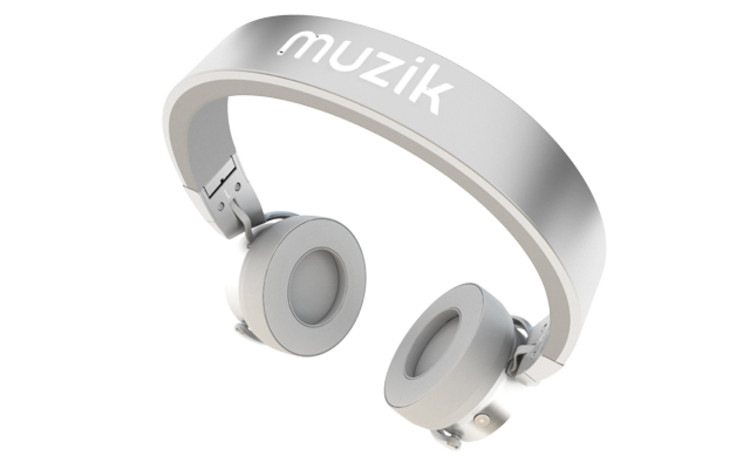
Muzik's Smart Headphones - QTOOTH

Muzik’s Smart Headphones claim to be “Google Glass For Your Ears”. Wearable technology is certainly quite the buzz-phrase these days and QTOOTH is certainly all about cool products that both enable us with technology and liberate us from that same technology at the same time. A company called Muzik has created a pair of “smart” headphones CEO Jason Hardi describes as “Google Glass for your ears.” Do they live up to that claim?


Muzik's Smart Headphones - Top View - QTOOTH

The headphones will be available for a retail price of $299 in October. Although Hardi mentioned Spotify, he didn’t confirm any specific partners but states that it will work with best-of-breed music software services. The headphones feature four built-in hotkeys that control different social sharing options, so that you can post the tracks you’re listening to on Facebook or Twitter, or sharing a song directly with a friend. The headphones also include an accelerometer which is a motion sensitive switch that cues the headphones to stop playing music when you take them off.

These wireless headphones seek to be a solution to what Muzik sees as the current problem with discovering music through social sharing on current popular services such as Spotify, RDio, SoundTracking, etc… Listeners often feel inundated with too much material and lack direction.

Muzik's Smart Headphones - Music Sharing - QTOOTH

“A lot of people don’t know where to find good music, and the many options available make it increasingly difficult for content to be served up to you, because it’s in so many different places,” Hardi says.

After Muzik launches in the fall they will release its API to third-party developers.  This will allow them to take advantage of the headphones’ proximity sensors and even re-purpose hotkey functionality. Because they are at the same price as the new Beats by Dre Studio headphones ($299) Muzik will need to deliver both device quality and a rich selection of third-party apps to be successful and find its place among its rivals.

[amzn_product_inline asin=’B008EQ1YWA’]

[amzn_product_inline asin=’B0001FTVEK’]

[amzn_product_inline asin=’B009A6CZYO’]

Filed Under: Entertainment, Wearable

Ruckus Explores Tracking Your Indoor Location with Your Cell Phone

2013-07-14

WiFi Symbol - QTOOTHRuckus Wireless has discovered another application for its Wi-Fi technology beyond just delivering fast connections to the web. Drawing on the help of YFind, a location services startup based in Singapore, Ruckus utilizes Wi-Fi signals to triangulate a smartphone’s position indoors, an environment that GPS signals typically can’t penetrate.

Ruckus revealed on Wednesday that it purchased YFind for an undisclosed amount. Wi-Fi location is becoming a hot market now that most of the world has been mapped, marked and recreated in a wide variety of navigation and location-based services apps. The problem with using GPS in buildings is that our usual tools that we depend on to determine location — like GPS satellites and mobile network towers — aren’t strong enough or accurate enough to deliver a precise interior location.

When discussing a building’s interior, location data needs to be within a few meters, otherwise the app will display a position in the wrong room or floor. GPS signals can’t pass through most roofs or floors and cell tower triangulation just doesn’t have that level of accuracy.

Ruckus WiFi Location Services - QTOOTH

But the big the big dogs like Google and Qualcomm, and even smaller niche companies like Wifarer, Walkbase,  and WifiSlam (which was just purchased by Apple, are attempting to solve that problem by converting Wi-Fi networks into miniature GPS constellations. Every Wi-Fi access point has a unique identifier, and by measuring the strength and direction of a building’s access points, these companies can determine a device’s position within a few meters.

The first Wi-Fi location companies began by working independently of the Wi-Fi equipment manufacturers producing the signals — and usually independently of the businesses that owned the networks. However, the big Wi-Fi vendors are starting to get involved. The large enterprise-level wireless-LAN supplier Aruba Networks purchased Meridian earlier this year, and now Ruckus has acquired YFind.

Ruckus said it would begin offering up a suite of location services such as indoor navigation, geo-targeted advertising and “footfall analytics” to customers. Ruckus is most likely looking to use YFind as a teaser to gain more enterprise Wi-Fi customers (right now the majority of Ruckus’s business is in outdoor Wi-Fi). By layering location data on top of access, Ruckus’s indoor access points become all the more useful to the businesses that buy them.

[amzn_product_inline asin=’B0087NZ31S’]

[amzn_product_inline asin=’B008ALA2RC’]

[amzn_product_inline asin=’B005WKIKA0′]


Filed Under: Mobile, News, Tech Talk

  • « Go to Previous Page
  • Page 1
  • Interim pages omitted …
  • Page 18
  • Page 19
  • Page 20
  • Page 21
  • Page 22
  • Interim pages omitted …
  • Page 29
  • Go to Next Page »

Primary Sidebar

Affiliate Disclosure

This website uses affiliate programs for monetization. At no additional cost to you, links to various sites mentioned in posts may result in a commission that is credited to this site if you make a purchase.

Some affiliate programs and affiliations include, but are not limited to, Commission Junction, Apple, Google, Amazon.com and more.

For complete details
click here.

Copyright © 2026 · Preferred Hosting by WP Engine and Domain Name Registry by Namecheap

We are using cookies to give you the best experience on our website.

You can find out more about which cookies we are using or switch them off in .

QTOOTH
Powered by  GDPR Cookie Compliance
Privacy Overview

This website uses cookies so that we can provide you with the best user experience possible. Cookie information is stored in your browser and performs functions such as recognising you when you return to our website and helping our team to understand which sections of the website you find most interesting and useful.

Strictly Necessary Cookies

Strictly Necessary Cookie should be enabled at all times so that we can save your preferences for cookie settings.

3rd Party Cookies

This website uses Google Analytics to collect anonymous information such as the number of visitors to the site, and the most popular pages.

Keeping this cookie enabled helps us to improve our website.

Additional Cookies

This website uses the following additional cookies:

(List the cookies that you are using on the website here.)