• Skip to primary navigation
  • Skip to main content
  • Skip to primary sidebar

QTOOTH

News & Reviews for Living with Bluetooth Wireless

  • Reviews
    • Wearable
    • Gaming
    • Health & Fitness
    • Home & Office
  • How To Tips
  • Industry News
  • About QTOOTH

Home & Office

NuForce Introduces the BTR-100, a High-Fidelity Bluetooth Digital Receiver

2013-07-10

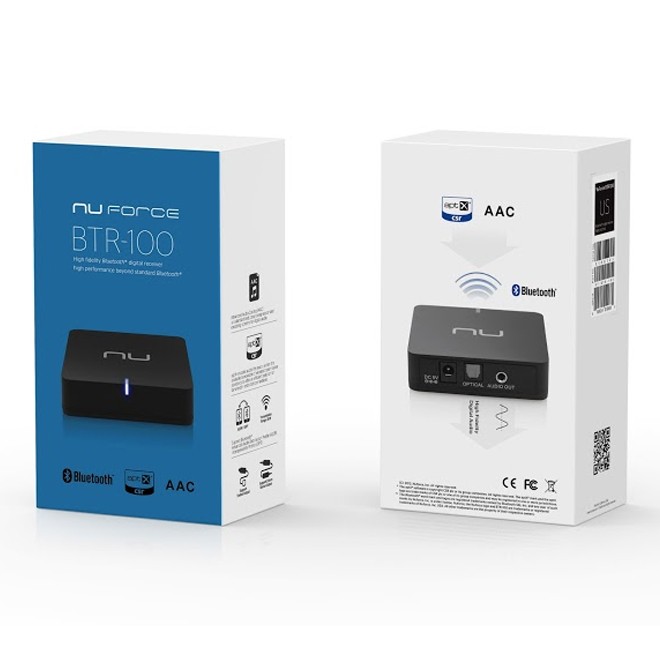
nuforce-btr-100-high-fidelity-bluetooth-digital-receiver-rear-panel-viewWith the NuForce BTR-100, users can stream CD quality digital audio directly to their high performance digital home stereo system.

NuForce, Inc., a leader in professional and consumer audio gear, introduces the BTR-100, a high-fidelity Bluetooth digital receiver that enables users to stream CD-quality audio directly to their home stereo systems. With their mass-market DACs and analog output stages, the majority of Bluetooth receivers achieve no more than mediocre audio performance. The BTR-100 delivers audiophile-grade fidelity via state-of-the-art aptX-enabled Bluetooth technology and direct optical connectivity, features that permit CD-quality audio to be streamed wirelessly to your NuForce digital integrated amplifier or other digital-input DAC/amp devices.

In those instances where the user prefers to connect directly to an analog amplifier or powered speakers, the BTR-100 also offers stereo analog outputs. Whatever connection you choose, with the BTR-100, you can be sure that your system will perform to the limits of its ability.

The [easyazon_link asin=”B00DUH4C8Q” locale=”US” new_window=”default” nofollow=”default” tag=”uneomediacom-20″ add_to_cart=”default” cloaking=”default” localization=”default” popups=”default”]Nuforce BTR-100[/easyazon_link], available worldwide at a suggested retail price of $69 USD.

nuforce-btr-100-high-fidelity-bluetooth-digital-receiver-box-view-qtoothBased in Fremont, California, NuForce first gained acclaim for its patented audiophile-grade Class-D power amplifiers, earning numerous awards from audio publications in the U.S. and Japan. Building upon its reputation as a company that develops state-of-the-art audio products, NuForce has worked diligently to expand its product line with digital-to-analog converters, in-ear and over-the-ear headphones, speakers and subwoofers, cables, additional home and headphone amplifiers, and other quality audio accessories. In every product and in every way, the NuForce brand offers superior engineering in designs of simple elegance.

Sold internationally, NuForce remains firmly committed to value and integrity in the production of high-performance consumer electronics adhering to stringent quality standards.

[easyazon_block add_to_cart=”default” align=”center” asin=”B00DUH4C8Q” cloaking=”default” layout=”left” localization=”default” locale=”US” nofollow=”default” new_window=”default” tag=”uneomediacom-20″]

[easyazon_block add_to_cart=”default” align=”center” asin=”B009POYA6C” cloaking=”default” layout=”left” localization=”default” locale=”US” nofollow=”default” new_window=”default” tag=”uneomediacom-20″]

[easyazon_block add_to_cart=”default” align=”center” asin=”B004E10KGU” cloaking=”default” layout=”left” localization=”default” locale=”US” nofollow=”default” new_window=”default” tag=”uneomediacom-20″]

Filed Under: Entertainment, Home & Office, Reviews

Lapka — Personal Environment Monitors for iOS

2013-07-08

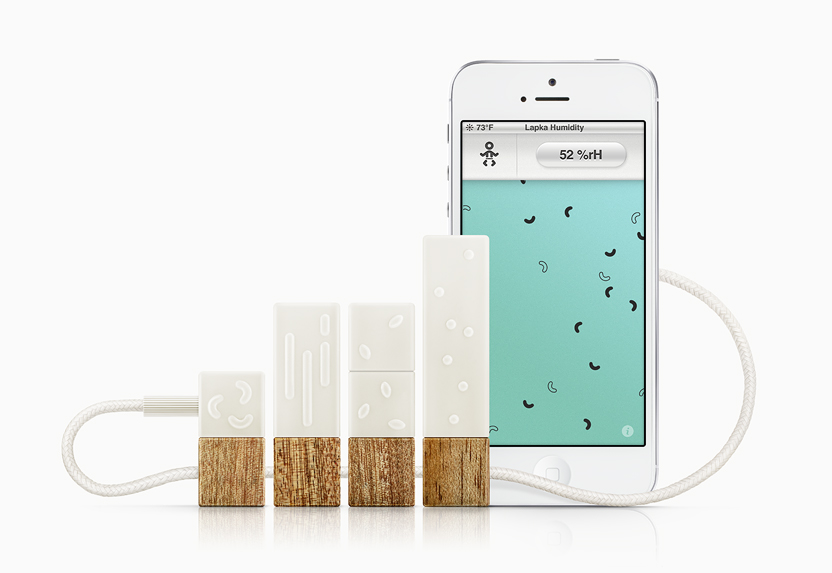
Here’s a quick look at the LAPKA Personal Environmental Monitor for your iOS powered devices. We’re stepping out a little bit on this product by covering something that is not wireless, per se, but works with a wireless device, namely the iPhones, iPads and iPod Touch.What does it do exactly? Well, it monitors your environment on key factors like temperature, humidity, electromagnetic fields, radiation, and even the conductivity of nitrate ions left behind in fruits and vegetables by the use of fertilizers to give you a quick gauge of just how “organic” that food really is.
lapka-main-view-qtooth
Here’s a look at each sensor and what it does:
lapka-app-measure-radiation-qtooth

Lapka RadiationProfessionally precise. Lapka Radiation reveals highly accurate information about the radioactive particles around you and how they might be affecting you.
Method and ProcessСonnect Lapka Radiation to your iOS device usingthe cable from the box. Lapka Radiation averages the number of particles it detects over time, so running the test for longer than two minutes will yield more accurate results. Just wait until the indicator turns black before completing the test.Lapka Radiation is sensitive to low levels of hard beta and gamma particles. Use it to measure the background radiation level wherever you go, or to detect increased levels of radioactive particles in certain scenarios (like on a flight). After testing, you’ll get a personal report comparing the final results with established guidelines, which you can save to your diary box or share with the world.

lapka-app-measure-organic-qtooth

Lapka OrganicDesigned to detect significant quantities of nitrates in raw produce left behind by the use of synthetic fertilizers.
Method and ProcessСonnect Lapka Organic to your iOS device using the cable from the box. Remove the cap from Lapka Organic and insert the stainless steel probe into any fruit or vegetable included on the preset list.Lapka Organic simply measures conductivity, which correlates to the relative concentration of nitrate ions left behind from nitrogen-based fertilizers. In other words, the less electricity a fruit or vegetable conducts, the more likely it is to be free of impurities (distilled water, for example, is nonconductive). Each fruit and vegetable has a defined limit for nitrate concentration, and conductivity that significantly exceeds these limits suggests the use of non-organic farming practices.Be sure to clean the probe after every use.

lapka-app-measure-emf-qtooth

Lapka EMFDetects electromagnetic fields (EMF), which can be caused by electronic devices, wireless transmitters, or nearby power lines. Lapka EMF can be used to help find a spot in your home with the least electromagnetic pollution — perfect for your bed, desk, or yoga mat.
Method and ProcessСonnect Lapka EMF to your iOS device using the cable from the box.Lapka EMF can measure both High Frequency (HF) Low Frequency (LF) fields. Depending on the preset, Lapka EMF can be used to detect cell phone antenna activity, microwaves, or exposed wires. Move around, discover, and investigate new places. Or try wearing Lapka throughout the day.

lapka-app-measure-humidity-qtooth

Lapka HumidityThe temperature and relative humidity of your environment are measured, combined, and compared with our knowledge base of comfort standards to help you better understand your personal climate at any moment.
Method and ProcessGive Lapka Humidity 10 minutes to fully acclimate to a new environment before use. Once acclimated, connect Lapka Humidity to your iOS device using the cable from the box.Lapka Humidity will measure the temperature and relative humidity simultaneously. After measuring, you’ll get a personal report comparing the results with established guidelines. Don’t forget to store the results in your diary box!

These monitors are great for those of us who really want to know what goes on around our bodies and for determining where we want make changes to improve our immediate surroundings and what we choose to put inside of us. The next two images show how the accompanying apps can make suggestions as to how make those changes and give us statistics over time as to whether or not we are headed in the right direction.lapka-app-share-report-qtooth


So far the LAPKA system only seems to be available on their own website. But check it out if you, or someone you love, fits the profile of someone who just “wants to know”.

via Lapka — Personal Environment Monitor.

[amzn_product_inline asin=’B00BSZCT5A’]

[amzn_product_inline asin=’B00B1TLQY8′]

[amzn_product_inline asin=’B00BNXISL6′]

Filed Under: Health & Fitness, Home & Office, Reviews

Acer’s Iconia W3: Full Windows 8 on an 8-inch Tablet

2013-07-07

The Acer Iconia W3 (starting at $379) is among the first tablets to come with a full version of Windows 8 of the gate with a product.

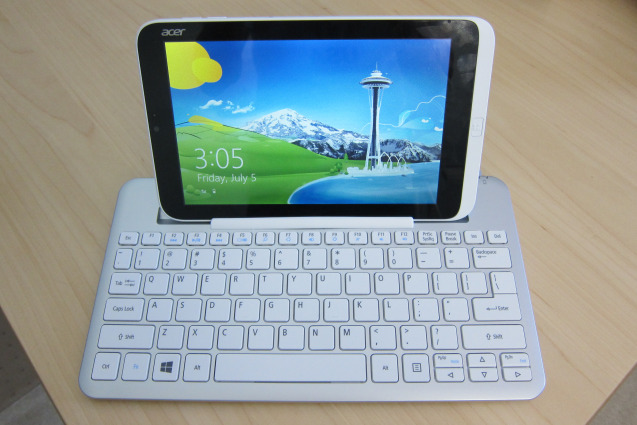
Acer Iconia W3 in Keyboard - QTOOTH

The following notes are for the $429 version; the extra $50 boosts the storage capacity from 32 GB to 64 GB. Acer also sent an optional $69 Bluetooth keyboard that doubles as a both a stand and type of carrying case for the small slate:

  • The 8-inch tablet is solidly built and shares design elements from Acer’s larger Windows 8 tablets such as the W510. You can’t flex the device due to a solid body (likely polycarbonate) but the back is all plastic meant to look like metal.
  • At 8 inches, the 1280 x 800 display provides a decent 188 pixels per inch, yet some text and images appear grainy and not so crisp. It could be the fonts or font sizes used by default, but the viewing experience is marginal to my eyes: not terrible nor impressive. The screen is not an IPS panel, so viewing angles aren’t the best either. Screen brightness is quite good except in full sunlight.
  • Because of the resolution, the W3 doesn’t support snapping apps in Windows; you can’t run two apps on the screen at the same time unless you connect the tablet to an external monitor of 1366 x 768 resolution or greater.
  • Instead of a capacitive Windows button under the screen when in landscape, Acer used a physical button that’s off to the right in this orientation. Holding the tablet in portrait mode puts the button under the screen, but I find myself using Windows 8 in landscape far more often. I suspect most others do, or will do, the same. Windows 8 screen gestures all work great.
  • The device’s two speakers also suffer from what I call “portrait-itis”: When holding the tablet in landscape, both speakers are on the right side of the unit. I’d like to see Acer add a third speaker to offset this. The speakers aren’t very loud either.
  • For a tablet of this size, I think you get a fair amount of ports and interfaces: micro USB, micro HDMI and micro SD memory card slot, in addition to the expected power port and headphone jack.
  • Battery life is rated for 7 to 8 hours and, although I’ve only had the unit a short time, I was able to use it continuously for 5 hours with juice to spare. I think the run-time claims are accurate.
  • The 1.5 GHz Intel Atom chip is helping in the battery department: this chipset is used in Acer’s Iconia W510 tablet, which gets similar battery life. There are 2 GB of memory, which is standard for the Atom-powered Windows 8 devices on the market.
  • Likewise, performance on the W3 is similar to the larger Atom-powered tablets currently available. That makes sense since the guts of this 8-inch tablet are mostly the same as its larger siblings. It’s certainly not as fast a Windows 8 machine running an Intel Core chip, but it’s at least as fast as Windows RT machines. And unlike those devices, you can install any Windows application you like on the W3.
  • The device has two cameras — front and rear — and I can’t say that either impressed me. I’d use the front camera for video chatting but the rear sensor is sub-par.
  • I’m still not a fan of jumping between the Windows Desktop for full Windows apps and the modern user interface for touch-friendly apps. That’s more of an issue with Windows itself, not the W3 tablet, and is due to some personal preference on my part.
  • Microsoft Office is pre-installed, which is a big value for those that need it.
  • Using the Desktop mode is a bit of a challenge, at least for me, because it’s not optimized for touch and everything is a bit smaller in a screen of this size. You can modify the DPI scaling (I find 150 percent to work well) and even the size of Windows elements, such as title bars and scroll bars, but I think Acer should optimize these out of the box.

Acer Iconia W3 Front Panel Display - QTOOTH


  • The touch apps I used all worked well on the small slate, offering the same experience as a full-sized Windows 8 or Windows RT computer.
  • I want to like the keyboard, but have a major issue with it. It’s easy to pair with the tablet; I like the feel and layout of the keys. And it’s nearly a full-sized keyboard. There’s a slot to prop up the tablet on the keyboard that works fine… until you start tapping at the tablet screen. That’s quite often since this is a touchscreen device. When closing apps — swiping from top to bottom on the display — the tablet would often fall out of the keyboard. And as I tapped the display with regular use, each little tap dislodged it a little more from the rubber keyboard grip, eventually causing the W3 to tip over. Perhaps it’s me or a defective unit, but this doesn’t seem well-designed.
  • I do like how the tablet clips in to the back of the keyboard, making it easier to carry while protecting the screen.

Acer Iconia W3 Back Panel - QTOOTH


If you like or mostly use Metro style apps and don’t mind limited performance, I suggest considering the W3 tablet. The 1.1 pound device measures in at 8.62 x 5.31 x 0.45 inches, so it’s easy to tote around. And it runs the full version of Windows 8 with support for legacy Windows software. Is it a super-fast performer or a premium device? No, but starting at $379, I think many will find it a great value for the price, given all Windows capabilities.

via Hands on with Acer’s Iconia W3: Full Windows 8 on an 8-inch tablet — Tech News and Analysis.

Filed Under: Home & Office, Mobile, Reviews

LinkedIn Wants to Make Your Job Search Mobile

2013-07-01

LinkedIn Mobile - QTOOTH

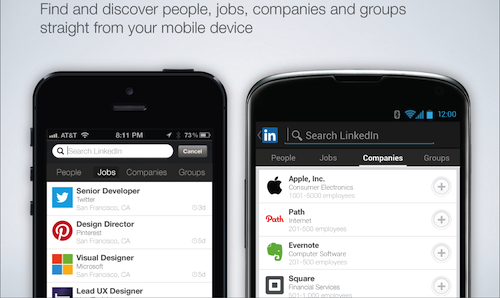
LinkedIn (LNKD) is working to boost its mobile traffic in general, and its job search traffic in particular. Today the company announced new features for its iOS and Android apps that will let users search for jobs, company pages and groups from their smartphones and tablets. The new apps are designed to minimize touchscreen taps, with shortcuts for all the major LinkedIn features.

The 10-year-old professional networking site gets about 30% of its traffic from mobile devices already, and the new apps are likely to boost that percentage. The service has more than 225 million members, about half the number that Twitter has and less than a quarter of Facebook’s membership. LinkedIn does not share statistics on how many of those are premium members, but it did say in its first quarter earnings report that the premium subscription business grew 73% year-on-year.

But premium subscriptions are not the most important business for LinkedIn, and neither is advertising. The company’s recruitment and job search business contributed more than half of total revenue during the first quarter and grew 80% year-on-year. Called talent solutions, the service helps companies and recruiters source “passive” talent, good candidates who may not be actively job hunting at the moment but are open to opportunities. LinkedIn counts major brands like Walmart, Unilever and Sony as clients of its talent solutions service.

That’s why the job search feature of LinkedIn’s new apps may end up being the most important to the company’s future. LinkedIn is positioning its mobile apps as a way for professionals to become more productive by taking advantage of “in-between” moments in their workday to do things like look at job opportunities. The company has also started sending targeted emails to individuals, listing specific job opportunities that may be of interest.

via LinkedIn wants to make your job search mobileMobile Technology | Wireless Broadband | Wireless Carriers | RCR U.S. Wireless News.

[amzn_product_inline asin=’B007708HJC’]

[amzn_product_inline asin=’1118358708′]

[amzn_product_inline asin=’1482014092′]

Filed Under: Home & Office, Mobile, News

The Case for the Intranet of Things and the Smart Home

2013-06-13

Eclipse Technologies for the Internet of Things and the Smart Home - QTOOTH

The following thoughts come from Kai Kreuzer. He raises a good point when he questions what it all really means when people discuss the “Internet of Things” or, as he makes a great case for, the Intranet of Things. In other words, many of us want our home and office technology to be networked and to work well together, and hopefully saving money and precious resources in the process, but this doesn’t mean that we want the information that this network produces to be readily available over the internet. So, here’s what he has to say on the subject:

“The Internet of Things (IoT) is one of the big hypes at the moment – and as usual with such a buzzword, it does not mean much at all (or rather it means something different, depending on who you talk to).IoT is often used synonymously with M2M (machine-to-machine). From my point of view, this is not a valid equation – the IoT is trifold, M2M just being one part of it. M2M was coined by the telco operators and thus it usually meant in the past to stick a SIM-card on a remote device and have it communicate through the GSM network. Work was usually done in customer projects which had the goal to remotely administrate and monitor distributed devices, be it solar panels, trucks or coffee machines. None of these solutions actually wanted to connect anything to the Internet, they were usually proprietary and closed – or if you want to formulate it positively: they were targeting vertical markets.
A step towards more openness of M2M is the Open Source M2M initiative at Eclipse led by Benjamin Cabé. This will hopefully help on standardizing the used communication protocols and make it much easier for many people to program embedded devices and make them connected. Nonetheless, the focus here is still on connecting proprietary devices through unreliable and low-bandwidth networks (like GSM), so it is a good match for the classical M2M use cases mentioned above.

iPhone - QTOOTH

Another “movement” that likes using the term IoT is all the cloud-enabled gadgets ( I call them Cloudy Things) that are popping up here and there. Think of things like Nest, Koubachi, Withings, Fitbit, WeMo etc – each of these gadgets comes with its own cloud service, for which you need to register a user account, install a separate app and let all your data flow to some cloud service. Ok, these gadgets are connected to the Internet, but effectively they are totally disconnected from each other. The user serves as the point of integration, using his smartphone, switching from one app to another. Is this really the ultimate answer?

No, there is one more thing to it – a big part of what is the Internet to all of us is actually the private part that is under our own control: The Intranet! Nobody wants to make his printer, scanner, VoIP telephone etc. publicly available on the Internet – and yet they are part of the Internet, merely behind the firewall of the local router.

And here we enter the space of the Smart Home – Smart Home technologies again are a part of the Internet of Things, but they are neither M2M nor Cloudy Things – they are the Intranet of Things. There are two simple reasons: Firstly, you don’t want your house become unusable just because your DSL connection is down – things still have to work when you are offline! Secondly, you want to be in control of the data and process it the way you need. It shouldn’t be a dozen of cloud services that grab your data exclusively and then decide, what you will at all see of it and how you are allowed to use it.

Actually the three parts (M2M – Cloudy Things – Intranet of Things) are not disjunct, but also clearly overlap. Yet, the intention behind them is quite different.

Let me give you an example that everybody should be familiar with: The Smart Meter. In the European Union Smart Meters are aggressively pushed to the households. But what is the intention?

M2M: Smart Meters are a mandatory part of the smart grids through which the utility companies want to move towards a distributed system of power generation, driven by the renewable energies. A possible way of connecting the meters is via GSM using a SIM-card. This is clearly M2M: The companies need the data from these distributed remote devices for their own purpose, the customer does not have any benefit.

Cloudy Thing: As the customer does not have any benefit from the original M2M use case, the utility companies try to offer him at least something – they visualize the gathered consumption data in a nice chart that the customer can view after login at the companies cloud service, right next to his invoices. How this is presented and with which granularity is completely up to the company. The raw data is not available to the customer.

Intranet of Things: A Smart Meter is only really interesting for the customer, if he himself can get hold of the data. Unfortunately this is not really in the focus of the utility companies. Otherwise, you could have use cases like: Is the “idle” consumption a few hundred watts higher than usual? -> possibly something was not turned off! Is the current consumption higher than what the photovoltaics produce? -> maybe a bad time to start the washing machine. Is my average daily consumption lower than last month? The investment in the new fridge might pay off.

OPENHAB Powering the Smart Home - QTOOTH

You may wonder, how you can avoid relying on Cloudy Things for your Smart Home – well, this is what I founded openHAB for! It is the missing part of your Intranet to give you (and not the cloud services) full control of your devices and your data. It already supports a long list of devices, like KNX, Homematic, Philips Hue and many more. Others are currently under development like digitalSTROM, EnOcean, AVM Fritz DECT ULE, Z-Wave etc.), so soon there should hardly be anything missing what is currently hip in the Smart Home market.

Having mentioned Eclipse M2M above: openHAB is not a competition, but a perfect complement to it – while the Eclipse M2M projects allow building devices, openHAB brings them (and many others) together and introduces the user to the network of “machines”. openHAB itself is built on Eclipse technologies: Equinox, Jetty, EMF, RCP, Xtend, Xtext, Xbase,… Once the openHAB MQTT binding is ready, this can be a really cool combination!

If you have read up to here, I am convinced that you share my enthusiasm that openHAB is the missing piece to make the IoT really useful to the end user – please therefore support us and vote for openHAB at the IOT challenge, where we participate – it is just a simply click. I count on you!”

via Eclipse Technologies for the Internet of Things and the Smart Home | Kai Kreuzer.

[easyazon_block add_to_cart=”default” align=”center” asin=”B008BBWAIA” cloaking=”default” layout=”right” localization=”default” locale=”US” nofollow=”default” new_window=”default” tag=”uneomediacom-20″]

[easyazon_block add_to_cart=”default” align=”center” asin=”B007005364″ cloaking=”default” layout=”right” localization=”default” locale=”US” nofollow=”default” new_window=”default” tag=”uneomediacom-20″]

[easyazon_block add_to_cart=”default” align=”center” asin=”B00JO9YOGE” cloaking=”default” layout=”right” localization=”default” locale=”US” nofollow=”default” new_window=”default” tag=”uneomediacom-20″]

Filed Under: Home & Office, Tech Talk

Dell ships its WiGig-based Wireless Dock for Latitude

2013-06-06

Dell WiGig Wireless Dock

Dell Makes Wireless Docking a Reality with the Industry’s First and Only WiGig Docking Station for Unparalleled Connectivity and Convenience

New Dell Wireless Dock provides best-in-class untethered docking experience with the Dell Latitude 6430u Ultrabook for fast, flexible connectivity between devices and peripherals

WiGig standard led by Dell and Wilocity marks new era in mainstream wireless with speeds up to 10 times faster than Wi-Fi and the ability to transmit high quality video streams

Dell today announced the availability of the Dell Wireless Dock, the industry’s first and only docking solution based on the latest multi-gigabit tri-band Wi-Fi standard (WiGig) and compatible with the award-winning Dell Latitude 6430u Ultrabook™ for a best–in-class wireless docking experience. The new WiGig standard begins an exciting new era in mainstream wireless connectivity with speeds up to 10 times that of today’s fastest Wi-Fi networks.

Designed for use in offices, meeting rooms and classrooms, the Dell Wireless Dock offers quick and easy connectivity to displays, projectors, networks, speakers and other peripherals for unparalleled connectivity and convenience. The new dock supports up to two external displays with both DisplayPort and HDMI, features ample peripheral connectivity via three USB 3.0 ports and facilitates easy collaboration with a front Audio In/Out port for voice over IP at speeds of up to 4.6 gigabits per second. The Dell Wireless Dock can also be easily managed with the updated Dell Connection Manager that now supports both WiGig and Wireless LAN settings.

Especially ideal as a connectivity solution in conference rooms and classrooms, the Dell Wireless Dock supports cable-free, seamless transitions between multiple presenters and hassle-free collaboration. An adapter is available for VGA-based infrastructures and an Ethernet connector helps ensure dedicated, stable bandwidth for fast data transfers and efficient communication with remote locations. Additionally, the Dell Wireless Dock has the same level of usability and easy integration as the current Latitude E Series Docking Stations with remote access, monitoring and configuration for business class control.

With the potential to offer many advanced uses, such as virtually instantaneous wireless backups, synchronization and file transfers between computers and handheld devices, the WiGig standard (802.11ad) is the result of close industry collaboration led by Dell and Wilocity. Based on the proven IEEE 802.11 standard specification for long-term stability, WiGig offers the same level of security and manageability as today’s best WLAN technologies. WiGig is powered by the first 60 GHz multi-gigabit wireless chipsets developed by Wilocity and brought to the Dell Latitude 6430u by Qualcomm Atheros, Inc., a subsidiary of Qualcomm Technologies, Inc.

[amzn_product_inline asin=’B00080QGCS’]

[amzn_product_inline asin=’B00CLHA9V0′]

[amzn_product_inline asin=’B00CODBP5K’]


Filed Under: Featured Content, Home & Office, News, Reviews

  • « Go to Previous Page
  • Page 1
  • Interim pages omitted …
  • Page 4
  • Page 5
  • Page 6
  • Page 7
  • Go to Next Page »

Primary Sidebar

Affiliate Disclosure

This website uses affiliate programs for monetization. At no additional cost to you, links to various sites mentioned in posts may result in a commission that is credited to this site if you make a purchase.

Some affiliate programs and affiliations include, but are not limited to, Commission Junction, Apple, Google, Amazon.com and more.

For complete details
click here.

Copyright © 2026 · Preferred Hosting by WP Engine and Domain Name Registry by Namecheap

We are using cookies to give you the best experience on our website.

You can find out more about which cookies we are using or switch them off in .

QTOOTH
Powered by  GDPR Cookie Compliance
Privacy Overview

This website uses cookies so that we can provide you with the best user experience possible. Cookie information is stored in your browser and performs functions such as recognising you when you return to our website and helping our team to understand which sections of the website you find most interesting and useful.

Strictly Necessary Cookies

Strictly Necessary Cookie should be enabled at all times so that we can save your preferences for cookie settings.

3rd Party Cookies

This website uses Google Analytics to collect anonymous information such as the number of visitors to the site, and the most popular pages.

Keeping this cookie enabled helps us to improve our website.

Additional Cookies

This website uses the following additional cookies:

(List the cookies that you are using on the website here.)