• Skip to primary navigation
  • Skip to main content
  • Skip to primary sidebar

QTOOTH

News & Reviews for Living with Bluetooth Wireless

  • Reviews
    • Wearable
    • Gaming
    • Health & Fitness
    • Home & Office
  • How To Tips
  • Industry News
  • About QTOOTH

Featured Content

New Smartwatches: The Debut of Samsung Gear 2 and Gear 2 Neo

2014-02-25

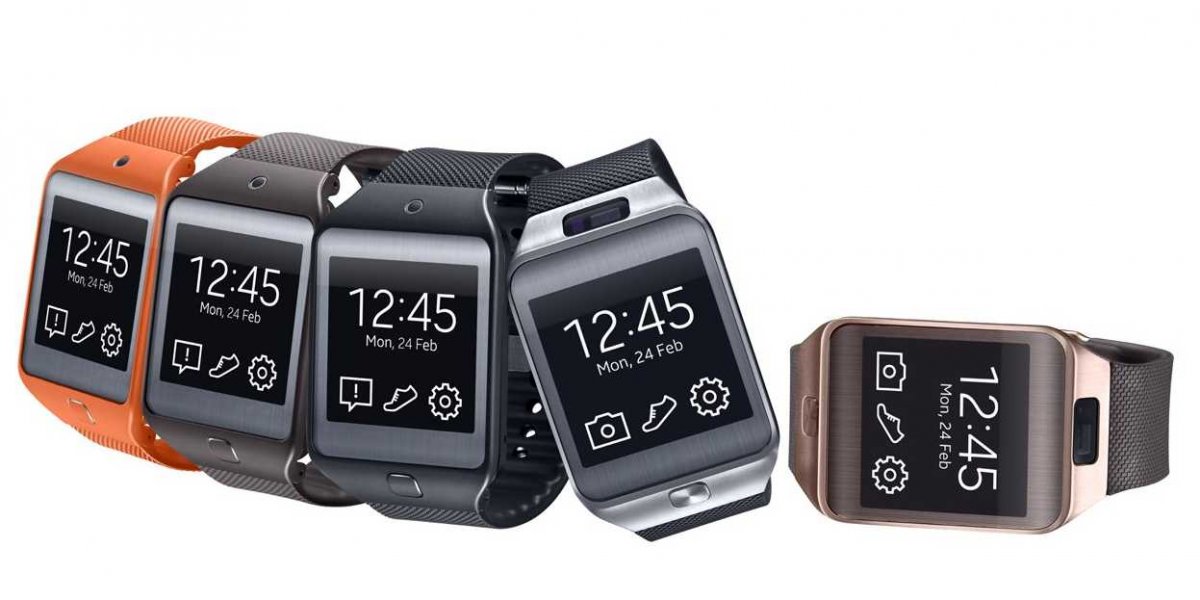
Samsung Gear 2 and Gear 2 NeoSamsung is using the Mobile World Congress that is being held in Barcelona this week to reveal its latest line of innovative products. First up was an update on their Galaxy Gear Smartwatch. Introduced in 2013, the original version was mostly greeted with indifference by the general press but found a lot of admirers among a growing user-base of dedicated fans. Samsung has shown that there is a viable market out there for smartwatches. These latest entries, the Gear 2 and the Gear 2 Neo, should help to further add to their level of acceptance.

By Any Other Name… and Oh, and What’s Tizen?

The first thing that gave an indication that serious changes were to be found was that Samsung has dropped “Galaxy” from the name. The two new smartwatches go simply by the names Samsung Gear 2 and Samsung Gear 2 Neo. This is most likely because Samsung wants to differentiate them from the rest of the Galaxy line up, like the S4 and new S5 smartphones. The reason, and perhaps the most important thing to know, is that these watches are no longer Android-based devices. Instead, Samsung has opted to switch to the open source, Linux-based mobile operating system known as Tizen.

tizen-logo-qtoothTizen isn’t that well-known outside of developers’ circles yet, but it is a very promising platform that may attract app developers who do not want to work within the constraints set by Apple for iOS or Google for Android. This will also help Samsung move yet one step further away from those two companies who are in effect their rivals. Samsung has been experimenting with smartphones based on Tizen, but they are smart enough not to release a phone to the market until there is enough of an ecosystem of apps to support it. Android and iOS have millions of apps, many of them free. Any phone attempting to compete will need to have a full complement of full featured, powerful apps. A lack of app choices is one of the main things holding back Windows and Blackberry phones from finding more of an audience. App development for these two new smartwatches may be Samsung’s way of laying the perfect foundation for building a Tizen-based ecosystem. We’ll see how things develop over the next year or two, but this move could prove very forward-thinking on the part of Samsung. However, users of the Gear 2 and Gear 2 Neo will not notice this switch. The nature of a smartwatch is much different than a phone. Wearable technology tends to focus on doing a limited number of tasks really well and Samsung already has this covered with over 100 available apps. It is also going to release an SDK (software developers kit) so third party developers can get in on the action.

What’s the Difference Between the Gear 2 and the Gear 2 Neo?

There are really only two differences between the Samsung Gear 2 and the Gear 2 Neo. The Gear 2 has a camera and the Gear 2 Neo does not. The Gear 2 has a brushed metal body and the Gear 2 Neo has a plastic body.

Samsung Gear 2 and Gear 2 Neo

What Makes the Samsung Gear 2 and Gear 2 Neo Different from the Original Galaxy Gear?

Well first, let’s start off with what’s the same: The display is still a 1.6-inch Super AMOLED screen with a 320×320 pixel resolution, the RAM is still at 512MB, internal storage remains at 4GB,  and they still work on Bluetooth 4.0. Just about everything else has changed.

The biggest improvement came from listening to the feedback of users of the the original Galaxy Gear. The camera, microphone, and antennae were all originally located on the strap. For the camera, this meant that shooting pictures required holding your wrist and arm at an odd angle. In order to speak into the device, the user had to flip their wrist over away from the watch face and the speaker because the microphone was located on the clasp of the strap. And because the camera, microphone, and antennae needed to maintain their electronic connections to the body of the watch, this setup prohibited the wearer from changing out the strap for different styles. The Gear 2 and Gear 2 Neo have moved all of these components to the body of the watch itself. This has made for a much improved shooting angle for the camera on the Gear 2 and, for both models, an easier time using the microphone while listening to the speaker and the ability to swap out the straps for any traditional watch wristbands on the market. This will help the user to truly customize the look of the watch. Plus, they’ve also added a couple of new watch body colors into the mix.

What else has changed besides the OS and the interchangeable straps? Processors have been improved from an 800MHz single core to a 1GHz dual core. A Bluetooth music player is included so that the user can stream music stored on their watch to any Bluetooth compatible audio system without the need for their phone. This could be handy for working out without worrying about carrying a phone. They also come with a built-in infrared projector which allows the included app to turn your watch into a remote for TVs and other entertainment systems.  Because it is one of the most used functions of any existing wrist-mounted wearable tech, a heart rate monitor and its accompanying app are also included. The screen glows when you tell it to check your vitals, pulsing every 90 seconds. If you use it with one of the personal coaching apps it will use haptic feedback, otherwise known as a vibration alarm, plus on-screen notifications to let you know you should pick up the pace.

Samsung Gear 2 and Gear 2 NeoThe size of these devices has also gotten a little smaller. Because it lacks a camera, the Gear 2 Neo is slightly smaller than the Gear 2. Both of the new units are also smaller than the original Galaxy Gear. This is due in part to the fact that the new versions have a slightly smaller battery. This has caused some to be concerned about battery life and how often they will need to be recharged. The original Galaxy Gear initially had issues with short battery life until a software update increased the average time to about a day to a day and a half. However, Samsung promises that the new devices will last between two and a half to five days between charges. this is most likely because of the new Tizen operating system. The smaller sizes also mean less weight. The Gear 2 is about 10% lighter and the Gear 2 Neo is about 25% lighter than the original Galaxy Gear. This should help improve comfort and their long term wearability.

The body of both versions is IP67 certified for dust and water resistance. This means that they can be submerged in water for up to 30 minutes at a depth of 3 feet/1 meter and should suffer no ill effects. This isn’t foolproof, but it is a great improvement and helps safeguard against one of the most common threats to electronics that no one likes to talk about or even think about… landing in a toilet. It also means that showering with it on should be okay.

Samsung Gear 2 and Gear 2 NeoWill the Samsung Gear 2 and Gear 2 Neo Work with My Device?

In addition to the new Samsung Galaxy S5, the Gear 2 series will work with Samsung’s Galaxy S III, Galaxy S4, Galaxy S4 Mini, Galaxy S4 Active, Galaxy S4 Zoom, Galaxy Mega, Galaxy Note 2, Galaxy Note 3, Galaxy Note 10.1 2014 Edition, Galaxy Note Pro, and Galaxy Tab Pro (12.2, 10.1, 8.4).

How much will the Gear 2 and Gear 2 Neo Cost?

Samsung hasn’t released any final pricing on these yet, but consensus says that the Gear 2 will probably be about the same as the current Galaxy Gear at $299 and the Gear 2 Neo is expected to be about $100 less. Although a specific date hasn’t been released, Samsung says that both models will be available for sale in April.

Do I Need a Gear 2 or a Gear 2 Neo Smartwatch?

This is a question many people are asking, even those who make these things! Traditional watches have fallen out of widespread use in general. We have clocks everywhere, on our car dashboards, on our appliances, and especially on our computers, tablets and phones. However, there are still quite a few people who do wear them, and the added functionality that a smartwatch provides may entice a few more to start wearing them again. They may never gain as much market share as a smartphone, but they do have their place and only time will tell how big the audience is. No matter what the answer ends up being, smartwatches will most likely be here to stay, in some form or another.

[easyazon_block add_to_cart=”default” align=”center” asin=”B00FH9I0FQ” cloaking=”default” layout=”left” localization=”default” locale=”US” nofollow=”default” new_window=”default” tag=”uneomediacom-20″]

[easyazon_block add_to_cart=”default” align=”center” asin=”B00BKEQBI0″ cloaking=”default” layout=”left” localization=”default” locale=”US” nofollow=”default” new_window=”default” tag=”uneomediacom-20″]

[easyazon_block add_to_cart=”default” align=”center” asin=”B00FI1678A” cloaking=”default” layout=”left” localization=”default” locale=”US” nofollow=”default” new_window=”default” tag=”uneomediacom-20″]

Filed Under: Featured Content, Health & Fitness, News, Wearable

The Dash – The Latest Entry in the Dawn of the Smart Headphone

2014-02-16

The latest product to make a splash on Kickstarter as of last week is The Dash, an in-ear wireless headphone. The Dash looks to be a strong entry into the growing class of devices known as smart headphones. In order to make the device qualify as “smart”, the creators of The Dash have included a variety of sensors that can be used to track the wearers health and to communicate and control connected devices wirelessly.

Although we have some questions about some of its component and design choices, the device shows a tremendous amount of promise. Here’s their promo video and info direct from their Kickstarter campaign:

bragi-dash-details-chart-qtoothbragi-dash-inside-details-chart-qtooth

Click for Zoomed View
Click for Zoomed View of Internal Components

Overall we are incredibly impressed with their choices of components and the featured functionality of The Dash. Here are what we think are some of the pros:

  • CSR’s AptX circuitry – for delivering quality audio over Bluetooth
  • The use of 3-axis and accelerometer sensors in both the left and right ear buds for greater accuracy of motion tracking
  • Onboard media/music storage (4GB) and playback for greater audio quality than available over Bluetooth and use even when not connected to another device or smart phone
  • The ability to use the built-in ambient mic to listen to the immediate environment – a great safety feature for when the ears are plugged by use of the device
  • The ability to turn features on and off via an app – Currently the practical battery charge is about 3 hours when all of the internal circuitry is on and working. Turning of functions that aren’t currently being used will allow the battery life to be extended
  • A companion storage case that will be able to recharge the ear buds within an hour several times before it too needs to be recharged

Here are some of our potential cons. Since the device may evolve yet before its official introduction to the world, and since we have not personally tried The Dash, these questions may not add up to a hill o’ beans. Here they are any way:

  • The use of an ear bone microphone for speech – In our experience, we are yet to find an ear bone microphone that really works well, especially for communicating speech. Microphones and speakers that rely on bone conduction are usually significantly lacking in treble response. This is where the clarity of any sound occurs and how we can differentiate one consonant sound from another. Without those high frequencies clearly articulated “P” can sound like “B”, “T” can sound like “D”, and so on. This can cause a lot of confusion for the person on the other end of the line. Perhaps the folks at Bragi have found the ultimate microphone for this, but there is a reason why Google recently abandoned the bone conduction audio on their much anticipate Google Glass. Used in tandem with a traditional microphone that picks up sound from airwaves, a bone conduction microphone can be a great asset (like the way it is used on the Jawbone headsets). In this case we are skeptical, especially since conduction microphones work best when they are held securely against bone. As far as we can tell, The Dash will mostly be surrounded by the softer flesh and cartilage of the folds of the inner ear. Perhaps they can still make it work in conjunction with their ambient mic? Or at least make it an option?
  • A claim of “waterproof” – Sure, they only claim water resistance to 1m (about 3 feet), but they also claim that it should be okay for daily swimming, albeit with reduced functionality. They also feature pictures of surfing a wave. I’m not sure who only swims to a depth of 1 meter. Diving into a pool, pushing off the wall at the turn of a lap, or getting hit by a wave will probably easily exceed the water pressure of 1 bar/ 1 meter that they claim. It will be interesting to see what real world use of actual customers demonstrates. But just to be clear, we are still thrilled with the direction that Bragi is taking with The Dash. This level of water resistance should mean that getting caught in the rain or keeping the music going or taking a quick call when hitting the post workout shower should be a non-issue.
  • Passive Noise Reduction – This is a rather cryptic way of saying that The Dash works as an ear plug. They lay claim to the fact that this will help isolate the wearer from noise from their environment. True! Bragi does make some effort to differentiate what they are doing from active noise cancellation circuitry, but we just wanted to clarify the terms for those who may be less familiar. Good active noise reduction circuitry will actually do a better job of reducing noise across a broader range of frequencies than an ear plug. Bragi states that they have kept out the more expensive active noise reduction because it would reduce the battery life. This makes sense, especially considering that the size of this device is quite small and leaves little room for the extra circuitry or increased battery size that might be required. We’d also like to point out that although The Dash provides an ambient microphone to help the user stay aware of their surroundings when necessary, this is not as accurate for positioning those sounds within the environment. All of the folds and curves of the human ear are not just there to make them look as pretty as a sea shell, they serve the purpose of helping us locate sounds. Even if a person is deaf in one ear, as long as the other ear is reasonable healthy, human hearing is incredibly accurate in determining location. This is super beneficial for survival and one of the main reasons I never ride my bike while wearing headphones. I rely on my hearing far too much to help me know exactly where that SUV is in relationship to my rear wheel! Even with the ambient mics active, plugging both ears with The Dash will greatly reduce the wearer’s hearing location abilities.
  • Reflectance Pulse Oximetry – Say what?! That’s the fancy term for the technology behind how The Dash measures heart rate and oxygen saturation (the amount of oxygen carried by the blood). Reflectance pulse oximetry uses two tiny LEDs to emit low intensity red and infrared light into the capillaries of the ear. The optical reflection of the emitted light reveals the relative amount of red and white blood cells and can be interpreted as both heart rate and oxygen saturation. So far in, other devices,  this approach has proven to be a less than perfect way to measure this information. Perhaps having it located on the inside of the ear and using whatever associated circuitry Bragi has developed will greatly improve accuracy. We hope so. This is one of the key features of The Dash and helps combine multiple wearable devices into one. We love the idea!
  • Comfort and secure mounting – Bragi claims that the 3 sizes that they offer for the ear molds will comfortably fit 94% of the population. Maybe so, but many other headset manufacturers offer the similar and make the same claim. We’ve found that ALL devices that are stuffed into the ear canal increase our desire to remove them the longer we wear them. And although we believe that The Dash mounts securely in the ear (see image below) we wonder what will happen if we do shake them loose, say when swimming or surfing. It would be nice if they added some optional, secondary means of attachment. Maybe an ear hook or some form of leash? Just a thought…

bragi-dash-in-ear-3-point-mounting-qtooth

So there you have it, our quick take on The Dash. We’re very excited for them and they are absolutely crushing it on Kickstarter. Check them out when you get a chance and maybe get in line for your own pair by making a pledge toward their campaign. We here at QTOOTH will definitely be keeping an ear out for any news as they get closer to release or when they become available next November!

Filed Under: Entertainment, Featured Content, Health & Fitness, Mobile, News, Wearable

The Fastest Way to Join the Internet of Things? Belkin WeMo Home Automation

2013-12-04

Do you want to take advantage of the Internet of Things today? The Belkin WeMo Home Automation line of products is perhaps the easiest and fastest way to do it.

You may know Belkin for making great consumer accessories, however the majority of their business is probably that of being a supplier the electronics and electrical industries. for many decades. I know that as a lifelong musician, getting a guitar or microphone cable that featured Belkin components was always a good sign. So it was with interest that we had a chance to use the Belkin WeMo Home Automation family of products. In particular, the WeMo Switch,  Insight Switch, and WeMo Light Switch.

We’ve seen many reviews of these, including the ones on Amazon. Most people are thrilled with their performance and ease of use. A few people have reported issues with setting up the devices initially. From what I can glean from these frustrations, it is either because the person didn’t understand the requirement necessary for proper installation or they didn’t allow the devices to automatically update themselves first to the latest firmware before attempting to use them. From my point of view there is not much that can be done about those cases. Whether on a retail website like Amazon or on Belkin’s own website, great care has been made to alert consumers about how to use them. I’m not sure how much more Belkin can do. There will always be people who just won’t read a manual or watch a video no matter how simplified and accurate they may be.  That said, I found the Belkin WeMo Home Automation line of products easy to set up and consistently performed as advertised. Here’s a look at the big three that I’ve used in the series:

Belkin WeMo Switch

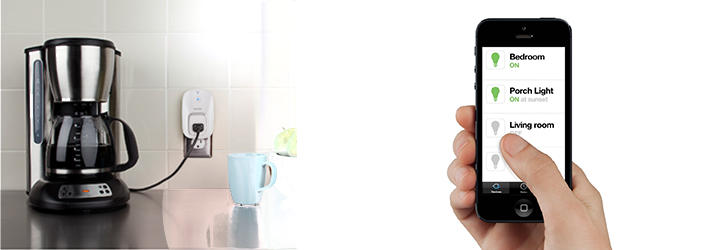
belkin-wemo-switch-qtoothThe Belkin WeMo Switch is the most simple device in the series. Looking like a single outlet plug adaptor, you simply plug it into your wall outlet and then plug whatever device you want to control into the WeMo switch. Setting it up to communicate with my home WiFi network was pretty routine and the instructions on how to do so were quite clear. Then, using the free app that is available for the iPhone, I was able to remotely power the outlet on and off, thereby turning the floor lamp that was plugged into it on and off. Voila! Simple. As long as my house has power, the WiFi is turned on, and I have my cell phone, this can be done from virtually anywhere in the world. There are also options to program when there is power to the outlet by using the app’s scheduler. Perfect if I want to automate lights to turn on or off when I’m away on vacation or if I want to turn the lights on from my car before I come into the house (handy when carrying armloads of groceries).

Of course this can be used with any device that plugs into the wall, stereos, TVs, space heaters, coffee maker, holiday lights, air conditioners, etc…  Limited only by your imagination.

Belkin WeMo Light Switch

http://www.youtube.com/watch?v=27GI-X-IXaQ

belkin-wemo-light-switch-qtoothThe Belkin WeMo Light Switch is probably the second most popular unit in the series. It takes a bit more to use because it actually requires replacing your current light switch. This involves a bit of know-how when it comes to wiring, If you are not comfortable with this, and fear the risk of getting shocked with the full electrical current from your house’s wiring, you should really look into hiring a professional. Or, at the very least, ask your more tech or handy-oriented friend or member of the family. Since I grew up in a house full of master tradesmen, this was a piece of cake for me. The Belkin WeMo Light switch is perfectly designed to replace the stock light switch in the majority of cases. There are two tips that Belkin tries very hard to make clear: the wiring in your wall MUST have a neutral wire and you should use the included faceplate if the current one is made of metal. This last tip is there because a metal faceplate might block the wireless WiFi signal. Makes sense! Once installed, these work great and can be overridden remotely at anytime. No need to worry if you last left the switch in a certain position that might inhibit remote access.

Belkin WeMo Motion

http://www.youtube.com/watch?v=hxEI_Wrkz9k

belkin-wemo-motion-sensor-qtoothThe Belkin WeMo Motion is a motion detector that hooks into one of their WeMo Switches. That said, the first tip would be to make sure you understand that the WeMo Motion will NOT work without buying a WeMo Switch to go with it. Luckily they are mostly sold a s apackage deal and it is likely that you’ll end up with exactly what you need. Besides that, there are plenty of uses for this and I found that it worked really well. Great for security purposes, it can also be used so that environmental controls or entertainment devices can cycle on and off as you move room to room.

Although I haven’t tried them, there are other members of the Belkin WeMo Home Automation family. There is the WeMo Insight Switch that allows you to track your electrical usage per outlet and the WeMo Baby that acts as an update on the classic baby monitor.

belkin-wemo-phone-app-qtoothAll of this is pretty powerful stuff and can all be controlled on either an iOS device or an Android device using Belkin’s free apps. I find the aesthetic design of these to be spot on and should meld well with just about any decor. Conclusion? Love it, and am looking forward to maybe hacking a few of these for my own nefarious IoT (Internet of Things) purposes. Especially when by writing a few controller scripts on IFTTT. Mwahahahahaha…!

[amzn_product_inline asin=’B00BB2MMNE’]

[amzn_product_inline asin=’B00DGEGJ02′]

[amzn_product_inline asin=’B0089WFPRY’]

Filed Under: Featured Content, Home & Office, Reviews

Who Wouldn’t Want Waterproof Electronics? – Check Out HzO (Video)

2013-10-28

hzo-iphone-in-beer-liquid-proofing-electronics-qtooth

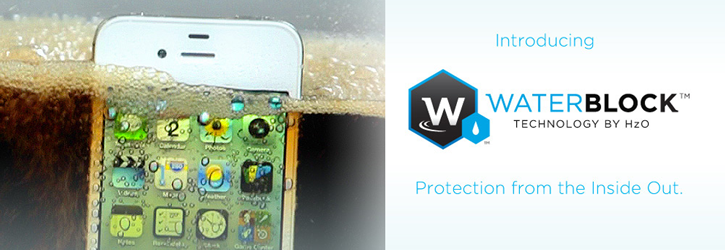
HzO is the developer behind WaterBlock, a special coating that uses nanotechnology to make sure our favorite electronics stay working no matter what liquid we try to drown them in. HzO has been making the rounds of all of the technology trade shows this past year and has one numerous awards. Check out this video and you’ll easily see why:

QTOOTH had the honor of being an official media partner for the 2013 Wearable Technologies Conference. that was held as part of the Taiwan International Cloud Technology & Internet of Things Show. One of the cool things that was on display was the amazing properties of HzO’s waterproofing technique. I’ve certainly lost at least one cell phone to water immersion and, as a lifetime musician, have had at least several prized pieces of musical equipment ruined by the careless drink “placement” of excited audience members. Where were you then, HzO, where were you then?

How does it work? HzO uses a vapor process that allows a layer of their organic polymer coating to form a barrier around every component of a device, This makes it not only liquid proof, but also virtually eliminates humidity and corrosion from wreaking havoc with these sensitive, and often expensive, pieces of technology. And we’re not talking mere water resistance, either. We’re talking water immersion. HzO’s WaterBlock technology can even work at considerable depths. In fact, it seems the pressure of the deep will probably have an effect on crushing the device before the waterproofing give out.

There are two things we wanted to bring focus to concerning HzO’s WaterBlock. First, most wireless devices that we enjoy here at QTOOTH are meant for real world living. If wireless technology makes things wearable and integrated into everyday devices (a la Internet of Things) then they will absolutely need to be waterproof. Second, we are on this quest of making technology transparent and unobtrusive. Being toxic to the environment is hardly being transparent or unobtrusive. Luckily, HzO makes the point that their coating, which is made of organic polymer,  has been FDA approved for use as “non-hazardous,” certifying each ingredient as being both non-toxic and bio-compatible for use in medical devices, such as implants inside the human body. Plus, Hzo Makes the point that the fewer electronics that are being dying prematurely due to immersion in liquid, the fewer devices end up a e-waste in landfills. Sounds good to us!

So when can you get your devices coated? Unfortunately not yet. HzO is focusing on working with manufacturers on new devices. They fill they can have the biggest, most pervasive effect by working with manufacturers during the assembly process so that their coating is done correctly from the start and performs to their high expectations. Perhaps someday soon either they’ll license it or develop a program that will retro-waterproof our current devices. But at least it’s good to know that in the near future, more and more of our devices will already be waterproof. In fact, we might just assume that they all are. Let’s hope so! Until then, where’s my clunky Otterbox for my iPhone…?

[amzn_product_inline asin=’B00AK1GN4Q’]

[amzn_product_inline asin=’B00B59NKRK’]

[amzn_product_inline asin=’B00EEB5NWG’]

Filed Under: Featured Content, Tech Talk

Why Apple’s iBeacon May Mark the End of NFC

2013-09-20

iphone5c-selection-hero-2013What is iBeacon? And why do most of us not have a clue as to why it is so important to… well, pretty much everyone?

Face it, we are all used to Apple putting on one heck of a show when it releases some new revolutionary product. They are so good at it that, even if you are a pretty low tech kind of person, it is hard to avoid hearing the news. Well here’s one that they have barely mentioned in their last to big product reveals: iBeacon. Although iBeacon showed up in a slide during their Worldwide Developers Conference last June as a feature of their new iO7 mobile operating system, it wasn’t mentioned at all during that products presentation. And what did they say about it last week when they revealed the new line of iPhones that sport the new system? Nothing!

This is amazing since it could lead to a huge wave of new apps for such things as indoor mapping, in-store marketing, mobile payment systems and will probably make a true “internet of things” possible even sooner. Perhaps it is because it isn’t news for the general public yet. Apple is probably more concerned with creating an environment of applications and partnerships with other companies to ensure adoption. Only then will they really have something that is easy to demonstrate to their end-user. However it is a HUGE deal to companies that want to leverage it for their own uses. Here’s a video from one of those companies, Estimote, that also does a good job of showing a few of the many ways that iBeacon can be used:

So, What is iBeacon?

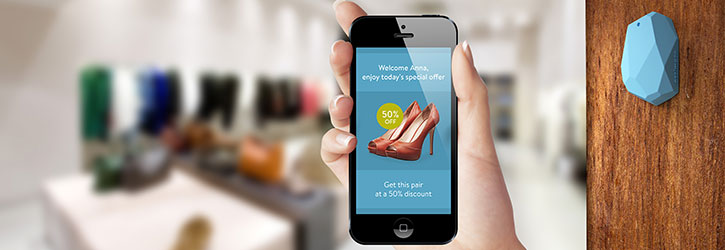
iBeacon uses Bluetooth Low Energy, otherwise known as BLE, and creates a beacon around a physical area so that an app can be alerted when a user enters them. The beacons come in the form of small wireless sensors which, when placed inside any physical space, will transmit data to your iPhone using Bluetooth.

The most used real-world example of this is typically when a person goes to a store with the new Apple iPhone 5s that comes is equipped both iO7 and iBeacon.  When they enter the store’s beacon field it can interact with the iBeacon on their phone and give them customized information such as special promotional offers, directions to where the product they wish to purchase is located, or recommendations based on their current location or purchasing history. This is what is known in the industry as “personalized microlocation-based notifications and actions”. doesn’t exactly roll off the tongue does it? Perhaps that’s why Apple is waiting to slowly roll out this new concept to the public. Something this new, complex and pervasive could be perceived as being scary and big brother-ish as much as empowering.

As a note on the empowerment side: it has been shown that the iBeacon can actually communicate in both directions. In other words when you go into that fictitious store or restaurant, what if you and your phone communicated to them, “I’m not buying today” or “I’m looking for a new shirt in a large” or “I’m vegan”. Then they can accommodate you and provide you with a higher level of service without the hassle or miscommunication.

These days everyone in the tech world is hot for context. This means that they want to provide or take advantage of information that is placed within real world context. This gives the information real value. A system like the one that iBeacon promises can provide this type of contextual information when it is needed. Just like one of the more common uses for NFC, or Near Field Communication, iBeacons will even allow you to make payments using your smart phone. Here’s where it gets good: iBeacon runs on a single coin battery that can run for up to two years and includes an accelerometer, flash memory, a powerful ARM processor and Bluetooth connectivity. And the more sensors that are added to a system the better and more precise the context will be provided to the iBeacon.

What is NFC and Why is iBeacon Better?

NFC, otherwise known as Near Field Communication, is a very low power, short range form of wireless. It’s primary use so far has been for exchanging information and files between smartphones and as a means of using the phone to transfer funds at a payment terminal. There are a couple of significant limitations with NFC. It’s real world range is less than 2 inches (4cm). That means that when it is used to communicate with sensor tags in an environment like a retail store, the user has to be within 2 inches for it to communicate. The range for an iBeacon is up to 165 feet (50 meters). Another limitation is that NFC functionality on a phone requires its own chip. This chip is in addition to the ones already included on a device that will almost always have Bluetooth as well. Why not take advantage of a Bluetooth chip that is already there instead of adding another one?

Google and NFC Versus Apple and Bluetooth

What we are really witnessing is a war between Google and their support of NFC and Apple and their support of BLE (also known as Bluetooth 4.0 or Bluetooth Smart). Google has only started to support BLE with the release of Android version 4.3 and this was only done under extreme pressure from app developers. Many app developers couldn’t create their products for Android phones because of the lack of BLE.

Meanwhile Apple had been mysteriously avoiding NFC. Even when the iPhone 5s and 5c rolled out recently many were confused by its lack of NFC support. But as we start to wrap our heads around iBeacon and what it means and what it can do, it is easy to understand why. They do not feel the need to support yet another form of wireless and are committed to Bluetooth and WiFi. In the words of Apple’s mobile development chief Craig Federighi, “There’s no need to wander around the room, bumping your phone”. ANd Apple’s AirDrop allows their phones to share files across WiFi, so unless you are in a remote part of the ocean, why bump phones together? We agree! Between NFC, gesture controls, and the crazy smart watch phenomenon, we at QTOOTH are wondering what’s up with all this hands on approach to technology? Wireless is what will make our world hands-free so we can use them for more important things, like sports, hobbies, carrying things or holding hands! (Hey, why not? I guess we’re romantics at heart!)

Conclusion

There’s a few more things that iBeacon will do that NFC can’t: indoor mapping with navigation (hey, I’m in aisle 5!), share files with ANYONE on ANY PLATFORM using BLE, and the promise of making the sensors ever smaller and less obtrusive.

There’s the wise view of “the world is what it is, not as it should be”. QTOOTH is gonna go out on a limb and say how we think it should be: iBeacon in. NFC out.

Filed Under: Featured Content, Mobile, News, Tech Talk

Samsung Galaxy Gear – The Evolution of the Smartwatch

2013-09-04

Amid great fanfare, Samsung introduced their Galaxy Gear. The occasion for the introduction was the IFA 2013 Consumer Electronics Show, the largest of its kind in the world. It is even bigger than the CES trade show that is held every year in Las Vegas. There are so many exciting things coming out of this year’s event that it may take a while for us here at QTOOTH to even cover it all. For Samsung, this is their first foray into the brave new world of smartwatches. Let’s take a look at some of the exciting things that it represents, where they got it right and where they might want to improve the product.

samsung-galaxy-gear-smartwatch-front-view-with-band-qtooth

First, let’s talk about the fact that smartwatches will not be for everyone. The wearing of watches is at an all time low no matter how smart they are. People are quite comfortable with getting thew time and just about every other type of data from the smartphones, or their computers, cars, tablets, radios, etc… So even despite this limited market, it is interesting to see so many manufacturers getting on the bandwagon i the rush to provide some form of smartwatch. There are already ones on the market from major players like Casio, Nike and Sony, and the leading edge of this mania came from the small upstarts like the Pebble, Agent, and others. It is also a very strong rumor that Apple will be introducing their own smartwatch within the next few weeks.

Of course the reason we here at QTOOTH have our reservations when it comes to any form of smartwatch is the fact that they are not hands free. For us the reason to go wireless is so that we can “un-tether” ourselves from our technology. Just by the very nature of a wrist mounted device means that it will take not just one hand to operate but two! One to wear the device and the other to operate whatever interface is included. Plus, the watch is located near your hand which is often located in a position that makes it difficult to see, or to hear. Of course some things on a watch can be voice-controlled, but so far we haven’t seen a lot of functionality that can be accessed by voice alone on these first smartwatches.

That said, the Galaxy Gear is one of the best options in a smartwatch that we have seen so far. Seeing that all of the might of a behemoth like Samsung is behind the project, including all of their available technologies, this shouldn’t come as a surprise. Starting with its screen, the Galaxy Gear has a 320 x 320-pixel, 1.63″ diagonal AMOLED touchscreen. The brain of this smartwatch is provided by an 800 MHz processor powered by a 315mAh battery. For audio, it has a speaker and a pair of mics for recording and playing back video content.  This also allows for communicating with phone calls using the built-in dialer that works with whatever Galaxy device to which it is paired. Mounted into the wrist strap itself is a BSI (back-illuminated sensor, or back-sided illumination) sensor with an autofocus lens so that the wearer can capture 1.9-megapixel still images or 10-second videos at 720p, 640 or VGA quality resolution with sound. We have yet to get clarification as to whether the sound is captured in stereo via the two onboard mics or whether those mics are only paired for noise cancellation purposes when in use for making phone calls. Samsung states that the camera is designed more for convenience than it is for image quality. The camera also comes with a pre-installed app called Memographer for media management.

[amzn_product_inline asin=’B00FH9I0OC’]

So far there are a few dozen apps that will be available for the Galaxy Gear upon launch. This may be what sets this watch apart from the others. If Samsung can get a large amount of truly useful apps available quickly it will give it a real edge over the other entrants into this field. Like most of the other smartwatches, Gear can only display one app at a time due to its limited screen size and resolution. Each app is displayed as what’s known as a “card”, which is basically a slightly over-sized icon. To navigate your way around from one app to the next all you need to do is swipe the touchscreen with your finger. The other means of navigating your way through the watch’s offerings is to use the single button that is located on the right side of the body. A single press of this button will bring you to the home screen. Double pressing the button launches Samsung’s S Voice for voice controlling options and as triple press activates the “safety assistance” feature which will send your location info and a message to a saved contact in the event of an emergency.

samsung-smart-watch-lime-green-qtooth

As much as it seems like the Galaxy Gear should exhibit some real power, it seems a bit slow when executing some pretty basic functions, like launching an app. This is surprising considering that its processor is faster than what many of us had in our main computers just a few years ago. Part of the reason for this may be because it is communicating and synching with the wirelessly attached device. This might be something that will improve as updates become available, even with its current hardware configuration. Some of the apps that did perform very well though were the watch faces, of which optional ones can be uploaded from the Gear’s Android companion app, as well as the Music app which is basically a remote control for any native or 3rd party app currently active on the connected device.

There are some odd limitations that come with what we are sure is the first generation of this device. Only 10 3rd party apps can be uploaded at a time. The interface could use a little bit of refining for a smoother experience. But one of the most interesting things is the fact that the S Voice feature can only be accessed by tapping the side button twice. That might be hard to do if your hands are otherwise occupied and misses the point of being hands-free. It would be nice if they included a specific voice command that would activate the voice control functions. That can be done as shown by Google Glass’ “Ok, Glass” to activate its voice command. As much as we’ve slagged on their device, that is one of the things that Google definitely got right.

samsung-galaxy-gear-smartwatch-side-view-with-band-qtooth

We have a mixed review as far as the look of the device is concerned. Leaked reports had the Galaxy Gear looking pretty hefty but the one on display today was much more svelte. However, it is still pretty big and considering the color options that they have so far. Two of the colors are Rose Gold and Mocha Gray which are definitely aimed at a more feminine fashion sense. The size of this device look plenty awkward in our opinion when worn on even slightly petite wrists. For men it seems to be just about right in size and proportion. Men may prefer the JET Black or Oatmeal color, but for the sporty or flashy of any persuasion they may opt for the Wild Orange or Lime Green. Speaking of which, because of the utilitarian/industrial funkiness of the design this may not be what many people would want to wear on more formal occasions, but we suppose that is a subjective call.

samsung-smartwatch-orange-qtooth

Battery life on this device is pretty much limited to a single day of “regular” use. We are not sure what that means exactly yet, but that certainly puts it in a different class of fashion accessory than the average watch which can be worn for months at a time, or longer, depending on a person’s needs. That means that the Samsung Galaxy Gear will need to spend a fair amount of time on its included micro-USB-equipped plastic charging dock. The dock connects through five metal pins, or leads, located on the rear of the watch.

[amzn_product_inline asin=’B00FH9I0FQ’]

Another limitation, and perhaps its most significant, is that it is only compatible so far with the Galaxy Note 3 and the new Note 10.1. It is most likely to work with the Galaxy S4 phone when it gets the Android 4.3 update. What’s really unfortunate though is the fact that it will most likely never work with any non-Samsung smartphone or tablet.

So, to be honest, the future has arrived and the Dick Tracy watch is now a reality. In fact, it’s better and more powerful than anything he could’ve imagined. And yet will people want it? We’d love to get your feedback in the comments below or contact us directly.

The Samsung Galaxy Gear Smartwatch will cost $299 when it starts shipping on September 25th to the world, except to the US and Japan who will have to wait until October. Strange release dates. Perhaps they just want to tease the two biggest markets for a bit? Or perhaps they’re afraid that they’ll sell out immediately once the US and Japan csan get them directly. We’ll see!

[amzn_product_inline asin=’B00892N53U’]

[amzn_product_inline asin=’B00AZOA5EC’]

[amzn_product_inline asin=’B009ELZ8ZS’]

[amzn_product_inline asin=’B007VG6ZC8′]

Filed Under: Featured Content, Mobile, News, Reviews, Wearable

  • « Go to Previous Page
  • Page 1
  • Page 2
  • Page 3
  • Page 4
  • Interim pages omitted …
  • Page 7
  • Go to Next Page »

Primary Sidebar

Affiliate Disclosure

This website uses affiliate programs for monetization. At no additional cost to you, links to various sites mentioned in posts may result in a commission that is credited to this site if you make a purchase.

Some affiliate programs and affiliations include, but are not limited to, Commission Junction, Apple, Google, Amazon.com and more.

For complete details
click here.

Copyright © 2026 · Preferred Hosting by WP Engine and Domain Name Registry by Namecheap

We are using cookies to give you the best experience on our website.

You can find out more about which cookies we are using or switch them off in .

QTOOTH
Powered by  GDPR Cookie Compliance
Privacy Overview

This website uses cookies so that we can provide you with the best user experience possible. Cookie information is stored in your browser and performs functions such as recognising you when you return to our website and helping our team to understand which sections of the website you find most interesting and useful.

Strictly Necessary Cookies

Strictly Necessary Cookie should be enabled at all times so that we can save your preferences for cookie settings.

3rd Party Cookies

This website uses Google Analytics to collect anonymous information such as the number of visitors to the site, and the most popular pages.

Keeping this cookie enabled helps us to improve our website.

Additional Cookies

This website uses the following additional cookies:

(List the cookies that you are using on the website here.)