• Skip to primary navigation
  • Skip to main content
  • Skip to primary sidebar

QTOOTH

News & Reviews for Living with Bluetooth Wireless

  • Reviews
    • Wearable
    • Gaming
    • Health & Fitness
    • Home & Office
  • How To Tips
  • Industry News
  • About QTOOTH

Featured Content

Logitech UE Boombox Review: The Bluetooth Wireless Speaker by Which Others are Judged?

2013-08-23

[youtube=http://youtu.be/N32vDMxWtTI]

The Logitech UE Boombox

Straight up, no-frills. It just works. There’s a reason why this Bluetooth wireless speaker is often used as the reference point by which other products on the market are judged.

So just what does the “UE” in the name Logitech UE Boombox mean? Logitech purchased the company Ultimate Ears (UE) a while back and it is through this collaboration that they were able to start turning out some great audio products.

The $250 Logitech UE Boombox has been designed from the ground up to support four internal drivers and four custom tuned passive drivers. Apparently its appearance was inspired by the legendary designer Dieter Rams from Braun and by Jonathan Ive of Apple fame. Who knew? It definitely exhibits a certain elegance, a logical layout to the controls, and simplicity of use.

logitech-ue-boombox-main-view-qtooth

Construction

Constructed of brushed aluminum and featuring a sculpted handle, the Logitech UE Boombox is definitely made to be ready-to-go. The stainless steel grill and the rubber feet should help make this portable speaker fairly ding resistant, but in general you might be better served to put it in a backpack, bag, or some type of carrying case. Some competitors supply their wireless speakers with some type of protection. It would’ve been nice if Logitech did too. Or at least made one available.

Hooking It Up

The Logitech UE Boombox is made to play music by connecting to a music source such as a phone, mp3 player, or similar device. It does this ether wirelessly through a Bluetooth connection or wired directly using a 3.5mm cable. Pairing a Bluetooth-enabled device is pretty straight forward and similar to most wireless speakers on the market. First, make sure your other device, be it a phone, computer, mp3 player, etc…, is in its discovery mode, then press the large Bluetooth connect at the top of the side control panel. They should find each other pretty easily.

logitech-ue-boombox-control-view-qtooth

Setting the Controls

The controls are very easy to navigate and most people may never need to read the instructions to get what they need out of this device. The control buttons are arranged vertically on the side panels at each end of the boombox. On the left side panel and starting from the top is the Bluetooth Pairing button, then the power switch, then 3.5mm auxiliary input jack to connect external devices, and at the bottom is the power port. The specifications for the rechargeable battery claim a 6-hour lifespan and we found that to be the case. On the right side panel, there are two large volume buttons with clearly marked positive and negative symbols to indicate which one does what function.

A really great feature of this wireless boombox is the fact that it can pair with up to three devices at a time. This means you could connect it to your phone, tablet and computer at the same time and easily switch between each one. Logitech suggests using this feature with friends so that each of you can take turns playing disk jockey from their own device. Hey, why not?

logitech-ue-boombox-carried-by-handle-qtooth

So, How Does the Logitech UE Boombox Sound?

Since Logitech and Ultimate Ears worked together to sculpt the sound of the Boombox the results are far louder than might be imagined for its size. It achieves this by both active speakers and specially tuned porting. The Logitech UE Boombox has a pair of half-inch tweeters that produce a very smooth, detailed treble response. Two 3-inch woofers deliver a tight, full-throated mid range. These feed four, custom-tuned 2.75-inch passive radiators coupled with the rubber casing surrounding them to deliver deeply resonant yet defined bass. It easily competes with Bluetooth speakers like the Bose SoundLink 2 and the Jawbone BigJambox.

Even though the audio is compressed due to the nature of the Bluetooth wireless specification, and this is true for all Bluetooth wireless speakers, the Logitech UE Boombox did a great job in all of the tests we put it through, jamming with everything from hip hop, classical, rock and more. The sound was clear, even when pushing the upper limits of its volume capabilities. And that’s saying a lot, cause this baby gets LOUD.

logitech-ue-boombox-in-use-view-qtooth

Conclusion

So, does it do as well as the Bose SoundLink 2, the reigning top of the heap for this type of device? Not quite, bit since the Bose is pretty much $299 no matter who you buy it from, and the $249 Logitech can often be found for $199, for something that is 2/3rds the price the Logitech UE Boombox comes incredibly close. And that is why the Logitech UE Boombox gets used as the reference point by which to compare the competition. The value versus quality make it undeniable.

[amzn_product_inline asin=’B0094S35QU’]

[amzn_product_inline asin=’B00CM0XHP6′]

[amzn_product_inline asin=’B0090Z3SPU’]

Filed Under: Featured Content, Home & Office, Reviews

Tips on How to Stop Mobile Text Spam

2013-08-20

How to Stop Text Spam - QTOOTHMobile text spam is on the rise. Bloomberg news reports that more than  4.5 billion spam text messages were received this past year, and that is just in the United States. This growing trend ends up costing carriers money and frustrating their subscribers who have to pay for the messages and deal with determining which of their texts are potentially fraudulent.

Here are some steps that you can take to help stop mobile text spam:

  1. Forward spam texts to your cell phone provider to “7726”. Verizon Wireless, AT&T Inc., T-Mobile USA and Sprint Nextel Corp. all support this service.
  2. Take advantage of the Do Not Call Registry at www.donotcall.gov. Register your phone number with them and this free service should make your phone number off limits to marketers within a month. If you are still receiving calls after that time, file a complaint against abuser on the same site.
  3. The most immediately effective thing to do is to adjust the settings on your cell phone provider’s website to block the specific numbers from which you are receiving spam.
  4. There are special apps specifically made to cope with this type of spam. “Mr. Number” for Android devices can block communication from unwanted numbers. There is also the McAfee Mobile Security app for Android, BlackBerry and Symbian comes with an SMS/text filter.
  5. And last but not least, call your cell phone provider’s customer service.

Some people may suggest replying to unwanted messages with the word “STOP”. Although some legitimate advertisers may respect this, most spammers could care less and will actually list your number as active and be MORE likely to text spam you in the future.

QTOOTH hopes these tips help. After all, the whole point of going wireless in this world is for less of a hassle, not more!

If you have any tips to share for stopping mobile text spam, please let us know in the comments below.

[amzn_product_inline asin=’B007FHX9OK’]

[amzn_product_inline asin=’B0043XZEEC’]

[amzn_product_inline asin=’B00BZD6QCW’]

Filed Under: Featured Content, How To Tips, News

What is Bluetooth Wireless Technology ?

2013-08-19

Bluetooth Technology Basics:

Bluetooth is a form of short-range wireless communications technology that is simple and easy to use, secure, and found in an increasing array of devices. Literally billions of devices ranging from cell phones, tablets and computers to home entertainment products, game consoles and medical devices. The reason Bluetooth was created was to replace the cables connecting devices, while maintaining high levels of security.

Bluetooth technology was developed around three main criteria: robustness, low power, and low cost. By requiring manufacturers and developers of compatible devices to adhere to a uniform Bluetooth Specification a wide variety of devices are able to connect and communicate with each other.

“Pairing” refers to when two Bluetooth enabled devices connect to each other. Because of its features and its global acceptance, any Bluetooth enabled device, in almost location anywhere in the world, can connect to other Bluetooth devices as long as they are located relatively close to one another.

When Bluetooth devices connect to each other wirelessly they form a short-range temporary network that is called a “piconet”. These devices can be setup by the user to automatically connect or disconnect to these piconets at any time, whether on command or by simply moving in and out of the range of the piconet’s wireless range.

Each device in a piconet can communicate simultaneously with up to seven other devices within that same piconet. Each device can also belong to several piconets at the same time. This means Bluetooth devices can connect to each other in virtually an infinite number of ways.

A key strength of Bluetooth wireless technology is the ability to handle data and voice transmissions at the same time. Bluetooth can be used to create devices that will perform a near limitless variety of tasks. Good examples would be hands-free headsets for voice calls, printing and fax capabilities, synchronization of PCs and mobile phones, device controllers for video games, remote access to environmental controls, and more. Bluetooth promises to be at the very heart of achieving the “Internet of Things”, where almost any device in our day-to-day lives can be accessed from anywhere in the world and controlled wirelessly through the internet.

Bluetooth Core Specification:

Unlike other wireless standards the Bluetooth Core Specification provides developers with both link layer and application layer definition in order to support both data and voice applications. For more information visit the Bluetooth.org website (some sections of the site require a password which can be obtained by becoming a member of the Bluetooth Special Interests Group, or BSIG).

Wireless Signal;

The Bluetooth wireless signal operates in the unlicensed industrial, scientific and medical (ISM) band, between the 2.4 to 2.485 GHz range. The 2.4 GHz ISM band is available and unlicensed in almost all countries. Bluetooth makes use of a spread spectrum, frequency hopping, full-duplex signal at a nominal rate of 1600 hops per a second. Because it can detect other signals within its operating spectrum it can avoid them, allowing for a minimum of interference from other wireless signals that may be already exist in the immediate environment. By using adaptive frequency hopping, otherwise known as AFH, it can constantly shift from one frequency to the next and make it very difficult for hackers to intercept or corrupt the signal. This adds an extra layer of security for the users of an enabled device.

Range:

The effective range of Bluetooth wireless technology depends on its application.  The Core Specification requires a minimum range of 10 meters, or just over 30 feet. However, there is no predetermined limit and manufacturers can modify the range to support the how their application will be used.

Bluetooth devices are typically rated as being of one of three Classes which gives an indication of both their range and their power consumption:

Class 3: Has a range of up to 1 meter, or 3 feet
Class 2:  Has a range of 10 meters, or approximately 33 feet (most common class found in mobile devices)
Class 1: has a range of 100 meters, or just over 300 feet (primarily used in industrial applications)

Power:

The most commonly used signal is Class 2. It uses a mere 2.5 mW of power. Since most application are battery powered, Bluetooth technology is designed to have very low power consumption. This is reinforced in the specification by allowing Bluetooth radios to be power down when inactive for certain periods of time.

Bluetooth Low Energy technology, optimized for devices requiring maximum battery life instead of a high data transfer rate, consumes between 1/2 and 1/100 the power of classic Bluetooth technology.

It is because of these low power specifications that Bluetooth is widely considered to be the ideal wireless solution for devices that are meant to be safely used on or near the human body, especially over extended periods of time.

[amzn_product_inline asin=’B0054JJ0QW’]

[amzn_product_inline asin=’B005IMB5NG’]

Filed Under: Featured Content, News, Tech Talk

Jawbone ERA – Is It Really The Best? – Review

2013-08-13

We’re very hard on Bluetooth headsets here at QTOOTH and the Jawbone ERA is no exception. Here’s our take on one of the most universally praised headsets on the market.

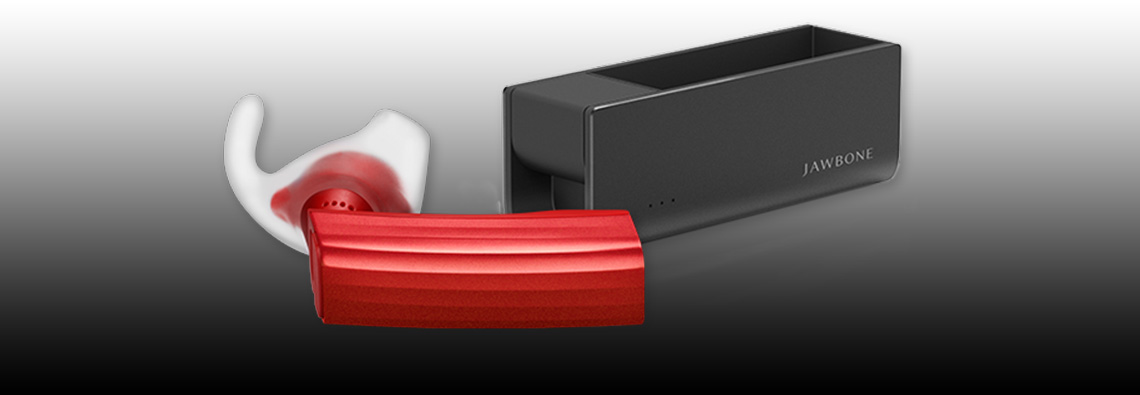
jawbone-era-review-man-riding-bike-qtoothThe [easyazon_link asin=”B00H2RP71G” locale=”US” new_window=”default” nofollow=”default” tag=”uneomediacom-20″ add_to_cart=”default” cloaking=”default” localization=”default” popups=”default”]Jawbone ERA Bluetooth Headset[/easyazon_link], manufactured by the Aliph company who are also the makers of the Jawbone Up, was introduced as an update from their popular and successful Jawbone Icon. It was meant to have superior audio and to improve on the fit and comfort of its predecessor. Unfortunately in our opinion it didn’t quite do either. Please keep in mind that we have owned several of both models and have used them extensively. It is from this experience that we are drawing our opinions.

First up is the audio quality. The audio fidelity on this might be just fine… except that it is not nearly loud enough. This lack of volume is true for either the user or for the person on the other end of the call. The ERA uses what is known as “adaptive volume” control. That means that the audio level should automatically increase or decrease depending on the volume level of the wearer’s environment. We’re fine with that if the it actually did a good job of matching, or competing with, the surrounding noise. We found that it is lacking in this department. It would be great if there was some way to manually set a base volume level from which the adaptive circuitry could then make its adjustments. Instead the user is stuck with whatever volume the circuit decides it should be. It just didn’t do its job to our satisfaction. We much prefer the quick and easier manual controls that were on the Jawbone Icon.

Second, the positioning of the Voice Activity Sensor is far more finicky than the Jawbone Icon. The Voice Activity Sensor, or VAS (see diagram below), rests on your cheek and turns on the microphones by detecting when you are speaking by the vibrations that are conducted through your jawbone (hence the name).

jawbone-era-review-web-tech-specsWe’ve found that even small variations on where the VAS is placed means the difference between a normal sounding voice when we speak versus the ERA switching to its conduction mode which essentially makes us sound like a robot. The conduction mode means that the normal microphones are shut off and all audio is picked up only through the vibrations of the voice that are transmitted through the body. FYI: Conduction is the same technology being used for both transmitting and receiving audio with the Google Glass project. It is another of Google’s many feature missteps with Glass’ introduction. Bone conduction just can’t replace normal hearing fidelity experienced by the human ear. However it must be said that bone conduction technology is an absolute miracle when it comes to hearing aids and helping those with hearing loss. Once again, the Voice Activity Sensor feature was far more forgiving and workable in the Jawbone Icon.

jawbone-era-review-woman-driving-car-qtoothThird, we must take issue with Jawbone advertising these as having HD (high definition) audio. HD audio means something very specific and these headsets do not met the criteria. The Jawbone ERA uses the A2DP audio protocol for Bluetooth which is limited to 320 kbit/s for mono and 512 kbit/s for stereo. This means that it is impossible for these headsets to transfer audio information at the rate required to deliver HD audio which is specified as 1,411.2 kbit/s (CD quality) or up to 6.144 Mbit/s (Dolby Digital Plus) or even 18 Mbit/ s. True, there are some “lossless” formats that can be in the 400 – 1,411 kbit/s like FLAC but they are not standards accepted by the industry as being HD. Now that said, 320 kbit/s isn’t bad. In fact, that’s considered to be on the high end for the MP3 format. You know, the quality at which iTunes and similar services decide they can charge you about a dollar extra per track? So, yes, it is good quality audio for the format but to call it HD is very misleading.

jawbone-era-review-portable-charger-qtoothAnd finally, the last thing we want bring up is how they came so close to turning the world of Bluetooth headsets on its ear, so to speak, by the inclusion of motion sensors. Right now they are using this circuitry for a “shake to pair” and “tap-to-answer” functions. Although we find these features fun, they are a bit gimmicky. It would’ve been so cool if it could be used for controlling a cursor, for instance, or for controlling any other type of device by motions of the head. This could also be incredibly enabling for those with motor issues, think quadriplegics or amputees for example. Jawbone says they have plans in the works for a pedometer that utilizes this circuitry and for releasing the API so that other people can develop apps for it, but it’s been close to two years or so and still no word. Maybe they were too busy developing and re-developing their UP Fitness Band. It uses similar electronics and had flaws upon its initial entry into the market. This just seems like a missed opportunity when it comes to the Jawbone ERA.

jawbone-era-review-phone-apps-qtoothSo, now that we’ve taken Aliph to task for their Jawbone ERA, please know that we are still fans and think that their Jawbone Icon is still one of the very best on the market. There is strong competition from the likes of Plantronics, Jabra, Blue Ant, Motorola and Bose, but Jawbone’s got game. We just look forward to seeing where they might be able to take it next. And if you are going to buy, you might want to go for the Jawbone Icon.

[easyazon_block add_to_cart=”default” align=”center” asin=”B00H2RP7BQ” cloaking=”default” layout=”top” localization=”default” locale=”US” nofollow=”default” new_window=”default” tag=”uneomediacom-20″]

[easyazon_block add_to_cart=”default” align=”center” asin=”B005MHGBX6″ cloaking=”default” layout=”top” localization=”default” locale=”US” nofollow=”default” new_window=”default” tag=”uneomediacom-20″]

For more details, check out the videos at the bottom of this post.

https://www.youtube.com/watch?v=0GPYwxvqW7s

https://www.youtube.com/watch?v=dUjKai_fccM

https://www.youtube.com/watch?v=OpN22N3lIaQ

Filed Under: Featured Content, Mobile, Reviews, Tech Talk, Wearable

Magnetyze Wireless Charging Case For The iPhone 5 – Coming Soon!

2013-08-12

Magnetyze Wireless Charging Case For The iPhone 5 Coming Soon! - QTOOTH

Wires are like SO last decade! Everything is going wireless, even our power supplies. The one thing keeping the iPhone 5 from being free from all cables is when it comes time to recharge it. However that is soon to change. Buqu Tech has just announced that its line of Magnetyze wireless charging cases will soon be available for the iPhone 5. Already available are wireless charging cases for the Galaxy S3, Galaxy S4, and iPhone 4/4s. Theses cases allow for wireless charging via the Magnetyze USB, desk, car or wall chargers.

It is incredibly easy to setup and use. Just slip the Magnetyze case onto the back of the iPhone and plug into the Lightning connector. Then place the encased phone onto a Magnetyze charger and the magnets will hold the phone in place while it charges. The cost for the charging case and a USB cable with a charger at the end is $60. From there, add accessories like the $40 desk charger which doubles as a stand or the $60 car charger which doubles as a mount.

Here are a few FAQs for this dual-purpose lightweight case that acts as both a shock-absorbent protector and a magnetic charger in one:

  • Eliminate cords or connectors! Built in to the case are magnets that act as both mounts and connectors that make charging your phone easy.
  • A cable is included with a USB connector on one end and a magnetic connector on the other. This allows for full speed magnetic charging from any USB port or USB charger.
  • Because the Lightning connector on your phone stays plugged in to the case there is no excessive wear on your phone’s charge port
  • Maintain easy access to all of your phone’s camera and function buttons. The case will not block you from using them as you normally would.
  • Choose from any of the Magnetyze charging accessories. The entire product line is compatible.

Use the links below to check out the entire series of great accessories from Magnetyze:

[amzn_product_inline asin=’B009TOPHN8′]

[amzn_product_inline asin=’B009TOPI3W’]

[amzn_product_inline asin=’B009BRGA2U’]

Filed Under: Featured Content, Mobile

Mad Style and Sound with the Beats by Dr. Dre Pill Bluetooth Wireless Speaker

2013-08-10

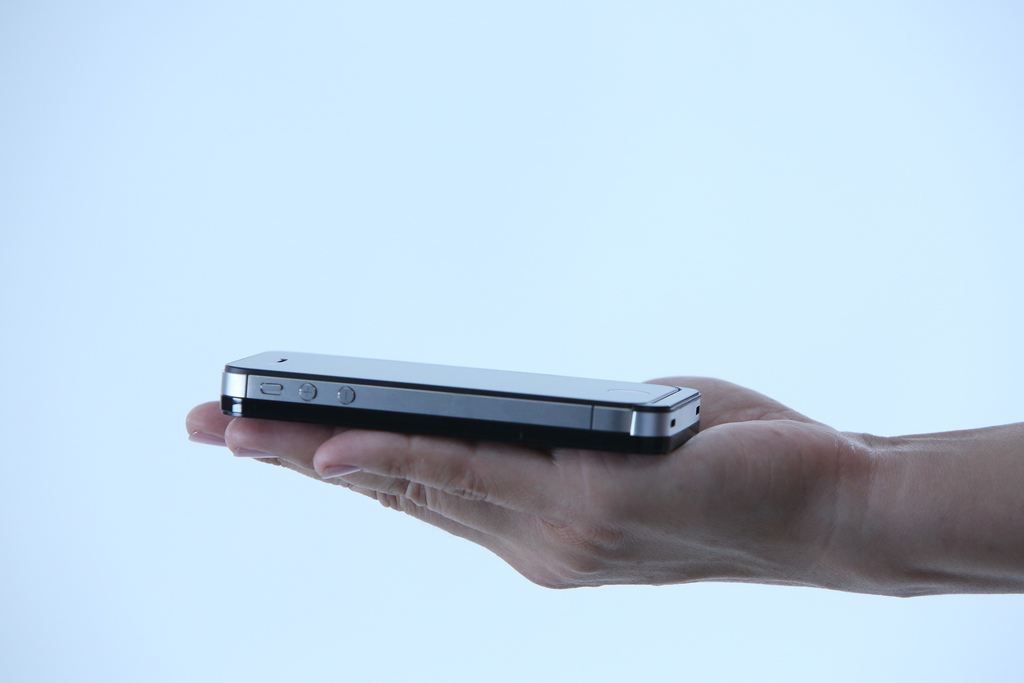
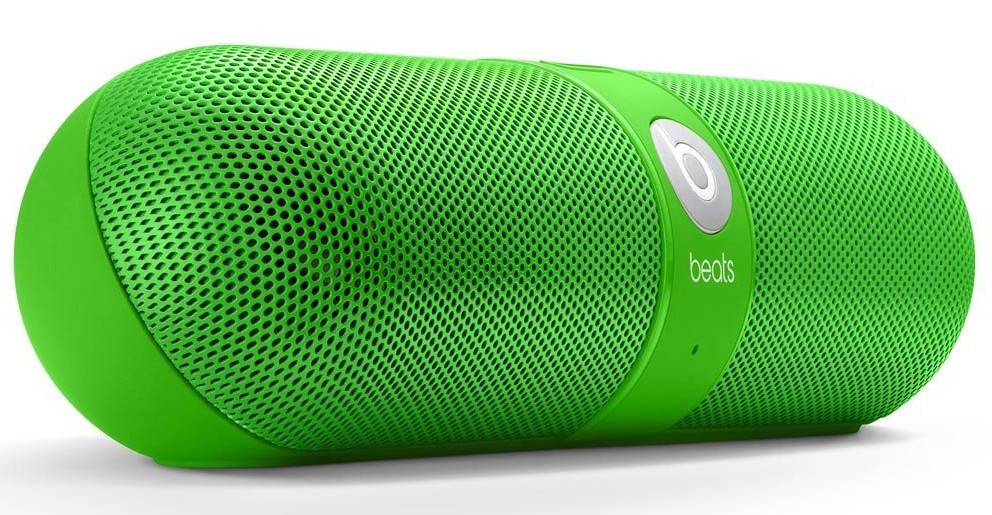
Beats by Dr. Dre Pill Wireless Bluetooth Speaker Green - QTOOTHWhat kid doesn’t like candy? For the kid in us all, Beats by Dr. Dre has brought us the Pill Bluetooth Wireless Speaker in an array of candy colors. Not only is it a powerful, compact speaker for listening to music but it also works as a speaker phone to make calls hands-free using any Bluetooth compatible phone. It is pretty impressive how much sound a lot of these type of devices get (take a look at the Jawbone Jambox, Cambridge SoundWorks Oontz, JBL Micro or Flip,etc…) considering how small they are.  The Pill is truly wireless. Sound is provided by hooking up any Bluetooth compatible audio device, like a phone/mp3 player/tablet/laptop,  and, because it runs on a rechargeable battery that can last up to 5-7 hours, it is cord-free. For some reason all of the manufacturers for these types of devices want to make them look HUGE. However, once you see them in person you realize just how small they are. The Pill is lightweight  and can literally be tucked in a cargo  pocket or a backpack. It even comes with carabiner clip on its carry case so you can attach it to your backpack. Here’s a decent representation of how big it really is (and this person’s hand is prety small):

Nicki Minaj Beats by Dr. Dre Pill Wireless Speaker Pink Limited Edition - Qtooth

[amzn_product_inline asin=’B00C9THROW’]

Even though there are a lot of similarities in this crowded field of competitor’s there are a few features that set it apart:

The Pill Bluetooth Wireless Speaker features NFC, otherwise known as Near Field Communication, which is a form of very low power wireless that allows you to simply tap your phone on the speaker and it have it automatically connect, or pair, via Bluetooth. Can’t get much easier than that. It does require an NFC capable phone, however. Most of the recent Android phones have it, unfortunately the iPhone doesn’t…yet. Rumor has it that the iPhone 5s or 6, or whatever it will ultimately be called, is supposed to have it. We here at QTOOTH sure hope so. We’ll see!

The Pass-through Audio feature means that the Pill has both in and out jacks. So even without an NFC/Bluetooth device you can still hook up your computer or other audio source with a cable. This also means that the audio out can make any audio system into a Bluetooth sound device. Leave it plugged in to your home stereo system and stream music from your phone, laptop or tablet. This is a massive plus when comparing the Pill to the competition.

The Pill can also act as a speaker phone capability and does it with an ease that is missing from other models. One button does it all when it comes to a call. If you are listening to music and a call comes in you the option to answer it with through the Pill. Tap the ‘b’ button on the front the answer. If another call comes in while you are still on the first call, tap and hold to ignore or tap quickly to switch to the new call. Switch back and forth between the calls with another button tap or hang up with a sustained press of the button.  The calls quality was very clear without a lot of shouting or ambient noise.

And did we mention the riot of colors this comes in? The light pink one pictured above is a limited edition Nick Minaj version. All of the other colors for the Pill Bluetooth Wireless Speaker are pictured below.


[amzn_product_inline asin=’B00CJGB9DU’]

[amzn_product_inline asin=’B00CJGATTA’]

[amzn_product_inline asin=’B00CJGAV0W’]

[amzn_product_inline asin=’B00CJGAZPS’]

Black

[amzn_product_inline asin=’B008FQMUYK’]

White

[amzn_product_inline asin=’B008FQMW3E’]

Filed Under: Entertainment, Featured Content, Home & Office, Mobile, Reviews

  • « Go to Previous Page
  • Page 1
  • Page 2
  • Page 3
  • Page 4
  • Page 5
  • Interim pages omitted …
  • Page 7
  • Go to Next Page »

Primary Sidebar

Affiliate Disclosure

This website uses affiliate programs for monetization. At no additional cost to you, links to various sites mentioned in posts may result in a commission that is credited to this site if you make a purchase.

Some affiliate programs and affiliations include, but are not limited to, Commission Junction, Apple, Google, Amazon.com and more.

For complete details
click here.

Copyright © 2026 · Preferred Hosting by WP Engine and Domain Name Registry by Namecheap

We are using cookies to give you the best experience on our website.

You can find out more about which cookies we are using or switch them off in .

QTOOTH
Powered by  GDPR Cookie Compliance
Privacy Overview

This website uses cookies so that we can provide you with the best user experience possible. Cookie information is stored in your browser and performs functions such as recognising you when you return to our website and helping our team to understand which sections of the website you find most interesting and useful.

Strictly Necessary Cookies

Strictly Necessary Cookie should be enabled at all times so that we can save your preferences for cookie settings.

3rd Party Cookies

This website uses Google Analytics to collect anonymous information such as the number of visitors to the site, and the most popular pages.

Keeping this cookie enabled helps us to improve our website.

Additional Cookies

This website uses the following additional cookies:

(List the cookies that you are using on the website here.)