• Skip to primary navigation
  • Skip to main content
  • Skip to primary sidebar

QTOOTH

News & Reviews for Living with Bluetooth Wireless

  • Reviews
    • Wearable
    • Gaming
    • Health & Fitness
    • Home & Office
  • How To Tips
  • Industry News
  • About QTOOTH

Featured Content

PetziConnect – A Wireless Remote Camera & Treat Dispenser For Pet Owners

2013-08-09

petziconnect-dog-qtooth

Pet owners have gone boffo crazy for gadgets that allow them to remotely monitor and care for their pets. How modern! Taking advantage of this developing mania, err… we mean need, is Petzila who has created the PetziConnect wireless monitor. It includes not only a wireless HD camera and microphone but also a dispenser that will provide treats for your pet when triggered remotely.

Where other devices, like the FitBark or the Tagg Pet Locator are more for tracking either the fitness or the location of your pet, the PetziConnect allows you to interact with your pet even while you are at another location, like work, school, vacation, etc…

petziconnect-box-front-side-back-qtoothUsing the camera and microphone allows pet owners to remotely summon their furry four-legged family member from their mid-day nap and then watch as they react to the disembodied voice of their master coming out of a box plugged into the wall. The PetziConnect can also record video or take photos. The owner then has the option to reward their feigned interest by dispensing a treat using a button on either the iOS or the Android app or through the internet.

Petzila was seeking funding on Indiegogo to manufacture the first batch of its wirelessly connected pet monitor/treat dispensers but easily passed its crowdfunding $30,000 goal. And in case you were wondering, PetziConnects says its device is made rugged enough to survive being mauled by a frenzied pet hoping to get more treats or to liberate its owner from inside the box. The lowest price-tag for crowdbackers to purchase a device is $99 and is scheduled for a December delivery.

In the meantime, check out all of the alternatives that are already available in the links below.

[vimeo http://vimeo.com/69582864]

[amzn_product_inline asin=’B006ZP8UOW’]

[amzn_product_inline asin=’B0077I42S4′]

[amzn_product_inline asin=’B001COT8LU’]

[amzn_product_inline asin=’B003WF0LDG’]

Filed Under: Featured Content, Home & Office, News

Moto X Phone – Revealed by Google at Last

2013-08-03

The Moto X! Finally revealed by Google it represents a bid to revive the once mighty mobile tech giant. We here at QTOOTH remember having several Motorola phones over the years. We loved them. Durable with excellent call quality. Nothing else compared. The ultimate benchmark for quality was a Motorola phone on the Verizon network. We were huge, devoted fans. Remember those days?

And then the smart phone revolution began and Motorola was completely cut out of the loop. How they didn’t see it coming is a mystery. Apple, Samsung, HTC, Nokia, LG, even Blackberry had at least something going on. But not Motorola.

So, after much hype and anticipation, Motorola Mobile’s new owner Google finally rolled out their new offering. The general consensus? Better luck next time. Overpriced, under-performing and laden with curious choices, including NOT including the latest version of the Android operating system. This has to be one of the biggest mysteries, after all, Google makes Android and Google owns Motorola. Why wouldn’t it be sporting you latest offering? Baffling…

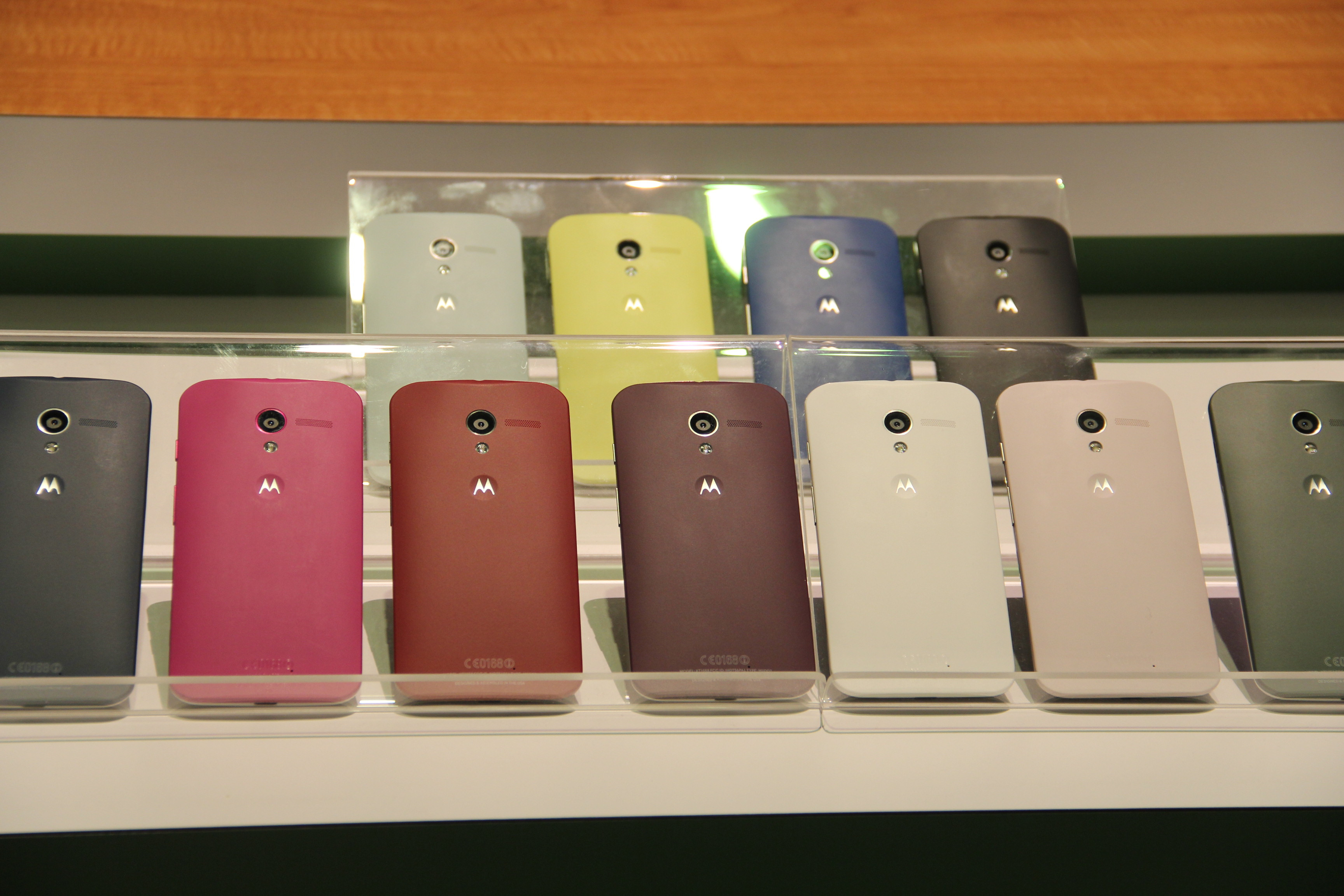
The biggest feature that they are touting? It’s ability to come in different colors… after being special ordered… and taking at a few days to get to you. Really? When most people want a phone they want it immediately. They want to walk into a store and by it today. And in the end, who really cares what color your phone is when you are just going to cover it with a case or some type of protector? That’s where the real style choices happen, not with the phone itself.

Google’s Motorola Moto X Phone - QTOOTH

Google’s Motorola Moto X Phone

Google’s Motorola Moto X Phone - QTOOTH

The phone features a 4.7-inch screen device is aimed at the iPhone and the Galaxy S phones. The Moto X features “all-day” battery life, a choice of colors and materials, and an instant-start camera, the company said today at a press event in New York. The Moto X is priced starting at $199 with a two-year contract and will only be available on all AT&T by the end of August or early September. That’s about the same time that the new Apple iPhone is set to hit the market and will probably make the Moto X completely irrelevant.

The device is the first homegrown smartphone from Motorola since Google acquired the business last year for $12.4 billion, as the Internet giant ramps up its hardware ambitions against Apple and others.

There is some claim to being made in U.S.A. and are hoping to attract fans because of this. The reality is that it will only be assembled in Texas at a former Nokia factory and that this will mostly involve the customizing of the color options.  Customers can choose the colors of the front, back and accents of the Moto X on the website Motomaker.com. Motorola guarantees phone delivery in four days. One of the custom options is to have a wooden back made from a choice of ebony, teak, rosewood, or bamboo. Only that last choice is remotely sustainable. So? Not exactly hi-tech and not exactly made in America. Unlikely that they will fool anyone with this ruse.

Here are a few good details:A curved, ergonomic back and 10-megapixel camera. Similar to the Motorola Droids on Verizon Wireless, the Moto X runs on a chip system known as X8. Motorola developed twin lower-powered chips to run alongside the Qualcomm Snapdragon S4 Pro main processor.

The multichip system is designed to conserve battery life by letting the processor sleep while the lower-power chips work in the background — sensing location, speed and message notifications, as well as listening for voice commands. As an example, even if the phone is locked, the user can say, “OK Google now,” to create and send a message, or open turn-by-turn navigation through Google Maps. And with two flips of the wrist, sensors will turn on the camera and be ready to shoot in 2 seconds, said Rick Osterloh, product chief for Motorola.

As we see it here at QTOOTH maybe Google/Motorola will make more of their investment back when they introduce it to the international market. Maybe they are just trying to establish value by charging $199 with a two year contract but it should be half the price, or less, for what it offers. We’ll take an iPhone 4s or a Galaxy S3 over this anytime. Also, maybe they have plans to roll out instant upgrades to the latest Android OS. Whatever their plans are, they better move quickly to save this phone from an early death.

[amzn_product_inline asin=’B005SSB0YO’]

[amzn_product_inline asin=’B004ZLV5UE’]

[amzn_product_inline asin=’B00A29WCA0′]

Filed Under: Featured Content, Mobile, News, Reviews

Google Chromecast – What Is It… and Why You Should Care!

2013-08-01

Chromecast Display Sample - QTOOTH

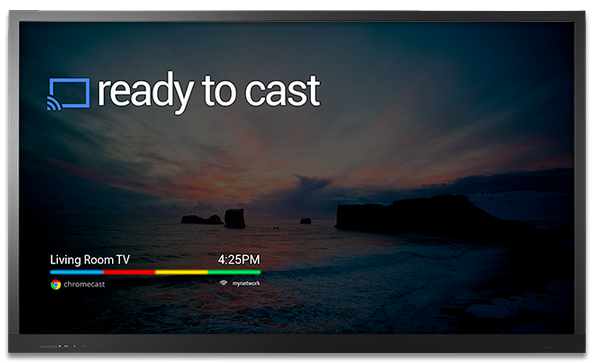
What is Chromecast? Chromecast is a brilliantly simple product: plug it into your TV and stream video and music to it from apps running on your Android device, iPhone, or laptop. Chromecast has no need for a remote; just use whatever device you’re streaming from as the remote. Instead of Chromecast having its own dedicated user interface it’s got a single screen that displays the time and, if nothing is being streamed, an indicator as to whether or not it’s connected to your WiFi. How can it be so simple? Because the device you’re streaming from acts as the primary interface. Chromecast is simply a wireless media streamer to your TV and doesn’t try to be anything more.

What’s in the Box?

First, the price of Chromecast is only $35. Google felt compelled to assure the media that they’re not selling them at a loss. I believe them. Even though it has a Wi-Fi chip, a basic CPU, 2GB of flash memory, RAM, a licensing fee to use HDMI, the cost of these parts are pretty cheap these days. Plus it is really a re-purposing of existent, very common technologies so the R & D I’m sure was next to nil. And yet we love it. There’s is so much brilliant technology already in existence and we here at QTOOTH know that most of us, whether as developers or as the end-user customer, barely scratch the surface of the devices that we already own.

The setup is ridiculously easy. Plug it into an HDMI port, give it some juice (through USB, which most new TVs have, or a standard adaptor), then run the Chromecast app on a laptop or other compatible device so that it can connect to your Wi-Fi network. That’s it!

From the day of its release, the Chromecast App has been compatible with some of the most popular online video apps, including Netflix and YouTube. No need to update these apps either, just launched them and the Chromecast button is already there. There is even an extension for Chrome that promises to greatly expand the functionality of the device. It is an early, Beta release and I’m sure it will improve over time.

It’s interesting to note that Google released this with very little fanfare, even though in our eyes this is one of the coolest things they’ve ever released as a physical product (here’s looking at you Google Glass).

There are a few things that will need to be improved, but this is off to a great start. It will be interesting to see how competitors respond.

https://www.youtube.com/watch?v=cKG5HDyTW8o

So far the video streaming quality seems to be on par with Apple TV or the Xbox 360, especially when using an app or website like Netflix, Youtube, or Google Play, that been designed for compatibility.

If you’re using the Chromecast extension for Chrome on your laptop to project an otherwise incompatible video site (like Hulu or HBOGO), however, video quality can dump quite a bit depending on your setup. It’s using your laptop as a middle man to encode the video signal and broadcast it to the Chromecast, whereas the aforementioned compatible sites just send video straight to the dongle, mostly removing your laptop from the mix. When casting video tabs on a 2012 MacBook Air running on an 802.11n network, the framerate was noticeably lower and there were occasional audio syncing issues.

While we’re on the topic, the Chrome extension packs a bit of an easter egg: the ability to stream local videos from your laptop to the Chromecast. Just drag a video into Chrome, and it’ll start playing in a new tab. Use the Chrome extension to cast that tab, and ta da! You’re streaming your (totally legitimate, not-at-all-pirated-am-i-right) videos without bringing any other software into the mix. I tried it with a bunch of video formats (mostly AVIs and MKVs. MOVs kinda-sorta work, though most won’t push audio from the laptop to the TV for some reason), and they all seemed to work quite well, albeit with the lowered framerate I mentioned earlier.

Even within the apps that have already been tweaked for Chromecast compatibility, there are some day-one bugs. Sometimes videos don’t play the first time you ask them to, instead dropping you into a never-ending loading screen. Other times, the video’s audio will start playing on top of a black screen. These bugs aren’t painfully common, but they’re not rare, either.

As compared to AirPlay, AppleTV’s built-in streaming feature, Chromecast’s wins because of its cross-platform compatibility. Whereas AirPlay is restricted to Macs and iOS devices and only has limited support for Windows through iTunes, Chromecast works well with any iOS, Android, Mac, or Windows app that utilizes Google’s Cast SDK (or software development kit). although Chromecast just launched, we would be very surprised if developers didn’t jump on this and expand upon the universe of applications that are possible. That means it could be adopted by TV, speaker, entertainment device manufacturers and more, putting the AirPlay protocol in certain jeopardy of being the odd man out.

As expected the experience on Android is a slightly better than it is on iOS. Google has considerably more freedom on their own platform; as an example, apps that use Chromecast can take priority over the lockscreen so that the user can operate the controls, like play/pause/skip, of a video without having to fully unlock their Android device. But that’s a minor thing and, for the most part, all of the primary features work just as well on iOS as they do on Android.

Conclusion

This is the future. It’s probably in all of our futures. If not Chromecast then something almost exactly like Chromecast.

[amzn_product_inline asin=’B00DR0PDNE’]

[amzn_product_inline asin=’B00DVFLJKQ’]

[amzn_product_inline asin=’B00E5M7P1G’]

Filed Under: Entertainment, Featured Content, Mobile, Reviews

Polar Stride Sensor Bluetooth Smart for iPhone 5 and 4S

2013-07-13

polar-smart-stride-sensor-qtooth

One of the the world’s first, the Polar Stride Sensor Bluetooth Smart connects directly to iPhone 5 or 4S to deliver speed, distance and run cadence. The sensor provides all the data needed for running with the exception of heart rate and you can add a Polar H7 heart rate monitor to receive that data. A great way to realize the full potential of the Smart Stride Sensor is to pair it with the Polar H7 Bluetooth Smart Heart Rate Sensor, an armband for iPhone and a tube of heart rate monitor electrode cream.

polar-smart-stride-sensor-product-qtooth

The Polar Stride Sensor Bluetooth Smart comes with a Polar S3+ Stride Holder that threads directly into the show laces. It is worth having a couple of these if you have more than one pair of running shoes so you don’t have to re-thread the pod, simply move it from holder to holder.

The Polar Bluetooth Stride Sensor also has a user changeable battery and complete stride sensor calibration instructions are available on the Polar website.

For folks that bring an iPhone 5 or 4S with them for exercise, or have to have it for work, this is a good solution. Competitive runners will be much more apt to stick with GPS watches.

[amzn_product_inline asin=’B00CCASIMS’]

[amzn_product_inline asin=’B007S088F4′]

[amzn_product_inline asin=’B00CELI5HI’]

Filed Under: Featured Content, Health & Fitness, News, Reviews, Wearable

Twine: The Wireless Sensor That Monitors Your Life and Alerts You – Wherever You Are

2013-07-12

So here’s the scenario:
You’re at work, on vacation, goofing off on holiday… but you have that nagging feeling that the relentless rainstorms back home might be finally adding up to enough to flood your basement. Again. Although you can’t see it, things are happening pretty much exactly as you fear is starting to look like this:

Twine Monitoring System - QTOOTH

Not so bad you think? EXACTLY! It’s just starting to come into the basement. Luckily you have a Twine wireless sensor unit ready to detect the state of things and it sends you a lovely notification through text, email, tweet, etc… Like so:

TWine Sensor Alert on iPhone - QTOOTH

Now you can call your family, neighbors, house-sitter, handyman, and make sure things are taken care of BEFORE there’s any real damage from an otherwise avoidable disaster. But wait! The Twine is capable of doing a lot more. And if you are really clever, and one of those home inventor/creative-types, you’re pretty much only limited by your imagination. Here’s the lowdown for Twines own site:

Listen to your home, wherever you are.

Twine alerts you to small problems before they become big problems. Quick Wi-Fi setup and AAA batteries that last up to 3 months let you drop Twine anywhere you want to monitor temperature, vibration and orientation. Additional wired sensors detect floods, leaks, opened doors, and signals from your other home systems. Tell a web app what to listen to with simple rules, and you’ll get notifications and peace of mind via email, SMS, Twitter and more.

How it works

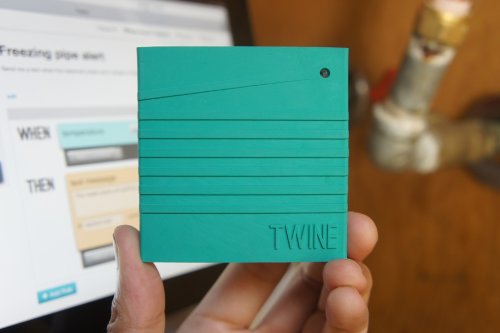
Twine is a wireless sensor block tightly integrated with a cloud-based service. The durable, rubbery block has Wi-Fi, on-board temperature and orientation sensors, and an expansion connector for other sensors. Power is supplied by micro USB or two AAA batteries that will run for up to 3 months (and Twine will email you when you need to change the batteries).

twine-screenshot-qtoothThe Twine web app makes it simple to set up and monitor your Twines from a browser anywhere. You set rules to trigger messages — no programming needed. The rules are put together with a palette of available conditions and actions, and read like normal sentences: WHEN moisture sensor gets wet THEN text “The basement is flooding!”

Because the hardware and software are made for each other, setup is easy. There’s nothing to install — just point Twine to your Wi-Fi network. Sensors are immediately recognized by the web app when you plug them in, and it reflects what the sensors see in real time, which makes understanding and testing your rules easy.

Listen to your world

Talk to the Web

Out of the box, Twine has several internal sensors.

Temperature

Measure the temperature. Are your pipes freezing? Is your air conditioning broken? Is it nice up by the lake today?

Vibration

Sense when Twine starts or stops shaking, with adjustable sensitivity. Know when your laundry’s done, your sump pump starts, or someone’s knocking at the door.

Orientation

Sense which side of Twine is facing up. Trigger actions by flipping Twine over, or detect when the garage or the oven is left opened.

Plug in additional external sensors and they pop up on the web app, ready to use.

External temperature

Measure the temperature where your Twine can’t go. Make sure your freezer or refrigerator is working properly, your grain silo isn’t too hot, or that the weather outside is nice.

Magnetic switch

Triggered when a magnet is moved toward or away from it. Get notified when your door or window is opened, the mailbox is opened, or your dog goes outside.

Moisture sensor

Detect the presence of water. Know when your basement floods, when your AC’s drip pan is overflowing, or when it rained.

Breakout board

Plug in your own digital input without soldering. Terminals for signal, 3.3V power and ground are provided. Connect your doorbell, garage door or other electrical system.

Cloud Shield

The easiest way to make an Arduino talk to the Internet. Add Twine actions to your project, or use Arduino to build custom sensors for Twine.

Twine can contact you in a number of ways.

  • Email
  • Twitter
  • Text message *
  • Phone call (text-to-speech)*
  • HTTP GET and POST requests
  • Put your real-time Twine sensor information in Panic Status Board or your own webpage

* With optional paid account: $5/month for 100 text messages, $9/month for 200 text messages or voice calls.

via Supermechanical: Twine

twine-wireless-sensor-monitor-qtooth

These is one cool unit. We here at QTOOTH can’t wait to get our hands on one. I see these, or similar devices, becoming routine in many homes in the near future. Can you say, “Hey insurance company! How’s about a discount on our home or renter’s policy if we promise to run these?”

[amzn_product_inline asin=’B009YWTPNS’]

[amzn_product_inline asin=’B009YWTNFI’]

[amzn_product_inline asin=’B009YWTOF2′]

Filed Under: Featured Content, Home & Office, Mobile

Wireless Fun with the Sphero iOS and Android App Controlled Robotic Ball

2013-07-09

Sphero Wireless App Controlled Robotic Ball - QTOOTH

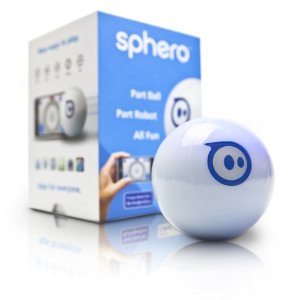
And now for a little bit of fun! Check out the Orbotix Sphero, the first robotic ball gaming device that you control with a tilt, touch, or swing from your smartphone or tablet. You can even use Sphero as a controller for on-screen gameplay. Sphero interacts seamlessly with mobile apps, giving you new ways to test your skills, play games with friends, or get inventive and co-op this for your own nefarious purposes. A Bluetooth connection makes Sphero ready to play as fast as you can launch an app. And with single- or multi-player games, there will be plenty of surprises.

Acclaimed by Popular Science, Forbes, Wall Street Journal, and MSNBC and featured as one of the year’s hottest gadgets by TechCrunch, Wired, Gizmodo, Engadget, and Make magazine, Sphero offers a new type of game play for the smartphone generation.

Sphero Android and iOS Robotic Ball - QTOOTH

A durable, impact-resistant polycarbonate shell allows for lasting gameplay. Easily operate the Sphero robotic ball from your smartphone or tablet’s touchscreen. Controlling from your mobile device is easy and intuitive–just tilt, gesture, or swing, and it responds. Because your experience changes with every new app you download, the entertainment never stops.

Playing with Sphero - QTOOTH

Sphero’s Bluetooth connection ensures control is always responsive and fluid, even at long ranges. You will be able to steer through homemade obstacle courses, weave it between feet, and even out-maneuver your family pet.

Sphero Game Play - QTOOTH

Sphero immerses you in a new type of gameplay called mixed-reality, in which real and virtual elements are seamlessly merged together. Several free apps are available for download (and more continuously being developed), providing you with plenty of gaming thrills.

Orbotix Sphero App-Controlled Robotic Ball - QTOOTH

Standout apps include Sphero Drive, where you can choose from touchscreen interfaces like joystick, old-school RC control, and tilt mode to give you a variety of ways to test your skills and challenge friends. In a mixed-reality version of golf, you create a hole, then swing your phone to putt towards the hole. Think Sphero just rolls? Think again. Hold it in your hand, start up Chromo, and move Sphero to match colors and patterns as they appear on your screen.

Roughly the size of a baseball, Sphero is compact enough to slip into a bag or jacket pocket. The durable, impact-resistant polycarbonate shell allows for lasting gameplay. And with customizable colored LEDs, you can change color to suit your mood, play in the dark, or create a team color.

Sphero Changes Color with LEDs - QTOOTH

Sphero is extremely efficient. A single battery charge delivers over an hour of full-throttle play, thanks to cable-free induction charging. Sphero is compatible with a variety of mobile platforms, including iOS 4.0 or greater, Android 2.2, Android 2.3.3+, and Android 3.0+. Sphero also has an Open API (application program interface) for developers, which allows virtually anyone to program new games and apps for Sphero. The API is intuitive, so you will be able to use it whether you are a seasoned developer or a novice app programmer.

What’s in the Box? Sphero robotic ball, inductive charging base, quick-start card, and user’s manual.

Sphero Logo - QTOOTH

Free Apps Available via Download Include:

Sphero

Familiarize yourself with Sphero’s personality, give commands, and gain access to basic driving functions. See where you stand on leaderboards and achievements. Even discover new apps as they roll in.

Drive

Drive Sphero with joystick, tilt, or old-school remote controls. Create challenging courses, race against friends and family, or turn out the lights for a little night racing.

Golf

Sphero is the ball and your phone is the club. Create a “hole” then swing your phone or swipe a finger to hit. Challenge friends to a round of office golf, create your own course at home, or venture out and make your own course practically anywhere.

SpheroCam

Have fun with Sphero and never miss a funny moment. Use the built-in camera on your device to record video or take snapshots while you simultaneously drive it. Will your SpheroCam video go viral? Record, upload, and find out!

Draw N’ Drive

Use your finger to trace a shape or path on the screen and it will follow it before your eyes. Just give your smartphone or tablet a shake to clear the slate. Even make Sphero change colors as it rolls by using the integrated color wheel.

Chromo

Get ready to challenge your coordination and memory with the first app that lets you use it as a controller. Move Sphero to match the colors on your screen for an entirely new way to challenge yourself. You can choose from six different game modes.

MacroLab

Create easy, repeatable programs and macros. Arrange simple commands and settings in any combination you choose to let Sphero drive autonomously, follow unique patterns, and more, all while learning basic programming. Play your commands, save favorites, and even share them with friends. MacroLab makes programming easy and fun.

So we at QTOOTH say give it a whirl, it looks like fun!

[amzn_product_inline asin=’B0081J2LRC’]

[amzn_product_inline asin=’B008X0ACP2′]

[amzn_product_inline asin=’B007HZLLOK’]

Filed Under: Entertainment, Featured Content, Gaming, Reviews

  • « Go to Previous Page
  • Page 1
  • Page 2
  • Page 3
  • Page 4
  • Page 5
  • Page 6
  • Page 7
  • Go to Next Page »

Primary Sidebar

Affiliate Disclosure

This website uses affiliate programs for monetization. At no additional cost to you, links to various sites mentioned in posts may result in a commission that is credited to this site if you make a purchase.

Some affiliate programs and affiliations include, but are not limited to, Commission Junction, Apple, Google, Amazon.com and more.

For complete details
click here.

Copyright © 2026 · Preferred Hosting by WP Engine and Domain Name Registry by Namecheap

We are using cookies to give you the best experience on our website.

You can find out more about which cookies we are using or switch them off in .

QTOOTH
Powered by  GDPR Cookie Compliance
Privacy Overview

This website uses cookies so that we can provide you with the best user experience possible. Cookie information is stored in your browser and performs functions such as recognising you when you return to our website and helping our team to understand which sections of the website you find most interesting and useful.

Strictly Necessary Cookies

Strictly Necessary Cookie should be enabled at all times so that we can save your preferences for cookie settings.

3rd Party Cookies

This website uses Google Analytics to collect anonymous information such as the number of visitors to the site, and the most popular pages.

Keeping this cookie enabled helps us to improve our website.

Additional Cookies

This website uses the following additional cookies:

(List the cookies that you are using on the website here.)