• Skip to primary navigation
  • Skip to main content
  • Skip to primary sidebar

QTOOTH

News & Reviews for Living with Bluetooth Wireless

  • Reviews
    • Wearable
    • Gaming
    • Health & Fitness
    • Home & Office
  • How To Tips
  • Industry News
  • About QTOOTH

Mobile

Samsung Galaxy Gear – The Evolution of the Smartwatch

2013-09-04

Amid great fanfare, Samsung introduced their Galaxy Gear. The occasion for the introduction was the IFA 2013 Consumer Electronics Show, the largest of its kind in the world. It is even bigger than the CES trade show that is held every year in Las Vegas. There are so many exciting things coming out of this year’s event that it may take a while for us here at QTOOTH to even cover it all. For Samsung, this is their first foray into the brave new world of smartwatches. Let’s take a look at some of the exciting things that it represents, where they got it right and where they might want to improve the product.

samsung-galaxy-gear-smartwatch-front-view-with-band-qtooth

First, let’s talk about the fact that smartwatches will not be for everyone. The wearing of watches is at an all time low no matter how smart they are. People are quite comfortable with getting thew time and just about every other type of data from the smartphones, or their computers, cars, tablets, radios, etc… So even despite this limited market, it is interesting to see so many manufacturers getting on the bandwagon i the rush to provide some form of smartwatch. There are already ones on the market from major players like Casio, Nike and Sony, and the leading edge of this mania came from the small upstarts like the Pebble, Agent, and others. It is also a very strong rumor that Apple will be introducing their own smartwatch within the next few weeks.

Of course the reason we here at QTOOTH have our reservations when it comes to any form of smartwatch is the fact that they are not hands free. For us the reason to go wireless is so that we can “un-tether” ourselves from our technology. Just by the very nature of a wrist mounted device means that it will take not just one hand to operate but two! One to wear the device and the other to operate whatever interface is included. Plus, the watch is located near your hand which is often located in a position that makes it difficult to see, or to hear. Of course some things on a watch can be voice-controlled, but so far we haven’t seen a lot of functionality that can be accessed by voice alone on these first smartwatches.

That said, the Galaxy Gear is one of the best options in a smartwatch that we have seen so far. Seeing that all of the might of a behemoth like Samsung is behind the project, including all of their available technologies, this shouldn’t come as a surprise. Starting with its screen, the Galaxy Gear has a 320 x 320-pixel, 1.63″ diagonal AMOLED touchscreen. The brain of this smartwatch is provided by an 800 MHz processor powered by a 315mAh battery. For audio, it has a speaker and a pair of mics for recording and playing back video content.  This also allows for communicating with phone calls using the built-in dialer that works with whatever Galaxy device to which it is paired. Mounted into the wrist strap itself is a BSI (back-illuminated sensor, or back-sided illumination) sensor with an autofocus lens so that the wearer can capture 1.9-megapixel still images or 10-second videos at 720p, 640 or VGA quality resolution with sound. We have yet to get clarification as to whether the sound is captured in stereo via the two onboard mics or whether those mics are only paired for noise cancellation purposes when in use for making phone calls. Samsung states that the camera is designed more for convenience than it is for image quality. The camera also comes with a pre-installed app called Memographer for media management.

[amzn_product_inline asin=’B00FH9I0OC’]

So far there are a few dozen apps that will be available for the Galaxy Gear upon launch. This may be what sets this watch apart from the others. If Samsung can get a large amount of truly useful apps available quickly it will give it a real edge over the other entrants into this field. Like most of the other smartwatches, Gear can only display one app at a time due to its limited screen size and resolution. Each app is displayed as what’s known as a “card”, which is basically a slightly over-sized icon. To navigate your way around from one app to the next all you need to do is swipe the touchscreen with your finger. The other means of navigating your way through the watch’s offerings is to use the single button that is located on the right side of the body. A single press of this button will bring you to the home screen. Double pressing the button launches Samsung’s S Voice for voice controlling options and as triple press activates the “safety assistance” feature which will send your location info and a message to a saved contact in the event of an emergency.

samsung-smart-watch-lime-green-qtooth

As much as it seems like the Galaxy Gear should exhibit some real power, it seems a bit slow when executing some pretty basic functions, like launching an app. This is surprising considering that its processor is faster than what many of us had in our main computers just a few years ago. Part of the reason for this may be because it is communicating and synching with the wirelessly attached device. This might be something that will improve as updates become available, even with its current hardware configuration. Some of the apps that did perform very well though were the watch faces, of which optional ones can be uploaded from the Gear’s Android companion app, as well as the Music app which is basically a remote control for any native or 3rd party app currently active on the connected device.

There are some odd limitations that come with what we are sure is the first generation of this device. Only 10 3rd party apps can be uploaded at a time. The interface could use a little bit of refining for a smoother experience. But one of the most interesting things is the fact that the S Voice feature can only be accessed by tapping the side button twice. That might be hard to do if your hands are otherwise occupied and misses the point of being hands-free. It would be nice if they included a specific voice command that would activate the voice control functions. That can be done as shown by Google Glass’ “Ok, Glass” to activate its voice command. As much as we’ve slagged on their device, that is one of the things that Google definitely got right.

samsung-galaxy-gear-smartwatch-side-view-with-band-qtooth

We have a mixed review as far as the look of the device is concerned. Leaked reports had the Galaxy Gear looking pretty hefty but the one on display today was much more svelte. However, it is still pretty big and considering the color options that they have so far. Two of the colors are Rose Gold and Mocha Gray which are definitely aimed at a more feminine fashion sense. The size of this device look plenty awkward in our opinion when worn on even slightly petite wrists. For men it seems to be just about right in size and proportion. Men may prefer the JET Black or Oatmeal color, but for the sporty or flashy of any persuasion they may opt for the Wild Orange or Lime Green. Speaking of which, because of the utilitarian/industrial funkiness of the design this may not be what many people would want to wear on more formal occasions, but we suppose that is a subjective call.

samsung-smartwatch-orange-qtooth

Battery life on this device is pretty much limited to a single day of “regular” use. We are not sure what that means exactly yet, but that certainly puts it in a different class of fashion accessory than the average watch which can be worn for months at a time, or longer, depending on a person’s needs. That means that the Samsung Galaxy Gear will need to spend a fair amount of time on its included micro-USB-equipped plastic charging dock. The dock connects through five metal pins, or leads, located on the rear of the watch.

[amzn_product_inline asin=’B00FH9I0FQ’]

Another limitation, and perhaps its most significant, is that it is only compatible so far with the Galaxy Note 3 and the new Note 10.1. It is most likely to work with the Galaxy S4 phone when it gets the Android 4.3 update. What’s really unfortunate though is the fact that it will most likely never work with any non-Samsung smartphone or tablet.

So, to be honest, the future has arrived and the Dick Tracy watch is now a reality. In fact, it’s better and more powerful than anything he could’ve imagined. And yet will people want it? We’d love to get your feedback in the comments below or contact us directly.

The Samsung Galaxy Gear Smartwatch will cost $299 when it starts shipping on September 25th to the world, except to the US and Japan who will have to wait until October. Strange release dates. Perhaps they just want to tease the two biggest markets for a bit? Or perhaps they’re afraid that they’ll sell out immediately once the US and Japan csan get them directly. We’ll see!

[amzn_product_inline asin=’B00892N53U’]

[amzn_product_inline asin=’B00AZOA5EC’]

[amzn_product_inline asin=’B009ELZ8ZS’]

[amzn_product_inline asin=’B007VG6ZC8′]

Filed Under: Featured Content, Mobile, News, Reviews, Wearable

Jawbone ERA – Is It Really The Best? – Review

2013-08-13

We’re very hard on Bluetooth headsets here at QTOOTH and the Jawbone ERA is no exception. Here’s our take on one of the most universally praised headsets on the market.

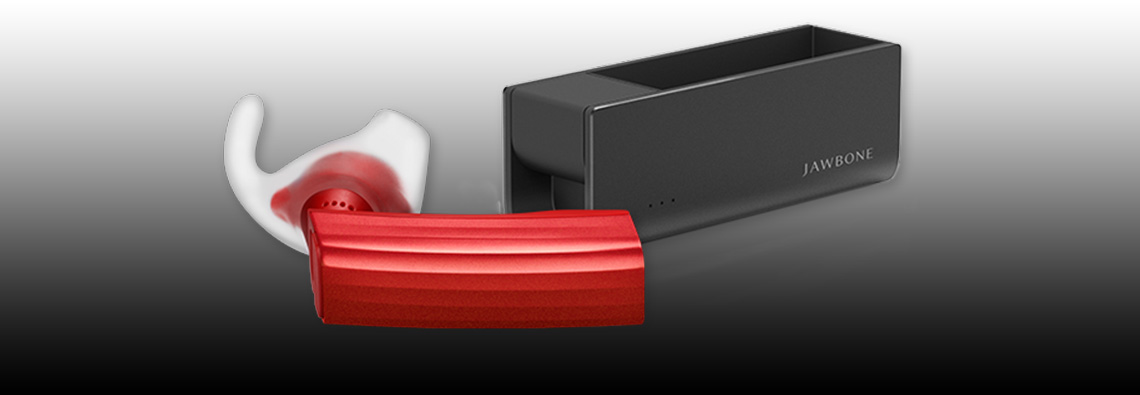
jawbone-era-review-man-riding-bike-qtoothThe [easyazon_link asin=”B00H2RP71G” locale=”US” new_window=”default” nofollow=”default” tag=”uneomediacom-20″ add_to_cart=”default” cloaking=”default” localization=”default” popups=”default”]Jawbone ERA Bluetooth Headset[/easyazon_link], manufactured by the Aliph company who are also the makers of the Jawbone Up, was introduced as an update from their popular and successful Jawbone Icon. It was meant to have superior audio and to improve on the fit and comfort of its predecessor. Unfortunately in our opinion it didn’t quite do either. Please keep in mind that we have owned several of both models and have used them extensively. It is from this experience that we are drawing our opinions.

First up is the audio quality. The audio fidelity on this might be just fine… except that it is not nearly loud enough. This lack of volume is true for either the user or for the person on the other end of the call. The ERA uses what is known as “adaptive volume” control. That means that the audio level should automatically increase or decrease depending on the volume level of the wearer’s environment. We’re fine with that if the it actually did a good job of matching, or competing with, the surrounding noise. We found that it is lacking in this department. It would be great if there was some way to manually set a base volume level from which the adaptive circuitry could then make its adjustments. Instead the user is stuck with whatever volume the circuit decides it should be. It just didn’t do its job to our satisfaction. We much prefer the quick and easier manual controls that were on the Jawbone Icon.

Second, the positioning of the Voice Activity Sensor is far more finicky than the Jawbone Icon. The Voice Activity Sensor, or VAS (see diagram below), rests on your cheek and turns on the microphones by detecting when you are speaking by the vibrations that are conducted through your jawbone (hence the name).

jawbone-era-review-web-tech-specsWe’ve found that even small variations on where the VAS is placed means the difference between a normal sounding voice when we speak versus the ERA switching to its conduction mode which essentially makes us sound like a robot. The conduction mode means that the normal microphones are shut off and all audio is picked up only through the vibrations of the voice that are transmitted through the body. FYI: Conduction is the same technology being used for both transmitting and receiving audio with the Google Glass project. It is another of Google’s many feature missteps with Glass’ introduction. Bone conduction just can’t replace normal hearing fidelity experienced by the human ear. However it must be said that bone conduction technology is an absolute miracle when it comes to hearing aids and helping those with hearing loss. Once again, the Voice Activity Sensor feature was far more forgiving and workable in the Jawbone Icon.

jawbone-era-review-woman-driving-car-qtoothThird, we must take issue with Jawbone advertising these as having HD (high definition) audio. HD audio means something very specific and these headsets do not met the criteria. The Jawbone ERA uses the A2DP audio protocol for Bluetooth which is limited to 320 kbit/s for mono and 512 kbit/s for stereo. This means that it is impossible for these headsets to transfer audio information at the rate required to deliver HD audio which is specified as 1,411.2 kbit/s (CD quality) or up to 6.144 Mbit/s (Dolby Digital Plus) or even 18 Mbit/ s. True, there are some “lossless” formats that can be in the 400 – 1,411 kbit/s like FLAC but they are not standards accepted by the industry as being HD. Now that said, 320 kbit/s isn’t bad. In fact, that’s considered to be on the high end for the MP3 format. You know, the quality at which iTunes and similar services decide they can charge you about a dollar extra per track? So, yes, it is good quality audio for the format but to call it HD is very misleading.

jawbone-era-review-portable-charger-qtoothAnd finally, the last thing we want bring up is how they came so close to turning the world of Bluetooth headsets on its ear, so to speak, by the inclusion of motion sensors. Right now they are using this circuitry for a “shake to pair” and “tap-to-answer” functions. Although we find these features fun, they are a bit gimmicky. It would’ve been so cool if it could be used for controlling a cursor, for instance, or for controlling any other type of device by motions of the head. This could also be incredibly enabling for those with motor issues, think quadriplegics or amputees for example. Jawbone says they have plans in the works for a pedometer that utilizes this circuitry and for releasing the API so that other people can develop apps for it, but it’s been close to two years or so and still no word. Maybe they were too busy developing and re-developing their UP Fitness Band. It uses similar electronics and had flaws upon its initial entry into the market. This just seems like a missed opportunity when it comes to the Jawbone ERA.

jawbone-era-review-phone-apps-qtoothSo, now that we’ve taken Aliph to task for their Jawbone ERA, please know that we are still fans and think that their Jawbone Icon is still one of the very best on the market. There is strong competition from the likes of Plantronics, Jabra, Blue Ant, Motorola and Bose, but Jawbone’s got game. We just look forward to seeing where they might be able to take it next. And if you are going to buy, you might want to go for the Jawbone Icon.

[easyazon_block add_to_cart=”default” align=”center” asin=”B00H2RP7BQ” cloaking=”default” layout=”top” localization=”default” locale=”US” nofollow=”default” new_window=”default” tag=”uneomediacom-20″]

[easyazon_block add_to_cart=”default” align=”center” asin=”B005MHGBX6″ cloaking=”default” layout=”top” localization=”default” locale=”US” nofollow=”default” new_window=”default” tag=”uneomediacom-20″]

For more details, check out the videos at the bottom of this post.

https://www.youtube.com/watch?v=0GPYwxvqW7s

https://www.youtube.com/watch?v=dUjKai_fccM

https://www.youtube.com/watch?v=OpN22N3lIaQ

Filed Under: Featured Content, Mobile, Reviews, Tech Talk, Wearable

Magnetyze Wireless Charging Case For The iPhone 5 – Coming Soon!

2013-08-12

Magnetyze Wireless Charging Case For The iPhone 5 Coming Soon! - QTOOTH

Wires are like SO last decade! Everything is going wireless, even our power supplies. The one thing keeping the iPhone 5 from being free from all cables is when it comes time to recharge it. However that is soon to change. Buqu Tech has just announced that its line of Magnetyze wireless charging cases will soon be available for the iPhone 5. Already available are wireless charging cases for the Galaxy S3, Galaxy S4, and iPhone 4/4s. Theses cases allow for wireless charging via the Magnetyze USB, desk, car or wall chargers.

It is incredibly easy to setup and use. Just slip the Magnetyze case onto the back of the iPhone and plug into the Lightning connector. Then place the encased phone onto a Magnetyze charger and the magnets will hold the phone in place while it charges. The cost for the charging case and a USB cable with a charger at the end is $60. From there, add accessories like the $40 desk charger which doubles as a stand or the $60 car charger which doubles as a mount.

Here are a few FAQs for this dual-purpose lightweight case that acts as both a shock-absorbent protector and a magnetic charger in one:

  • Eliminate cords or connectors! Built in to the case are magnets that act as both mounts and connectors that make charging your phone easy.
  • A cable is included with a USB connector on one end and a magnetic connector on the other. This allows for full speed magnetic charging from any USB port or USB charger.
  • Because the Lightning connector on your phone stays plugged in to the case there is no excessive wear on your phone’s charge port
  • Maintain easy access to all of your phone’s camera and function buttons. The case will not block you from using them as you normally would.
  • Choose from any of the Magnetyze charging accessories. The entire product line is compatible.

Use the links below to check out the entire series of great accessories from Magnetyze:

[amzn_product_inline asin=’B009TOPHN8′]

[amzn_product_inline asin=’B009TOPI3W’]

[amzn_product_inline asin=’B009BRGA2U’]

Filed Under: Featured Content, Mobile

Mad Style and Sound with the Beats by Dr. Dre Pill Bluetooth Wireless Speaker

2013-08-10

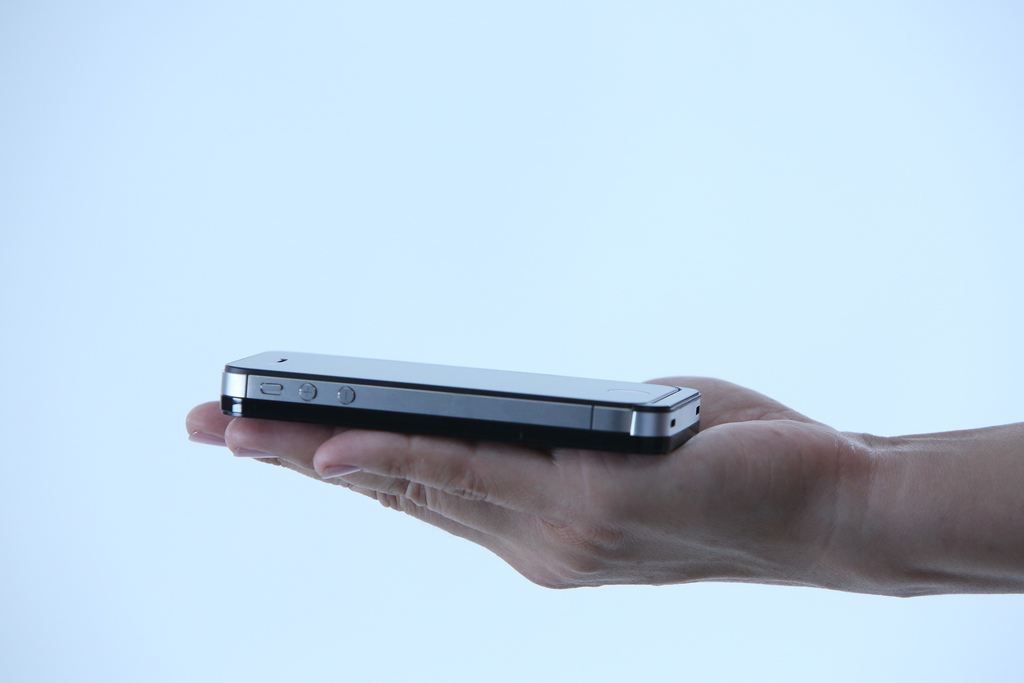
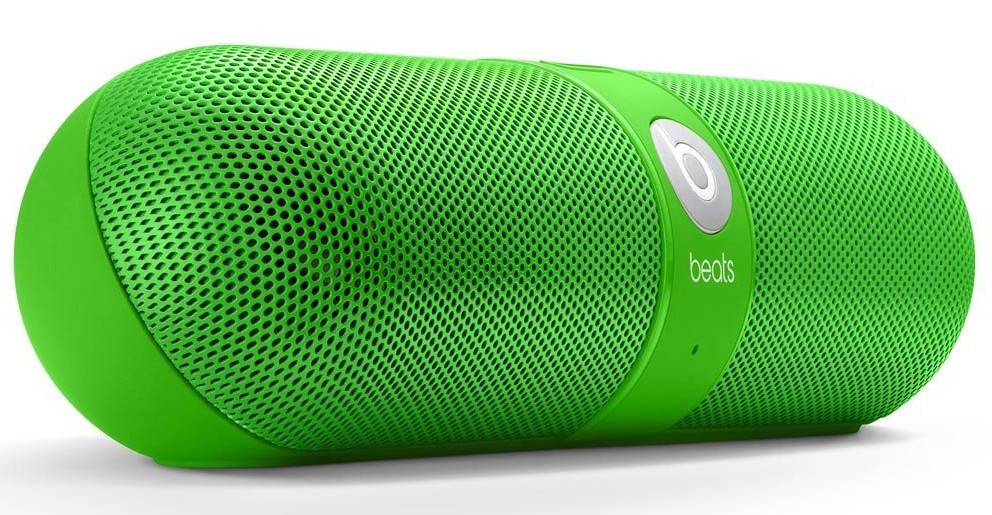
Beats by Dr. Dre Pill Wireless Bluetooth Speaker Green - QTOOTHWhat kid doesn’t like candy? For the kid in us all, Beats by Dr. Dre has brought us the Pill Bluetooth Wireless Speaker in an array of candy colors. Not only is it a powerful, compact speaker for listening to music but it also works as a speaker phone to make calls hands-free using any Bluetooth compatible phone. It is pretty impressive how much sound a lot of these type of devices get (take a look at the Jawbone Jambox, Cambridge SoundWorks Oontz, JBL Micro or Flip,etc…) considering how small they are.  The Pill is truly wireless. Sound is provided by hooking up any Bluetooth compatible audio device, like a phone/mp3 player/tablet/laptop,  and, because it runs on a rechargeable battery that can last up to 5-7 hours, it is cord-free. For some reason all of the manufacturers for these types of devices want to make them look HUGE. However, once you see them in person you realize just how small they are. The Pill is lightweight  and can literally be tucked in a cargo  pocket or a backpack. It even comes with carabiner clip on its carry case so you can attach it to your backpack. Here’s a decent representation of how big it really is (and this person’s hand is prety small):

Nicki Minaj Beats by Dr. Dre Pill Wireless Speaker Pink Limited Edition - Qtooth

[amzn_product_inline asin=’B00C9THROW’]

Even though there are a lot of similarities in this crowded field of competitor’s there are a few features that set it apart:

The Pill Bluetooth Wireless Speaker features NFC, otherwise known as Near Field Communication, which is a form of very low power wireless that allows you to simply tap your phone on the speaker and it have it automatically connect, or pair, via Bluetooth. Can’t get much easier than that. It does require an NFC capable phone, however. Most of the recent Android phones have it, unfortunately the iPhone doesn’t…yet. Rumor has it that the iPhone 5s or 6, or whatever it will ultimately be called, is supposed to have it. We here at QTOOTH sure hope so. We’ll see!

The Pass-through Audio feature means that the Pill has both in and out jacks. So even without an NFC/Bluetooth device you can still hook up your computer or other audio source with a cable. This also means that the audio out can make any audio system into a Bluetooth sound device. Leave it plugged in to your home stereo system and stream music from your phone, laptop or tablet. This is a massive plus when comparing the Pill to the competition.

The Pill can also act as a speaker phone capability and does it with an ease that is missing from other models. One button does it all when it comes to a call. If you are listening to music and a call comes in you the option to answer it with through the Pill. Tap the ‘b’ button on the front the answer. If another call comes in while you are still on the first call, tap and hold to ignore or tap quickly to switch to the new call. Switch back and forth between the calls with another button tap or hang up with a sustained press of the button.  The calls quality was very clear without a lot of shouting or ambient noise.

And did we mention the riot of colors this comes in? The light pink one pictured above is a limited edition Nick Minaj version. All of the other colors for the Pill Bluetooth Wireless Speaker are pictured below.


[amzn_product_inline asin=’B00CJGB9DU’]

[amzn_product_inline asin=’B00CJGATTA’]

[amzn_product_inline asin=’B00CJGAV0W’]

[amzn_product_inline asin=’B00CJGAZPS’]

Black

[amzn_product_inline asin=’B008FQMUYK’]

White

[amzn_product_inline asin=’B008FQMW3E’]

Filed Under: Entertainment, Featured Content, Home & Office, Mobile, Reviews

Moto X Phone – Revealed by Google at Last

2013-08-03

The Moto X! Finally revealed by Google it represents a bid to revive the once mighty mobile tech giant. We here at QTOOTH remember having several Motorola phones over the years. We loved them. Durable with excellent call quality. Nothing else compared. The ultimate benchmark for quality was a Motorola phone on the Verizon network. We were huge, devoted fans. Remember those days?

And then the smart phone revolution began and Motorola was completely cut out of the loop. How they didn’t see it coming is a mystery. Apple, Samsung, HTC, Nokia, LG, even Blackberry had at least something going on. But not Motorola.

So, after much hype and anticipation, Motorola Mobile’s new owner Google finally rolled out their new offering. The general consensus? Better luck next time. Overpriced, under-performing and laden with curious choices, including NOT including the latest version of the Android operating system. This has to be one of the biggest mysteries, after all, Google makes Android and Google owns Motorola. Why wouldn’t it be sporting you latest offering? Baffling…

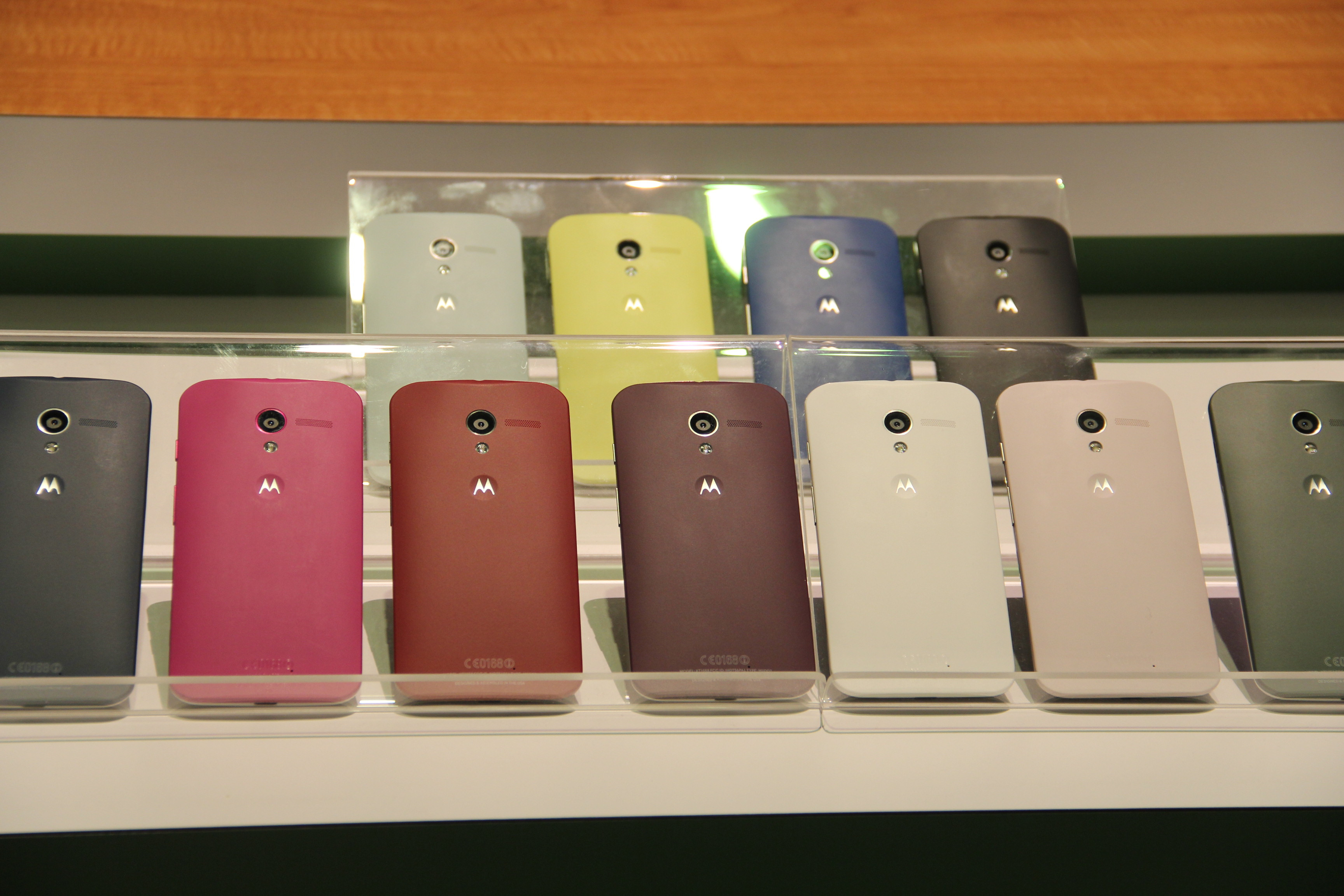
The biggest feature that they are touting? It’s ability to come in different colors… after being special ordered… and taking at a few days to get to you. Really? When most people want a phone they want it immediately. They want to walk into a store and by it today. And in the end, who really cares what color your phone is when you are just going to cover it with a case or some type of protector? That’s where the real style choices happen, not with the phone itself.

Google’s Motorola Moto X Phone - QTOOTH

Google’s Motorola Moto X Phone

Google’s Motorola Moto X Phone - QTOOTH

The phone features a 4.7-inch screen device is aimed at the iPhone and the Galaxy S phones. The Moto X features “all-day” battery life, a choice of colors and materials, and an instant-start camera, the company said today at a press event in New York. The Moto X is priced starting at $199 with a two-year contract and will only be available on all AT&T by the end of August or early September. That’s about the same time that the new Apple iPhone is set to hit the market and will probably make the Moto X completely irrelevant.

The device is the first homegrown smartphone from Motorola since Google acquired the business last year for $12.4 billion, as the Internet giant ramps up its hardware ambitions against Apple and others.

There is some claim to being made in U.S.A. and are hoping to attract fans because of this. The reality is that it will only be assembled in Texas at a former Nokia factory and that this will mostly involve the customizing of the color options.  Customers can choose the colors of the front, back and accents of the Moto X on the website Motomaker.com. Motorola guarantees phone delivery in four days. One of the custom options is to have a wooden back made from a choice of ebony, teak, rosewood, or bamboo. Only that last choice is remotely sustainable. So? Not exactly hi-tech and not exactly made in America. Unlikely that they will fool anyone with this ruse.

Here are a few good details:A curved, ergonomic back and 10-megapixel camera. Similar to the Motorola Droids on Verizon Wireless, the Moto X runs on a chip system known as X8. Motorola developed twin lower-powered chips to run alongside the Qualcomm Snapdragon S4 Pro main processor.

The multichip system is designed to conserve battery life by letting the processor sleep while the lower-power chips work in the background — sensing location, speed and message notifications, as well as listening for voice commands. As an example, even if the phone is locked, the user can say, “OK Google now,” to create and send a message, or open turn-by-turn navigation through Google Maps. And with two flips of the wrist, sensors will turn on the camera and be ready to shoot in 2 seconds, said Rick Osterloh, product chief for Motorola.

As we see it here at QTOOTH maybe Google/Motorola will make more of their investment back when they introduce it to the international market. Maybe they are just trying to establish value by charging $199 with a two year contract but it should be half the price, or less, for what it offers. We’ll take an iPhone 4s or a Galaxy S3 over this anytime. Also, maybe they have plans to roll out instant upgrades to the latest Android OS. Whatever their plans are, they better move quickly to save this phone from an early death.

[amzn_product_inline asin=’B005SSB0YO’]

[amzn_product_inline asin=’B004ZLV5UE’]

[amzn_product_inline asin=’B00A29WCA0′]

Filed Under: Featured Content, Mobile, News, Reviews

Google Chromecast – What Is It… and Why You Should Care!

2013-08-01

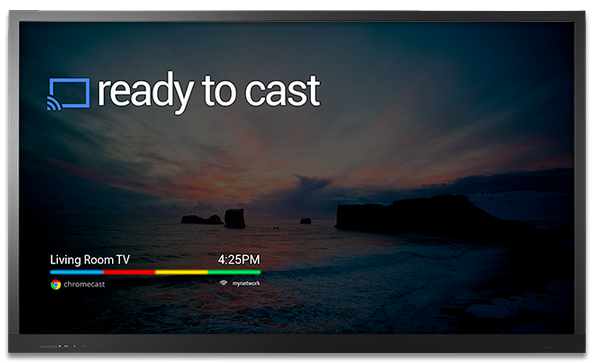
Chromecast Display Sample - QTOOTH

What is Chromecast? Chromecast is a brilliantly simple product: plug it into your TV and stream video and music to it from apps running on your Android device, iPhone, or laptop. Chromecast has no need for a remote; just use whatever device you’re streaming from as the remote. Instead of Chromecast having its own dedicated user interface it’s got a single screen that displays the time and, if nothing is being streamed, an indicator as to whether or not it’s connected to your WiFi. How can it be so simple? Because the device you’re streaming from acts as the primary interface. Chromecast is simply a wireless media streamer to your TV and doesn’t try to be anything more.

What’s in the Box?

First, the price of Chromecast is only $35. Google felt compelled to assure the media that they’re not selling them at a loss. I believe them. Even though it has a Wi-Fi chip, a basic CPU, 2GB of flash memory, RAM, a licensing fee to use HDMI, the cost of these parts are pretty cheap these days. Plus it is really a re-purposing of existent, very common technologies so the R & D I’m sure was next to nil. And yet we love it. There’s is so much brilliant technology already in existence and we here at QTOOTH know that most of us, whether as developers or as the end-user customer, barely scratch the surface of the devices that we already own.

The setup is ridiculously easy. Plug it into an HDMI port, give it some juice (through USB, which most new TVs have, or a standard adaptor), then run the Chromecast app on a laptop or other compatible device so that it can connect to your Wi-Fi network. That’s it!

From the day of its release, the Chromecast App has been compatible with some of the most popular online video apps, including Netflix and YouTube. No need to update these apps either, just launched them and the Chromecast button is already there. There is even an extension for Chrome that promises to greatly expand the functionality of the device. It is an early, Beta release and I’m sure it will improve over time.

It’s interesting to note that Google released this with very little fanfare, even though in our eyes this is one of the coolest things they’ve ever released as a physical product (here’s looking at you Google Glass).

There are a few things that will need to be improved, but this is off to a great start. It will be interesting to see how competitors respond.

https://www.youtube.com/watch?v=cKG5HDyTW8o

So far the video streaming quality seems to be on par with Apple TV or the Xbox 360, especially when using an app or website like Netflix, Youtube, or Google Play, that been designed for compatibility.

If you’re using the Chromecast extension for Chrome on your laptop to project an otherwise incompatible video site (like Hulu or HBOGO), however, video quality can dump quite a bit depending on your setup. It’s using your laptop as a middle man to encode the video signal and broadcast it to the Chromecast, whereas the aforementioned compatible sites just send video straight to the dongle, mostly removing your laptop from the mix. When casting video tabs on a 2012 MacBook Air running on an 802.11n network, the framerate was noticeably lower and there were occasional audio syncing issues.

While we’re on the topic, the Chrome extension packs a bit of an easter egg: the ability to stream local videos from your laptop to the Chromecast. Just drag a video into Chrome, and it’ll start playing in a new tab. Use the Chrome extension to cast that tab, and ta da! You’re streaming your (totally legitimate, not-at-all-pirated-am-i-right) videos without bringing any other software into the mix. I tried it with a bunch of video formats (mostly AVIs and MKVs. MOVs kinda-sorta work, though most won’t push audio from the laptop to the TV for some reason), and they all seemed to work quite well, albeit with the lowered framerate I mentioned earlier.

Even within the apps that have already been tweaked for Chromecast compatibility, there are some day-one bugs. Sometimes videos don’t play the first time you ask them to, instead dropping you into a never-ending loading screen. Other times, the video’s audio will start playing on top of a black screen. These bugs aren’t painfully common, but they’re not rare, either.

As compared to AirPlay, AppleTV’s built-in streaming feature, Chromecast’s wins because of its cross-platform compatibility. Whereas AirPlay is restricted to Macs and iOS devices and only has limited support for Windows through iTunes, Chromecast works well with any iOS, Android, Mac, or Windows app that utilizes Google’s Cast SDK (or software development kit). although Chromecast just launched, we would be very surprised if developers didn’t jump on this and expand upon the universe of applications that are possible. That means it could be adopted by TV, speaker, entertainment device manufacturers and more, putting the AirPlay protocol in certain jeopardy of being the odd man out.

As expected the experience on Android is a slightly better than it is on iOS. Google has considerably more freedom on their own platform; as an example, apps that use Chromecast can take priority over the lockscreen so that the user can operate the controls, like play/pause/skip, of a video without having to fully unlock their Android device. But that’s a minor thing and, for the most part, all of the primary features work just as well on iOS as they do on Android.

Conclusion

This is the future. It’s probably in all of our futures. If not Chromecast then something almost exactly like Chromecast.

[amzn_product_inline asin=’B00DR0PDNE’]

[amzn_product_inline asin=’B00DVFLJKQ’]

[amzn_product_inline asin=’B00E5M7P1G’]

Filed Under: Entertainment, Featured Content, Mobile, Reviews

  • « Go to Previous Page
  • Page 1
  • Page 2
  • Page 3
  • Page 4
  • Page 5
  • Page 6
  • Page 7
  • Go to Next Page »

Primary Sidebar

Affiliate Disclosure

This website uses affiliate programs for monetization. At no additional cost to you, links to various sites mentioned in posts may result in a commission that is credited to this site if you make a purchase.

Some affiliate programs and affiliations include, but are not limited to, Commission Junction, Apple, Google, Amazon.com and more.

For complete details
click here.

Copyright © 2026 · Preferred Hosting by WP Engine and Domain Name Registry by Namecheap

We are using cookies to give you the best experience on our website.

You can find out more about which cookies we are using or switch them off in .

QTOOTH
Powered by  GDPR Cookie Compliance
Privacy Overview

This website uses cookies so that we can provide you with the best user experience possible. Cookie information is stored in your browser and performs functions such as recognising you when you return to our website and helping our team to understand which sections of the website you find most interesting and useful.

Strictly Necessary Cookies

Strictly Necessary Cookie should be enabled at all times so that we can save your preferences for cookie settings.

3rd Party Cookies

This website uses Google Analytics to collect anonymous information such as the number of visitors to the site, and the most popular pages.

Keeping this cookie enabled helps us to improve our website.

Additional Cookies

This website uses the following additional cookies:

(List the cookies that you are using on the website here.)